Other WordPress extensions tell you what's wrong.Digispot AI just fixes it.
Audit every page, fix issues in bulk with AI, and let Claude or Cursor work on your SEO, with your approval.
Trusted by 1,250+ SEO experts worldwide

See it fix a real site
An audit, bulk AI fixes and an AI agent working with your approval.
From audit to fixed, inside WordPress
- 1
Migrate
Switch in one click
Bring titles, descriptions, schema and redirects over from Yoast SEO, Rank Math, AIOSEO, SEOPress or Redirection. One click undoes it.
- 2
Audit
See what's costing you traffic
27 checks on every page as Google sees it, ranked by what to fix first.
- 3
Fix
Fix hundreds of pages at once
AI writes titles, descriptions, alt text and schema. You review, apply in bulk and undo anytime.
- 4
Delegate
Hand the rest to your AI agent
Claude Code, Claude Desktop or Cursor proposes changes over MCP. Nothing goes live until you approve.
The SEO work it takes off your plate
Six jobs you'd otherwise do by hand or pay extra for, all inside wp-admin.
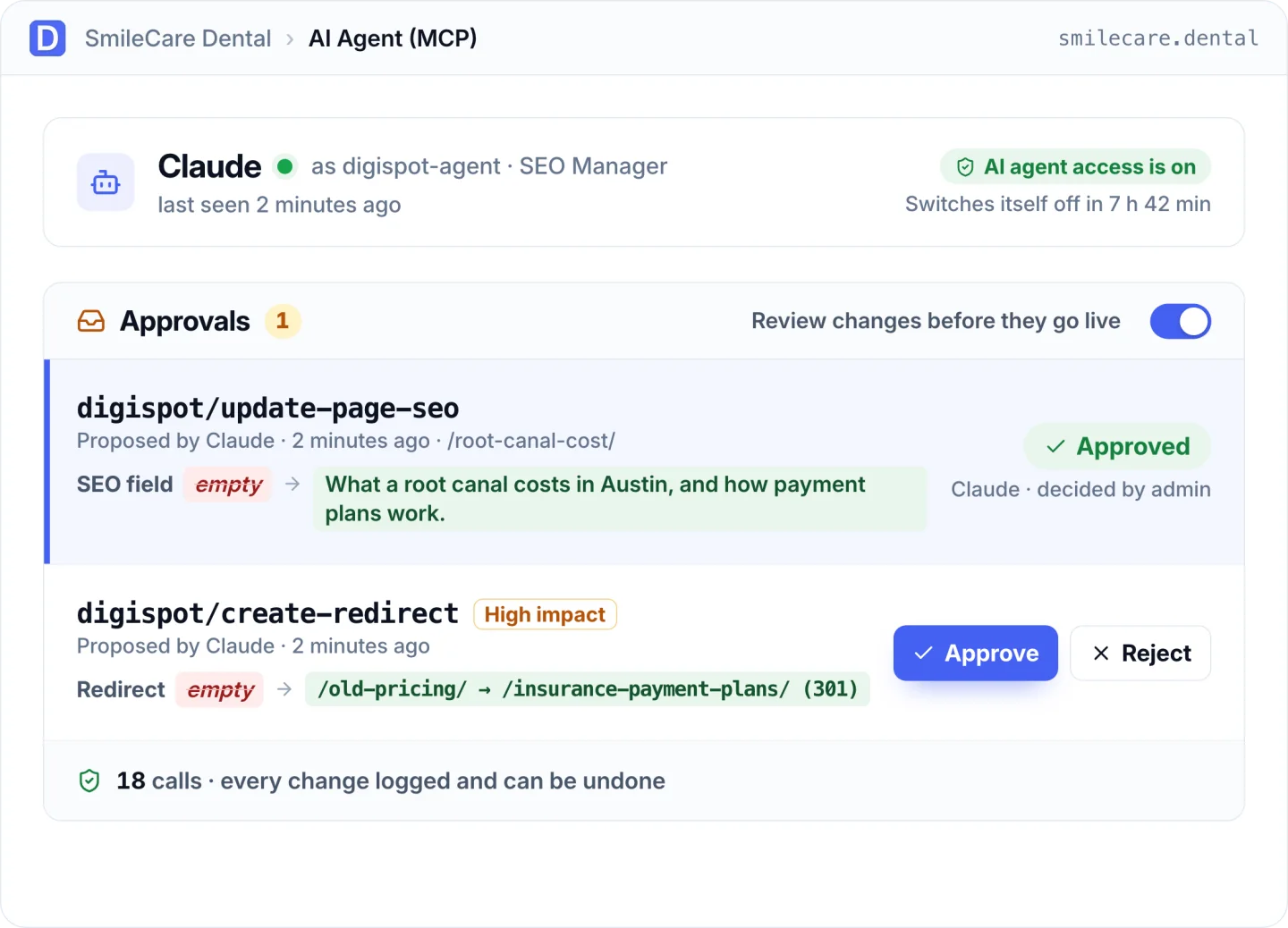
Your AI agent does the SEO work. You approve it.
Connect Claude Code, Claude Desktop, Cursor or any MCP app. It reads your audit and Search Console data, then proposes fixes you see side by side before anything goes live.
- Approve or reject each change from a before-and-after view
- Change limits, protected pages and email alerts for every agent
- Agent access switches itself off after the hours you choose
- Every change logged, and undone in one click
Fix hundreds of pages in one pass.
Pick an issue and AI writes the fix for every affected page: titles, descriptions, focus keywords, alt text, schema, canonicals and H1s. Compare each one with what's there now, then apply.
- Nothing saves until you click Apply
- Runs on Digispot AI, or your own OpenAI, Claude, Gemini or DeepSeek key
- No per-feature caps

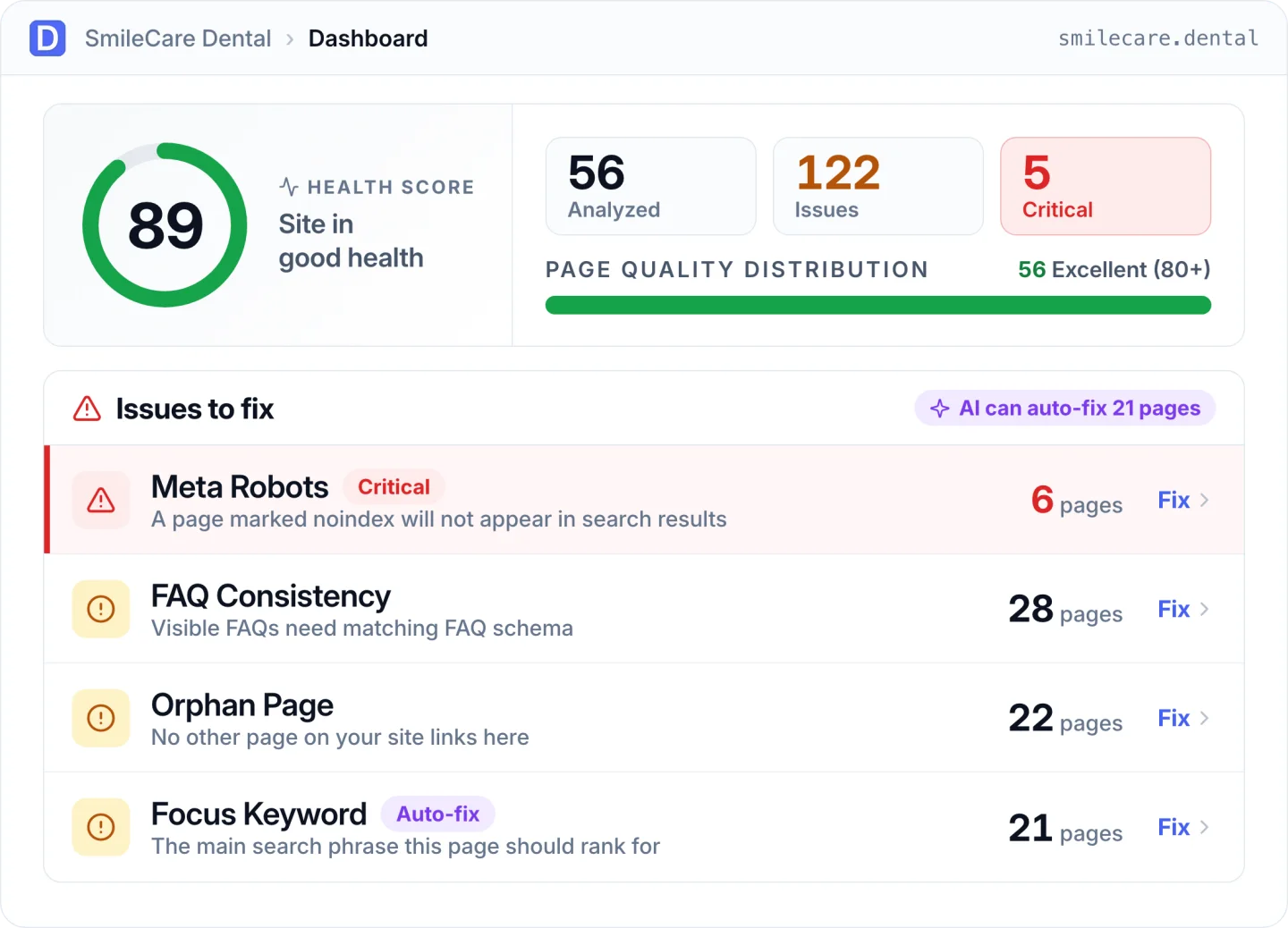
Know exactly what's holding each page back.
27 checks on every page as it renders, so Elementor and page-builder content counts. One ranked list puts the issues costing you the most at the top.
- A health score for the site and for every page
- Issues ranked by how many pages they affect
- Change history: who changed what, with one-click undo
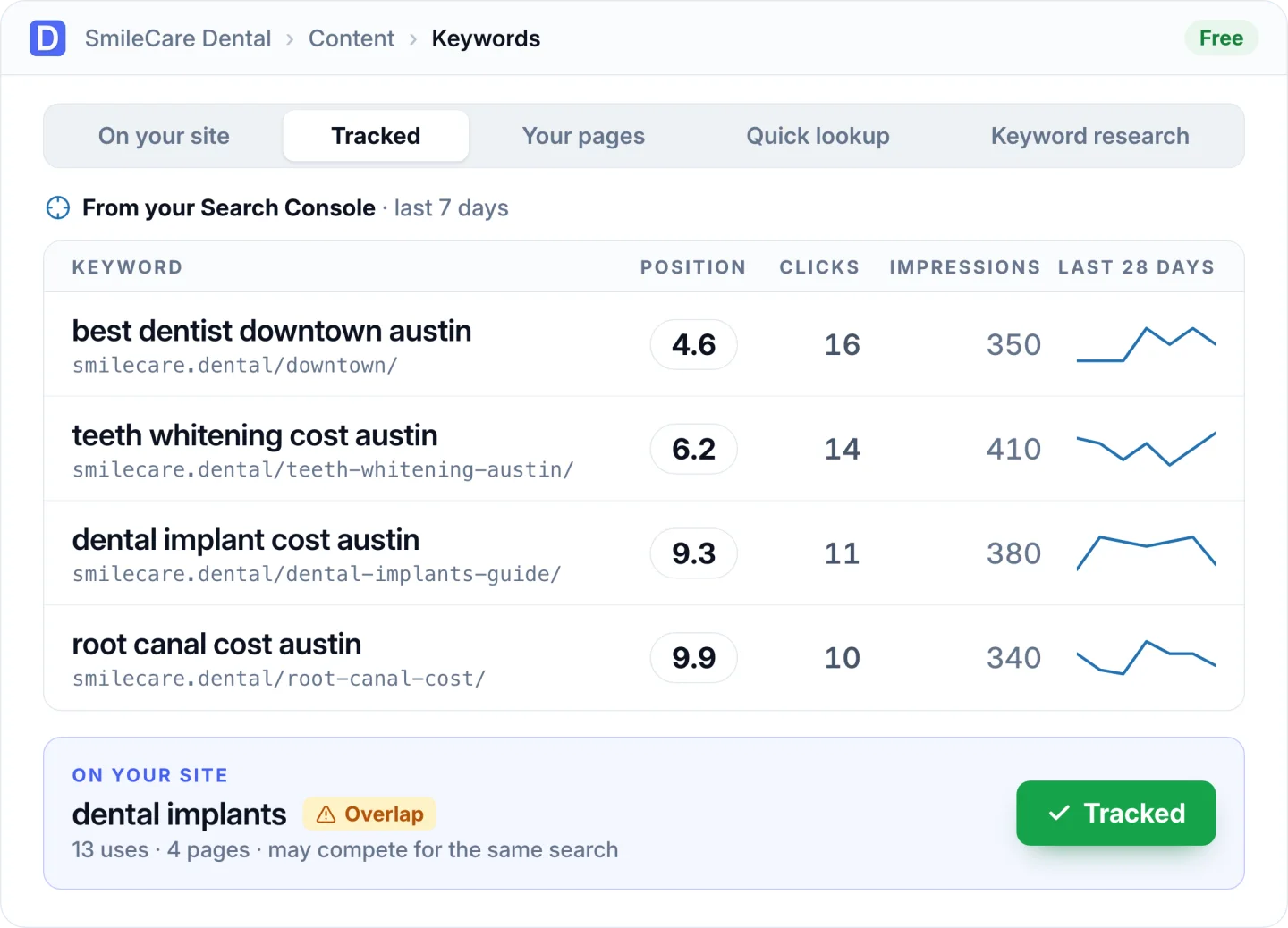
Track your keywords free, from your own Search Console.
Connect Google in one click, with no Client ID to paste. Pick the keywords that matter and see position, clicks and what moved, next to your GA4 traffic.
- A 28-day trend for every tracked keyword
- Weekly or monthly SEO report by email
- Clicks, impressions, CTR and position for every page
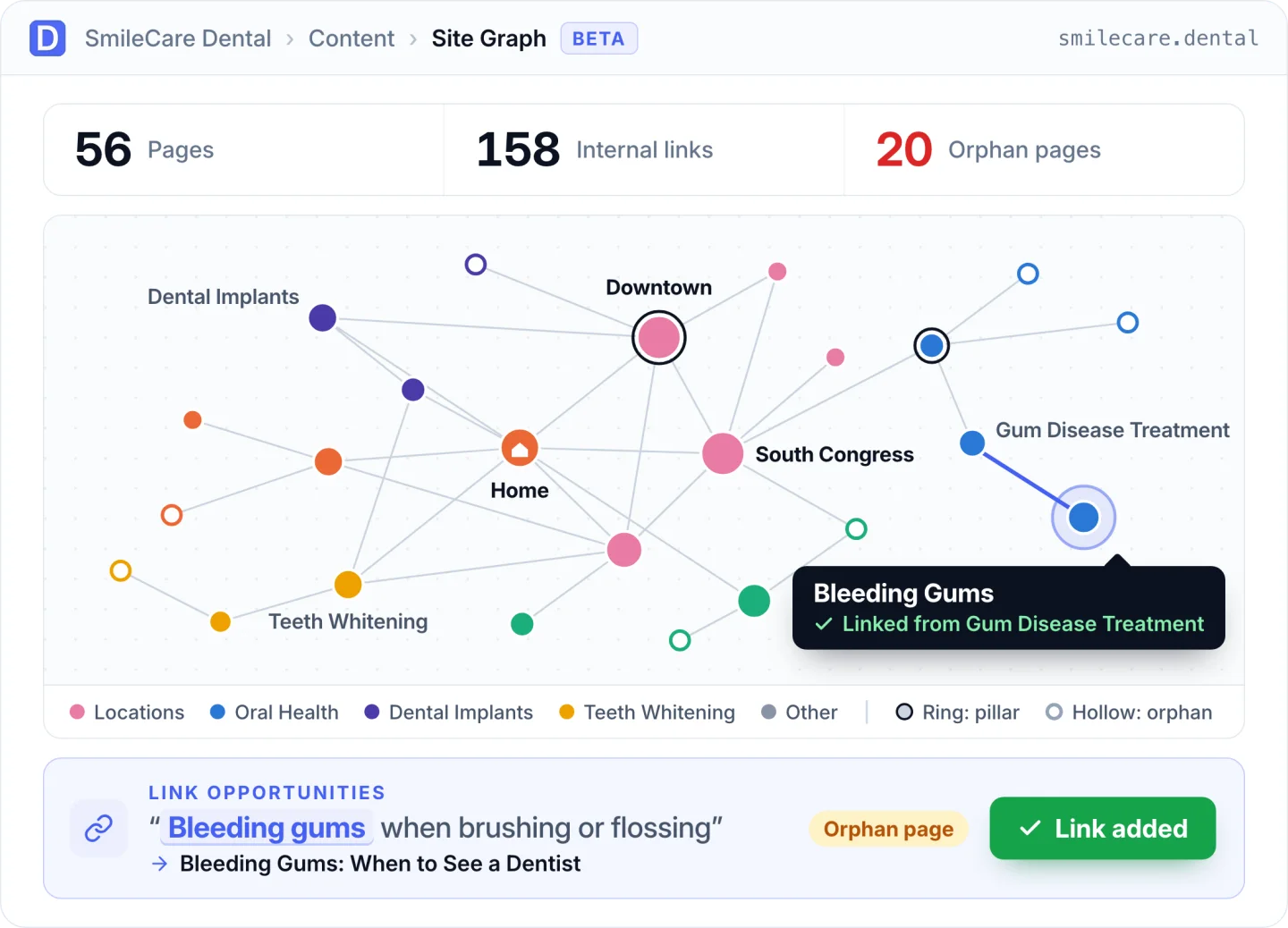
Find orphan pages and link them in one click.
Site Graph (beta) maps how your pages link by topic, with pillar and orphan pages highlighted. Link suggestions give you the exact sentence and words to link.
- Link suggestions to and from every page, added in one click
- Broken links checked in the background, with one-click fixes
- Every link you add can be undone
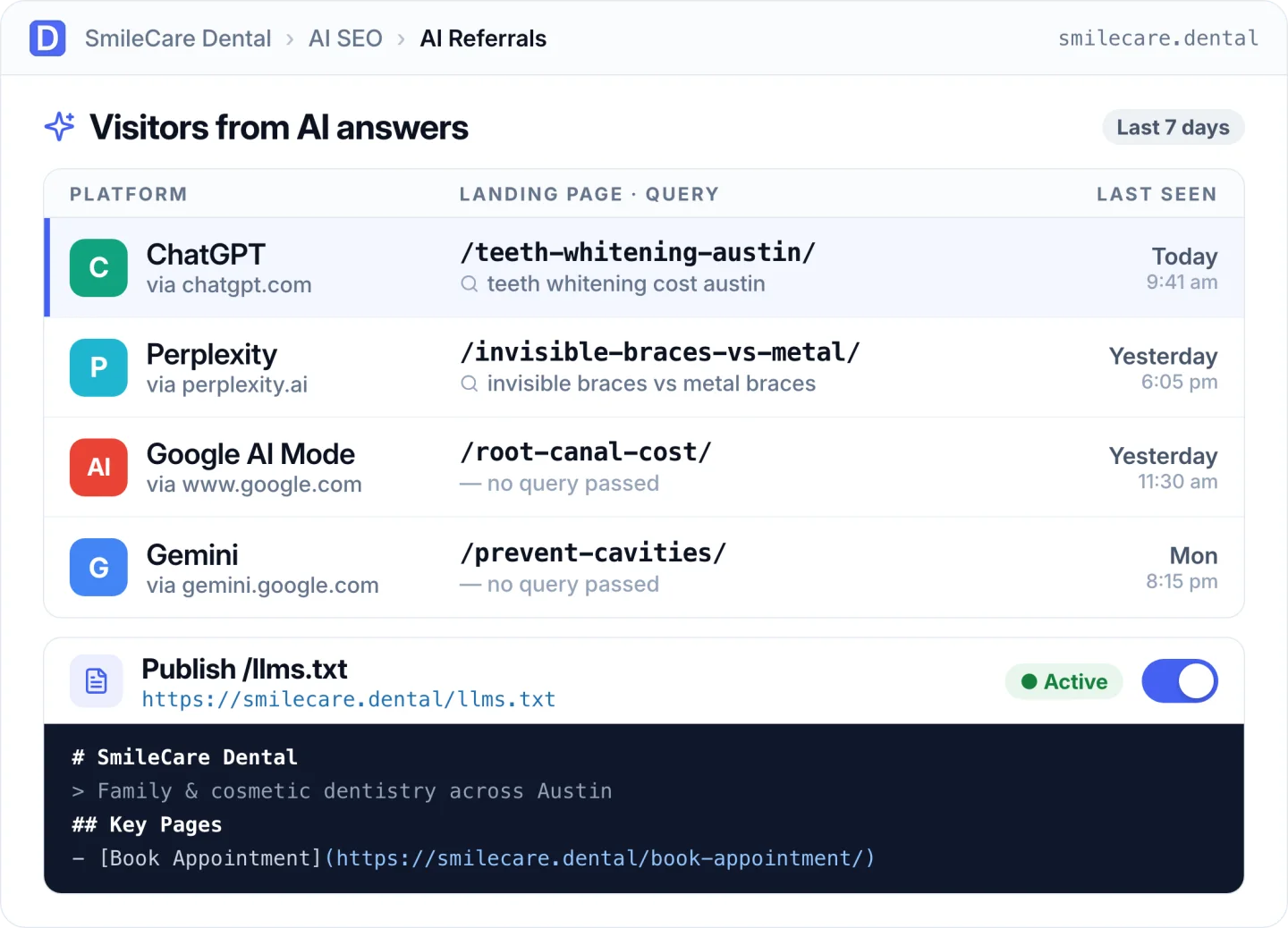
See who finds you through ChatGPT, Perplexity and Gemini.
AI referrals show the people who click through to you from AI answers, with the page they landed on and the query when one is passed. AI visibility shows which AI crawlers can reach you.
- Every crawler checked against its published IP list, fakes flagged
- AI referrals with the landing page and query
- Auto-generated llms.txt with one switch
The SEO basics, done properly
SEO panel in your editor
Live score, snippet preview and Generate with AI in the block editor, Classic editor, Elementor and Quick Edit.
Schema markup
Organization or LocalBusiness (55 types), breadcrumbs, Article, Product, FAQ, HowTo and automatic Video schema.
Multi-location local SEO
One profile per location with hours, services and payments, built into your LocalBusiness schema.
Redirects & 404 monitor
301 to 451, regex, scheduling and CSV. Real missing pages separated from bot probes.
Sitemaps, robots.txt & IndexNow
XML sitemaps, a robots.txt editor, IndexNow, breadcrumbs and automatic image alt text.
Works alongside your SEO plugin
Runs next to Yoast, Rank Math, AIOSEO or SEOPress without duplicate tags while you switch.
Built for teams
An SEO Manager role for editors, a setup wizard, and modules you can switch off.
WP-CLI
Run audits, update SEO fields, manage redirects and undo changes from the command line.
More done, for free
How Digispot AI compares with Rank Math and Yoast SEO on the features that save you the most time.
Based on each plugin's public feature pages, free and paid tiers, as of October 2026. Rank Math and Yoast SEO are trademarks of their respective owners.
Questions, answered
Is it really free?
Yes. The plugin is free on WordPress.org with no account and no credit card: audits, bulk AI fixes, the AI agent, keyword tracking, links, schema, local SEO, redirects, the crawl log and migration. An optional Digispot account adds managed AI credits, unlimited full-site crawls, 24/7 Core Web Vitals monitoring and competitor tracking.
How is it different from Yoast or Rank Math?
They tell you what's wrong and you fix it by hand. Digispot AI writes the fix for every affected page at once, shows it to you next to the current value, and applies it when you say so. Every change can be undone in one click, and keyword tracking, a broken link checker, a verified crawl log and AI referral tracking are included free.
Can an AI agent change my site without me knowing?
No. Agents only see the tools you share, and by default every change waits for your approval with a before-and-after preview. Each agent has change limits, your key pages can be protected, you get an email when a new agent connects, and every change is logged and can be undone.
Which AI does it use?
Two separate things. AI actions inside WordPress, like bulk fixes and Generate with AI in the editor, run on Digispot AI by default, or on your own OpenAI, Anthropic Claude, Google Gemini or DeepSeek key. Separately, AI agents such as Claude Code, Claude Desktop or Cursor can connect over MCP and propose changes for your approval.
Will I lose my Yoast or Rank Math settings?
No. One click imports titles, descriptions, keywords, canonicals, robots, social fields, schema and redirects from Yoast SEO, Rank Math, All in One SEO, SEOPress or Redirection. It never overwrites what you've already set, it's safe to re-run, and one click undoes the whole import. Both plugins can run side by side while you switch, without duplicate tags.
Does it work with my page builder?
Yes. The audit scores each page as it renders, so page-builder content counts. The SEO panel works in the block editor, the Classic editor, Elementor and Quick Edit.
What do I need to install it?
WordPress 6.2 or newer and PHP 7.4 or newer. Install it like any plugin: Plugins → Add New → search “Digispot AI” → Install → Activate. A setup wizard handles the import, your first audit and your AI provider.
Stop listing SEO problems. Start fixing them.
Install Digispot AI from WordPress.org and run your first audit in a few minutes.
Or in wp-admin: Plugins → Add New → search “Digispot AI”