Free forever, no credit card. AI with your key or a free account.
4.8/5 on the Chrome Web Store
Trusted by 1,250+ SEO experts
Watch it audit a page in 85 seconds
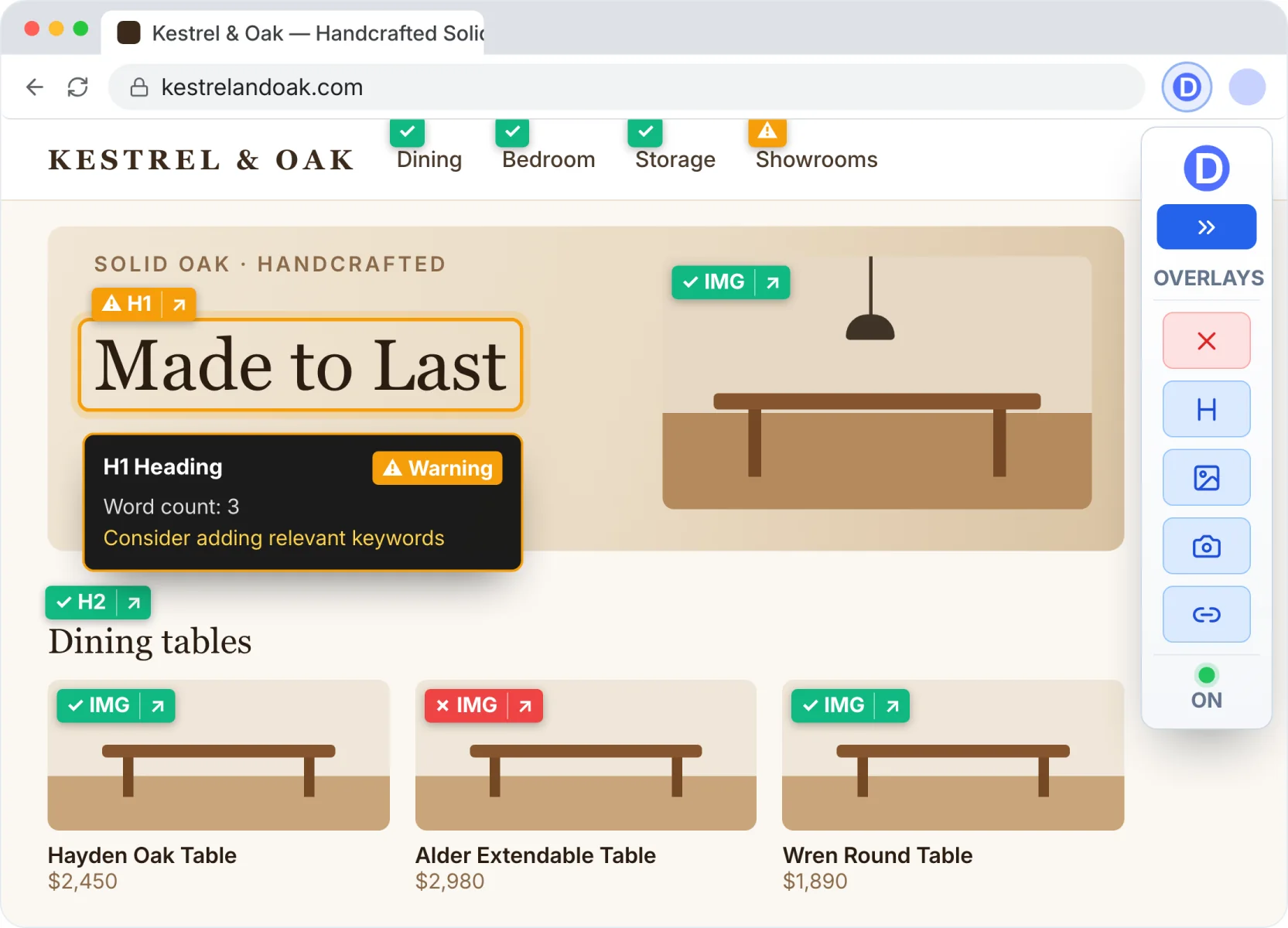
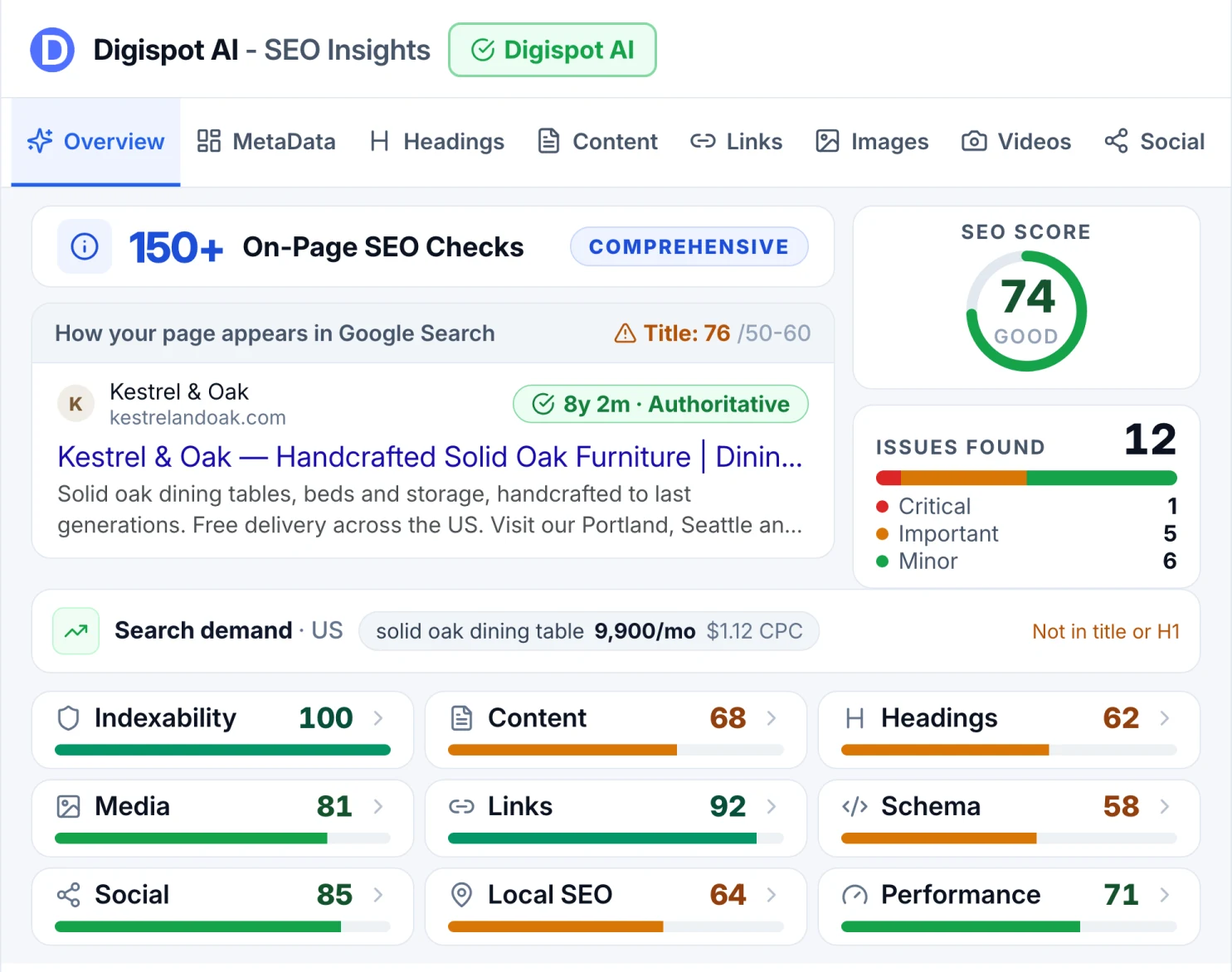
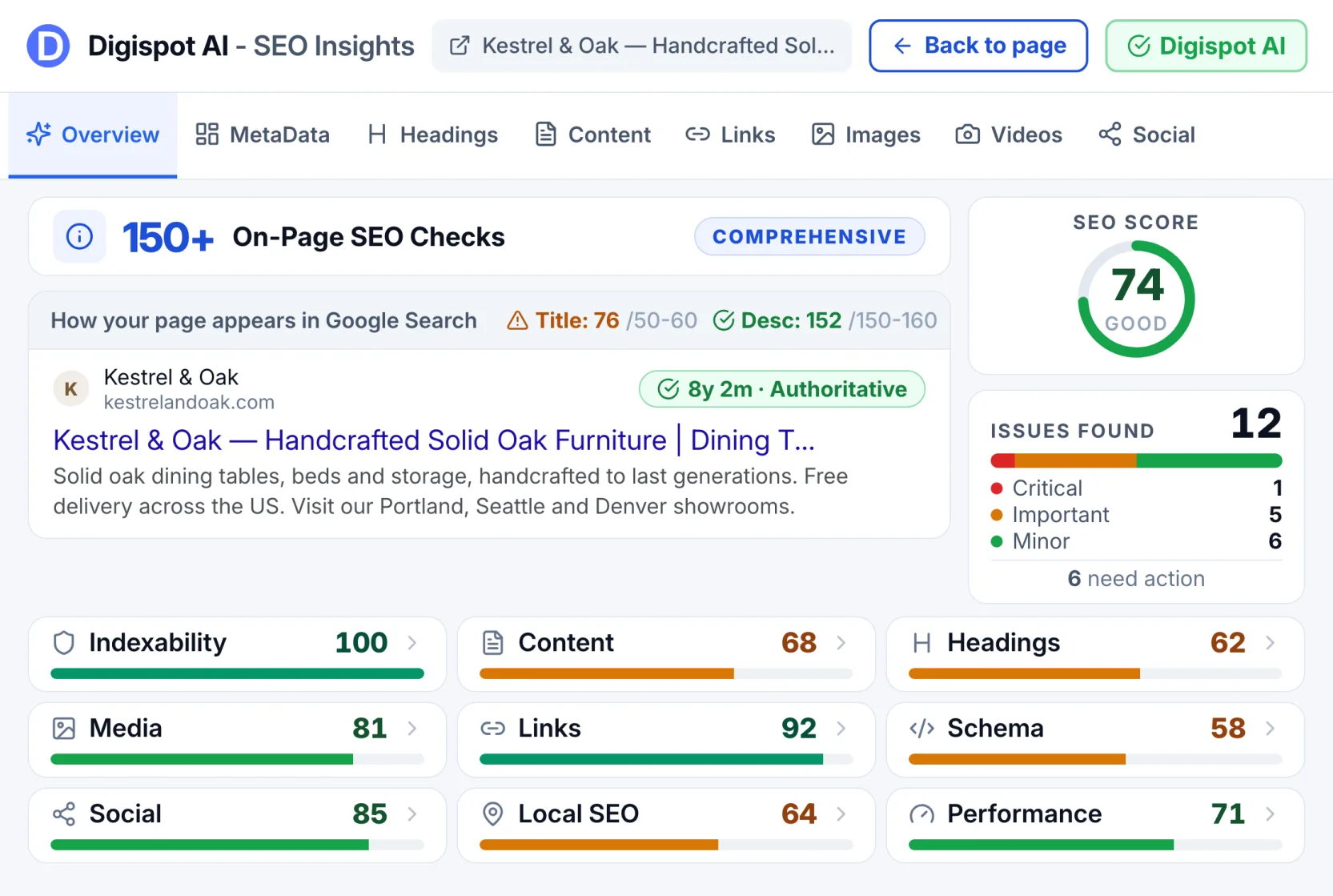
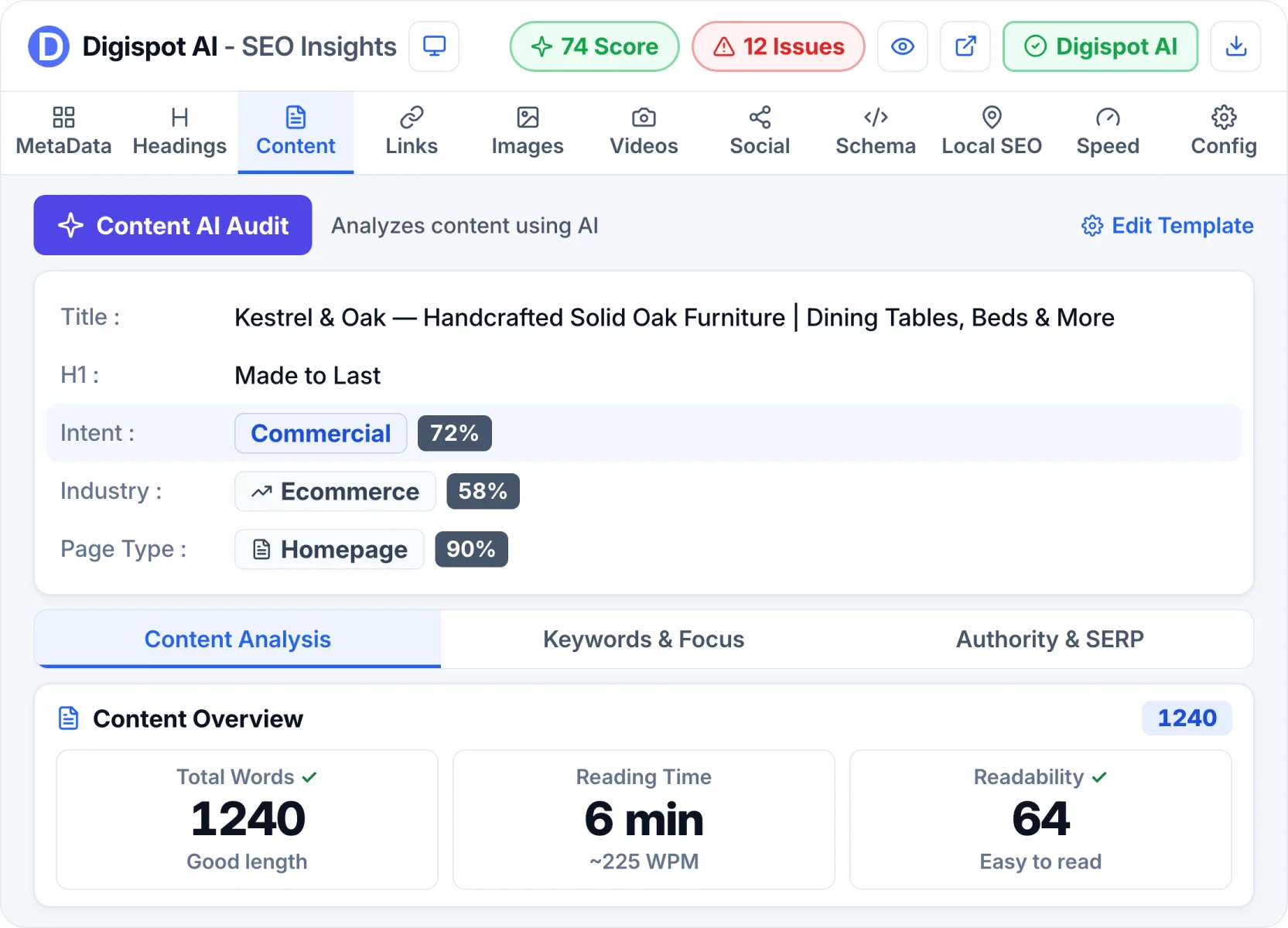
One store's homepage. Tags scored, money keyword found, fix rewritten.
Deep audit
Go deeper than title and meta tags
Digispot AI SEO Insights is a free Chrome extension engineered for depth, speed and a clean UI. It audits the fully loaded page for SEO and AEO, then ranks every issue by severity. AI insights and chat work from those results.
Tags and page elements
Title, description, canonical, robots, headings and links.
Basic SEO checkers stop here
Rendered page
Content, images, video and schema, read after JavaScript runs.
10audit panels
Live measurement
LCP, INP, CLS, FCP and TTFB, timed inside the page.
5live vitals
Page context
Schema expected by page type. Advice by industry and language.
54page types
Crawler and AI access
Search, AI and social bots. robots.txt, sitemap and llms.txt.
25bots tracked
SERP and AI Overviews
Every result classified, with AI Overview citations marked.
16result types
AI insights and chat
AI audits per panel. Chat with the audit in context. Your key or a free account.
4AI providers
Engineered to stay fast
Runs on click
Page audits start only when you ask.
Runs in your browser
Page analysis stays on your machine.
Caches AI results
Kept 7 days per URL. No repeat runs.
Built-in AI
AI insights and chat, built on your audit
No copy-paste. Use OpenAI, Claude, Gemini or DeepSeek with your key, or a free account.
AI audit on every panel
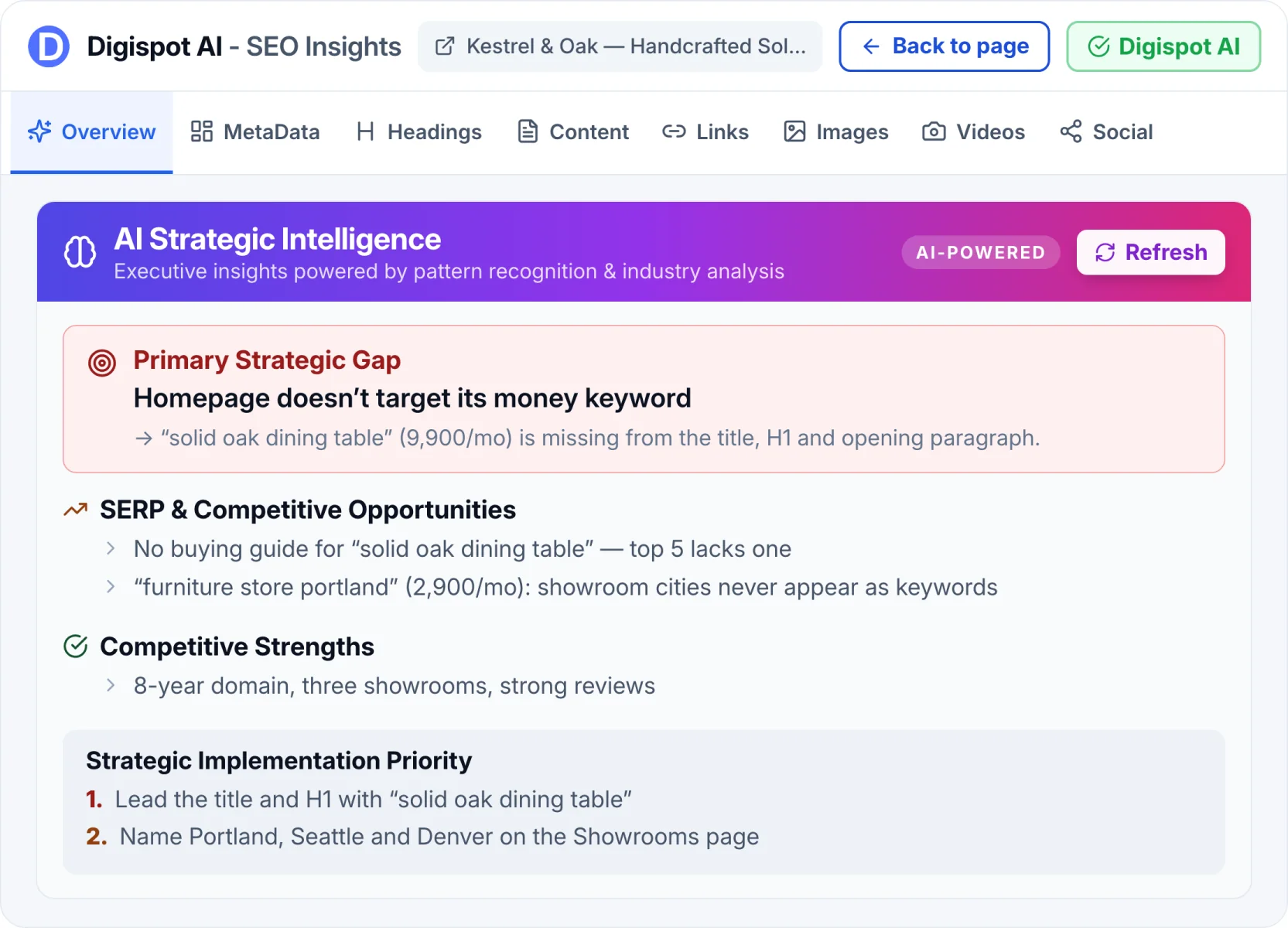
Strengths, improvements and quick wins.
One prioritised plan
Full Audit rolls it up into 9 weighted categories.
Chat with the page or SERP
Ask why it isn't ranking. Keep 7 days of history.
Rewrites you can apply
Accept AI headings live on the page, with undo.
How you use it
Two modes: on the page and on Google
Audit any page. Decode any Google search.
On-page SEO audit
150+ on-page checks
Reads the fully rendered DOM, not raw HTML. Catches JS content, lazy images and dynamic schema.
Issues ranked critical, warning or info
AI crawler access and llms.txt checks
Search volume, CPC and domain age (free account)
Live Core Web Vitals and schema graph
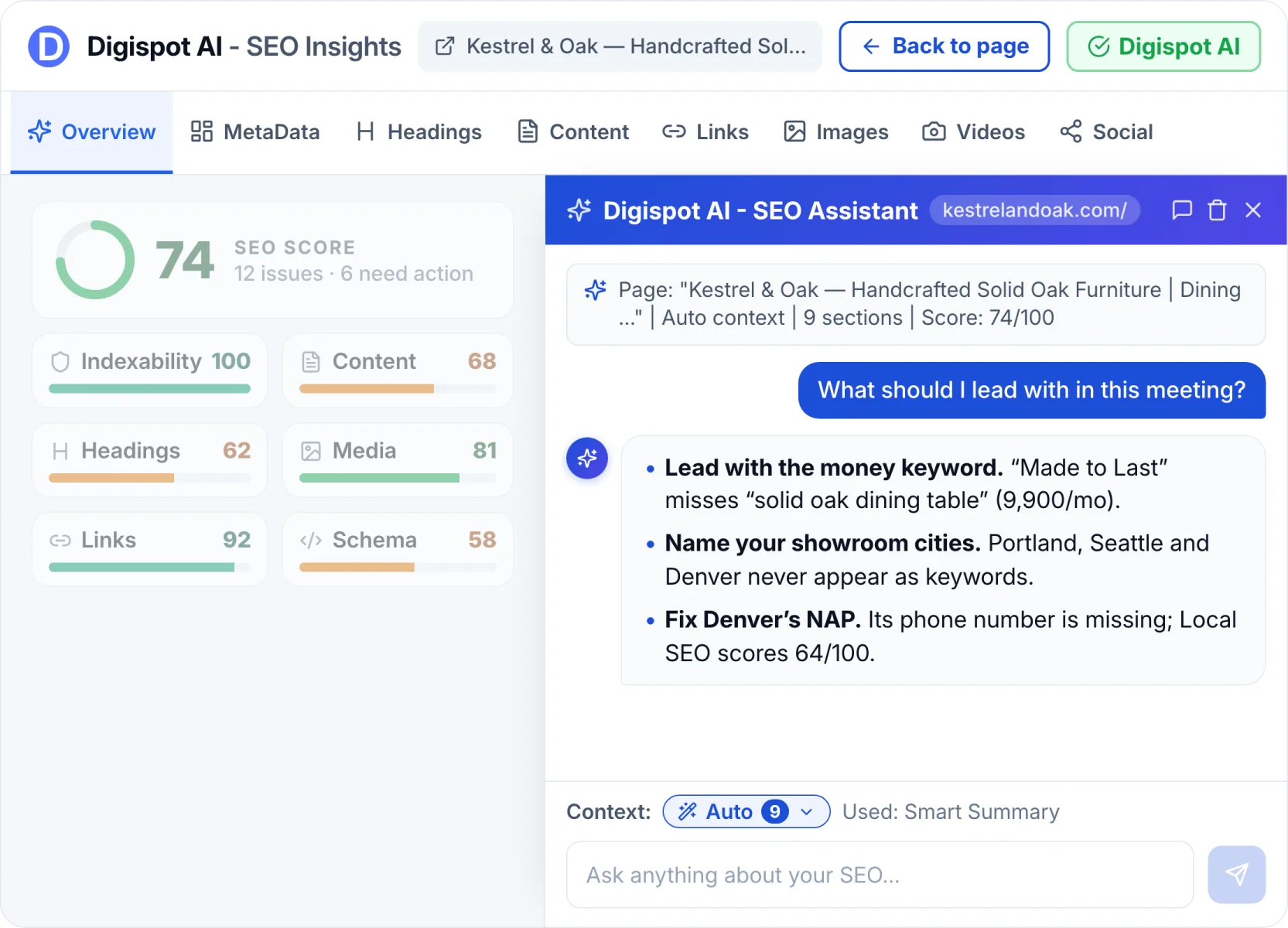
AI Chat — ask about the page and its fixes
SERP Intelligence
Decode Google search results
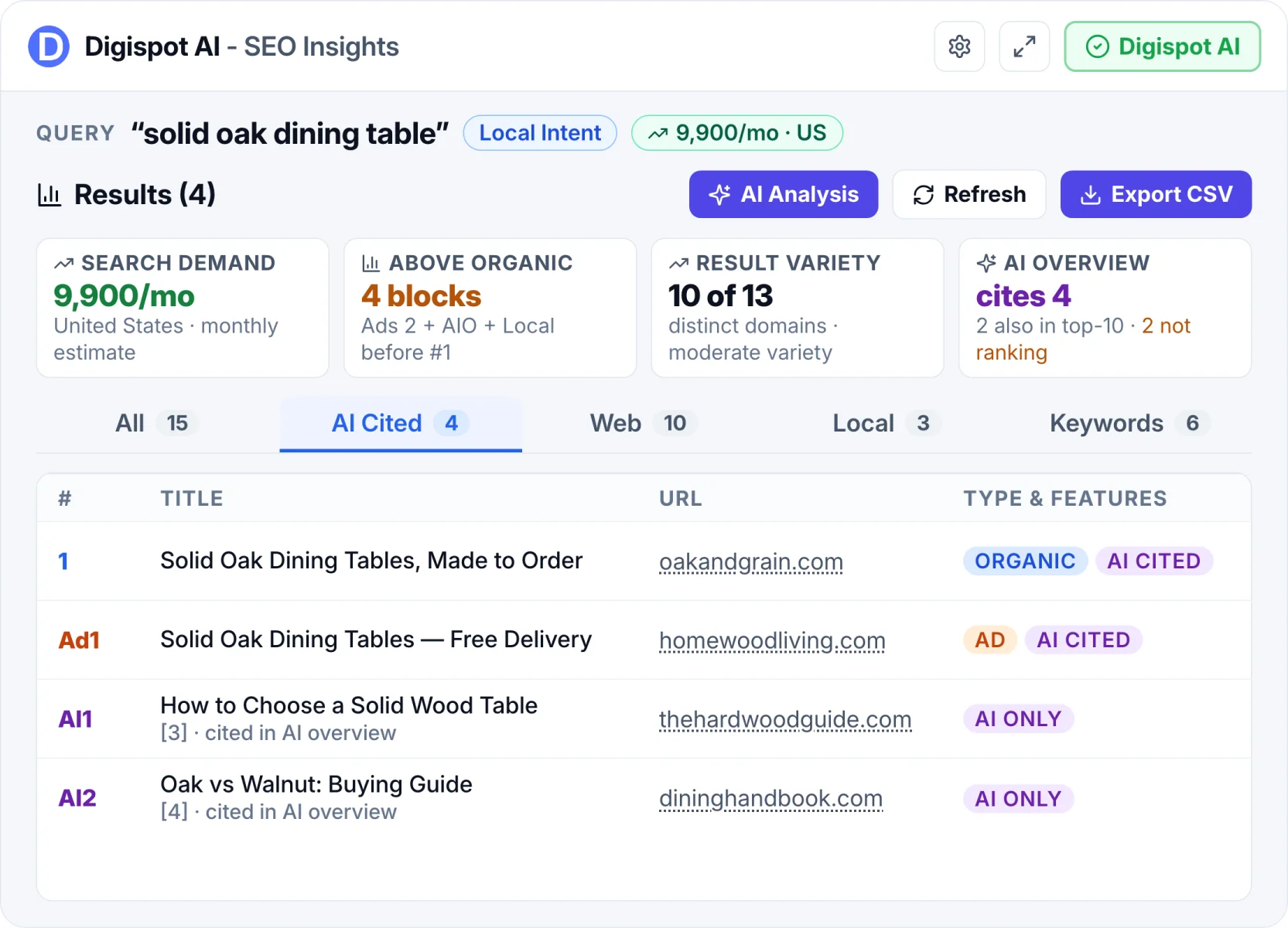
16 result types on 17 Google domains. AI Overview citations, forums, shopping, local and video.
Sortable results table with CSV export
AI Overview citations marked
Query volume and keyword ideas (free account)
Local pack, snippets, PAA and video
AI Chat — ask about the SERP and competitors
Trusted by 1,250+ SEO experts. Both modes free, no signup.
Digispot AI has been instrumental in enhancing our online presence and visibility. Their expertise in SEO and digital optimization has helped us rank higher and attract the right audience. The insights and recommendations provided were truly game-changing, and we couldn't be happier with the results.
K
Kapil Dixit LLP
Co Founder / Senior Partner
Kapil Dixit LLP Law Firm
Healthcare
“
We were barely showing up on Google — patients couldn't find us even when searching for our specialties. Digispot AI ran a full audit and showed us exactly what was wrong. After fixing those issues, our website traffic grew 5X in four months. We now rank in the top 5 for our key procedures, and patients tell us they found us through Google and even ChatGPT.
Mrinalini
Managing Director
THANC Hospitals, Chennai
Technology
“
As a self-taught team, we've always learned by building. However, when we started with our website, SEO felt like a black box. Digispot AI made it crystal clear. It uncovered issues we didn't know existed and guided us with actionable, easy to understand fixes.
Digispot AI SEO Insights is a free Chrome extension engineered for depth, speed and a clean UI. It audits the fully loaded page for SEO and AEO, then ranks every issue by severity. AI insights and chat work from those results. It measures Core Web Vitals live, shows AI crawler access and analyses Google results with AI Overview citations. Page analysis runs in your browser. AI needs your own key or a free account.
What makes this different from other SEO extensions?
Depth plus AI. It reads the rendered page, measures Core Web Vitals in the page, and fits advice to the page type, industry and language. You also get an interactive schema graph, AI crawler access checks and SERP analysis with AI Overview citations. Add AI Chat with your own key or a free account.
Is this SEO audit Chrome extension really free forever?
Yes. All 10 on-page panels, overlays, SERP analysis, live Core Web Vitals and TXT, CSV and JSON-LD exports are free, with no signup and no trial. A free Digispot AI account adds Keyword Pulse, domain age, CrUX and lab tests. The core extension stays free.
Will it slow down my browser?
Page analysis runs only when you click the icon, and it runs locally in your browser. On Google search pages, a script adds result badges automatically. Pages you don't audit aren't analysed.
What can't the extension do?
It audits one page at a time, so site-wide crawls need the Digispot AI SEO Spider or the cloud platform. It has no backlink data and no rank history; those are in the platform. It reads local signals and the local pack, but doesn't audit or manage Google Business Profiles.
What is AEO and does this extension support it?
AEO (Answer Engine Optimization) means getting cited in AI answers from ChatGPT, Perplexity, Gemini and Google AI Overviews. The extension shows whether AI crawlers such as GPTBot and ClaudeBot can reach the page, checks llms.txt, and detects AI Overview citations on Google. AI Chat can then review how answer-ready the page is.
Does the extension show keyword search volume?
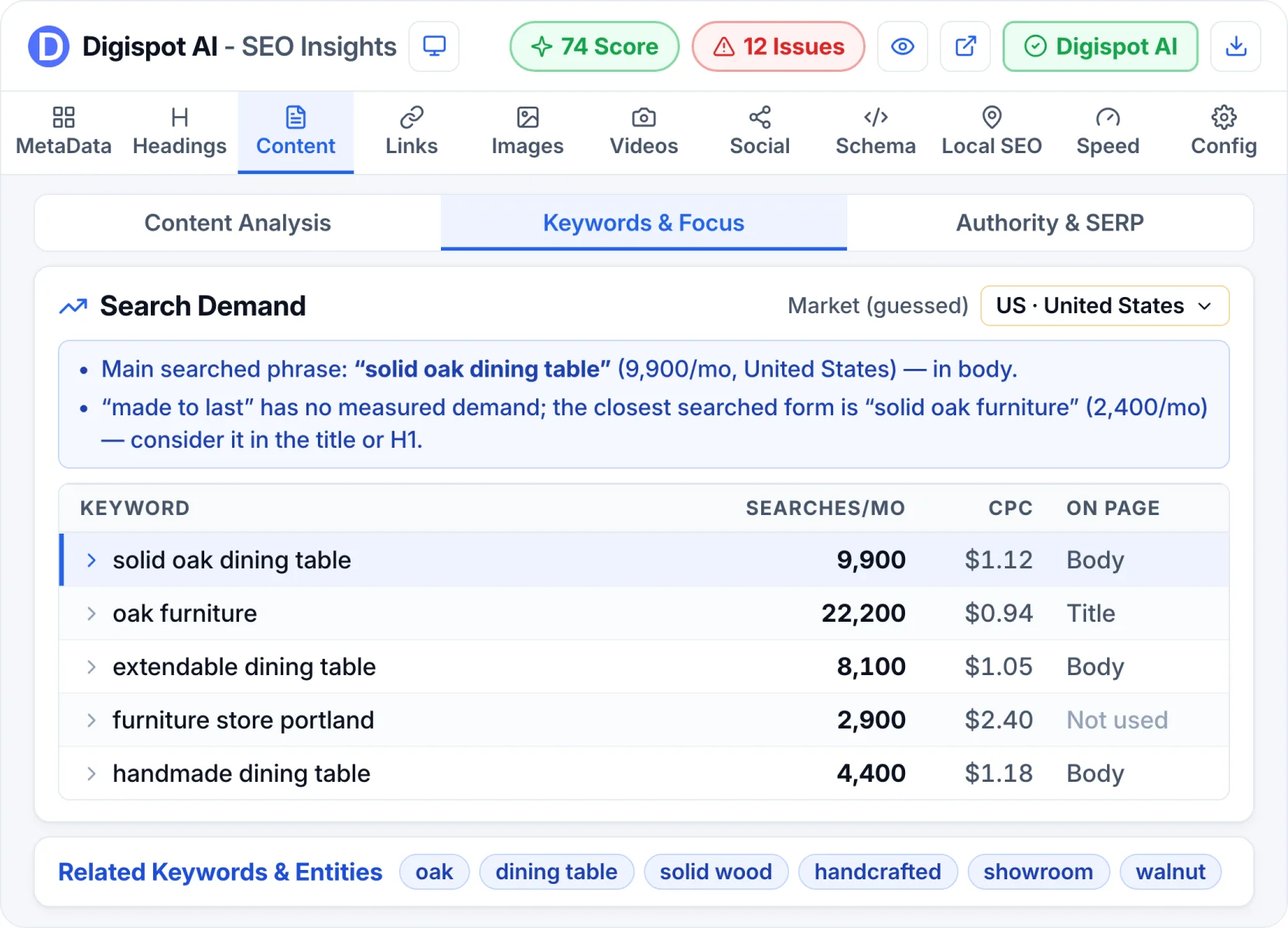
Yes. Keyword Pulse adds monthly search volume and CPC. MetaData shows a Demand row. Content › Keywords & Focus lists each phrase with volume, CPC and placement (title, H1 or body). On Google, you see the query's volume plus related keywords. Markets: United States, United Kingdom, Canada, Australia, India, Ireland, New Zealand and Singapore. Monthly estimates by country, CPC in USD. Free with a Digispot AI account.
Can I use this for client work and agencies?
Yes. Run quick client audits, export TXT and CSV, and show issues live with overlays during calls. For agencies at scale, the Digispot.ai platform adds site-wide crawls on mobile and desktop, content opportunities and GSC and GA4 integration.
See all 42 questionsDo I need to create an account or provide a credit card?
No. On-page audits, SERP analysis and AI with your own API key need no account. No credit card, ever. A free Digispot AI account adds Keyword Pulse search volume, domain age, CrUX field data and lab tests.
What browsers are supported?
Google Chrome and Chromium-based browsers: Microsoft Edge, Brave, Opera and Vivaldi. Install it from the Chrome Web Store.
How does the extension work?
Click the extension icon on any page. It reads the rendered page and runs 150+ checks across 10 panels: MetaData, Headings, Content, Links, Images, Videos, Social, Schema, Local SEO and Speed. Issues are ranked critical, warning or info, with clear fixes.
Does it work on any website?
Yes, any public http or https page: yours, a client's, a competitor's or a prospect's. Use it for competitive analysis, pre-sale audits and learning from top-ranking pages. Browser pages such as chrome:// and local files are not analysed.
Does this extension check indexability and discoverability issues?
Yes. It checks meta robots (noindex, nofollow), the canonical URL and viewport. It probes robots.txt, sitemap and llms.txt, and shows the access status of 25 crawlers, from Googlebot and Bingbot to GPTBot and ClaudeBot. Because it reads the rendered page, JavaScript content is checked as the browser sees it. If Google can't crawl or index a page, nothing else matters.
What metadata checks does the extension perform?
Title, meta description, canonical, viewport, robots meta, favicon and language, plus a Google search preview. Domain age comes with a free account. It also detects 138 technologies the page loads. Open Graph and Twitter Card tags are checked in the Social panel.
How does the schema markup validator work?
It parses every JSON-LD block on the page, validates it and draws an interactive graph of the entities. It suggests the schema each page type should have and flags what's missing. Export the JSON-LD for your developers. Works on any page, including competitors'.
Can this Chrome extension analyze content and keywords for SEO?
Yes. It detects search intent and page type, scores readability, and counts words and reading time. Keyword density covers 1-, 2- and 3-word phrases, with related keywords, entities and a significance score per term. Industry advice draws on 48 industry databases, and language detection covers 23 languages. With a free account, Keyword Pulse adds search volume.
Can I edit headings directly in the extension?
Yes. See the H1-H6 structure, get AI rewrite suggestions, and Accept to apply them on the live page, with undo and download. Reject All restores the original. AI rewrites need your own key or a free account.
Does this extension check image SEO?
Yes. It audits every image for alt text, dimensions, file weight per pixel, format (such as WebP and AVIF) and lazy loading. Export the list to CSV.
What video SEO checks does the extension perform?
It detects YouTube, Vimeo, Wistia and other players, including background video. It checks VideoObject schema, thumbnails, dimensions, autoplay and responsiveness. Export the list to CSV.
How does the extension analyze internal and external links?
Links are split into internal, external, social and other. You see anchor text, follow or nofollow, and a link health score. Export everything to CSV.
Can I check Open Graph and social media tags?
Yes. It validates Open Graph, Twitter Card and article tags, checks the share image spec, and shows a live preview of the shared card.
What Core Web Vitals does this extension check? Do I need a PageSpeed API key?
Live Web Vitals (LCP, INP, CLS, FCP and TTFB) are measured in the page, free. A free Digispot AI account adds CrUX real-user data (28 days) and a Lighthouse lab test with mobile and desktop scores. No PageSpeed API key needed. A resource-hints scan (preload, preconnect, dns-prefetch) is also free.
Does this check for mobile SEO issues?
Yes. It checks the viewport tag, and the lab test scores mobile and desktop separately (free account). CrUX shows real-user mobile data. Google indexes mobile-first, so these checks matter.
What local SEO checks does this extension perform?
On local pages it checks NAP (name, address, phone) and hours, LocalBusiness schema, and Business Profile and Maps links. It detects city and country from a gazetteer of 196 countries. Local advice appears only when the page is actually local.
Which AI models are supported and what is BYOK?
BYOK (Bring Your Own Key) means AI runs on your own API key, billed by your provider, with no extension limits. Providers: OpenAI (GPT-5 Nano, GPT-5.4 Mini, GPT-6 Luna, GPT-5.5, GPT-6.1 Sol), Anthropic (Claude Haiku 5.5, Sonnet 5.5, Opus 5.5), Google (Gemini 3.5 Flash Lite, 3.8 Flash) and DeepSeek (V4.1 Flash, V4 Pro). Keys are encrypted in your browser and sent only to your provider. No key? Connect a free Digispot AI account instead.
How does AI prompt automation work?
Audit data flows into prompt templates you edit per panel. Write a template once, for intent, meta descriptions or internal links, and run it on any page. The extension passes the page data to your chosen model. No copy-paste, no code.
What are prompt template placeholders and how do they work?
Templates use variables that fill in with the page's data: content, keywords, headings, metadata, schema, images, links and speed. Each panel has its own set. Write a template once, then run it on any page in one click.
How does the AI Chat work for on-page SEO audits?
AI Chat opens beside your audit with the page's SEO data in context. Ask "What's hurting this page most?" or "Rewrite my meta description for higher CTR." It sends only the relevant audit data, so answers are page-specific, not generic. History is kept per URL for 7 days. Needs your own key or a free account.
What does AI Chat reveal in SERP analysis mode?
On Google, the extension parses 16 result types on 17 Google domains: organic, ads, AI Overview citations, People Also Ask, local pack, shopping, video, forums and more. Ask AI Chat "What content gaps can I exploit?" or "Why are these pages ranking?" AI insights cover intent, content gaps, SERP feature opportunities and title guidance.
Can the AI Chat optimize content for AI search engines (AEO/GEO)?
Yes, in both modes. On a page, ask "Is this structured for AI citations?" and it reviews entity clarity, question-and-answer format and structured data. On Google, ask "Which results are AI-cited, and why?" The goal: be the source AI engines cite, not just a blue link.
What are the different viewing modes?
Popup for quick audits on the page. Visualize overlays badge headings, images, videos and links on the live page, ideal for showing clients and developers. Fullscreen adds the Full Audit and side-by-side AI Chat. Light, dark or auto theme.
Can I export SEO audit reports from this extension?
Yes. Export a full TXT report, CSV for links, images, videos and SERP results, and JSON-LD from the Schema panel. Copy AI results in one click.
Are my API keys safe? Where are they stored?
Yes. AI keys (OpenAI, Claude, Gemini, DeepSeek) are AES-GCM encrypted in local extension storage. They are sent only to your chosen provider, never to us. We cannot see them.
Do you collect any of my data or usage information?
No analytics, telemetry or tracking. Page analysis runs in your browser. Data leaves it only when you use an AI action (to your provider, or to Digispot AI if you connect an account) or account features such as CrUX, lab tests, domain age and Keyword Pulse. We don't track what pages you audit.
Is the extension secure? How is my data encrypted?
Yes. Keys are AES-GCM encrypted at rest, and all connections use HTTPS. Install permissions are minimal: activeTab, scripting, storage and contextMenus. Access to a new site is requested one site at a time, only when a feature needs it.
How do I use this for competitor analysis?
Open any competitor page and click the icon. See their schema, headings, metadata, content, links and Core Web Vitals. Export a report per page to compare. Learn why they rank, then close the gap.
How can agencies use this for client pitches?
Audit the prospect's site live on the call. Show the issues right on their page, export the report, and walk them through the fixes. It positions you as the expert who can solve them.
Can I use this to check pages before publishing?
Yes. Run it on staging before you publish. Catch missing tags, broken schema, slow Core Web Vitals, intent gaps and heading issues. Fixing before launch beats fixing after.
What's the difference between the extension and the platform?
The extension is your free SEO assistant, one page at a time. The Digispot.ai platform works at site scale: crawls of 1,000+ pages on mobile and desktop, content opportunities, Content Studio, backlinks, and Google Search Console and Analytics integration. A few pages? The extension is enough. Competing for organic revenue at scale? Use the platform.
How do I know when I need the platform?
Most users are happy with the free extension for spot checks. Consider the platform if you audit 50+ pages a week, compare mobile and desktop by hand, or report for several clients. The platform automates that work. Extension = SEO assistant. Platform = SEO at scale.
Will you add more features?
Yes. We build from community feedback. Recent additions: Keyword Pulse search volume, AI Overview citation detection, and the latest OpenAI, Claude, Gemini and DeepSeek models.
How can I support this project?
Leave a review on the Chrome Web Store, share it with your network, and send us feedback and feature ideas. Word of mouth is how we reach more SEO professionals.