Progressive Web App SEO: PWA Optimization Guide
Optimize Progressive Web Apps for search engines. Solve PWA SEO challenges, ensure crawlability, and maintain rankings while delivering app-like experiences.
 Maya Krishnan
The digital landscape is constantly evolving, and today, standing out means offering an exceptional online experience. Imagine a website that not only loads instantly but also offers offline capabilities, push notifications, and feels just like a native app installed on your phone. This isn't a futuristic concept; it's the reality of Progressive Web Apps (PWAs). But for all their technological prowess, what do these advanced web applications mean for your visibility in Google and other AI search engines? How can your PWA not just exist, but thrive and dominate search results, bringing in a flood of traffic and business leads? This comprehensive guide will unravel the mysteries of Progressive Web App SEO, equipping you with the knowledge to make your PWA a search engine champion.
What Exactly are Progressive Web Apps (PWAs)? The Foundation of Modern Web Experiences
Before diving into the intricacies of SEO, it's crucial to understand what a PWA truly is. Simply put, a Progressive Web App is a website built using modern web technologies to deliver an app-like experience to users. They are designed to work on any device and enhance progressively, meaning they offer core functionality to all users regardless of their browser choice, and advanced functionality (like offline access or push notifications) to users with modern browsers.
Why are PWAs such a game-changer? They bridge the gap between traditional websites and native mobile applications. For years, businesses faced a dilemma: invest in a website for broad accessibility or develop a native app for deeper engagement. PWAs offer the best of both worlds. They are discoverable through search engines like a website, but provide the rich, immersive, and fast experience of a native app. This dual nature is powered by several key technologies:
- Service Workers: These are scripts that run in the background, separate from the web page. They act as a programmable network proxy, allowing PWAs to intercept network requests, cache resources, and provide offline functionality. This means users can browse your content even when they're disconnected from the internet.
- Web App Manifest: A JSON file that gives the browser information about your PWA. It defines how the app should appear to the user, including its name, short name, start URL, icons, and display mode (e.g., fullscreen, standalone). This manifest is what allows users to "install" your PWA to their home screen, giving it an app-like icon.
- HTTPS: Security is paramount for PWAs. All PWAs must be served over HTTPS, ensuring data integrity and user privacy. This is not just a best practice; it's a fundamental requirement for service workers to function.
- Responsive Design: While not exclusive to PWAs, responsive design is a core tenet. PWAs are built to adapt and look great on any screen size, from desktops to tablets and smartphones, providing a consistent user experience across all devices.
The combination of these elements creates a web experience that is reliable, fast, and engaging. Imagine a retail website where you can browse products and add them to your cart even if your internet connection drops, or a news site that sends you timely updates directly to your device. These are the powerful capabilities PWAs bring to the table, and critically, these attributes inherently align with what search engines, especially Google, value most: user satisfaction and speed.
Why Progressive Web App SEO is More Crucial Than Ever Before
Merely building a PWA, no matter how technically brilliant, isn't enough. For your progressive web application to genuinely deliver business outcomes like improved visibility and increased leads, it must be discoverable. This is where the art and science of PWA SEO come into play, making it a pivotal strategy in today's search-driven world.
Google, as the dominant search engine, has consistently emphasized user experience (UX) and site performance as critical ranking factors. With its mobile-first indexing initiative, the mobile version of your website is now the primary version used by Google for indexing and ranking. This shift makes PWA SEO not just beneficial but absolutely essential. PWAs, by their very design, naturally align with many of Google's core recommendations:
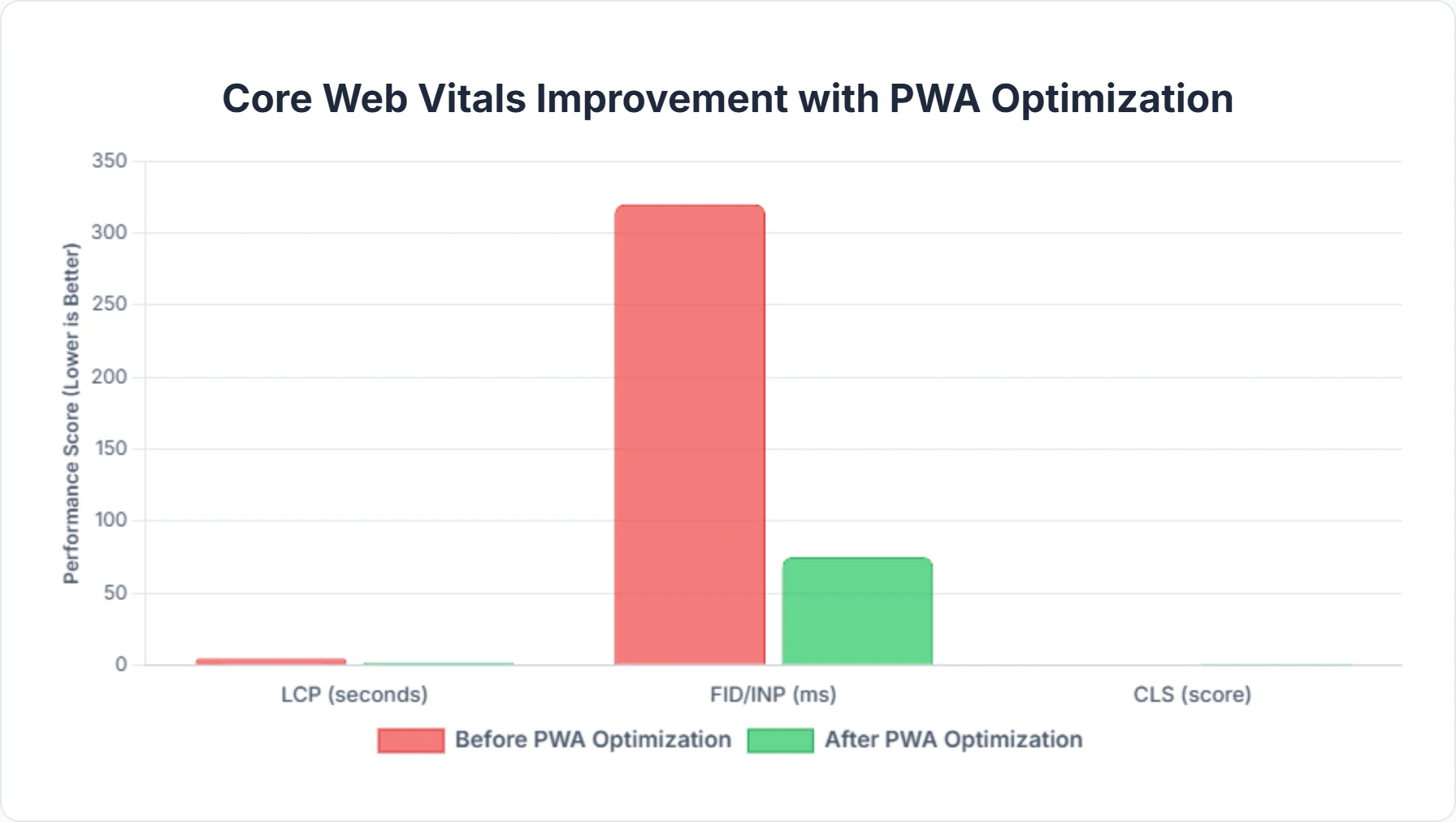
- Superior Performance: PWAs are engineered for speed. Their caching mechanisms, especially through service workers, drastically reduce load times after the initial visit. This directly contributes to excellent Core Web Vitals scores, a set of metrics Google uses to measure page experience, including Largest Contentful Paint (LCP), First Input Delay (FID), and Cumulative Layout Shift (CLS). Websites that perform well on these metrics are favored in search rankings.
- Enhanced User Experience: The app-like interface, smooth navigation, and engaging features of PWAs lead to lower bounce rates and higher dwell times. When users spend more time on your site and interact positively with it, these are strong signals to search engines that your content is valuable and relevant.
- Mobile-First by Nature: Because PWAs are inherently responsive and designed for mobile interaction, they are perfectly positioned for Google's mobile-first indexing. They offer a seamless experience on smartphones, which is what Googlebot primarily evaluates.
- Security (HTTPS): As mentioned, HTTPS is a prerequisite for PWAs. Google has long confirmed HTTPS as a minor ranking signal, but more importantly, it builds trust with users and ensures data integrity, which are indirect but powerful SEO advantages.
Ignoring PWA SEO is akin to building a state-of-the-art store in a hidden alley. Your product might be incredible, but if no one can find it, its potential remains untapped. Therefore, understanding and actively optimizing your PWA for search engines isn't just about tweaking technical settings; it's about strategic planning to ensure your cutting-edge web experience is fully discoverable, indexable, and ranks prominently for your target audience. It means transforming your PWA from a hidden gem into a highly visible beacon that attracts, engages, and converts visitors into loyal customers.
The Pillars of PWA SEO: What You Absolutely Need to Know
Optimizing a PWA for search engines involves a blend of traditional SEO principles and specific considerations for its unique architecture. To ensure your PWA climbs the search rankings, you must focus on several fundamental pillars.
1. Crawlability & Indexability: Making Your PWA Visible to Search Engines
The first step in any SEO strategy is ensuring search engines can find and understand your content. For PWAs, this can sometimes be more complex due to their client-side rendering nature.
- Service Workers and Caching: While service workers are fantastic for user experience and speed, they can occasionally confuse search engine crawlers if not managed correctly. Crawlers need to see the fully rendered content, not just cached shells. Ensure your service worker configuration allows crawlers to access fresh content without hindrance.
- App Shell Architecture and Content Delivery: PWAs often use an "app shell" model, where a minimal UI is loaded first, and content is dynamically fetched. For SEO, it's vital that the primary content is rendered and available to search engine bots upon their initial crawl. If your content relies heavily on client-side JavaScript to render, search engines might struggle to index it fully.
- URLs and Routing: Every piece of unique content in your PWA should have a unique, descriptive, and crawlable URL. Avoid relying solely on client-side routing that doesn't update the URL in the browser's address bar. Use the History API to ensure consistent and shareable URLs.
- Server-Side Rendering (SSR) or Prerendering: For PWAs that rely heavily on JavaScript, implementing Server-Side Rendering (SSR) or prerendering is often the best approach for SEO.
- SSR means your server generates the complete HTML for a page on each request, sending it directly to the browser (and thus, to the crawler). This ensures crawlers see fully formed content immediately.
- Prerendering involves generating static HTML files for your JavaScript-heavy pages at build time. These static HTML files are then served to crawlers, while users still get the dynamic PWA experience. Both methods circumvent potential issues with JavaScript rendering for search engines, ensuring your content is seen and indexed.
- Traditional SEO Fundamentals: Don't forget the basics. Ensure you have a well-structured
robots.txtfile that doesn't block essential resources, an up-to-date XML sitemap listing all your important URLs, and correctrel=canonicaltags to prevent duplicate content issues, especially if your PWA serves content via multiple routes or dynamic parameters. Regularly test your PWA's crawlability using tools like Google Search Console's URL Inspection tool and the Mobile-Friendly Test.
A practical approach to identifying and solving these technical SEO challenges for both mobile and desktop versions of your PWA involves a robust auditing process. Platforms like Digispot AI can step in here, offering comprehensive website audits that analyze your site for over 200 ranking factors. This includes meticulously checking for crawl errors, assessing how your service workers interact with crawlers, and ensuring your URLs are properly structured and accessible. It helps pinpoint exactly where technical issues lie, paving the way for effective solutions.
2. Blazing Speed & Performance: The Heart of PWA SEO
Speed is not just a luxury; it's a fundamental expectation of modern web users and a critical ranking factor for search engines. PWAs are inherently designed for speed, and optimizing this aspect is paramount for PWA SEO.
- Core Web Vitals Excellence: Google's Core Web Vitals (Largest Contentful Paint, First Input Delay, Cumulative Layout Shift) are direct measures of page experience. PWAs, with their robust caching via service workers and app shell architecture, are uniquely positioned to excel in these metrics.
- Largest Contentful Paint (LCP): Focus on rapidly delivering the main content block. This involves optimizing image sizes, prioritizing critical CSS, and ensuring your server response times are low.
- First Input Delay (FID): Ensure interactivity happens quickly. Optimize JavaScript execution, break up long tasks, and use efficient event listeners.
- Cumulative Layout Shift (CLS): Prevent unexpected layout shifts. Reserve space for images and ads, avoid injecting content above existing content, and use CSS transforms for animations where possible.
- Optimization Techniques:
- Image Optimization: Compress images, use modern formats (WebP), and implement lazy loading so images only load when they enter the viewport.
- Code Splitting: Break down your JavaScript bundles into smaller chunks that can be loaded on demand, reducing initial load times.
- Efficient Caching Strategies: Beyond service workers, leverage browser caching for static assets.
- Minification and Compression: Minify HTML, CSS, and JavaScript, and use GZIP or Brotli compression.
- Critical CSS: Inline essential CSS directly into your HTML to render the above-the-fold content immediately.
- Impact on User Experience and Bounce Rates: A fast-loading PWA drastically improves user satisfaction. Users are less likely to abandon a page that loads quickly, leading to lower bounce rates and higher engagement—signals that Google interprets positively.
To ensure your PWA delivers a lightning-fast experience, continuous monitoring and auditing of page performance are essential. Digispot AI excels in this area, auditing your website's performance in detail and identifying specific bottlenecks that impede speed. Whether it's oversized images, inefficient scripts, or problematic server responses, the platform helps you identify and solve these issues, directly contributing to superior Core Web Vitals and improved user experience.
3. Exceptional User Experience (UX): Engaging Your Audience
While technical SEO ensures discoverability, an outstanding User Experience (UX) keeps visitors engaged, reduces bounce rates, and encourages repeat visits—all strong indirect SEO signals. For PWAs, UX is inherent to their design philosophy.
- Mobile-First Design and Responsiveness: Given Google's mobile-first indexing, your PWA must be designed with mobile users in mind first. It should be fully responsive, adapting flawlessly to every screen size and orientation. This includes touch-friendly navigation, readable fonts, and appropriately sized interactive elements.
- Intuitive Navigation: A well-structured, easy-to-understand navigation system is crucial. Users should effortlessly find what they're looking for, whether they're on a desktop or a mobile device. Clear calls to action (CTAs) guide users through your PWA, improving conversion paths.
- Offline Experience: This is a unique and powerful UX differentiator for PWAs. Designing a thoughtful offline experience—even if it's just showing a custom offline page or allowing access to previously cached content—can significantly enhance user satisfaction and keep them connected to your brand even without internet access.
- Engagement Metrics: Google pays attention to how users interact with your site. Longer dwell times, lower bounce rates, higher pages per session, and direct traffic (users returning by typing your URL or via the home screen icon) are all positive signals. A PWA's app-like engagement capabilities directly contribute to these metrics.
4. Schema Markup: Giving Your PWA Context and Rich Results
Schema Markup, or structured data, is a powerful tool that enhances your PWA's visibility by helping search engines understand the context of your content. When implemented correctly, it can enable rich results, making your PWA stand out in search engine results pages (SERPs).
- What is Schema Markup? It's a vocabulary (microdata, RDFa, or JSON-LD) that you add to your HTML to give search engines explicit clues about the meaning of your content. Instead of just seeing text, Google understands "this is a product," "this is an event," or "this is a review." JSON-LD is the recommended format for implementing schema.
- Why it's Crucial for PWAs: For PWAs, which often have dynamic content and app-like functionalities, schema markup is even more critical. It helps search engines parse and categorize this dynamic content effectively.
- Rich Snippets: Schema can transform a basic search listing into an eye-catching "rich snippet" displaying ratings, prices, availability, or event dates directly in the SERP. This significantly increases click-through rates.
- Enhanced Visibility: Beyond rich snippets, schema can contribute to features like "People Also Ask" boxes, knowledge panels, and carousel results, further boosting your PWA's prominence.
- Types of Schema for PWAs:
ArticleorBlogPostingfor blog content.Productfor e-commerce PWAs.LocalBusinessfor local search visibility.FAQPagefor frequently asked questions.BreadcrumbListfor navigation paths.WebSitefor sitelinks search boxes.
- Implementation Considerations for Dynamic Content: Ensure that your schema markup dynamically updates with your PWA's content. If you're using SSR or prerendering, the schema should be part of the initially rendered HTML. For client-side rendered content, ensure your JavaScript correctly injects the JSON-LD into the
headorbodyof the document, and that Googlebot can process it. Always test your schema implementation using Google's Rich Results Test tool to catch any errors.
Implementing and verifying schema markup can be a meticulous process. Digispot AI provides robust capabilities for schema markup detection and visualization. This means you can easily see what schema is present on your PWA, identify any errors or omissions, and visualize how it contributes to your search presence. It helps ensure your structured data is correctly applied and optimized for maximum impact, even offering insights into opportunities for additional schema to enhance your rich results.
5. Content Strategy: Fueling Your PWA's Ranking Power
Even with the most advanced technical setup, without high-quality, relevant content, your PWA will struggle to rank. Content is the fuel that powers your SEO engine, driving traffic and establishing your authority.
- High-Quality, Relevant Content: The evergreen rule of SEO holds true for PWAs. Your content must be valuable, informative, and engaging to your target audience. Focus on solving user problems, answering their questions, and providing unique insights.
- Keyword Research Tailored for PWA Topics: Conduct thorough keyword research to understand what terms your audience uses. Don't just focus on short-tail keywords; explore long-tail queries that indicate specific user intent. Consider keywords related to the app-like features of your PWA (e.g., "offline mode recipes," "installable budgeting app").
- Optimizing Meta Titles, Descriptions, and Headings: Craft compelling meta titles and descriptions that include your target keywords and accurately reflect the page content. These are your PWA's storefront in search results. Use H1, H2, and H3 headings to structure your content logically, improving readability and making it easier for search engines to understand your page's hierarchy and main topics.
- Regular Content Updates and Fresh Perspectives: Search engines favor websites that regularly update and expand their content. Keep your PWA's blog posts, product descriptions, and informational pages fresh and relevant. This signals to search engines that your site is active and a valuable resource.
- User Intent Alignment: Beyond keywords, understand the "why" behind a search query. Is the user looking for information, a solution, a product to buy, or a specific location? Tailor your content to match this user intent.
To maintain a dynamic and effective content strategy, identifying new opportunities and generating high-quality content efficiently is key. Digispot AI offers an "Opportunity Finder" that helps you spot content gaps and emerging trends within your niche. Furthermore, its "Content Studio" utilizes advanced AI agents to generate SEO-optimized content, ensuring your PWA is always stocked with fresh, relevant, and search-friendly material. This integration helps you create content that resonates with your audience and ranks well.
Benefits of Mastering PWA SEO: Why It Matters for Your Business
Investing time and resources into PWA SEO isn't just about ticking off technical boxes; it translates directly into tangible business outcomes. The symbiotic relationship between PWAs and SEO creates a powerful engine for growth.
- Improved Business Visibility: When your PWA ranks higher in search results, it means more people see your brand. This enhanced visibility is the bedrock of digital success, allowing you to reach a broader audience actively searching for your products, services, or information. A well-optimized PWA becomes a prominent beacon in the vast digital sea.
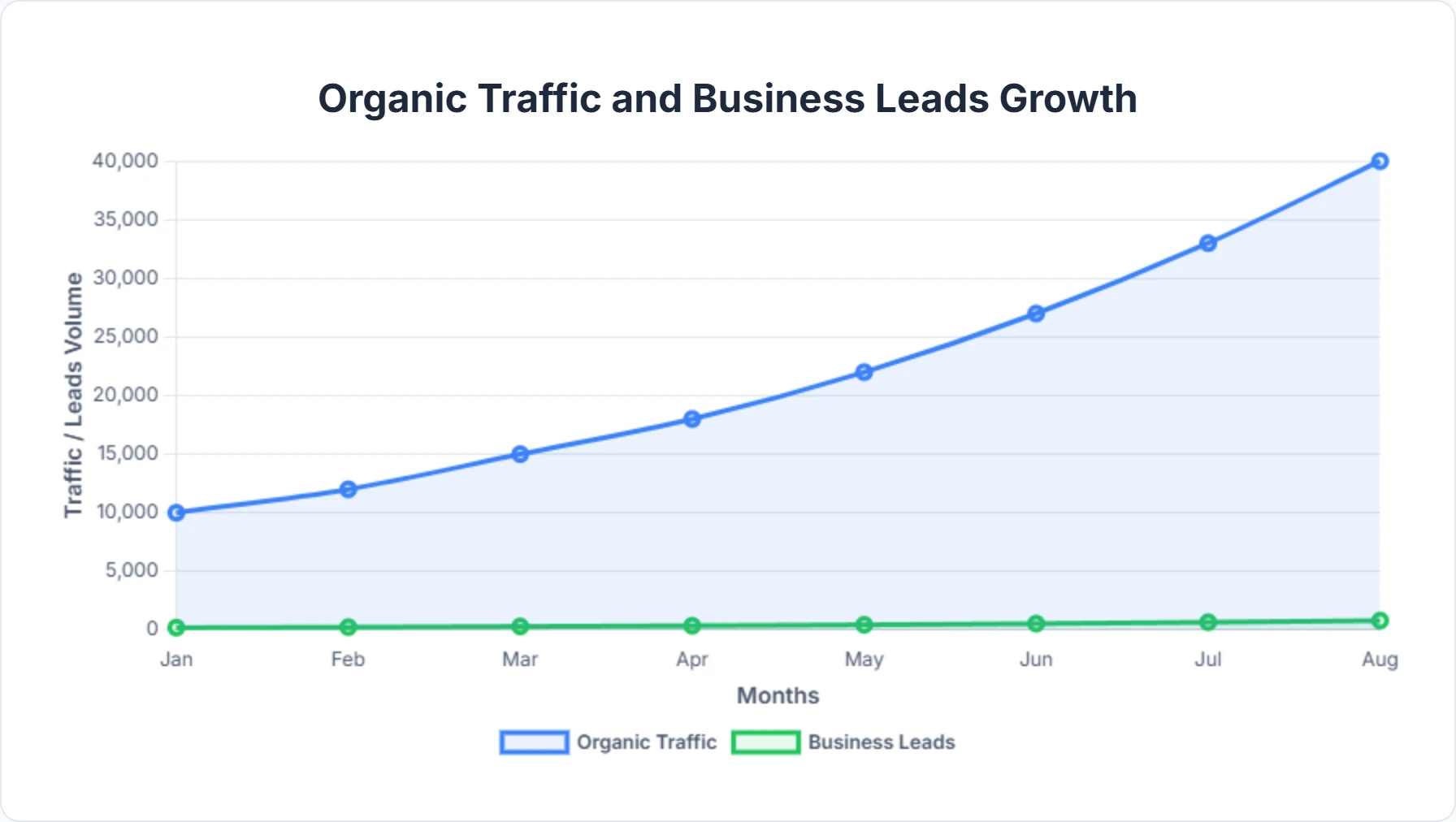
- Increase in Traffic and Business Leads: Higher visibility naturally leads to increased organic traffic. As more potential customers click through to your PWA, the likelihood of them converting into leads or direct sales grows exponentially. The app-like experience of PWAs also encourages deeper engagement, turning casual visitors into loyal customers. These are not just any visitors; they are actively searching for solutions you provide.
- Time and Cost Savings: Compared to developing and maintaining separate native mobile applications alongside a traditional website, a PWA offers significant efficiencies. You're developing one codebase that serves both web and app-like experiences. This streamlines development, reduces maintenance costs, and simplifies your marketing efforts, as you're optimizing a single platform for both web and app-like distribution.
- Enhanced User Engagement: The core design of a PWA—speed, reliability, and an immersive app-like feel—leads to a superior user experience. This translates to higher engagement metrics: users spend more time on your site, interact more deeply with your content, and are more likely to return. This positive user behavior signals to search engines that your PWA offers value, further boosting its rankings.
- Better Mobile Experience: In an era dominated by mobile browsing, providing an outstanding mobile experience is non-negotiable. PWAs inherently deliver this by being responsive, fast, and interactive on smartphones. This alignment with Google's mobile-first indexing strategy ensures your PWA is evaluated favorably, helping you capture the ever-growing mobile audience.
- Offline Access: A distinct advantage of PWAs is their ability to function offline or in low-connectivity environments. This unique selling proposition not only delights users by providing uninterrupted access to content but also reduces frustration and bounce rates in situations where traditional websites would fail. It's a powerful feature that builds user loyalty and can indirectly contribute to positive user signals for SEO.
By mastering PWA SEO, businesses aren't just adopting a new technology; they are embracing a holistic strategy that improves their online presence, attracts more qualified prospects, and ultimately drives sustainable growth.
Table 1: PWA vs. Traditional Website (SEO Perspective)
To further illustrate the unique advantages and considerations of PWAs from an SEO standpoint, let's compare them directly with traditional websites.
| Feature | Traditional Website | Progressive Web App (PWA) | SEO Implication |
|---|---|---|---|
| Speed | Varies widely, often slower | Typically very fast, especially after first visit (caching) | Directly impacts Core Web Vitals, user experience, and search rankings. |
| Offline Access | None | Yes (via Service Workers) | Enhances user experience, reduces bounce rate, potentially improves engagement. |
| Installability | No, bookmarked in browser | Yes (add to home screen), app-like icon | Increases user retention, direct access, strong engagement signal. |
| Push Notifications | No | Yes | Drives re-engagement, traffic, and positive user signals. |
| Responsiveness | May or may not be responsive | Inherently responsive and mobile-first | Crucial for mobile-first indexing and user experience. |
| Security (HTTPS) | Optional (though now standard for SEO) | Mandatory for Service Workers | A ranking factor, essential for trust and data integrity. |
| App Store Presence | No | No (web-based) | Focus on web search visibility instead of app store optimization. |
| Crawlability | Generally straightforward | Can be complex with client-side rendering; requires careful setup | Requires attention to SSR/Prerendering and proper URL management. |
How to Optimize Your Progressive Web App for Search Engines: A Practical Guide
Now that we understand the 'what' and 'why,' let's delve into the 'how.' Optimizing your PWA for SEO requires a systematic approach, combining technical prowess with strategic content creation and continuous monitoring.
1. Technical SEO Checklist for PWAs
The technical backbone of your PWA needs to be solid to support your SEO efforts.
- Implement Server-Side Rendering (SSR) or Prerendering: If your PWA heavily relies on client-side JavaScript, this is paramount. Ensure that all critical content is rendered on the server or pre-rendered into static HTML, making it immediately visible to search engine crawlers. Test extensively with Google Search Console's URL Inspection tool to confirm.
- Ensure All Content is Accessible to Crawlers: Use Google Search Console's "Fetch as Google" or URL Inspection tool to verify that Googlebot can see and render your PWA's content exactly as a user would. Pay close attention to dynamic content loaded via JavaScript.
- Optimize Your
robots.txtand Sitemap: Yourrobots.txtfile should not block any essential resources (CSS, JavaScript, images) that Google needs to render your page correctly. Your XML sitemap should accurately list all indexable URLs within your PWA, helping crawlers discover your content efficiently. - Use a Consistent URL Structure: Adopt a clean, descriptive, and consistent URL structure throughout your PWA. Avoid overly long URLs or those with unnecessary parameters. Each unique piece of content should have a unique, stable URL.
- Implement Proper
rel=canonicalTags: If content can be accessed via multiple URLs (e.g., different parameters for the same product page), userel=canonicaltags to point to the preferred version, preventing duplicate content issues. - Ensure Fast Loading Times (Core Web Vitals): Prioritize optimizing your PWA for speed. This includes image optimization, code minification, efficient caching strategies (via service workers), and reducing server response times. Aim for "Good" scores across all Core Web Vitals metrics.
- Optimize Images and Other Media: Compress images without sacrificing quality, use modern formats like WebP, and implement lazy loading for images and videos that are not immediately in the viewport.
- Use HTTPS Universally: As a prerequisite for PWAs, ensure your entire site is served over HTTPS. This is not only a security best practice but also a minor ranking factor and essential for trust.
2. Content Optimization Strategies
Even the fastest PWA won't rank without compelling content.
- Conduct Thorough Keyword Research: Identify the search terms and phrases your target audience uses to find information related to your PWA. Use a mix of short-tail and long-tail keywords.
- Create Compelling, Unique, and Valuable Content: Develop high-quality, original content that directly addresses your audience's needs and questions. Your PWA's content should be informative, engaging, and provide genuine value.
- Optimize Meta Titles, Descriptions, and Headers: Craft unique, keyword-rich, and enticing meta titles and descriptions for every page. Use clear H1, H2, and H3 headings to structure your content logically, improving readability for both users and search engines.
- Regularly Update and Expand Your Content: Keep your PWA's content fresh and relevant. Regularly publish new blog posts, update existing articles, and expand on popular topics. This signals to search engines that your site is an active and authoritative resource.
3. User Experience (UX) Enhancements
A delightful user experience is a powerful indirect SEO signal.
- Prioritize Mobile Responsiveness: Design your PWA to be fully responsive and adapt seamlessly to all screen sizes. Ensure touch targets are adequately sized and navigation is finger-friendly.
- Design Intuitive Navigation: Create a clear, logical, and easy-to-use navigation menu. Users should be able to find any information with minimal clicks.
- Provide Clear Calls to Action: Guide users through your PWA with prominent and persuasive calls to action, encouraging them to engage further, convert, or explore more content.
- Offer a Smooth, Fast, and Delightful User Journey: Minimize friction points, reduce load times, and ensure all interactions are fluid and responsive. A positive user experience leads to longer dwell times and lower bounce rates, which are beneficial for SEO.
4. Leveraging Structured Data (Schema Markup)
Schema markup can significantly enhance your PWA's visibility in search results.
- Identify Relevant Schema Types for Your Content: Based on your PWA's content (e.g., articles, products, local business info, FAQs), identify the most appropriate schema types from Schema.org.
- Implement Correctly Using JSON-LD: Use the recommended JSON-LD format for adding structured data to your PWA's HTML. Ensure the markup is accurately nested and contains all required properties.
- Test Implementation Using Google's Rich Results Test: Before deploying, always test your schema markup using Google's official tool. This will highlight any errors or warnings and show you how your rich results might appear in search.
- Digispot AI Integration: To simplify the complexities of schema markup, Digispot AI offers capabilities for schema markup detection and visualization. This functionality helps you easily verify if your structured data is correctly implemented and identifies opportunities for adding more schema to enhance your rich snippets and overall search presence.*
5. Monitoring and Analytics
Continuous monitoring is vital for sustained SEO success.
- Integrate with Google Search Console: This free tool is indispensable. Monitor your PWA's index coverage, identify crawl errors, check for security issues, review Core Web Vitals reports, and analyze search performance (impressions, clicks, average position).
- Integrate with Google Analytics: Track user behavior, engagement metrics (bounce rate, pages per session, average session duration), and conversion paths within your PWA. Understanding how users interact with your content helps you refine both your UX and content strategy.
- Digispot AI Integration: The Digispot AI platform seamlessly integrates with both Google Search Console and Google Analytics. This integration allows you to track and improve your PWA's performance comprehensively, drawing upon the platform's analysis of over 200 ranking factors. This holistic view ensures you're always informed and can make data-driven decisions to boost your PWA's SEO.*
Table 2: PWA SEO Checklist and Digispot AI's Role
To summarize how Digispot AI can assist in the practical implementation of PWA SEO, here's a helpful overview:
| PWA SEO Task | What it Involves | Digispot AI's Contribution |
|---|---|---|
| Technical Audit & Issue Detection | Checking for crawl errors, broken links, canonical issues, rendering problems. | Audits websites (mobile/desktop), identifies 300+ ranking factors, pinpoints issues. |
| Performance Optimization | Improving loading speed, Core Web Vitals (LCP, FID, CLS). | Audits page performance, helps identify and solve speed-related issues. |
| Schema Markup Implementation | Adding structured data (JSON-LD) for rich results. | Offers schema markup detection and visualization, ensuring correct and optimal use. |
| Content Opportunity Identification | Finding gaps in content, trending topics, competitor analysis. | Opportunity Finder helps spot gaps and emerging trends. |
| SEO-Optimized Content Generation | Creating high-quality, keyword-rich content. | Content Studio uses AI agents to generate SEO-optimized content. |
| Monitoring & Performance Tracking | Connecting with Google Search Console and Analytics for insights. | Integrates with Google Search Console and Google Analytics for comprehensive tracking. |
| Quick Page Audits (Chrome Extension) | On-the-fly analysis of individual pages in the browser. | Free Community Chrome Extension audits website pages, powered by LLM models, supports audit, detection, and visualization. |
Digispot AI Cloud Platform: Your Ally in PWA SEO
Navigating the complexities of PWA SEO, especially when balancing cutting-edge web technologies with search engine requirements, can be a daunting task. This is where an intelligent platform can make a significant difference. The Digispot AI cloud platform is engineered to bring together all SEO best practices, encapsulating them in an automated and user-friendly model. This empowers you to manage and optimize your PWA's search presence at scale with remarkable accuracy.
By integrating with crucial tools like Google Search Console and Google Analytics, Digispot AI offers a holistic view of your PWA's performance. It goes beyond surface-level analysis, scrutinizing your website against over 200 ranking factors in both mobile and desktop modes. This deep audit capability allows it to precisely identify issues—from crawlability roadblocks to performance bottlenecks and schema markup inconsistencies—and importantly, helps you solve them. The platform's "Opportunity Finder" ensures you're always aware of new content possibilities, while its "Content Studio," powered by AI agents, assists in generating SEO-optimized content, keeping your PWA fresh and competitive.
A Free Helper: The Digispot AI Community Chrome Extension
For quick, on-the-fly insights without delving into a full platform dashboard, the Digispot AI free community Chrome extension is an invaluable asset. This browser extension allows you to audit any website page directly within your browser. Powered by popular LLM (Large Language Model) models, it provides instant detection of SEO issues, supports schema markup visualization, and offers a concise audit report right at your fingertips. It's like having a quick SEO check-up tool available whenever you need it, ensuring that as you browse your PWA or even competitor sites, you can instantly identify key SEO elements and potential areas for improvement.
Conclusion
Progressive Web Apps are undeniably charting the future course of web experiences, offering an unparalleled blend of speed, reliability, and engaging app-like functionality. However, for these advanced web applications to truly unlock their immense potential, they must not merely exist; they must be easily discoverable by the users who are actively searching for what you offer. Mastering PWA SEO isn't just about implementing technical tweaks or chasing the latest trends; it's about fundamentally understanding how search engines perceive and rank these sophisticated web applications.
By meticulously focusing on enhancing crawlability, delivering blazing-fast performance, crafting an exceptional user experience, strategically implementing structured data, and nurturing intelligent content, your PWA can ascend the search rankings. This ascent directly translates into significant business outcomes: vastly improved visibility for your brand, a substantial increase in organic traffic, and a healthy flow of valuable business leads. Tools and platforms like Digispot AI streamline this often complex and intricate process. They ensure your PWA is not only at the cutting edge of web technology but also a powerfully magnetic force for search engines, consistently attracting and engaging your target audience. Embrace PWA SEO, and watch your modern web experience transform into a robust engine for business growth.
Related deep-dives
Continue with these closely related guides:
- importance of cdn — Importance of CDN in SEO: Boosting Website Speed & Rankings
- technical seo — The Ultimate Technical SEO Checklist 2025: Rank on Google & AI
- image compression seo — Image Compression SEO: Speed Up Your Website
References
- What are Progressive Web Apps? | web.dev
- PWA SEO: How to make a PWA discoverable | web.dev
- Crawl Budget Management For Large Sites | Google Search Central
- Robots.txt Introduction and Guide | Google Search Central
- Sitemaps | Google Search Central
- Introduction to Core Web Vitals | Google Search Central
- Optimize Core Web Vitals | web.dev
- Introduction to Structured Data | Google Search Central
- Rich Results Test | Google Search Console
- Google Search Console
- Google Analytics
- Digispot AI - FREE On Page SEO Audit Tool
- Digispot AI - FREE Chrome Extension for SEO Insights
- Digispot AI - AI SEO Platform
Audit any page in seconds
300+ SEO checks including Core Web Vitals, schema markup, meta tags, and AI readiness — trusted by 1000+ SEO experts and marketers.
Frequently Asked Questions
Here are some of our most commonly asked questions. If you need more help, feel free to reach out to us.
Written by
Maya Krishnan
Digital growth expert
Maya is a seasoned expert in web development, SEO, and digital strategy, dedicated to helping businesses achieve sustainable growth online. With a blend of technical expertise and strategic insight, she specializes in creating optimized web solutions, enhancing user experiences, and driving data-driven results. A trusted voice in the industry, Maya simplifies complex digital concepts through her writing, empowering readers with actionable strategies to thrive in the ever-evolving digital landscape.