How to Improve User Experience for Better SEO
Boost SEO rankings through better user experience design. Optimize page speed, mobile usability, navigation, and engagement signals for search success.
 Maya Krishnan
Your website acts as your 24/7 salesperson, customer support agent, and brand ambassador. If visitors struggle to find what they need or get frustrated by slow loading times, they won't hesitate to leave. This immediate departure hurts more than just your conversion rates—it sends a negative signal to search engines. This is where the convergence of User Experience (UX) and Search Engine Optimization (SEO) becomes critical.
While traditionally handled by different teams—designers focused on aesthetics and flow, marketers focused on keywords and rankings—these disciplines are now inseparable. Modern SEO is less about manipulating algorithms and more about optimizing for the human searching behind the screen. When you delight your users, you align perfectly with the goals of search engines like Google, Bing, and AI-driven platforms.
This guide explores the deep synergy between UX and SEO. We will break down the mechanics of how user-centric design fuels search visibility and provide a detailed, actionable roadmap to transform your website into a high-performing asset.
Key Takeaways
- Optimize for the human first. Google rewards pages that satisfy searchers, so improving speed, clarity, and navigation improves rankings as a byproduct.
- Prioritize mobile and Core Web Vitals. With mobile-first indexing, fix LCP, INP, and CLS on the mobile experience before anything else — that is the version Google ranks.
- Structure content for scanning. Descriptive H2/H3 headings, bullets, and visual breaks help both skimming users and crawling bots understand your page.
- Use internal links and clear navigation to keep visitors engaged and to spread link equity to deep pages within three clicks of the home page.
- Measure, then iterate. Use Search Console's Page Experience report, GA4 events, and heatmaps to tie UX fixes to real behavior changes.
What is User Experience (UX)? Understanding the User's Journey
User Experience (UX) defines the quality of interaction a person has with your digital product. On a website, this encompasses the entire lifecycle of their visit: the speed at which the page loads, the clarity of the layout, the readability of the text, and the ease of completing a desired action, such as filling out a form or making a purchase.
Exceptional UX goes beyond making a site look "pretty." It is functional, accessible, and empathetic. It anticipates friction points and smooths them out before the user even encounters them. A site with strong UX answers questions quickly and guides visitors intuitively toward their goals.
Key Elements of an Exceptional User Experience:
To build a truly user-centric website, you must address several dimensions of the experience. These elements work together to form the user's overall perception of your brand.
| UX Element | Description | Importance for Users |
|---|---|---|
| Usability | The measure of how easily a user can complete a specific task. This involves intuitive interfaces, standard conventions (like a logo linking to home), and error prevention. | Users accomplish tasks without confusion or fatigue. High usability reduces the "cognitive load," allowing users to focus on your content rather than figuring out how to use the site. |
| Accessibility | The practice of designing sites to be usable by people with disabilities. This includes compatibility with screen readers, keyboard-only navigation, and sufficient color contrast. | Ensures inclusivity. An accessible site allows the 16% of the global population with disabilities to consume your content, expanding your reach significantly. |
| Findability | The ease with which users can locate specific content. This relies on clear navigation menus, search bars, breadcrumbs, and a logical information hierarchy. | Time is currency. If users can't find a product or answer in seconds, they leave. Good findability respects the user's time and reduces frustration. |
| Desirability | The emotional appeal of the website. It leverages high-quality imagery, consistent branding, typography, and micro-interactions to create a positive feeling. | Emotion drives decisions. A desirable interface builds an emotional connection, making users more likely to forgive minor errors and return in the future. |
| Credibility | The trustworthiness of the site. Signals include SSL certificates, clear contact details, author bios, testimonials, and freedom from technical errors. | Trust is the foundation of conversion. Users will not share personal data or credit card information with a site that appears broken, sketchy, or anonymous. |
| Value | The core utility of the site. Does it solve a problem? Does it entertain? Is the content accurate and helpful? | Value is the primary reason for the visit. Even the most beautiful site will fail if the content doesn't deliver on the promise made in the search results. |
By meticulously refining these elements, you create a digital environment where users feel understood and valued. This positive sentiment is the fuel that powers engagement metrics, which in turn, powers your SEO.
What is Search Engine Optimization (SEO)? Being Seen Online
Search Engine Optimization (SEO) is the strategic process of improving your website to increase its visibility for relevant searches. The goal is to attract "organic" (non-paid) traffic that is genuinely interested in your products or services. In the era of AI Overviews and chatbots, SEO also extends to AEO (Answer Engine Optimization), ensuring your brand is cited as a source by AI models like ChatGPT, Claude, and Gemini.
SEO is not a single task but a collection of strategies that help search engines crawl, index, and rank your content.
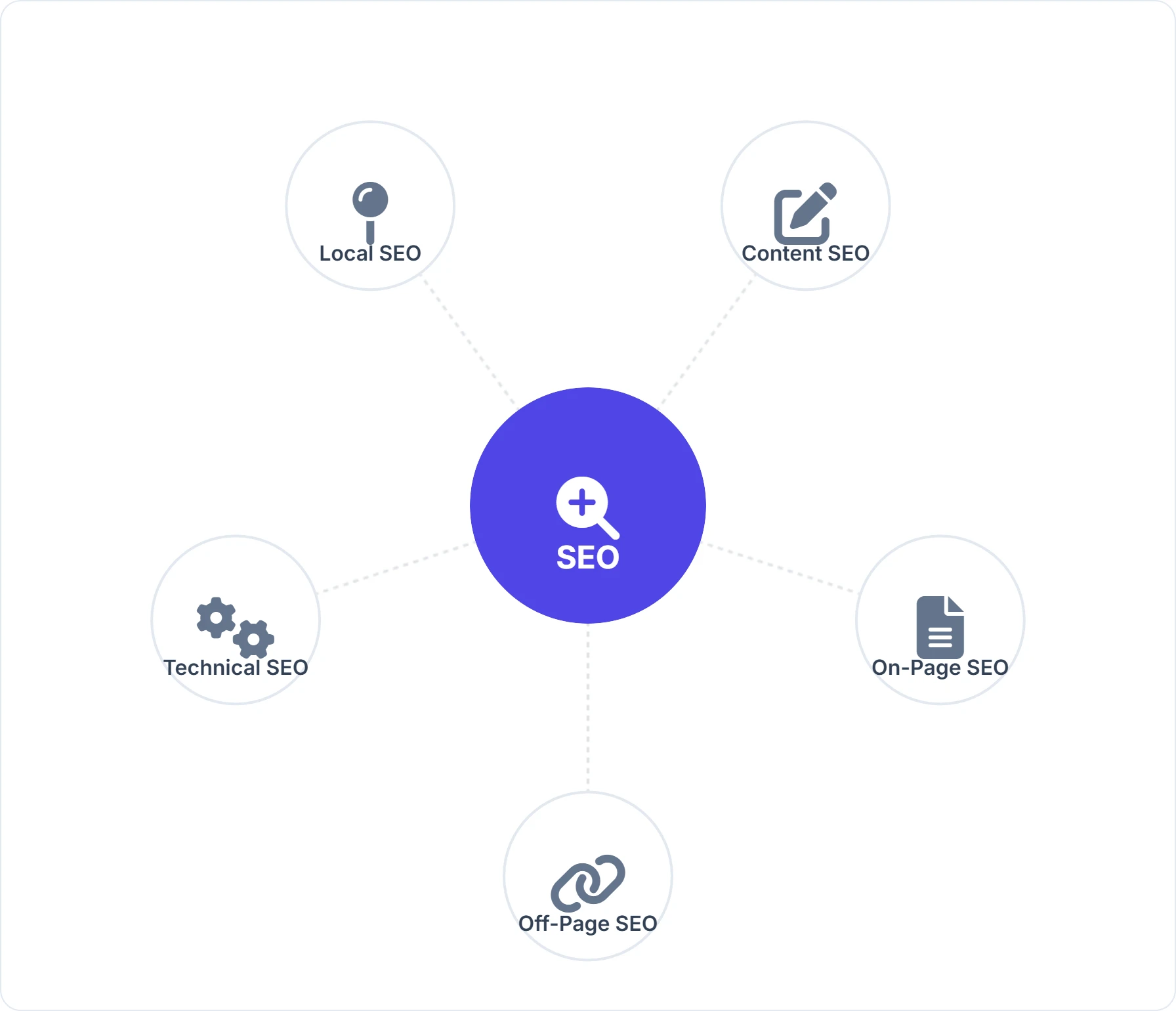
Types of SEO and Their Focus:
A holistic strategy requires attention to multiple pillars of SEO. Neglecting one area can undermine efforts in another.
| Type of SEO | Focus Area | How it Helps |
|---|---|---|
| On-Page SEO | Optimizing elements within your control on individual pages. This includes content quality, keyword usage, header tags (H1-H6), meta descriptions, and internal linking. | Helps search engines understand the topic and context of your content. Effective on-page SEO best practices ensure your pages satisfy specific user intent. |
| Off-Page SEO | Building authority through external signals. This primarily involves acquiring backlinks from reputable sites, brand mentions, and social signals. | Acts as "votes of confidence." A strong backlink profile signals to Google that others trust your information. Learn how to improve your backlink profile to boost domain authority. |
| Technical SEO | The "under the hood" optimizations that affect crawling and indexing. This covers site speed, XML sitemaps, robots.txt, mobile-friendliness, and secure connections (HTTPS). | Ensures the foundation is solid. Without technical SEO, great content may never be discovered. Regular audits using a SEO audit checklist are essential here. |
| Local SEO | Optimizing for location-based searches (e.g., "near me"). This involves Google Business Profile management, local citations, and reviewing management. | Crucial for brick-and-mortar businesses. It captures high-intent traffic from users ready to visit a physical store or service provider nearby. |
| Content SEO | The creation of content that satisfies user intent. It focuses on depth, freshness, E-E-A-T (Experience, Expertise, Authoritativeness, Trust), and semantic relevance. | Engages the user. High-quality content keeps users on the page, lowering bounce rates and establishing your brand as a topical authority. |
A robust strategy integrates these pillars. For instance, technical SEO ensures the site loads fast (good UX), on-page SEO ensures the content is readable (good UX), and off-page SEO proves the site is trustworthy (good UX).
How UX and SEO Intersect: A Symbiotic Relationship
Historically, developers, designers, and SEOs often worked in silos. Designers wanted high-resolution visuals that slowed down the site; SEOs wanted text-heavy pages that looked cluttered. Today, those conflicts are largely resolved because Google has made user experience a ranking factor.
The introduction of algorithms like RankBrain, BERT, and the Helpful Content Update confirms that Google is trying to mimic human behavior. If a human finds a site frustrating, Google will eventually penalize it.
Why is UX crucial for SEO?
Search engines have one primary customer: the searcher. If Google consistently sends users to websites that are slow, broken, or irrelevant, users will stop using Google. Therefore, search engines are incentivized to rank websites that provide a delightful experience.
When a user clicks your link in the SERP (Search Engine Results Page) and immediately hits the "Back" button (a behavior known as pogo-sticking), it tells the algorithm: "This result was bad." Conversely, if they click, read the content, visit another page, and spend five minutes on your site, it signals: "This result was excellent."
Common Goals: Providing Value and a Seamless Experience
By aligning your page experience efforts with SEO, you achieve the following shared goals:
- Intent Satisfaction: Both UX and SEO aim to give the user exactly what they searched for as quickly as possible.
- Accessibility: Search engine bots are essentially "blind" users. They rely on code structure, alt text, and logical navigation—the same features that make a site accessible to humans using screen readers.
- Trust: A well-designed, secure, and professional-looking site builds trust with users and signals authority to search engines.
- Efficiency: Fast loading times and clear navigation respect the user's time and conserve the search engine's crawl budget.
Key UX Factors that Influence SEO: What Search Engines Look For
To improve your rankings, you must look at your website through the lens of specific UX metrics that search engines measure.
1. Page Speed and Mobile-Friendliness
- What it is: The raw speed at which your content appears and becomes interactive, and its adaptability to mobile screens.
- How it impacts SEO: Speed is a confirmed ranking factor. Google's "Mobile-First Indexing" means it looks at your mobile site first to determine your rank. If your desktop site is perfect but your mobile site is slow or broken, your rankings will suffer everywhere.
- The Reality: 53% of mobile visits are abandoned if a page takes longer than 3 seconds to load. That is a massive loss of potential traffic before they even see your headline.
2. Content Quality and Readability
- What it is: The structure and clarity of your written content. Is it a wall of text, or is it broken up with headings, bullets, and images? Is the font size legible?
- How it impacts SEO: Readable content keeps users on the page. If text is too small or contrast is poor, users leave. Search engines analyze structure (H1, H2, H3 tags) to understand hierarchy. Clear structure aids both scanning humans and crawling bots.
3. Site Navigation and Structure
- What it is: The map of your website. It includes your main menu, footer links, breadcrumbs, and internal linking structure.
- How it impacts SEO: A "flat" architecture (where any page is reachable within 3 clicks) is ideal. It ensures link equity flows from your home page to deep internal pages. For users, intuitive navigation prevents the "where am I?" confusion that leads to exits. Pairing clear menus with a deliberate internal linking strategy is what turns a flat structure into one search engines can crawl fully.
4. Core Web Vitals
- What it is: Google's standardized set of metrics for measuring UX.
- Largest Contentful Paint (LCP): How fast the main content loads. Target: < 2.5s.
- Interaction to Next Paint (INP): Measures responsiveness to clicks and taps. Target: < 200ms. (Replaced FID in March 2024).
- Cumulative Layout Shift (CLS): Measures visual stability (do elements jump around?). Target: < 0.1.
- How it impacts SEO: These are direct ranking signals. Failing Core Web Vitals can prevent your content from appearing in Top Stories or other rich features. For a deep dive, check our comprehensive guide to Core Web Vitals.
5. User Engagement Signals
- What it is: Behavioral data collected by search engines.
- Dwell Time: The length of time a visitor spends on a page before returning to the SERPs.
- Pages Per Session: How many pages a user views in a single visit.
- Click-Through Rate (CTR): The percentage of people who see your snippet and click it.
- How it impacts SEO: These are effectively "happiness metrics." High dwell time implies the content was relevant and engaging, whereas a quick return to the SERP suggests the opposite. If your engagement numbers are weak, start by working through the tactics in our guide on how to reduce bounce rate.
6. Schema Markup and Structured Data
- What it is: A standardized vocabulary (code) that helps search engines understand the content on your page (e.g., "This is a recipe," "This is a product with a 5-star rating").
- How it impacts SEO: Schema powers "Rich Snippets" (stars, images, prices in search results). Rich snippets occupy more screen real estate and are visually attractive, which significantly increases CTR. Higher CTR can indirectly boost rankings.
Benefits of a Great User Experience for SEO: The Ripple Effect
Investing in UX is not a one-time cost; it is a compounding asset. The benefits ripple outward, improving every metric that matters to your business.
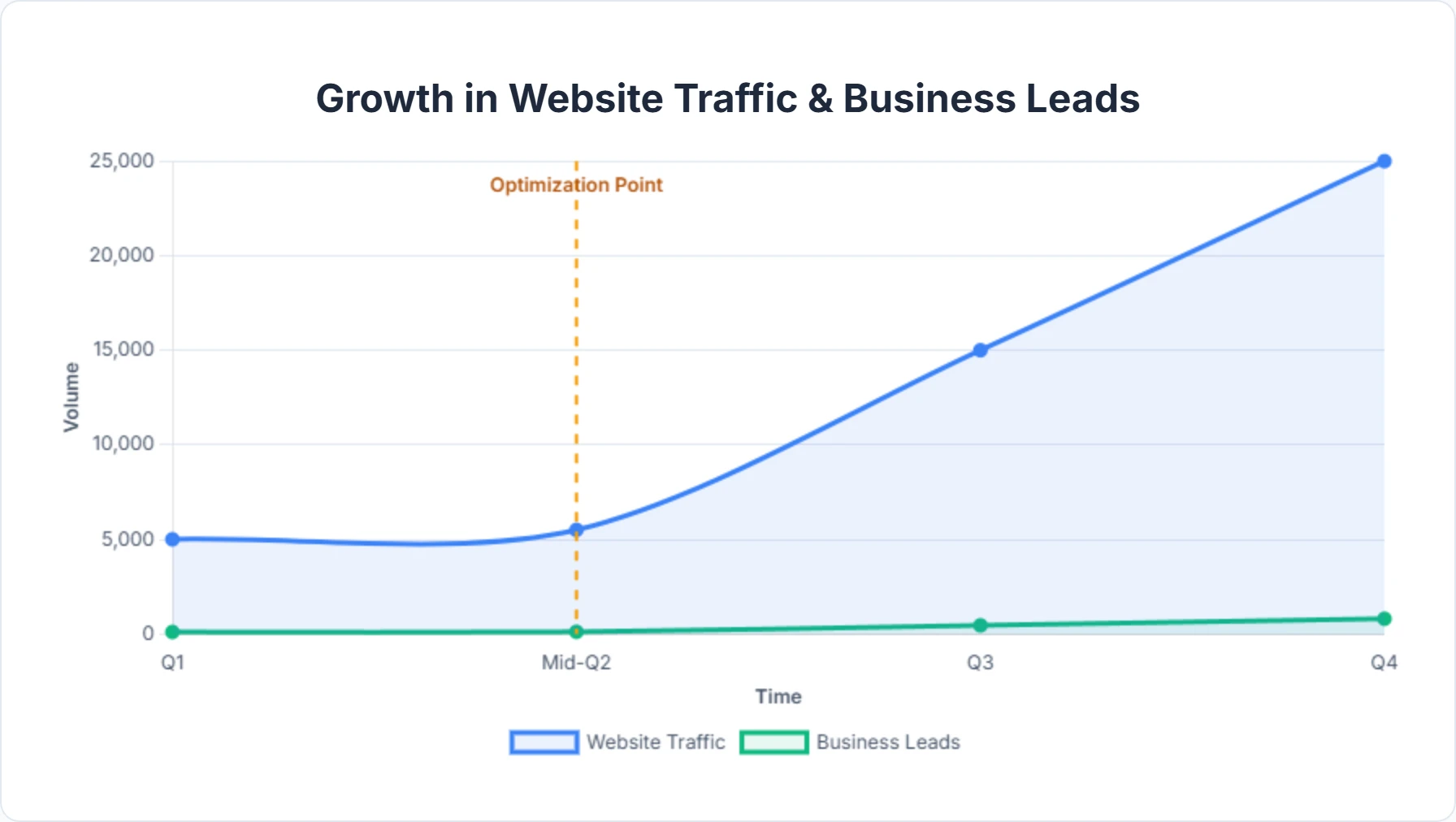
- Sustainable Higher Rankings: Unlike "black hat" SEO tricks that work for a week and then get you penalized, UX improvements are future-proof. As search engines get smarter, they will only value user experience more.
- Maximized Organic Traffic: It's not just about ranking #1; it's about getting the click. A site known for good UX (fast, helpful) builds a reputation. Users remember good experiences and are more likely to click your brand again in future searches.
- Improved Conversion Rates: SEO gets them to the door; UX invites them in and sells to them. Removing friction (like complex forms or hard-to-find buttons) directly increases the percentage of visitors who become leads or customers.
- Reduced Support Costs: A site with clear navigation and comprehensive, easy-to-find content answers customer questions before they need to email support. This saves your team time and money.
- Enhanced Brand Authority: A broken site looks amateur. A polished, fast site looks professional. This perception of quality is transferred to your products and services.
Practical Guide: How to Improve User Experience for Better SEO (Actionable Steps)
Theory is important, but execution drives results. Here is a step-by-step guide to auditing and improving your website's UX to boost your SEO performance.
1. Conduct a Thorough UX and SEO Audit
What to do: You cannot fix what you do not measure. Start by establishing a baseline of your website's current health.
- Heuristic Evaluation: Walk through your site as if you were a new user. Try to perform key tasks (buy a product, find a contact number). Note every moment of frustration.
- User Testing: Ask 5 people (who are not employees) to perform a task on your site while you watch. Their struggles will reveal obvious flaws you have become blind to.
- Analytics Review: Look for "leaky buckets" in Google Analytics. Which pages have the highest bounce rates? Where do most users exit the funnel?
- Competitor Analysis: Visit the top 3 ranking sites for your target keywords. What are they doing better? Is their text larger? Do they use more video?
How Digispot AI Helps: Manual audits are time-consuming and prone to human error. Digispot AI can help you identify and fix these issues automatically with AI-powered audits analyzing 300+ ranking factors. It scans your site in both mobile and desktop modes, flagging broken links, slow pages, and UX bottlenecks instantly.
2. Optimize Page Speed Mechanics
What to do: Speed optimization is technical but critical. Aim for a load time under 2 seconds.
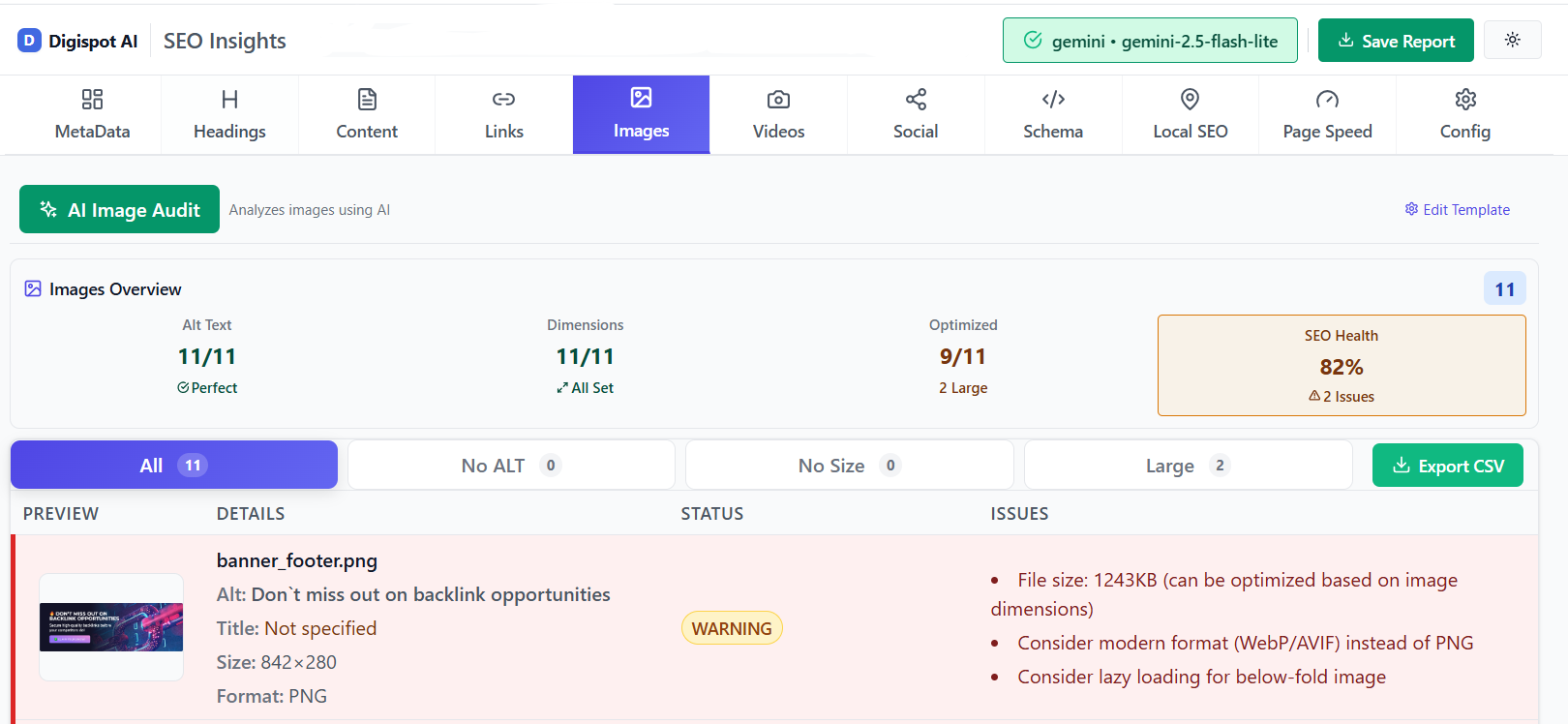
- Image Optimization: This is often the biggest win, since images are usually the heaviest asset on a page. Convert images to next-gen formats like WebP or AVIF, which are significantly smaller than PNG or JPEG, then resize them to the largest dimension they actually render at instead of shipping an oversized file the browser has to scale down. Always set explicit
widthandheightattributes so the browser reserves space and avoids layout shift (CLS). Our guide to image compression for speed walks through the exact settings. - Code Minification: Use tools to strip unnecessary spaces and comments from your CSS, JavaScript, and HTML files.
- Browser Caching: Configure your
.htaccessfile or use a plugin to tell browsers to save static files (like your logo) locally on the user's device, so they don't have to download them again on the next page view. - CDN Implementation: A Content Delivery Network stores copies of your site on servers around the world. A user in London downloads your site from a London server, not one in New York, reducing latency.
- Lazy Loading: Implement
loading="lazy"on images and iframes. This ensures assets below the fold don't load until the user scrolls down to them, speeding up the initial view.
Get instant SEO insights on any page, including speed bottlenecks, with our free Chrome extension.
3. Master Mobile Responsiveness
What to do: Designing for mobile requires a different mindset than desktop. It’s about the "Thumb Zone."
- Responsive Frameworks: Ensure your site uses a responsive grid (like Bootstrap or Tailwind) that fluidly adapts to any screen width.
- Tap Targets: Buttons and links must be at least 44x44 pixels. If users have to zoom in to click a link, you have failed the mobile UX test.
- Readable Fonts: Set a base font size of at least 16px. Anything smaller is hard to read on a phone without squinting.
- Avoid Pop-ups: Google penalizes "intrusive interstitials" on mobile. If you must use a pop-up, ensure it doesn't cover the main content and is easy to close.
4. Create High-Quality, Engaging Content
What to do: Content must be designed for consumption, not just storage.
- Satisfy Search Intent: If the keyword is "how to tie a tie," don't write 500 words on the history of silk. Give them a diagram or video immediately.
- Skimmability: Most users scan. Use descriptive H2 and H3 subheadings. Use bullet points for lists. Use bold text for key concepts.
- Visual Breaks: Insert an image, video, or quote every 300 words to break the monotony of text.
- Simple Language: Aim for an 8th-grade reading level. Use tools like Hemingway Editor to simplify complex sentences.
- Freshness: regularly update old content. Outdated statistics destroy trust.
How Digispot AI Helps: Our Content Studio with AI agents can help you generate outlines that cover all semantic entities related to your topic, ensuring your content is comprehensive and authoritative.
5. Improve Site Navigation and Information Architecture
What to do: Build a structure that makes sense to a complete stranger.
- Descriptive Labels: Avoid generic menu labels like "Solutions." Use descriptive ones like "SEO Tools" or "Audit Services."
- Breadcrumbs: These are the text trails (Home > Blog > SEO > This Post) at the top of a page. They allow users to backtrack easily and help Google understand site structure.
- Internal Linking: Link to related content naturally. For example, if you mention "common mistakes," link to a guide on common SEO mistakes to avoid. This keeps users on your site longer.
- Mega Menus: For large sites, use mega menus to organize links into categories, but ensure they don't overwhelm the user.
- Search Bar: If you have more than 50 pages, a visible search bar is mandatory.
6. Implement Structured Data (Schema Markup)
What to do: Translate your content into a language search engines speak fluently.
- Identify Opportunities: Does your page have FAQs? A video? A product? An event? A how-to guide? There is a Schema type for each. Match the markup to what the page actually shows — flagging content that isn't visible to users risks a manual action.
- Implementation: Add Schema via JSON-LD code in the
<head>of your page. JSON-LD is Google's preferred format because it lives in a single script block rather than being tangled through your HTML, making it easier to maintain. Nest related types (for example,Articlewith a nestedauthorandpublisher) so search engines understand relationships, not just isolated facts. - Validation: Always test your code using the Google Rich Results Test and the Schema.org validator to catch syntax errors and missing required properties. Then re-check the URL in Search Console's Enhancements reports after a few days to confirm Google has parsed it without warnings. For the full workflow, see our advanced schema markup guide.
- Keep it accurate: Structured data is not a "set and forget" task. When prices, ratings, or availability change on the page, update the markup to match — stale or contradictory data erodes the trust that rich results depend on.
How Digispot AI Helps: You don't need to be a coder. Use the free Schema Markup Generator to create valid structured data in minutes. Then, use the Visualizer tool to see how it might appear in search results.

7. Monitor User Behavior and Performance
What to do: SEO is an iterative process. You must track how changes affect behavior.
- Google Search Console: Check the "Page Experience" report. It will explicitly tell you which URLs are failing Core Web Vitals or mobile usability.
- Google Analytics 4 (GA4): Create custom events to track interactions like video plays, scroll depth, and file downloads.
- Heatmaps: Tools like Hotjar or Microsoft Clarity show you exactly where users are clicking and how far they are scrolling. If no one reaches your CTA, move it up.
How Digispot AI Helps: Digispot integrates seamlessly with GSC and GA4, pulling all your data into a single dashboard. This allows you to correlate technical fixes with traffic growth directly.
8. Address Technical SEO Issues
What to do: Ensure the foundation is solid so your UX efforts aren't wasted.
- Fix Broken Links: Hitting a 404 page is a terrible user experience. Regularly scan for and redirect broken internal and external links.
- Secure the Site (HTTPS): Chrome now marks HTTP sites as "Not Secure." This scares users away immediately. Ensure your SSL certificate is valid.
- Optimize Crawl Budget: Use your
robots.txtto block irrelevant pages (like admin login pages) so Google focuses on your high-value content. - Canonical Tags: Prevent duplicate content issues by using canonical tags to tell Google which version of a page is the "master" copy.
Try the free On-Page SEO Analysis tool to audit any URL instantly for these technical baselines.
Digispot AI: Your Partner in UX-Driven SEO
While the principles of UX and SEO are universal, implementing them effectively can be a complex and time-consuming endeavor involving multiple tools and skill sets. This is where advanced platforms become invaluable. Digispot AI cloud platform brings in all SEO best practices in an automated and user-friendly model, empowering you to operate at scale with accuracy.
By leveraging a platform like Digispot AI, you gain the ability to:
- Audit Comprehensively: Automatically identify issues across over 200 ranking factors, covering technical SEO, content, local SEO, and page performance, in both mobile and desktop modes.
- Uncover Opportunities: Utilize features like the Opportunity Finder to pinpoint areas where your website can gain a competitive edge in search visibility.
- Generate Optimized Content: Employ the Content Studio with AI agents to create high-quality, SEO-optimized content that resonates with your target audience and satisfies E-E-A-T requirements.
- Track Performance Holistically: Integrate seamlessly with Google Search Console and Google Analytics to monitor your progress and make data-driven adjustments based on real user signals.
- Audit On-the-Go with the Free Chrome Extension: For quick, real-time insights, the Digispot AI free community Chrome extension allows you to audit your website page directly in your browser. Powered by popular LLM models, this extension supports schema markup, audit, detection, and visualization, offering immediate feedback on your page's UX and SEO health. It's a handy tool for anyone looking to quickly check on-page elements, detect potential issues, and even see how structured data is implemented, making it easier to identify and address problems on the fly.
These capabilities translate directly into the business outcomes you seek: improving business visibility, increasing traffic and business leads, and achieving significant time and cost savings.
Conclusion: Start Improving Your UX Today
In the rapidly evolving digital landscape, one truth remains constant: the user is paramount. The journey toward SEO success is no longer just about keywords and backlinks; it is deeply rooted in providing an exceptional user experience. By embracing a user-centric approach, you naturally align your website with the priorities of search engines, creating a powerful synergy that drives visibility, engagement, and ultimately, business growth.
Don't wait for a major algorithm update to force your hand. Start small. Audit your mobile speed today. Fix those broken links. Simplify your menu. Every improvement you make to your user's journey is an investment in your search engine ranking, your brand reputation, and your bottom line.
Ready to improve your search visibility? Try Digispot AI for comprehensive website audits and actionable recommendations that bridge the gap between technical SEO and superior user experience. Prioritize your users, and watch your SEO soar.
Related deep-dives
Continue with these closely related guides:
- amp seo — AMP SEO: Mobile Pages & Search Rankings Guide
- bounce rate & seo — Bounce Rate & SEO: Keep Visitors Engaged in 2026
References
- Web Vitals | Articles - web.dev
- About PageSpeed Insights | Google for Developers
- Mobile-first indexing best practices | Google Search Central | Documentation
- How To Use Search Console | Google Search Central | Documentation
- [GA4] Introducing the next generation of Analytics, Google Analytics 4
- Google Analytics - Google for Developers
- Documentation - Schema.org
- Rich Results Test | Google Search Central
- 20 Fundamental UX Design Principles a Designer Has to Live By - UserGuiding
- Digispot AI - FREE On Page SEO Audit Tool
- Digispot AI - FREE Chrome Extension for SEO Insights
Audit any page in seconds
300+ SEO checks including Core Web Vitals, schema markup, meta tags, and AI readiness — trusted by 1000+ SEO experts and marketers.
Frequently Asked Questions
Here are some of our most commonly asked questions. If you need more help, feel free to reach out to us.
Written by
Maya Krishnan
Digital growth expert
Maya is a seasoned expert in web development, SEO, and digital strategy, dedicated to helping businesses achieve sustainable growth online. With a blend of technical expertise and strategic insight, she specializes in creating optimized web solutions, enhancing user experiences, and driving data-driven results. A trusted voice in the industry, Maya simplifies complex digital concepts through her writing, empowering readers with actionable strategies to thrive in the ever-evolving digital landscape.