Bounce Rate & SEO: Keep Visitors Engaged in 2026
Reduce bounce rates to boost SEO performance. Learn proven strategies for content structure, page speed, and UX to improve rankings and conversions.
 Maya Krishnan
Making your website truly shine in the vast digital landscape is an ongoing journey, not a destination. Among all the metrics we track, there's one incredibly important one that often gets overlooked, yet holds immense power to transform your online presence: your site's bounce rate. If you've ever found yourself wondering why visitors seem to leave your site almost as quickly as they arrive, or how to get them to stick around longer, then it's time to examine your Bounce Rate Optimization strategy.
Imagine pouring budget and hours into acquiring traffic, only to have users immediately hit the "back" button. It’s the digital equivalent of a leaky bucket—you can keep pouring water in (traffic), but until you plug the holes (bounces), you won’t see sustainable growth.
This guide will break down what bounce rate is in the modern era of Google Analytics 4 (GA4), explain why it's crucial for your success, and arm you with actionable strategies to keep your visitors engaged. The result? Better visibility, more leads, and significant time and cost savings. We'll also explore how advanced AI platforms, like Digispot AI, can make this complex process simpler and more effective through automation.
What is Bounce Rate Optimization? Unpacking the Core Concept
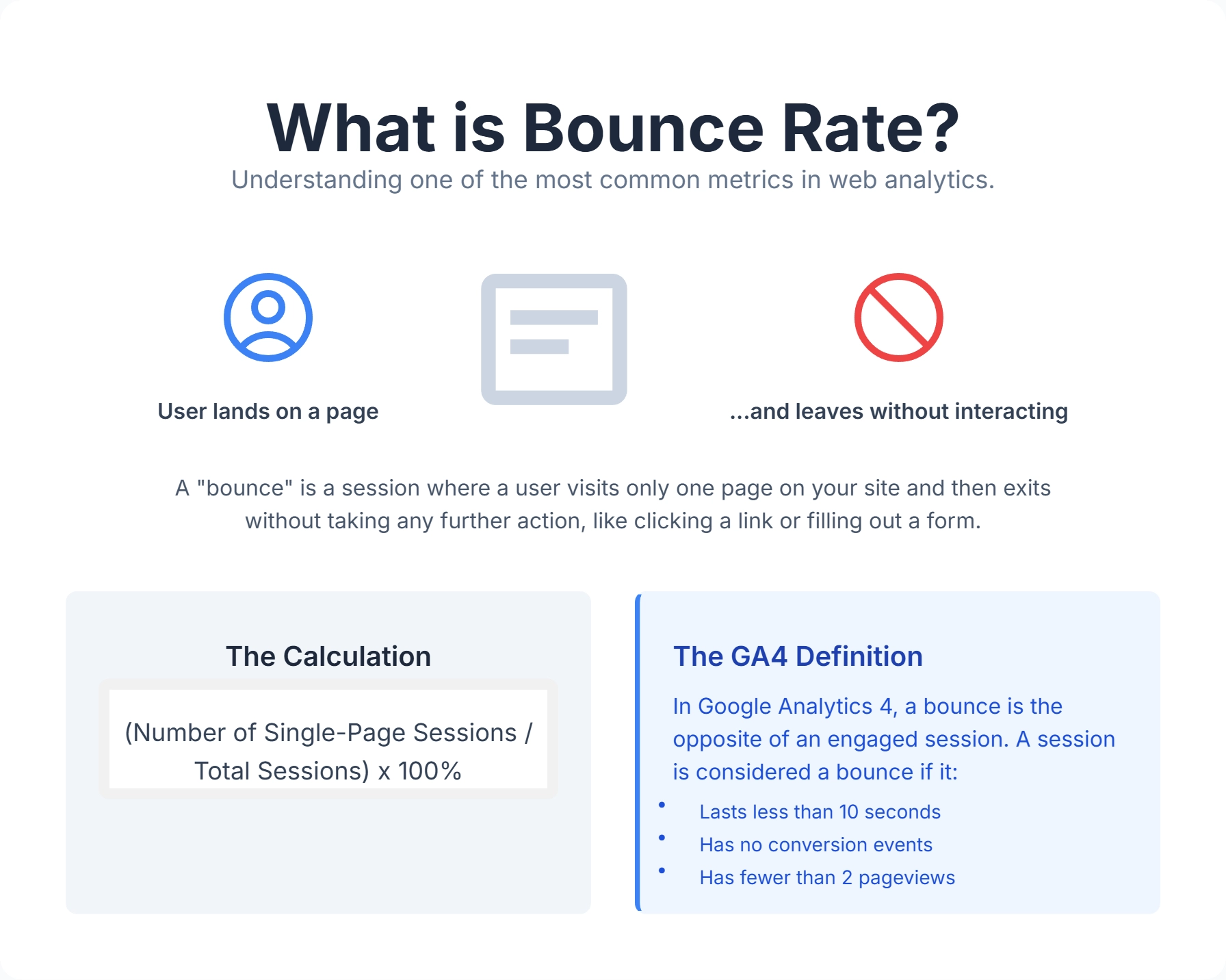
Let's start with the basics, but with a modern twist. What is bounce rate? In simple terms, your bounce rate is the percentage of visitors who land on one of your website pages and then leave without interacting further or visiting any other pages on your site. Think of it like a visitor walking into a physical store, glancing around, and leaving immediately without browsing or interacting with any products or staff. That single-page visit, with no engagement, counts as a "bounce".
The Evolution: Universal Analytics vs. GA4
It is critical to understand that the definition of "bounce rate" changed fundamentally with the shift to Google Analytics 4.
In the old Universal Analytics, a user could read a 3,000-word blog post, stay for 10 minutes, find exactly what they needed, and then leave. UA would call that a "bounce" (100% failure) because they didn't trigger a second pageview. This was a flawed metric.
How is bounce rate calculated in GA4? In GA4, bounce rate is essentially the inverse of Engagement Rate. A session is considered "engaged" if it meets any of the following criteria:
- Lasts longer than 10 seconds.
- Includes a conversion event (like a signup or purchase).
- Includes two or more page views.
If a session does not meet any of these criteria, it is a bounce. This makes the modern bounce rate a much more accurate reflection of true disinterest. If someone reads your article for 5 minutes but doesn't click anything else, GA4 recognizes that as a successful "engaged session," not a bounce.
Why is Bounce Rate Optimization important? It's not just a vanity metric; a high bounce rate often signals that visitors aren't finding what they expect or aren't engaged by your content or design. This can lead to missed opportunities for conversions, poor user experience, and even indirectly affect your search engine rankings through "pogo-sticking" (where users quickly return to search results to click a different link). Bounce Rate Optimization is the process of actively improving your website's elements to encourage visitors to stay longer, explore more pages, and interact meaningfully.
Understanding the "Why" Behind the Bounces
Before we can optimize, we need to understand why people bounce. A high bounce rate doesn't automatically mean your content is bad. Sometimes, a user might find exactly what they need on a single page (e.g., a phone number on a contact page or a quick answer to a question), and then leave satisfied. In such cases, a high bounce rate might be acceptable for that specific page.
However, more often, a high bounce rate points to underlying issues that need attention. These can range from technical glitches to content mismatches and poor user experience. Identifying the root cause is the first step toward effective optimization. Digispot AI can help you identify and fix these issues automatically with AI-powered audits that simulate user behavior.
Here's a table summarizing common reasons for high bounce rates and their immediate solutions:
| Common Causes of High Bounce Rate | What It Means for Your Visitor | Immediate Solutions |
|---|---|---|
| Slow Page Load Speed | Impatience; won't wait for content. | Optimize images, minify code, use reliable hosting, leverage browser caching. |
| Irrelevant Content or Keywords | Page doesn't match search intent; misleading title/description. | Align content directly with target keywords and user expectations. |
| Poor Website Design & Navigation | Confusing layout, hard to find information, visually unappealing. | Simplify navigation, use clear headings, improve visual hierarchy, ensure consistent branding. |
| Lack of Mobile Responsiveness | Difficult to use on smartphones; content breaks or is unreadable. | Implement a mobile-first design; ensure touch-friendly elements and responsive layouts. |
| Too Many Distractions (Pop-ups, Ads) | Overwhelmed, annoyed, or interrupted. | Use pop-ups strategically (e.g., exit-intent), avoid aggressive auto-play media. |
| Technical Errors (Broken Links, 404s) | Site seems unreliable or unprofessional. | Regularly audit your site for broken links and fix errors promptly. |
| Lack of Clear Call-to-Action (CTA) | Don't know what to do next or where to go. | Use prominent, relevant, and compelling CTAs that guide the user. |
| Unengaging or Poorly Formatted Content | Hard to read, wall of text, uninteresting. | Use short paragraphs, bullet points, images, videos, and compelling headlines to improve readability. |
Understanding these factors allows you to pinpoint specific areas of your website that might be frustrating visitors and causing them to leave prematurely. Tools like Google Analytics and Google Search Console are invaluable for identifying pages with high bounce rates, allowing you to focus your optimization efforts where they're needed most.
The Benefits of Optimizing Your Bounce Rate: Why Should You Care?
You might be thinking, "Why should I dedicate resources to reducing my bounce rate if Google says it's not a direct ranking factor?" While it's true that Google hasn't explicitly stated bounce rate is a direct ranking signal (especially the old UA version), it's a powerful indirect indicator of user satisfaction and engagement. And Google definitely cares about that!
A lower bounce rate signals to search engines that your website is relevant, valuable, and provides a good user experience. This can have a ripple effect on various aspects of your online success, leading to significant business outcomes.
Here are the key benefits of optimizing your bounce rate:
-
Improved SEO Performance: While not a direct ranking factor, a low bounce rate is often correlated with better search rankings. Search engines want to provide users with the best possible results. If users consistently bounce from your site, it suggests your content isn't meeting their needs, which could indirectly affect your visibility over time. Conversely, users who stay longer and interact send positive signals to search engines. Consider optimizing your click-through rate to ensure that once you rank, users actually arrive to stay.
-
Enhanced User Experience (UX): At its core, bounce rate optimization is about improving the user experience. When you reduce bounces, it means your site is more intuitive, easier to navigate, loads faster, and offers relevant, engaging content. A positive UX keeps visitors happy, encouraging them to return and build trust in your brand.
-
Higher Conversion Rates: The ultimate goal for most business websites is conversions—whether it's a sale, a lead form submission, or a newsletter signup. If visitors bounce, they can't convert. By keeping users engaged, you increase their likelihood of exploring your products/services, understanding your value proposition, and ultimately taking the desired action. Studies show a strong correlation between page speed, bounce rates, and conversion rates, with faster pages leading to better conversions.
-
Increased Time on Site and Pages Per Session: A lower bounce rate naturally leads to visitors spending more time on your site and viewing more pages. This deeper engagement provides more opportunities for them to absorb your message, discover more content, and move further down your sales funnel. You can strategically plan your content using a hub and spoke strategy to encourage users to explore more pages related to their initial query.
-
Lower Advertising Costs: If you're running paid advertising campaigns (e.g., Google Ads or Meta Ads), a high bounce rate means you're paying for clicks from users who immediately leave. This lowers your Quality Score in Google Ads, which in turn raises your Cost Per Click (CPC). By optimizing your landing pages to reduce bounces, you ensure that your ad spend is more effective, leading to higher quality leads and better return on investment (ROI).
-
Better Data for Decision-Making: By analyzing bounce rate alongside other metrics, you gain a more holistic view of user behavior. This data allows you to make informed decisions about content strategy, website design, and technical improvements, leading to more impactful changes.
Here's a table summarizing the key benefits:
| Benefit Category | Description |
|---|---|
| Search Engine Visibility | Indirectly improves SEO rankings by signaling user satisfaction and relevance to search engines. |
| User Engagement & Experience | Leads to a more intuitive, faster, and content-rich website that users enjoy interacting with. |
| Conversion & Lead Generation | Increases opportunities for visitors to become customers or leads by staying longer and interacting. |
| Efficiency & Cost Savings | Optimizes ad spend by ensuring traffic is more engaged; saves time on ineffective strategies. |
| Data-Driven Insights | Provides clearer insights into user behavior, enabling more effective website and content improvements. |
These outcomes—improving business visibility, increasing traffic and business leads, and achieving time and cost savings—are direct results of a successful bounce rate optimization strategy.
How to Reduce Bounce Rate: Practical Strategies and Tips
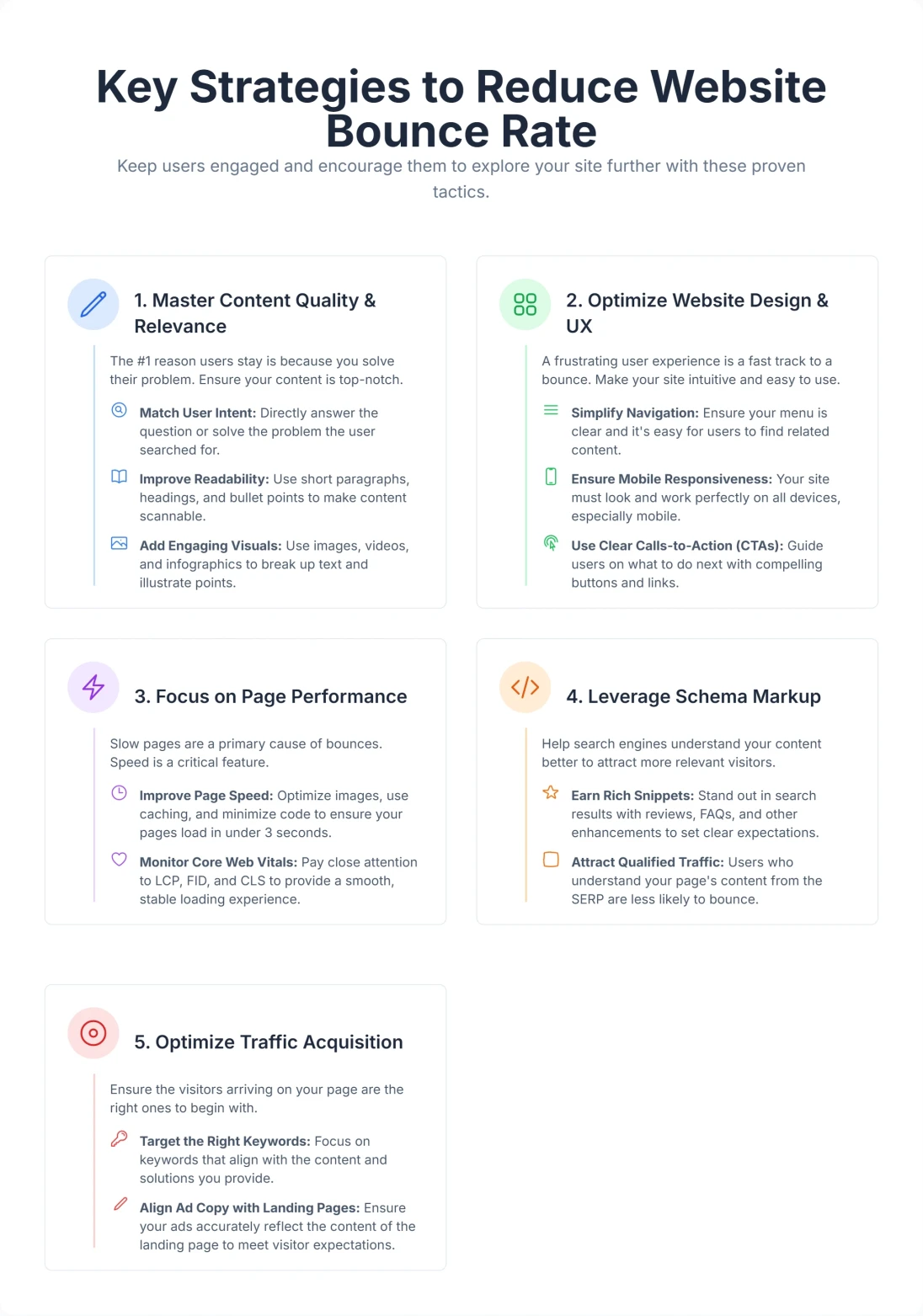
Now that we understand what bounce rate is and why it's so important, let's dive into the practical strategies you can implement to reduce it. Remember, it's often a combination of factors that leads to a high bounce rate, so a multi-faceted approach is usually best.
1. Master Content Quality and Relevance
Your content is the primary reason users visit your site. If it doesn't meet their expectations, they will leave.
- Align with User Intent: This is perhaps the most crucial factor. Does your page deliver exactly what the user was searching for? If someone searches "best running shoes" and lands on a page about "history of sneakers," they'll bounce. Ensure your page titles, meta descriptions, and content directly address the user's query. For instance, if a user searches for "best Italian restaurants near me," your content should immediately showcase Italian restaurants in their vicinity, complete with menus, reviews, and contact information.
- The "Inverted Pyramid" Style: Journalists use this technique, and SEOs should too. Place the most important information (the answer to the user's query) at the very top. Don't bury the lead. If you answer their question immediately, they are more likely to trust you and read on for details.
- Readability and Scannability: Even the best content can lead to bounces if it's hard to read. Modern web users scan in an "F-Pattern."
- Short Paragraphs: Break up large blocks of text. Keep paragraphs to 2-3 sentences max.
- Bullet Points and Numbered Lists: Make information easy to digest.
- Clear Headings and Subheadings (H1, H2, H3, etc.): Guide readers through your content and allow them to quickly find relevant sections.
- Ample White Space: Don't cram too much information on the screen. White space reduces cognitive load.
- Appropriate Font Size and Contrast: Ensure text is easy on the eyes (16px minimum for body text).
- Internal Linking: Once a user is engaged with a piece of content, give them a clear path to explore more relevant topics on your site. Strategic internal links can significantly increase page views and encourage deeper exploration. However, use them naturally and avoid excessive linking. For example, if you're discussing bounce rate optimization, link to a related article on off-page SEO strategies to provide a broader context of SEO health.
- Use Visuals (Images, Videos, Infographics): Visual content can break up text, explain complex ideas, and increase engagement. Videos, in particular, can keep visitors on your site longer (increasing dwell time). Ensure visuals are high-quality, relevant, and optimized for fast loading. If you're explaining a complex process, create an infographic to visually represent the steps.
2. Optimize Website Design and User Experience (UX)
A beautiful website is good, but a usable website is better. Intuitive UX design is fundamental to reducing bounce rates.
- Intuitive Navigation: Your website's navigation should be crystal clear. Visitors should be able to find what they're looking for without frustration. Use clear, descriptive labels, a logical hierarchy, and easily accessible menus. Imagine a user landing on your site looking for your pricing page. They should be able to find it within seconds, not buried deep within multiple layers of navigation.
- Mobile Responsiveness: A significant portion of web traffic comes from mobile devices. If your site isn't optimized for mobile, users will quickly leave. Ensure your design adapts seamlessly to different screen sizes, with touch-friendly elements and readable text. You can test your site's mobile-friendliness using tools like Google's Mobile-Friendly Test.
- Clear Call-to-Actions (CTAs): Guide your visitors to the next logical step. Whether it's "Read More," "Contact Us," "Buy Now," or "Download Guide," your CTAs should be prominent, compelling, and relevant to the content on the page. For instance, after reading a blog post about a specific product, the CTA should directly lead to the product page with a clear "Buy Now" button.
- Visual Appeal and Consistency: A professional and aesthetically pleasing design builds trust and makes users want to stay. Maintain consistent branding, colors, and fonts across your site.
- Minimize Distractions: Avoid intrusive pop-ups, excessive ads, or auto-play media that can annoy users and prompt them to leave. If you use pop-ups, make them timely and relevant, perhaps using exit-intent technology (which triggers only when the mouse leaves the browser window).
3. Focus on Technical SEO and Page Performance
Technical issues are often silent killers of user engagement. Slow loading times, in particular, are a major contributor to high bounce rates.
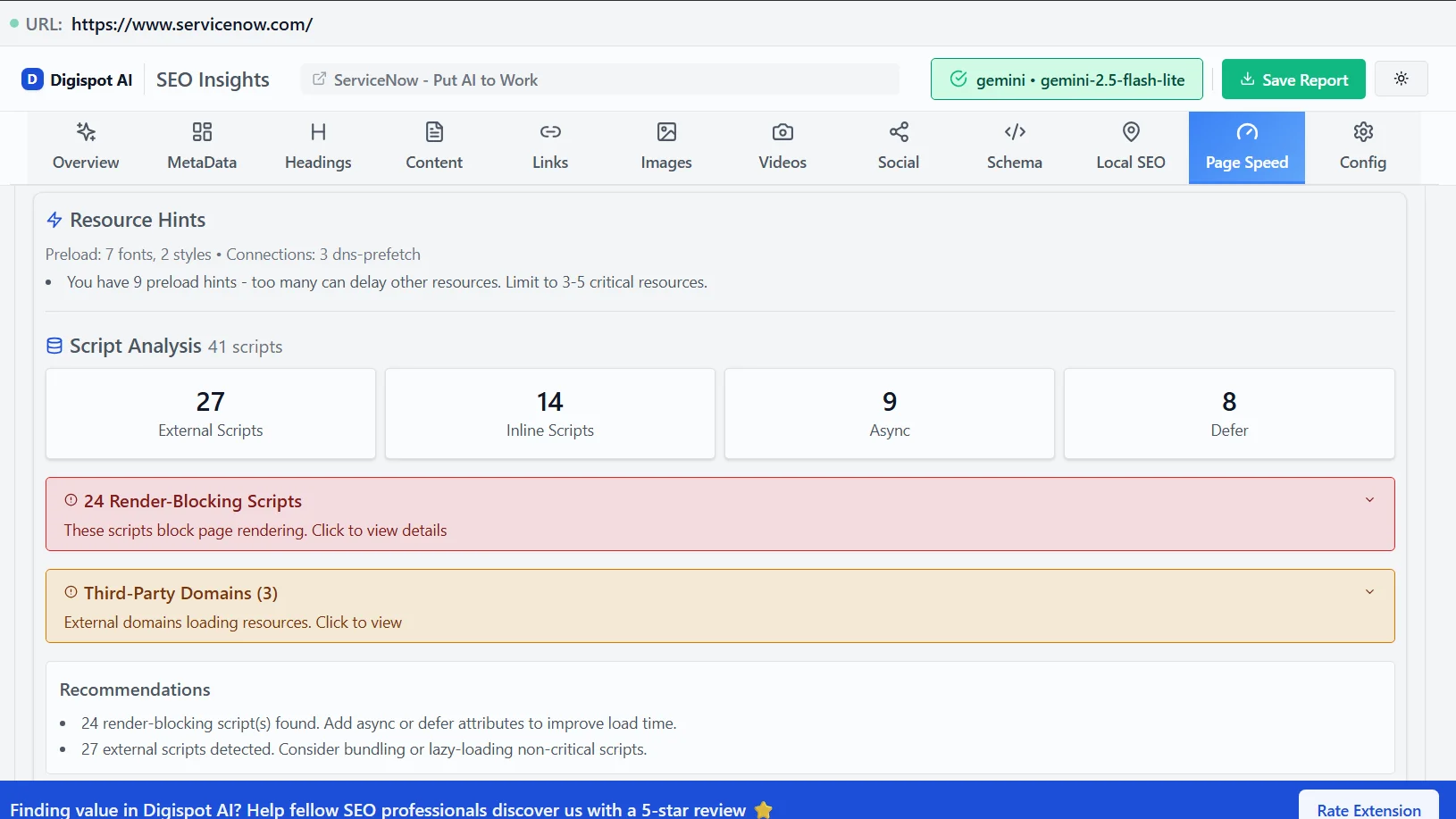
- Page Speed Optimization: This is non-negotiable. Users expect pages to load quickly; even a 1-second delay can significantly increase bounce rates.
- Compress Images: Large image files slow down pages. Use Next-Gen formats like WebP.
- Minify CSS, JavaScript, and HTML: Remove unnecessary characters from your code to speed up load times.
- Leverage Browser Caching: Store parts of your website on a user's browser so it loads faster on repeat visits.
- Use a Content Delivery Network (CDN): Delivers content from servers geographically closer to your users, speeding up delivery.
- Choose a Reliable Web Host: Your hosting provider plays a big role in your site's speed and uptime.
-
Fix Broken Links and Errors: Encountering a 404 page or a broken internal link is frustrating. Regularly audit your site for these errors and fix them to ensure a smooth user journey. For a deeper dive into on-site health, review our guide on on-page SEO best practices.
-
Ensure Cross-Browser Compatibility: Your website should look and function correctly across all major browsers (Chrome, Firefox, Safari, Edge) and devices.
-
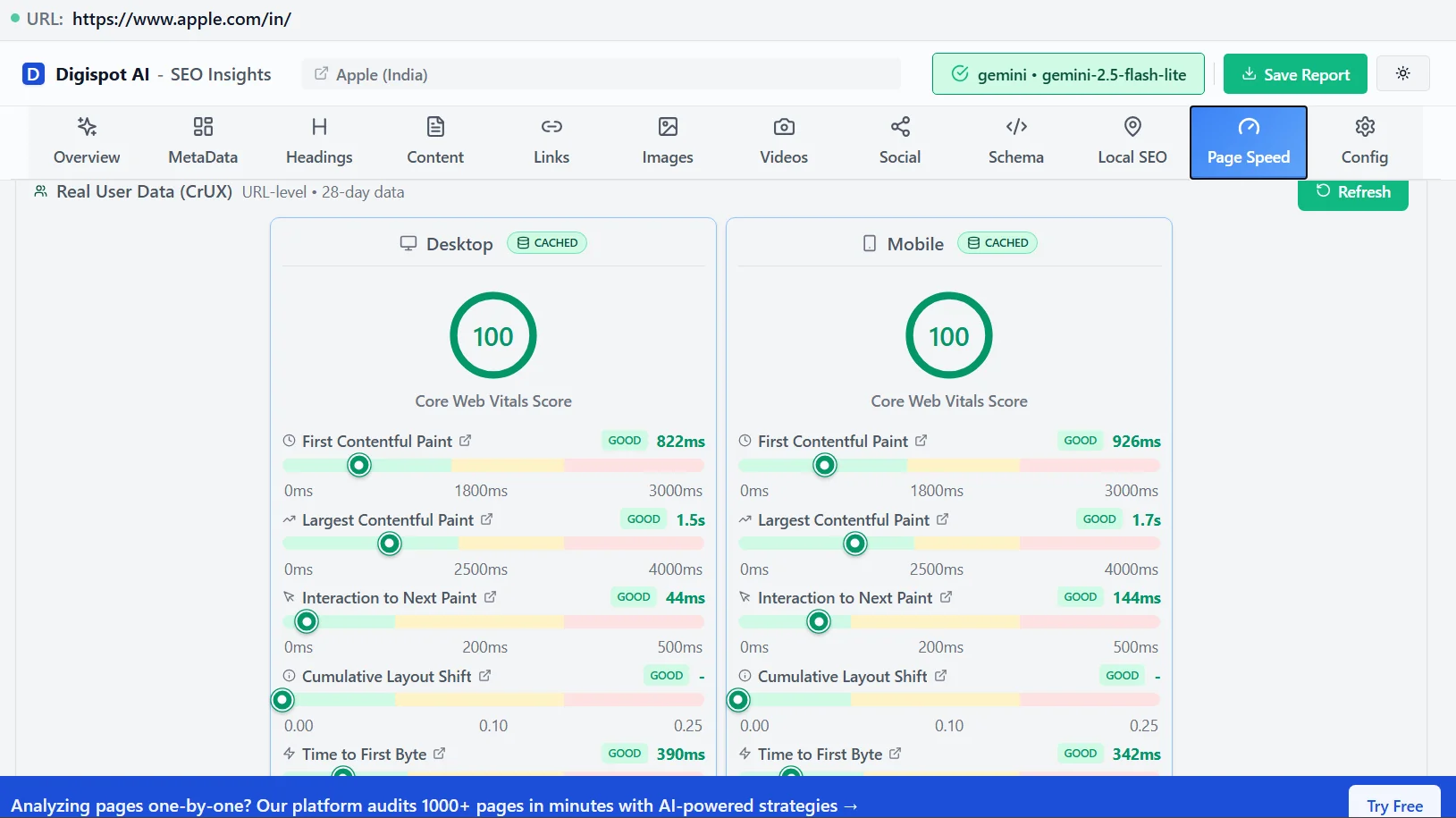
Addressing Core Web Vitals: Google emphasizes Core Web Vitals (Largest Contentful Paint, First Input Delay, Cumulative Layout Shift) as key indicators of page experience. Improving these metrics directly correlates with a better user experience and, consequently, a lower bounce rate. Note that Google recently replaced First Input Delay (FID) with Interaction to Next Paint (INP), which measures overall responsiveness. If your buttons or menus feel "laggy," users will bounce.
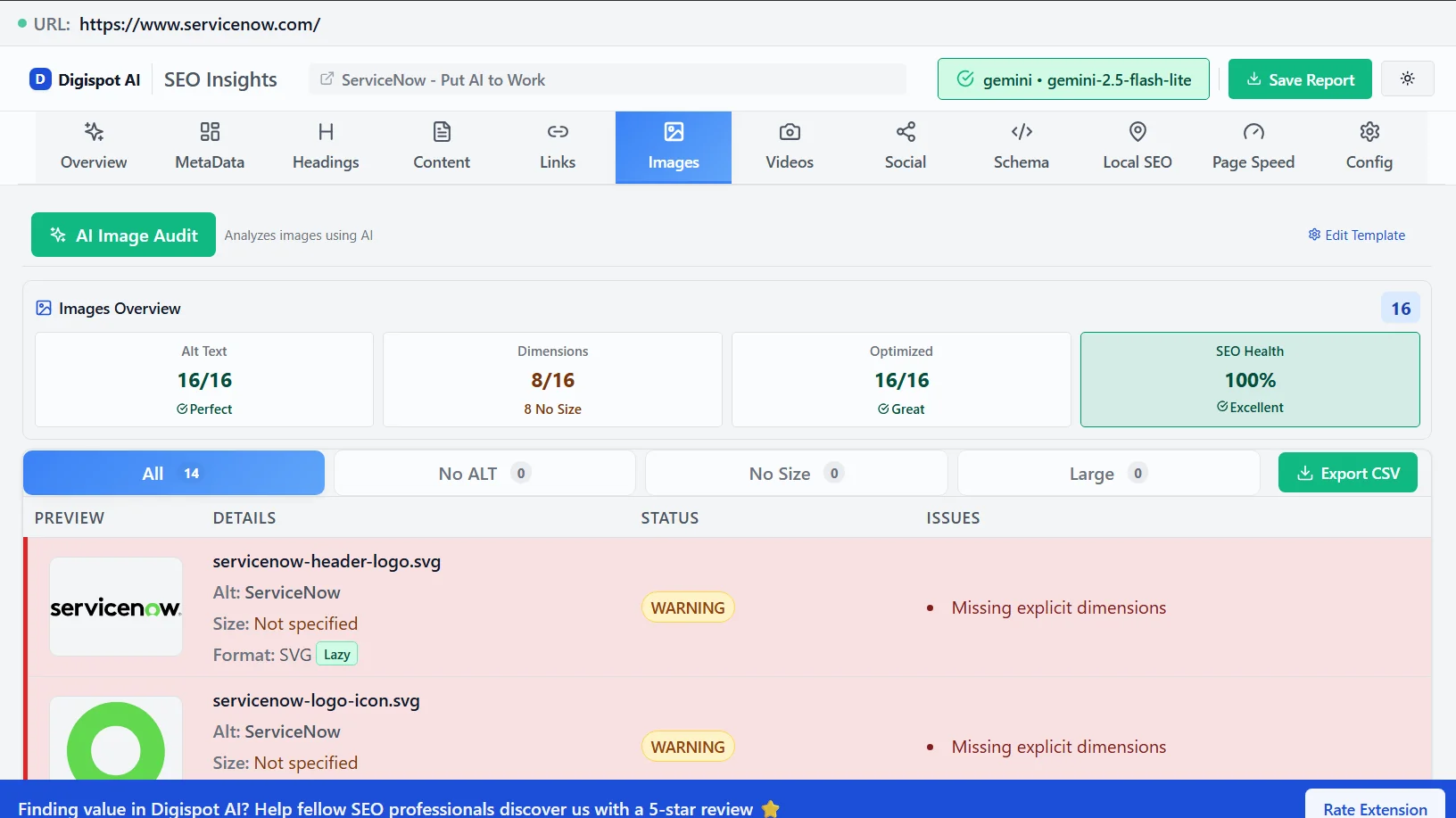
How does Digispot AI help here? This is where platforms like Digispot AI shine. Digispot AI is designed to help businesses rank better in Google and other AI search engines by automatically auditing websites in both mobile and desktop modes. It helps you identify critical issues impacting page performance and user experience. By analyzing your site for over 300+ ranking factors, including crucial page performance metrics, Digispot AI can detect these technical pitfalls and offer solutions, streamlining the process of resolving issues that contribute to high bounce rates.
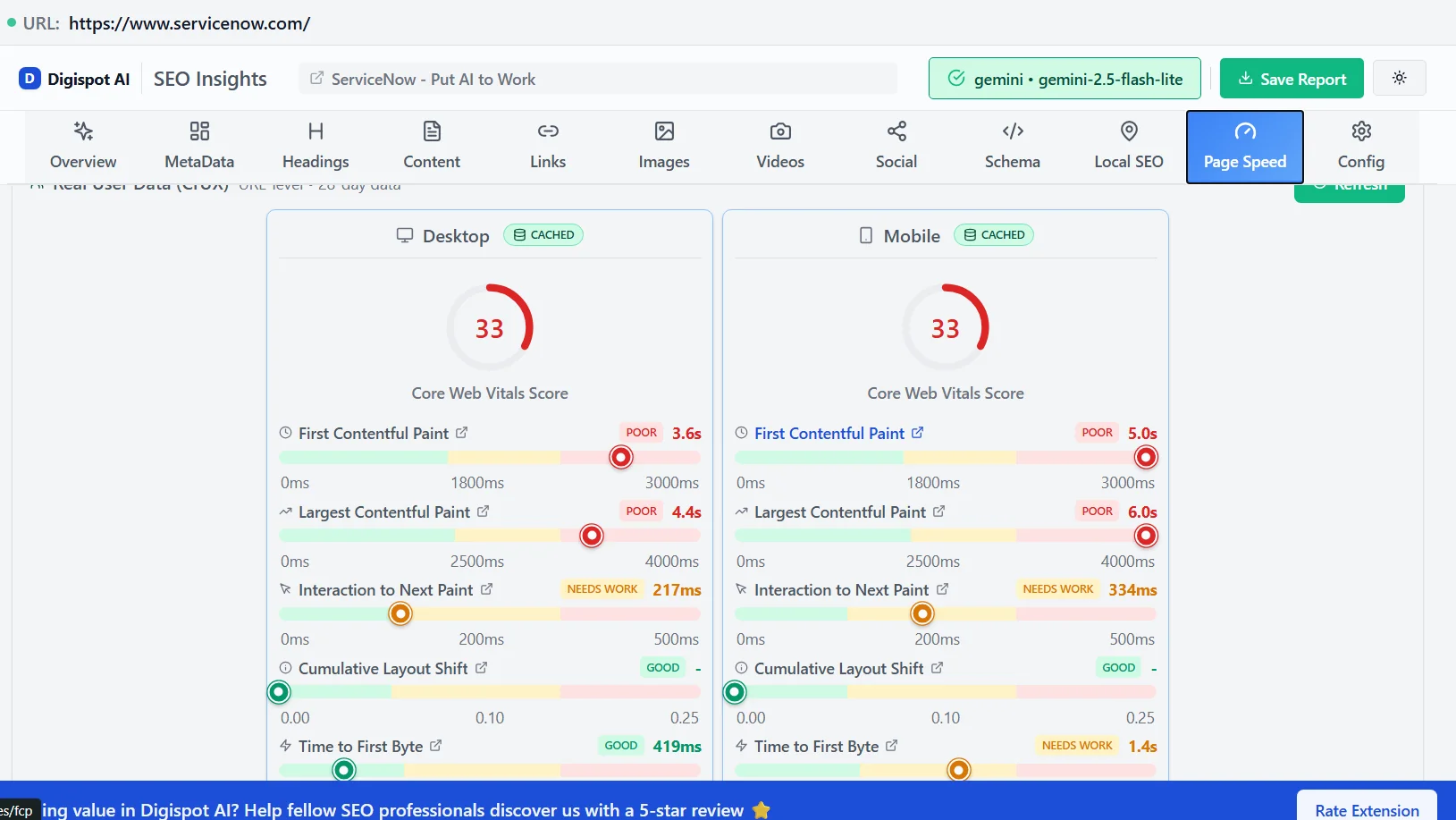
Let's consider Cumulative Layout Shift (CLS) as an example. CLS refers to unexpected shifts in page content while loading, which can be incredibly frustrating for users. Imagine trying to click a button, only for it to move at the last second, causing you to click the wrong thing. Digispot AI can pinpoint the elements causing CLS issues on your site and provide specific recommendations for fixing them, such as specifying image dimensions or reserving space for ads. Addressing these issues leads to a smoother, more enjoyable user experience, reducing the likelihood of users bouncing.
4. Leverage Schema Markup
Schema markup, also known as structured data, is a type of code you add to your website's HTML to help search engines better understand your content. While it doesn't directly reduce bounce rate, it can significantly improve your click-through rates (CTR) in search results, which means more qualified visitors reaching your site.
How does schema markup help bounce rate indirectly?
-
Rich Snippets: Schema can enable your content to appear with "rich snippets" in search results, such as star ratings, prices, event dates, or FAQ toggles. These visually enhanced results provide users with more information directly in the SERP, helping them decide if your page truly matches their intent before clicking.
-
Better Qualified Traffic: When users have more context from rich snippets, they are more likely to click on your link only if it genuinely aligns with their needs. This leads to more qualified traffic, meaning visitors are less likely to bounce because they already have a clearer idea of what your page offers.
-
Enhanced User Experience: By providing precise information to search engines, schema markup ensures that users receive more relevant and accurate search results, which contributes to a better overall user experience.
Digispot AI and Schema Markup: Digispot AI is designed to support schema markup, making it easier for you to implement this powerful SEO tool. It aids in the detection and visualization of schema opportunities and issues, ensuring your structured data is correctly implemented and optimized to enhance your search appearance and attract more engaged users. Get instant SEO insights on any page with our free Chrome extension.
5. Optimize Your Traffic Acquisition
Sometimes, the problem isn't your website, but the traffic you're attracting. You cannot force a user to like your content if they are the wrong audience entirely.
-
Target the Right Keywords: If you're ranking for keywords that don't truly represent your content, you'll attract visitors who quickly realize they're in the wrong place. Conduct thorough keyword research to ensure your content aligns with what your target audience is searching for. Watch out for "ambiguous keywords." For example, "jaguar" could mean the car or the animal. If you are a zoo, optimize for "jaguar animal facts" to avoid car enthusiasts bouncing immediately.
-
Refine Ad Copy and Meta Descriptions: Ensure your ad copy and meta descriptions accurately reflect the content of your landing page. Misleading text, even if it gets a click, will result in a bounce (and wasted ad spend).
-
Review Referral Sources: Analyze which channels (social media, email, paid ads, organic search) are sending high-bounce traffic. This can help you refine your marketing efforts to attract more engaged users.
For example, if you notice that social media traffic has a significantly higher bounce rate than organic search traffic, it could indicate that your social media posts are not accurately representing the content on your landing pages. You may need to refine your social media messaging to better align with user intent.
6. Understand Zero-Click Searches
In today's search landscape, many users are finding the information they need directly within the search results page (SERP) without ever clicking through to a website. These are known as "zero-click searches." While they don't directly contribute to your bounce rate (since the user never actually visits your site), they can impact your overall traffic and engagement metrics.
How to adapt to zero-click searches:
-
Optimize for Featured Snippets: Aim to have your content featured in Google's featured snippets, knowledge panels, and other SERP features. This increases your visibility and provides users with quick answers to their questions, even if they don't click through to your site.
-
Provide Concise and Direct Answers: Structure your content to directly answer common questions related to your industry or niche. Use clear headings, bullet points, and short paragraphs to make it easy for Google to extract the information needed for featured snippets.
-
Monitor Your Zero-Click Search Traffic: Use tools like Google Search Console to track the number of impressions you're getting for featured snippets and other SERP features. This will help you understand how well your content is performing in zero-click searches and identify areas for improvement.
While zero-click searches might seem like a threat to traditional SEO, they also present an opportunity to increase your brand visibility and establish yourself as an authority in your field. By optimizing for these types of searches, you can still capture value even if users don't click through to your site. Consider exploring strategies for zero-click searches to adapt to this trend.
Tools and Analytics for Bounce Rate Optimization
Effective bounce rate optimization relies heavily on data. Understanding how users interact with your site and identifying problem areas requires robust analytics tools.
Google Analytics (GA4)
Google Analytics is your primary source for understanding bounce rate.
- Track Bounce Rate by Page: Identify which specific pages have the highest bounce rates. This allows you to prioritize your optimization efforts. In GA4, go to Reports > Engagement > Pages and Screens. Customize the report to add the "Bounce Rate" column if it isn't there by default.
- Analyze User Flow: See the paths users take on your site (or where they drop off). The "Path Exploration" report in GA4 is excellent for this.
- Segment Data: Look at bounce rate by traffic source, device type (mobile vs. desktop), audience demographics, and even campaigns. This can reveal specific segments or channels where bounce rates are higher, allowing for targeted improvements.
- Set Up Engagement Events: In GA4, you can define "engaged sessions" based on criteria like time spent, key events (e.g., video plays, form submissions), or multiple page views. This gives a more nuanced understanding of user engagement beyond a simple "bounce."
Google Search Console (GSC)
Google Search Console provides crucial insights into how Google sees your site, helping you identify technical issues that can lead to bounces.
- Mobile Usability Report: Identify and fix issues that make your site difficult to use on mobile devices, a common cause of bounces.
- Core Web Vitals Report: Monitor your site's performance for key user experience metrics like loading speed and interactivity.
- Crawl Errors: Find and fix broken pages (404s) or other crawling issues that can lead to a negative user experience.
- Search Queries and CTR: Understand which keywords bring users to your site and their click-through rates. A low CTR for a high-ranking query might indicate a misleading title or description, which could lead to bounces once the user lands on the page.
How Digispot AI Supercharges Your Bounce Rate Optimization
While Google's native tools are indispensable, they often require manual analysis and expertise to translate data into actionable insights. This is where an AI SEO platform like Digispot AI truly makes a difference. Digispot AI integrates seamlessly with your existing Google Search Console and Google Analytics data, providing a unified and intelligent approach to bounce rate optimization.
Here's how Digispot AI amplifies your efforts:
- Comprehensive Website Auditing: Digispot AI automatically audits your website in both mobile and desktop modes. It digs deep, analyzing your site for over 300+ ranking factors, including content quality, technical SEO health, local SEO parameters, and overall page performance. This holistic audit helps you identify the specific issues (from slow loading times to content gaps or confusing navigation) that are contributing to your high bounce rate. The platform provides clear detection and visualization of these problems, making complex data easy to understand.
- Opportunity Finder: Beyond just identifying problems, Digispot AI's "Opportunity Finder" helps you spot areas for growth. This could mean identifying content gaps that, if filled, would better meet user intent and reduce bounces, or uncovering new keywords that attract more engaged visitors.
- Content Studio with AI Agents: Mismatched or unengaging content is a primary cause of bounces. Digispot AI's "Content Studio" leverages AI agents to help you generate SEO-optimized content that is highly relevant to user intent. By ensuring your content is compelling, informative, and directly answers user queries, you naturally encourage visitors to stay longer and explore more. This also helps with subtle promotion by allowing you to create content that naturally integrates your product as a solution.
- Schema Markup Support: Digispot AI understands the power of structured data. The platform supports schema markup, assisting in its proper implementation. It can audit, detect, and visualize issues with your existing schema, ensuring your structured data is correctly implemented and optimized to enhance your search appearance and attract more engaged users, thereby indirectly lowering your bounce rate.
- Automated Best Practices: Digispot AI is designed to bring "all SEO best practices in an automated and user-friendly model for you to operate at scale with accuracy." This means it helps you implement the necessary changes efficiently, saving you significant time and resources.
- Free Community Chrome Extension: For quick, on-the-go analysis, Digispot AI offers a free community Chrome extension. This powerful browser tool, "powered by popular LLM models," allows you to audit individual website pages directly in your browser. It provides instant insights into potential bounce rate issues, offering immediate detection and visualization of problems without needing to log into the full platform. This is a fantastic resource for quick checks and for those just starting their optimization journey.
Here's a table illustrating how Digispot AI's capabilities align with bounce rate optimization needs:
| Bounce Rate Optimization Need | How Digispot AI Helps (Subtly Promoted) |
|---|---|
| Identifying Root Causes | Comprehensive audits (mobile & desktop) for 300+ ranking factors; detection and visualization of issues. |
| Improving Content Relevance | Opportunity Finder and Content Studio with AI agents for SEO-optimized, intent-matched content generation. |
| Enhancing Technical Performance | Identifies tech SEO and page performance issues; brings automated SEO best practices for resolution. |
| Boosting Search Appearance | Supports schema markup; audits, detects, and visualizes schema implementation. |
| Quick On-Page Analysis | Free community Chrome extension provides instant page audits and insights, powered by LLM models. |
| Operating at Scale | Automates SEO best practices in a user-friendly model, saving time and cost. |
| Integrated Reporting | Integrates with Google Search Console and Google Analytics for a unified view of performance. |
By leveraging such a platform, businesses can move beyond basic analytics to proactive optimization, ensuring their websites are not just visible but truly engaging for every visitor.
Advanced Considerations: Industry Benchmarks and "Good" Bounce Rates
One of the most common questions in SEO is, "What is a good bounce rate?" The answer is highly dependent on your industry and the type of page you are analyzing. A blanket goal of "under 30%" is often unrealistic and sometimes detrimental if it leads to manipulating user behavior unnaturally.
Benchmarks by Page Type
- Blogs and Informational Pages: Expect higher bounce rates here, often between 70% and 90%. This is normal. A user searches for an answer, reads your post, gets the information, and leaves. This is a "good" bounce if the user is satisfied. To lower this, use "Read Next" widgets or related article links.
- eCommerce Product Pages: These should have lower bounce rates, typically 20% to 45%. If a user lands on a product page, the intent is transactional. A bounce here suggests the price, image, or shipping info turned them off.
- Landing Pages (Lead Gen): These vary wildly but often sit between 60% and 90%. Since landing pages usually have one specific goal (submit a form), users either convert or bounce. There is no middle ground.
- Service Sites (B2B): A healthy range is 35% to 55%. B2B buyers usually browse multiple pages (About Us, Pricing, Case Studies) before making a decision.
The Psychology of the "Back" Button
Understanding the psychological trigger for a bounce is as important as the technical fix. This often relates to System 1 vs. System 2 thinking.
- System 1 (Fast, Instinctive): Users land on your site and make a snap judgment in 0.05 seconds. "Does this look safe? Does it look professional?" If your design looks outdated or broken, System 1 triggers a bounce immediately.
- System 2 (Slow, Analytical): Users start reading. "Is this answering my question? Is the font legible?" If the cognitive load is too high (walls of text, jargon), System 2 gets exhausted, and they bounce.
Optimizing for bounce rate is essentially optimizing for both systems: catch them with design (System 1) and keep them with structure and clarity (System 2).
Conclusion: Your Journey to a Lower Bounce Rate
Bounce Rate Optimization is not a one-time fix; it's an ongoing commitment to understanding and improving your visitors' experience. It's about ensuring that every click to your website is a meaningful one, leading to deeper engagement and ultimately, stronger business outcomes.
By focusing on high-quality, relevant content, optimizing your website's design and user experience, ensuring top-notch technical performance, and strategically using tools like schema markup, you can significantly reduce your bounce rate. Remember, a low bounce rate is a powerful indicator that your website is effectively meeting user needs, building trust, and guiding visitors toward your business goals.
Platforms like Digispot AI simplify this complex process, offering automated audits, AI-powered content creation, and seamless integration with your existing analytics. Whether you're using advanced AI tools or relying on manual optimization, the key is to continuously monitor, analyze, and adapt.
Ready to improve your SEO and stop the leaks in your traffic bucket? Try Digispot AI for comprehensive website audits and actionable recommendations. Dive into your analytics, identify your high-bounce pages, and begin implementing these strategies. The reward? A more visible website, increased traffic, more valuable leads, and substantial time and cost savings. Make every visit count!
References
Audit any page in seconds
300+ SEO checks including Core Web Vitals, schema markup, meta tags, and AI readiness — trusted by 1000+ SEO experts and marketers.
Frequently Asked Questions
Here are some of our most commonly asked questions. If you need more help, feel free to reach out to us.
Written by
Maya Krishnan
Digital growth expert
Maya is a seasoned expert in web development, SEO, and digital strategy, dedicated to helping businesses achieve sustainable growth online. With a blend of technical expertise and strategic insight, she specializes in creating optimized web solutions, enhancing user experiences, and driving data-driven results. A trusted voice in the industry, Maya simplifies complex digital concepts through her writing, empowering readers with actionable strategies to thrive in the ever-evolving digital landscape.