Zero-Click Searches: SEO Strategy to Win Traffic
Adapt your SEO strategy for zero-click searches. Win featured snippets, People Also Ask boxes, and maintain visibility when users don't click through.
 Maya Krishnan
Search behavior has shifted fundamentally. You may have seen the headlines causing panic among marketers—reports claiming that nearly half of all Google searches end without a single click to a website. While recent data clarifies that the "death of the click" is often exaggerated, the trend is undeniable: zero-click searches account for a massive portion of user queries.
This isn't a sign of SEO's demise. It represents an evolution in how users consume information. Google’s primary mission has transitioned from organizing the world's information to answering questions directly. The Search Engine Results Page (SERP) is no longer just a directory; it is a destination.
For content strategists and business owners, this shift can be jarring. The traditional playbook was linear: rank high, earn the click, convert on-site. In this new era, success is nuanced. It is no longer just about driving traffic; it is about owning the answer, regardless of where that answer appears.
This guide demystifies the zero-click landscape. We will examine exactly what these searches are, why they occur, and provide a detailed, actionable playbook for thriving in this environment. You will learn how to adapt your on-page SEO best practices, optimize for specific SERP features, and measure success when "sessions" aren't the only metric that matters.
What is a Zero-Click Search, Really?
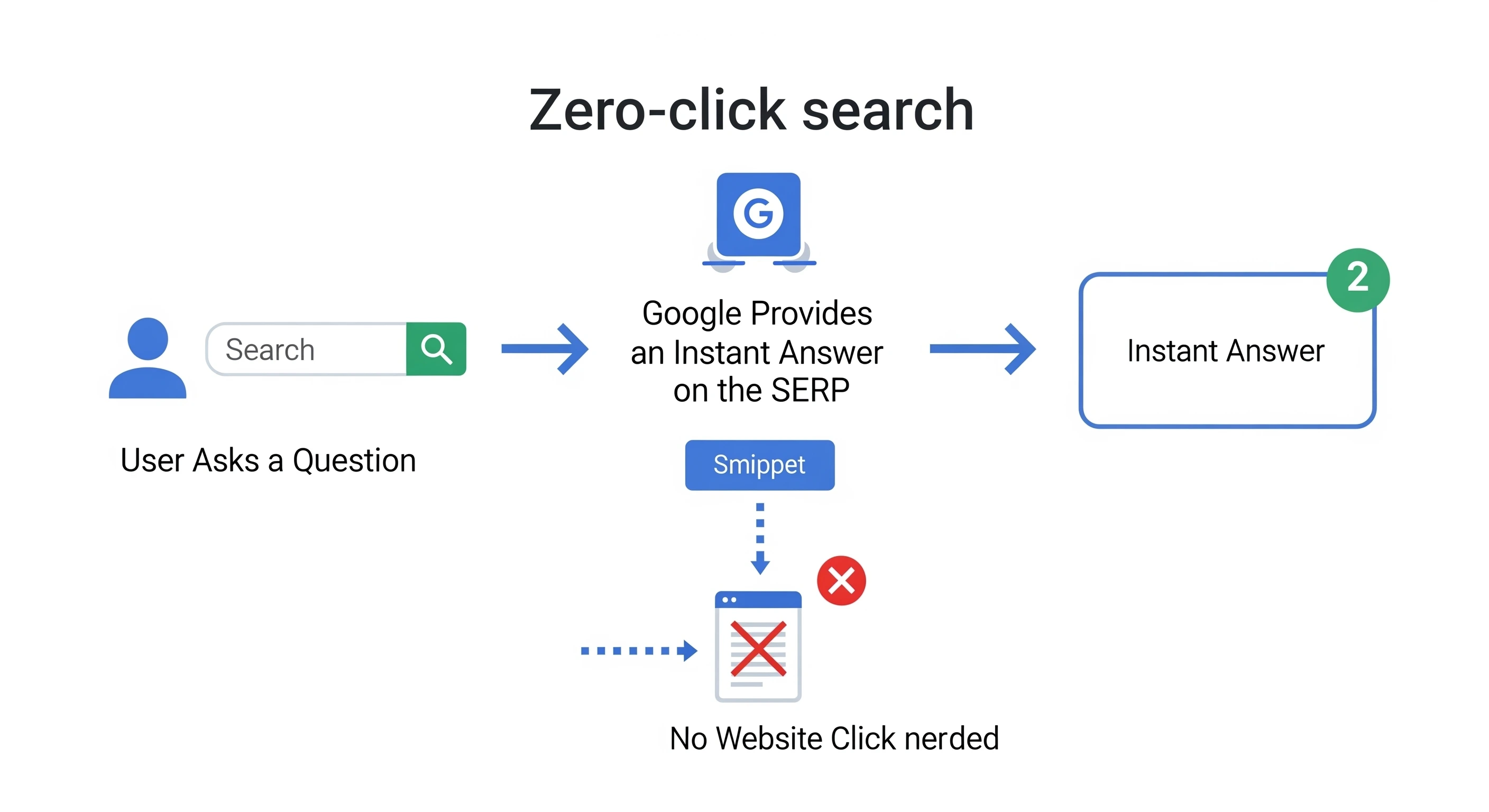
A zero-click search is an interaction where a user’s query is satisfied directly on the search results page. The user gets what they need—a phone number, a definition, a quick fact—and leaves Google without visiting a third-party website.
Consider a search for "how old is Tom Cruise." Google does not force you to visit a biography site or Wikipedia. It displays the answer in large, bold text at the top of the page. You get the information instantly and move on. That is a zero-click search in its purest form.
This phenomenon extends beyond simple facts. With the rise of AI Overviews and sophisticated knowledge graphs, Google now synthesizes complex answers, aggregates reviews, and even helps users book appointments directly from the interface. The search engine has effectively become an "answer engine."
Why Google Prioritizes Zero-Click Results
Google's motivation is user experience. Mobile usage dominates search, and mobile users want fast answers without the friction of loading new pages, dealing with pop-ups, or navigating slow mobile sites. By surfacing answers directly, Google retains users in its ecosystem and satisfies intent faster.
For SEOs, this means we must optimize for two distinct outcomes:
- Direct Answers: Providing concise information that Google can lift for snippets (branding awareness).
- Deep Dives: creating comprehensive content that answers the "next" question, compelling the user to click for more.
The Landscape: Key Zero-Click SERP Features
To win in this environment, you must understand the playing field. Google employs a diverse set of rich results to answer queries. While these features may reduce immediate click-through rates (CTR) for simple queries, securing them establishes massive authority and brand visibility.
Here is a breakdown of the most common zero-click features and how to approach them strategically.
The Zero-Click SERP Feature Cheat Sheet
| Feature Name | What It Is | Why It's Often Zero-Click | Primary Optimization Strategy | Click-Through Potential |
|---|---|---|---|---|
| Featured Snippets | A box at the top of the SERP providing a direct, summarized answer extracted from a webpage, including a link to the source. | It provides a concise, sufficient answer, especially for "what is" or "how-to" queries. | Answer questions directly (40-60 words). Use structured formats like lists, tables, and Q&A. | Medium to High |
| AI Overviews | An AI-generated summary synthesizing information from multiple sources to answer complex queries. | It provides a comprehensive, multi-faceted answer, reducing the need to visit multiple sites. | Focus on high-quality, structured content with strong E-E-A-T signals. | Low to Medium |
| Direct Answer Boxes | A simple, unlinked answer for specific factual queries (e.g., "when is the nba draft"). | The answer is so simple and complete that no further information is needed. | Hard to target as Google often uses licensed data. Focus on other features. | Very Low |
| Knowledge Panels | An information box on the right side of desktop SERPs for entities (people, places, organizations). | Consolidates key info (website, hours, facts), satisfying most informational needs. | Claim Google Business Profile. Build Wikipedia presence. Use Organization schema. | Medium |
| Local Packs (Map Packs) | A map with a list of 3 local businesses appearing for location-based searches. | Provides address, phone, and hours, allowing users to convert (call/visit) without a site click. | Optimize Google Business Profile. Build local citations and get customer reviews. | Medium |
| People Also Ask (PAA) | A box containing related questions. Clicking reveals a short answer with a link. | Creates an "endless" Q&A experience on the SERP, keeping users on Google. | Create dedicated FAQ sections. Answer related questions clearly. | Medium |
| Image & Video Packs | A horizontal carousel of visual media relevant to the query. | Users get visual info (product looks, tutorials) without leaving Google. | Descriptive filenames/alt text. Optimize video metadata and Video schema. | Low to Medium |
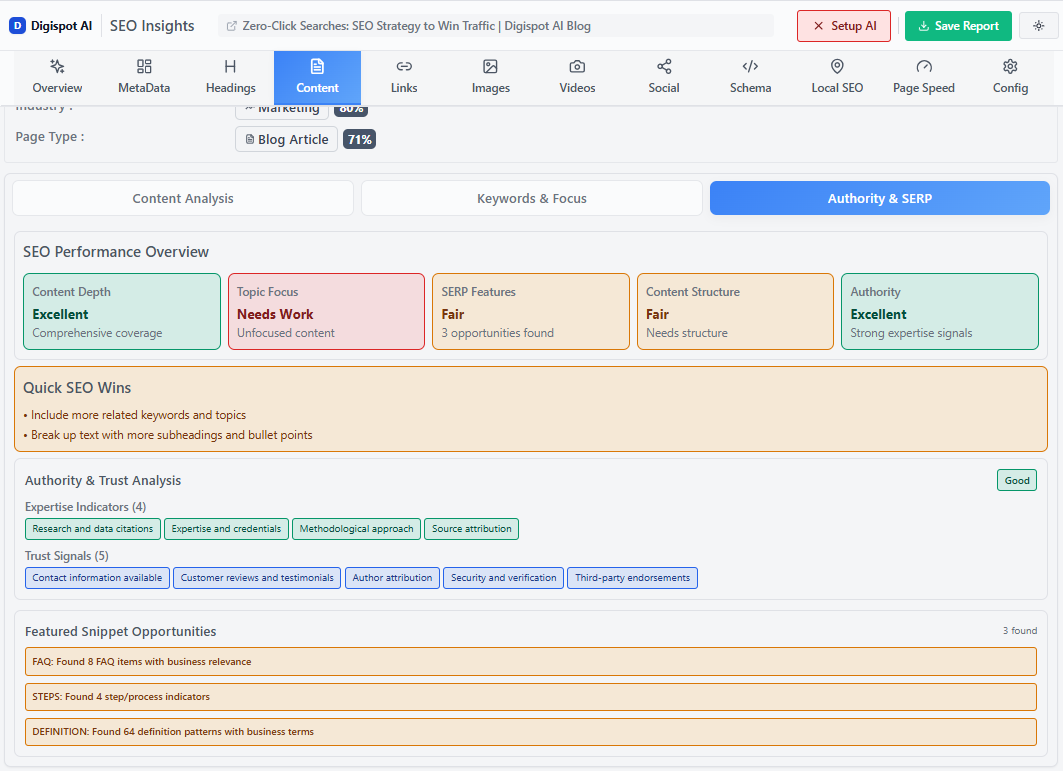
Turn invisible SEO data into clear visuals with our Free Chrome extension
The Core Strategy: How to Adapt and Win
Understanding the features is only the first step. Optimizing for them requires a fundamental shift in mindset—from creating content designed purely for your website to creating content that is portable, structured, and machine-readable.
Part 1: Foundational Content & Keyword Strategy
Your success starts with keyword selection. Not all keywords are worth targeting for clicks, and some are purely for brand awareness.
Identifying High-Value Opportunities
Use your keyword research tools to filter for SERP features. You want to identify terms where you are ranking on Page 1 but do not currently own the Featured Snippet.
- Target Opportunity-Rich Features: Prioritize keywords that trigger Featured Snippets, Local Packs, and People Also Ask boxes. These features provide immense visibility and still offer a reasonable chance for a click. A user might read a snippet about "how to fix a leaky faucet" but still click through for the detailed diagram or video tutorial.
- Filter Out "Dead End" Queries: Be wary of investing heavily in content for keywords like "what is the capital of France" or "current time in London." Google answers these definitively. Instead, target complex variations like "history of Paris architecture" which requires a nuanced explanation Google cannot summarize in two lines.
Structuring Content for the Algorithm
Google's bots need to parse your content efficiently. To increase your chances of being featured, structure your content to provide direct, modular answers.
- The Inverted Pyramid Method: Start with the answer. If your H2 is "How often should I change my oil?", the very next sentence should be "Most modern vehicles require an oil change every 5,000 to 7,500 miles." Do not bury the lead after three paragraphs of fluff.
- Embrace "Magic Keywords": Structure headings around question-based terms: What, Why, How, and When. These mirror user queries.
- Use HTML Formatting:
- Lists: Google loves extracting
<ul>and<ol>tags for step-by-step snippets. - Tables: For comparisons (e.g., pricing, features, specs), use HTML tables. These are frequently lifted directly into snippets.
- Short Paragraphs: Keep answers under 50 words to fit the typical snippet container.
- Lists: Google loves extracting
Get instant insights on how well your current pages are structured for these features with our free Chrome extension, which analyzes header hierarchy and content depth in real-time.
Mining "People Also Ask" for Content Gaps
The "People Also Ask" (PAA) section is a roadmap for content expansion.
- Scrape the Questions: Search for your primary keyword and note the top 4 PAA questions. Click on them to load more.
- Create an FAQ Section: specific FAQ section at the bottom of your post. Use the PAA questions as H3 headers.
- Provide Better Answers: Often, the answer Google pulls for a PAA is vague or slightly off-topic. If you provide a precise, direct answer, you can steal that spot.
- Connect the Journey: Answer holistically. If the user asks "how to buy a house," they will likely ask "how much is a down payment" next. Covering the full journey increases your authority and chances of appearing in multiple PAA slots.
Part 2: Advanced Technical Optimization
Great content needs a solid technical foundation to be discovered and understood by search engines. This is where you translate your human-readable text into machine-readable code.
Implementing Robust Schema Markup
Schema markup (structured data) is code that helps search engines understand the context of your content. It acts as a translator between your website and Google's algorithm.
For zero-click optimization, focus on these schema types:
- FAQPage Schema: Marks up Question and Answer lists. This is the most direct way to get your content into PAA boxes and rich snippets.
- HowTo Schema: Perfect for tutorials. It allows Google to display steps, duration, and required tools directly in the SERP.
- Product & Review Schema: Adds critical commercial data (price, availability, star ratings) to your listing. In a zero-click world, a 5-star rating on the SERP can be the deciding factor for a user.
- LocalBusiness Schema: Essential for brick-and-mortar stores. It clarifies your NAP (Name, Address, Phone), hours, and geolocation coordinates.
Writing JSON-LD code manually is error-prone. Use the free Schema Markup Generator to create valid structured data in minutes without writing a single line of code.
Dominating Local SEO
For local businesses, the "Zero-Click" experience often results in a phone call or a store visit rather than a website session. This is a conversion, even if your analytics don't track it as a "visit."
- Google Business Profile (GBP) Perfection: Treat your GBP as your homepage. Fill out every attribute. Upload fresh photos of your interior, exterior, and team. Use the "Updates" feature to post offers and news directly to the SERP.
- NAP Consistency: Inconsistencies in your Name, Address, or Phone number across directories (Yelp, Yellow Pages, Bing Places) confuse Google and lower your ranking.
- Reputation Management: Reviews are a ranking factor. Actively solicit reviews and reply to all of them—positive or negative. This signals to Google that the business is active and trustworthy.
Refer to our SEO audit checklist to ensure your local technical foundation is solid and free of common errors.
Part 3: Building Trust and Compelling a Click
Even in a zero-click environment, your ultimate goal is often to deepen the relationship with the user. You need strategies to provide value on the SERP while simultaneously enticing the user to visit your site for the full experience.
Boost Your E-E-A-T Signals
Google's quality guidelines (E-E-A-T: Experience, Expertise, Authoritativeness, and Trustworthiness) are critical for being cited in AI Overviews and Featured Snippets. Google prefers to pull answers from sources it trusts.
- Demonstrate Experience: Use first-person language ("In our testing...") and share real-world data.
- Showcase Expertise: Ensure content is reviewed by subject matter experts. distinct author bios with links to LinkedIn profiles.
- Build Authority: Earn backlinks from reputable industry sites.
- Maintain Trust: Cite sources, update content regularly, and ensure your site is secure (HTTPS).
For a deeper dive into establishing credibility, read our complete guide to E-E-A-T.
Creating Content That Demands a Click
This is the strategic counter-move. You can provide a satisfactory answer on the SERP while making it clear that the user is missing out if they don't click.
- The "Tip of the Iceberg" Technique: Structure lists so the SERP shows the top 3-4 items, but the list has 20 items. The user sees the value but needs to click to see the rest.
- Data Nuance: Provide a summary table that fits a snippet, but mention that the full dataset, with filtering and sorting, is available on the page.
- Downloadable Assets: Offer tools, templates, or PDF guides that cannot be consumed on the SERP. Example: "See the basic steps below, or click here to download our printable project checklist."
- Opinion and Analysis: AI and snippets are great for facts, but terrible for nuance and opinion. Differentiate your brand by offering unique perspectives, contrarian takes, or deep storytelling that an AI summary cannot replicate.
The New Playbook: Measuring Success Beyond the Click
If 40% of your audience never visits your site, traffic charts in Google Analytics are telling only half the story. You must evolve your KPIs to track "Search Visibility" rather than just "Sessions."
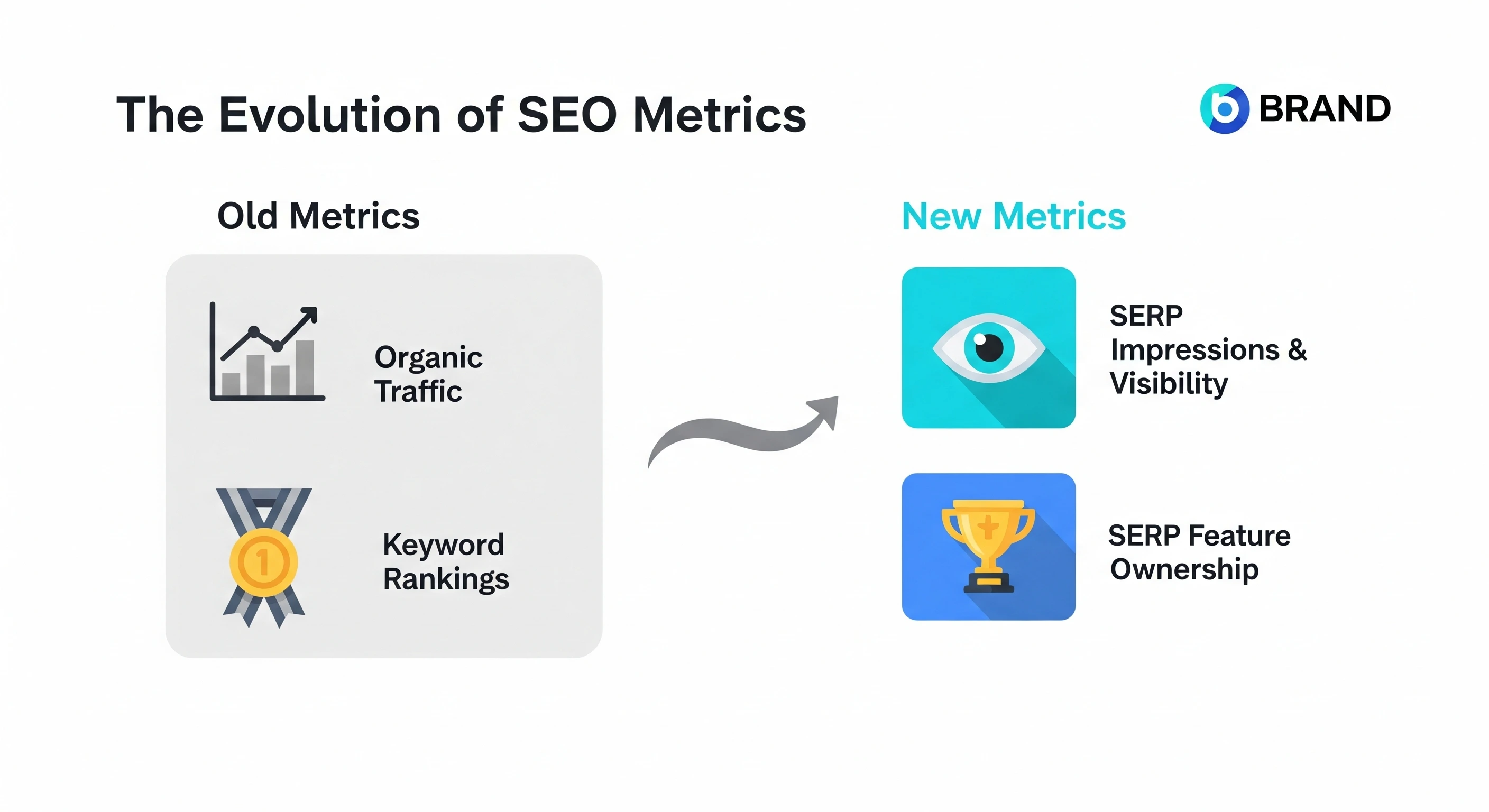
Rethinking SEO KPIs
| Old Metric | Why It's Less Relevant Now | New Metric | How to Track It |
|---|---|---|---|
| Organic Traffic | A zero-click answer provides brand value without a site session. Traffic alone misses this exposure. | SERP Impressions & Visibility | Monitor total impressions in GSC. High impressions with stable rankings but lower clicks often indicates zero-click consumption. |
| Click-Through Rate (CTR) | A low CTR on a #1 ranking might mean the user got their answer immediately (a success), not that the content failed. | SERP Feature Ownership | Track the number of Featured Snippets, PAA boxes, and Local Packs your domain occupies. |
| Keyword Rankings | Ranking #1 organically is less valuable if you are pushed down by 4 ads and a huge AI Overview. | Share of Voice (Pixel Depth) | Analyze how much physical screen space your brand occupies on Page 1 (e.g., PAA + Organic Listing). |
Manually tracking these features across hundreds of keywords is impossible. Digispot AI provides comprehensive dashboards that track not just rank, but Feature Ownership. You can see exactly which snippets you own, which ones competitors have stolen, and where you are losing visibility to AI Overviews.
Avoiding "Vanity" Wins
Be careful not to optimize for zero-click queries that offer zero value. If you rank #1 for "customer service number for [Competitor]," you might get thousands of impressions and zero clicks. Worse, you might get angry calls from people thinking you are the competitor. Ensure your zero-click strategy focuses on terms that build brand affinity or lead to downstream conversions.
Beyond Google: The Rise of "Search Everywhere Optimization"
A resilient strategy acknowledges that "search" is no longer synonymous with "Google." The concept of Answer Engine Optimization (AEO) applies to a growing ecosystem of platforms.
- AI Chatbots (ChatGPT, Claude, Perplexity): Users are asking LLMs complex questions. To be cited here, your content must be highly authoritative and easy for AI to parse.
- Vertical Search:
- YouTube: The second largest search engine. Optimize video titles, descriptions, and chapters.
- Amazon: The primary search engine for product intent.
- TikTok/Instagram: increasingly used by Gen Z for discovery and "how-to" content.
Digispot AI's multi-LLM engine helps you analyze how your brand appears across these AI platforms, ensuring your "Search Everywhere" strategy is data-driven.
Conclusion: It's an Evolution, Not an Apocalypse
Zero-click searches are not a threat to be feared; they are a signal that user expectations have matured. People want answers, and they want them fast. The brands that succeed in 2026 will be those that shift their mindset from "how do I extract a click?" to "how do I provide the best answer?"
The goal is to be the source of truth. Whether that truth is consumed in a Featured Snippet, an AI Overview, or a deep-dive blog post, the result is the same: you build trust, authority, and brand recognition.
Start Improving Your Zero-Click Strategy Today:
- Audit: Use the On-Page SEO Analysis tool to check your current content structure.
- Identify: Find keywords where you rank on Page 1 but don't own the snippet.
- Optimize: Rewrite your definitions, add schema markup, and target PAA questions.
- Monitor: Shift your focus to impressions and SERP feature ownership.
The zero-click world doesn't diminish the value of SEO; it elevates it. It forces us to be more strategic, more technical, and more focused on genuine user value than ever before.
References
- Google Search Central - Visual elements gallery.
- Schema.org - Documentation.
- Google Search Console.
- Digispot AI - FREE Schema Markup Generator.
- Digispot AI - FREE On Page SEO Audit Tool.
- Understanding User Attention and Satisfaction in Web Search.
- Google Business Profile.
- Digispot AI - FREE Chrome Extension.
Related deep-dives
Continue with these closely related guides:
- geo-targeting seo — Geo-Targeting SEO: Location-Based Search Optimization
- search box seo — Search Box SEO: Sitelinks & Schema Optimization
- chatgpt vs google search — ChatGPT vs Google Search: A Comprehensive Comparison for SEOs
- generative ai for seo — Generative AI for SEO The Ultimate Guide
- tiktok social search seo — TikTok Social Search SEO: Master the New Search Engine Algorithm
- chat seo — Chat SEO: Conversational AI & Search Impact
Audit any page in seconds
300+ SEO checks including Core Web Vitals, schema markup, meta tags, and AI readiness — trusted by 1000+ SEO experts and marketers.
Frequently Asked Questions
Here are some of our most commonly asked questions. If you need more help, feel free to reach out to us.
Written by
Maya Krishnan
Digital growth expert
Maya is a seasoned expert in web development, SEO, and digital strategy, dedicated to helping businesses achieve sustainable growth online. With a blend of technical expertise and strategic insight, she specializes in creating optimized web solutions, enhancing user experiences, and driving data-driven results. A trusted voice in the industry, Maya simplifies complex digital concepts through her writing, empowering readers with actionable strategies to thrive in the ever-evolving digital landscape.