Page Experience SEO: Rankings & Engagement Benefits
Master Google's Page Experience signals for SEO. Optimize Core Web Vitals, mobile usability, and security to improve rankings and user satisfaction.
 Maya Krishnan
The online world has shifted fundamentally. Keywords still matter, but they are no longer the sole gatekeepers of search visibility. Today, search engines like Google and AI-driven platforms prioritize one critical element above all else: the user experience (UX).
Imagine landing on a website. The content loads instantly. The buttons respond the moment you tap them. The layout stays stable, never jumping around as you try to read. This isn't just a pleasant surprise for you as a visitor; it is a powerful, algorithmic signal to Google that the site provides value. This prioritization of human interaction is the core of Page Experience SEO.
For businesses in 2025, ignoring these signals is a liability. Users expect seamless interactions, and if your site lags, shifts, or confuses them, they will bounce to a competitor in seconds. This guide explores how optimizing for Page Experience signals—specifically Core Web Vitals and mobile usability—can transform your search rankings and drive tangible business growth.
Key Takeaways
- Page Experience is a composite signal, not just speed. It bundles Core Web Vitals, mobile-friendliness, HTTPS, safe browsing, and the absence of intrusive interstitials—so a fast LCP alone won't save a page that fails elsewhere.
- Optimize with lab data, but win with field data. Google ranks on real-user metrics from the Chrome User Experience Report (CrUX), so validate every fix against 28-day field data, not just a one-off Lighthouse run.
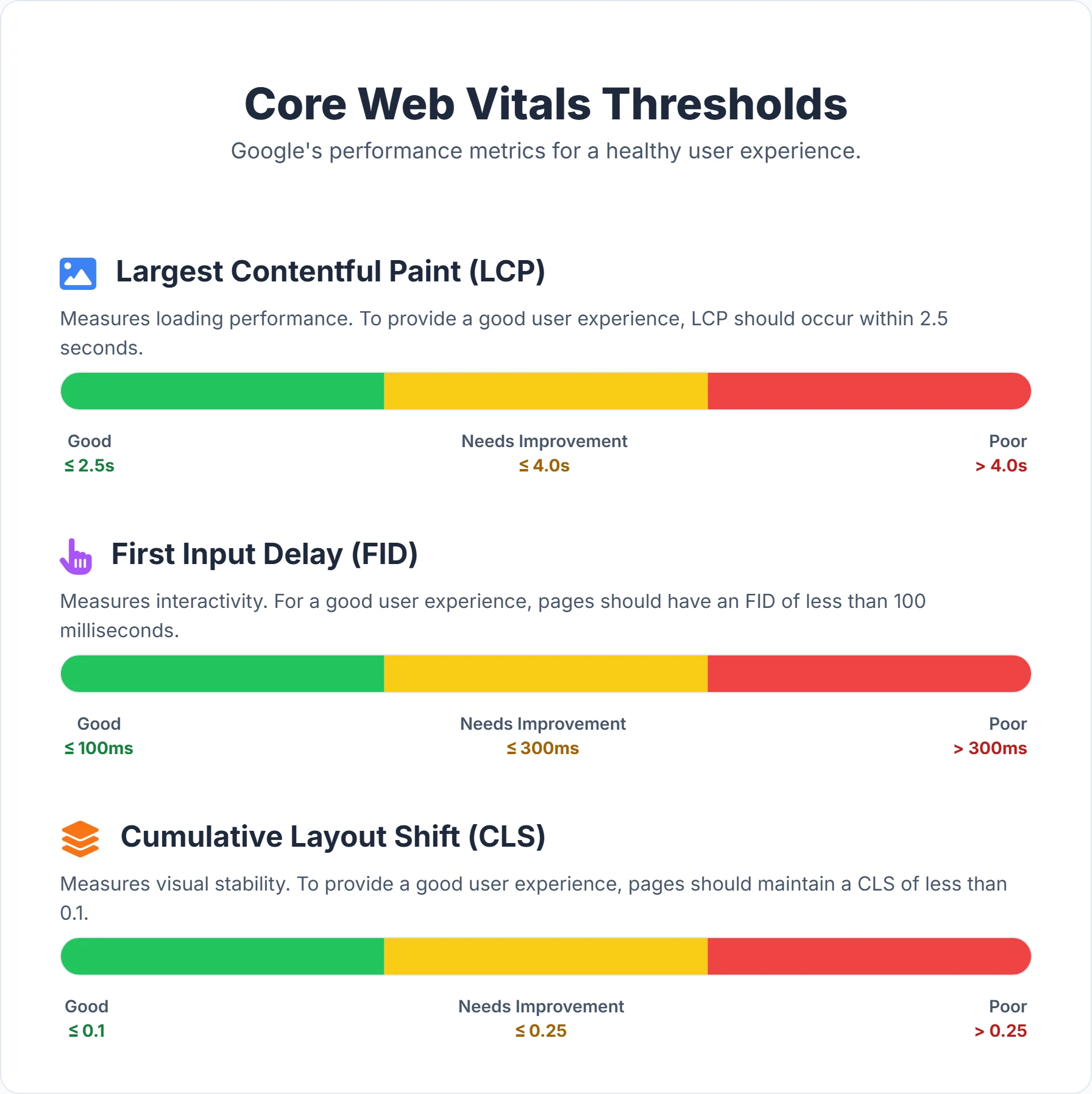
- Target the three CWV thresholds precisely: LCP under 2.5s, INP (which replaced FID) under 200ms, and CLS under 0.1. Treat these as pass/fail gates before chasing marginal gains.
- Fix templates, not pages. Most experience issues (unsized images, render-blocking scripts, layout shifts) live in shared templates—fix the template once to resolve the problem across thousands of URLs.
- Treat Page Experience as a tie-breaker, not a substitute for content. It rarely outranks strong relevance on its own, but it decides close contests and protects the rankings you already earned.
What Exactly is Page Experience SEO?
Page Experience SEO is a comprehensive framework of signals that Google uses to evaluate a user's perceived experience when interacting with a web page. It sits within the broader discipline of technical SEO and goes beyond the informational value of your text to assess how delightful, accessible, and efficient the page is to use.
Think of it as the "hygiene" of your website. Your content might be world-class, but if the delivery mechanism—the website itself—is slow, insecure, or cluttered, the value of that content diminishes. Google’s algorithms are designed to protect searchers from these frustrating experiences.
This concept became a formal ranking factor with the Page Experience update, rewarding sites that prioritize the user journey. The signals act as a tie-breaker: if two pages have equally relevant content, the one with the superior page experience will likely rank higher.
The Page Experience signals consist of several critical components:
- Core Web Vitals (CWV): Three distinct metrics measuring real-world user experience regarding loading speed, interactivity, and visual stability.
- Mobile-friendliness: The site's ability to adapt and perform flawlessly on mobile devices, which is critical given Google's mobile-first indexing.
- HTTPS: The security protocol that encrypts data between the user's browser and your server.
- Safe Browsing: The absence of malware, deceptive pages, or harmful downloads.
- No Intrusive Interstitials: The avoidance of aggressive pop-ups that block content access.
Together, these elements form a holistic view of your website’s health. They dictate not just how your site looks, but how it feels in the hands of a user.
Why Page Experience is a Game-Changer for Your Digital Presence
Understanding the metrics is step one. Grasping the impact on your bottom line is where the strategy begins. Optimizing for page experience is not merely an SEO checklist item; it is a revenue-generating activity. A faster, smoother site retains more users, builds trust, and converts traffic into customers.
Here are the key benefits of embracing Page Experience SEO:
- Improved Search Rankings: Google’s mission is to organize information and make it universally accessible. By aligning with their goal of providing great user experiences, you earn better placement in Search Engine Results Pages (SERPs). This is especially critical for competitive queries where every optimization edge counts.
- Enhanced User Satisfaction and Engagement: Users are impatient. A study by Google showed that as page load time goes from 1 second to 3 seconds, the probability of a bounce increases by 32%. A responsive, stable site keeps users happy, encouraging them to browse deeper and consume more content.
- Reduced Bounce Rates: Bounce rate is often a symptom of poor page experience. If a page takes too long to load or shifts unexpectedly, users leave. By fixing these technical issues, you naturally keep visitors on-site longer, signaling to search engines that your result answered the query effectively. For tactics beyond speed, see our guide on how to reduce website bounce rate.
- Increased Conversions and Business Leads: Friction kills conversions. A slow checkout page, a button that doesn't react immediately, or a layout shift that causes a misclick can all lead to abandoned carts. Optimizing page experience smooths the path to purchase, directly lifting conversion rates.
- Future-Proofing Your SEO Strategy: As we move toward Answer Engine Optimization (AEO) where AI models like ChatGPT and Google Gemini synthesize answers, technical health becomes even more vital. AI agents prefer structured, fast-loading, and error-free content sources. Solid page experience ensures your content is machine-readable and user-friendly.
- Time and Cost Savings: A well-architected site is easier to maintain. By reducing technical debt and optimizing assets upfront, you save on bandwidth costs and reduce the need for constant emergency fixes. Additionally, higher organic conversion rates lower your dependence on paid acquisition channels.
Deconstructing Core Web Vitals: A Deeper Dive
Core Web Vitals are the measurable backbone of Page Experience. Unlike generic "speed" metrics, these three specific signals—Largest Contentful Paint (LCP), First Input Delay (FID), and Cumulative Layout Shift (CLS)—quantify distinct aspects of the user journey.
Largest Contentful Paint (LCP): The Perception of Speed
What it is: LCP measures the time it takes for the largest visible element in the viewport to fully render. This is usually a hero image, a video poster, or a headline block. It is the most accurate representation of "load speed" from a user's perspective because it marks the moment the main content is actually useful.
How to measure: You can assess LCP using lab tools like Google PageSpeed Insights and Lighthouse for debugging. However, for ranking purposes, Google uses field data from the Chrome User Experience Report (CrUX), which aggregates data from real users visiting your site.
Why it matters: A fast LCP builds confidence. It reassures the user that the page is working and the information they requested is arriving. If LCP lags, users perceive the site as broken or sluggish. Google benchmarks a "Good" LCP at 2.5 seconds or less.
The Four Phases of LCP: To improve LCP, you must understand where the time goes:
- Time to First Byte (TTFB): How long the server takes to start sending data.
- Resource Load Delay: Time between the first byte and when the browser starts loading the LCP resource.
- Resource Load Time: How long it takes to download the image or text font.
- Element Render Delay: Time between the resource finishing download and actually appearing on screen.
If your LCP element only appears after JavaScript hydrates, the render delay can dominate your score—our JavaScript dynamic rendering SEO guide covers how rendering strategy affects when content becomes visible.
How to improve LCP:
| LCP Factor | Impact on LCP | Solutions |
|---|---|---|
| Slow Server Response Time (High TTFB) | Delays the start of the entire loading process. | Optimize database queries, upgrade hosting plans, and implement server-side caching (e.g., Redis, Varnish). |
| Render-Blocking Resources | Browser pauses rendering to parse CSS or JS files. | Minify CSS/JS. Defer non-critical JS. Inline critical CSS for above-the-fold content to paint immediately. |
| Slow Resource Load Times | Large hero images or fonts take too long to download. | Compress images (WebP/AVIF). Use fetchpriority="high" on your LCP image. Preload critical fonts. |
| Client-Side Rendering (CSR) | JavaScript must download and execute before content appears. | Implement Server-Side Rendering (SSR) or Static Site Generation (SSG) for immediate HTML delivery. |
For a complete guide on technical adjustments, check our Core Web Vitals SEO Guide.
First Input Delay (FID): The Responsiveness Factor
What it is: FID measures the delay between a user's first interaction (clicking a link, tapping a button) and the browser's response. It quantifies the "stickiness" or unresponsiveness of a page.
Note: While FID has been the standard for years, Google has transitioned towards Interaction to Next Paint (INP) as a more comprehensive metric. However, the optimization principles for reducing main-thread blocking remain identical for both.
How to measure: FID is strictly a field metric; it requires a real user to interact with the page. In lab environments (like Lighthouse), you use Total Blocking Time (TBT) as a proxy metric to estimate potential interactivity issues.
Why it matters: First impressions count. If a user clicks "Add to Cart" or "Menu" and nothing happens for half a second, they feel a loss of control. This frustration often leads to "rage clicks" (repeatedly tapping the button), which further bogs down the browser. Google considers an FID of 100 milliseconds or less to be "Good."
How to improve FID (and INP):
| FID Factor | Impact on Interactivity | Solutions |
|---|---|---|
| Long JavaScript Tasks | Scripts running longer than 50ms block the main thread, freezing the UI. | Break up "long tasks" into smaller chunks. Use requestIdleCallback to run non-urgent code during idle times. |
| Heavy Third-Party Scripts | Chat widgets, ads, and trackers compete for browser resources. | Audit third-party tags. Load them asynchronously or defer them until after the main content loads. |
| Unoptimized Event Listeners | Complex code executing on every scroll or click event. | Debounce or throttle event handlers. Use passive event listeners for scrolling to improve performance. |
Cumulative Layout Shift (CLS): Visual Stability
What it is: CLS measures the visual stability of a page. It tracks how much visible content shifts unexpectedly during the page's lifespan. We've all experienced this: you go to click a link, but an ad loads at the top of the page, pushing the content down, and you accidentally click an ad instead.
How to measure: CLS is calculated by multiplying the impact fraction (how much of the screen changed) by the distance fraction (how far the elements moved). Tools like Digispot AI's On-Page SEO Analysis can detect these shifts automatically.
Why it matters: Unexpected movement is disorienting and breaks the user's focus. In eCommerce, it can cause financial errors (clicking the wrong product or button). A stable page feels robust and professional. Google considers a CLS score of 0.1 or less to be "Good."
How to improve CLS:
| CLS Factor | Impact on CLS | Solutions |
|---|---|---|
| Dimensionless Images/Video | Browser doesn't know the aspect ratio, collapsing space until the image loads. | Always include width and height attributes on <img> and <video> tags. Use CSS aspect-ratio boxes. |
| Ads and Dynamic Embeds | Ads load late and expand, pushing content down. | Reserve fixed-size containers (divs) for ad slots. If the ad doesn't load, keep the empty space or collapse it only if it doesn't shift visible content. |
| Web Fonts (FOIT/FOUT) | Text swaps from a fallback font to a web font, changing line heights. | Use font-display: swap or optional. Preload critical fonts to minimize the swap period. Match fallback font metrics to your web font. |
| Late-Injected Content | Banners or newsletters appearing at the top after load. | Avoid inserting content above existing content. If necessary, use a skeleton UI or reserve space beforehand. |
Beyond Core Web Vitals: Other Essential Page Experience Signals
While Core Web Vitals often grab the headlines, the Page Experience update is a composite signal. Ignoring the other factors can cap your ranking potential, regardless of how fast your LCP is.
Mobile-Friendliness: The Absolute Necessity
In 2025, mobile traffic dominates. Google uses mobile-first indexing, meaning the mobile version of your site is the primary version for evaluation. If your desktop site is perfect but your mobile site is clumsy, your rankings will suffer across all devices.
Why it matters: Users on mobile devices have different constraints: smaller screens, touch navigation, and often unstable cellular connections. A site that requires pinch-to-zoom or has unreadable text is practically unusable.
How to ensure mobile-friendliness:
- Responsive Viewport: Ensure your HTML includes the
<meta name="viewport" content="width=device-width, initial-scale=1">tag. - Thumb-Friendly Design: Make buttons and links large enough (at least 44x44 pixels) with adequate spacing to prevent "fat finger" errors.
- Legibility: Use a base font size of at least 16px to ensure text is readable without zooming.
- Remove Incompatible Plugins: Avoid Flash, Silverlight, or Java applets that mobile browsers do not support.
Check if your site passes the mobile usability test with our Free On-Page Analysis Tool.
HTTPS: Security as a Ranking Factor
HTTPS (Hypertext Transfer Protocol Secure) ensures that all data transferred between the user and the site is encrypted. It has been a lightweight ranking signal since 2014 but is now a standard expectation.
Why it matters: Security builds trust. Browsers like Chrome aggressively flag non-HTTPS sites as "Not Secure," which scares off visitors immediately. For eCommerce or lead generation sites, HTTPS is non-negotiable for protecting credit card details and personal data.
How to implement HTTPS:
- Purchase or obtain a free SSL/TLS certificate (e.g., via Let's Encrypt), and set it to auto-renew so it never lapses—an expired certificate triggers the same "Not Secure" warning as having none at all.
- Install it on your web server and confirm the full certificate chain resolves, not just the leaf certificate.
- Set up 301 redirects to force all HTTP traffic to HTTPS, and consider adding an HSTS header so browsers default to secure connections without the extra redirect hop.
- Update all internal links and canonical tags to the HTTPS version to eliminate "mixed content" warnings, where a secure page loads insecure images or scripts and loses its padlock.
Safe Browsing: Protecting Your Users
Google wants to send users to safe destinations. The Safe Browsing signal checks for malicious activity on your domain.
Why it matters: If your site is compromised, Google will display a deeply discouraging red warning page ("Deceptive Site Ahead"). This kills traffic instantly (often by 95%+) and damages your brand reputation.
Safe Browsing failures usually fall into three buckets: malware and unwanted software (drive-by downloads, cryptominers injected via a compromised plugin), social engineering (phishing forms or fake "your account is locked" pages), and deceptive content (misleading download buttons or fake system warnings). Because the warning interstitial is served by Chrome, Firefox, and Safari, a single compromise can suppress traffic across every major browser simultaneously—not just in Google Search.
How to ensure safe browsing:
- Regular Scanning: Use security plugins or server-side scanners to detect malware, and check your domain's current status directly in Google's Safe Browsing Site Status tool before it becomes a ranking problem.
- Update Software: Keep your CMS (WordPress, Shopify, etc.), themes, and plugins updated to patch known vulnerabilities. Outdated plugins are the single most common entry point for injected malware.
- Lock Down Attack Surfaces: Enforce strong admin credentials with two-factor authentication, restrict file-upload permissions, and audit any third-party scripts you embed—a hijacked ad or analytics tag can inject malicious payloads without touching your own codebase.
- Monitor Search Console: Google will alert you via the "Security Issues" report if they detect hacking, social engineering, or malware on your site. Verify your property and enable email alerts so you learn about a flag within hours, not after a traffic collapse. Cleaning up and then requesting a review typically restores standing within a few days, but the faster you catch it, the smaller the damage. This kind of monitoring belongs in every technical SEO checklist.
No Intrusive Interstitials: A Clean User Journey
Interstitials are pop-ups that block the view of the main content. Google penalizes "intrusive" interstitials that make content less accessible, especially on mobile devices where screen real estate is limited.
Why it matters: Users want immediate answers. Having to close a giant newsletter popup before reading a headline creates friction.
Acceptable vs. Intrusive:
- Acceptable: Cookie usage notices (GDPR), age verification gates, or login dialogs for private content.
- Intrusive: Pop-ups that cover the main content immediately upon page load, or standalone interstitials that the user has to dismiss before accessing content.
Best Practice: Use banners that take up a reasonable amount of screen space (e.g., top or bottom 20%) rather than full-screen overlays.
How to Audit Your Website's Page Experience
Auditing is the bridge between understanding these concepts and fixing your website. You cannot improve what you do not measure. A robust audit strategy combines "Lab Data" (simulated tests) and "Field Data" (real user experiences).
You can start with Google's native ecosystem:
- Google PageSpeed Insights (PSI): Provides a quick snapshot of performance. It gives you both Lab data (Lighthouse) and Field data (CrUX) if available.
- Lighthouse: Great for local debugging. It breaks down performance, accessibility, best practices, and SEO.
- Google Search Console (GSC): The gold standard for monitoring. The "Core Web Vitals" report groups your URLs into "Poor," "Needs Improvement," and "Good" based on actual user data.
However, manually checking URLs one by one is inefficient for larger sites. You need a way to see the big picture.
Introducing the Power of AI for Auditing:
Platforms like Digispot AI revolutionize this process. Instead of isolated data points, Digispot AI provides a comprehensive Site Audit that crawls your entire website. It checks for over 200 ranking factors, including Core Web Vitals, broken links, schema errors, and content quality issues.
Digispot AI helps you prioritize. It doesn't just list errors; it uses AI to tell you which fixes will yield the highest ROI for your SEO visibility. For example, it can identify that a specific unoptimized image template is hurting LCP across 500 product pages, allowing you to fix one template and solve 500 problems.
Digispot AI Free Community Chrome Extension: Your Instant Page Experience Auditor
For quick, on-the-fly checks while browsing your site or analyzing competitors, the Digispot AI Chrome Extension is invaluable.
This tool brings enterprise-level data directly into your browser:
- Instant CWV Check: See the LCP, FID/INP, and CLS scores for the current page immediately.
- Schema Visualization: One of the most powerful features is the ability to visualize Schema markup. You can see exactly what structured data the page is sending to Google, helping you debug rich snippets.
- Competitor Recon: Use it on competitor sites to see their load times and schema strategies, giving you a benchmark to beat.
Whether you are a developer debugging a layout shift or a marketer checking a landing page, having these insights one click away speeds up your workflow significantly.
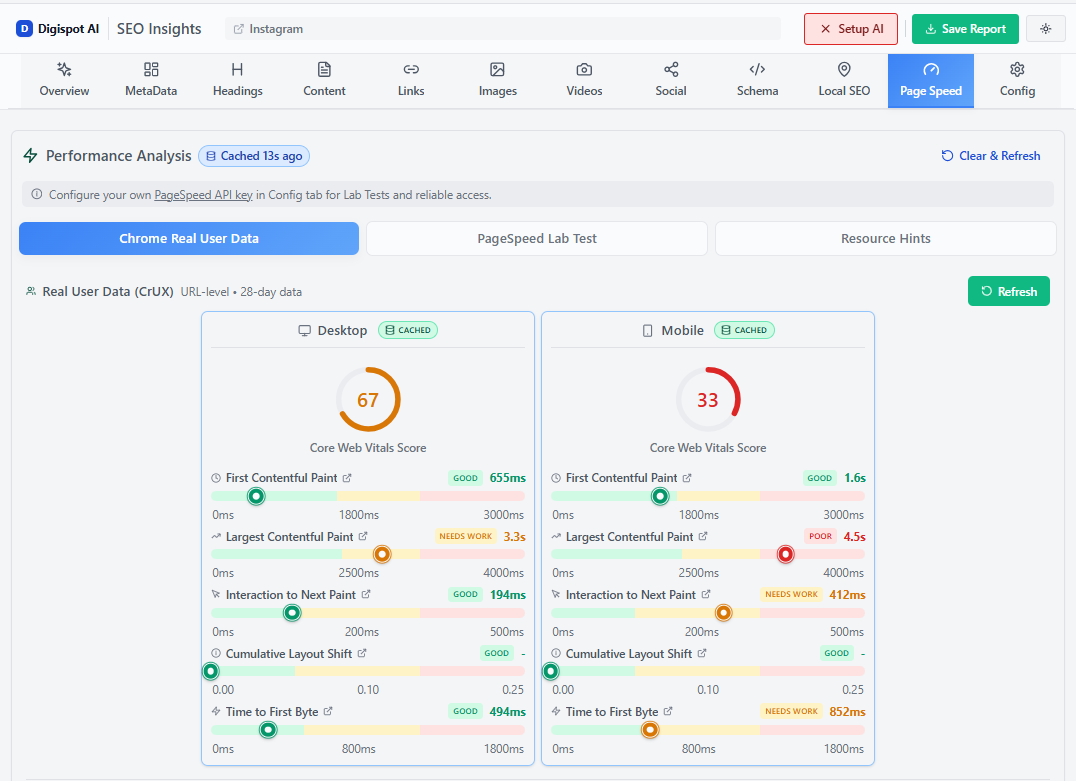
Turn invisible SEO data into clear visuals with our Free Chrome extension.
Optimizing for Page Experience: A Practical Roadmap
Knowing the issues is half the battle; fixing them requires a systematic approach. Here is a practical roadmap to elevate your Page Experience.
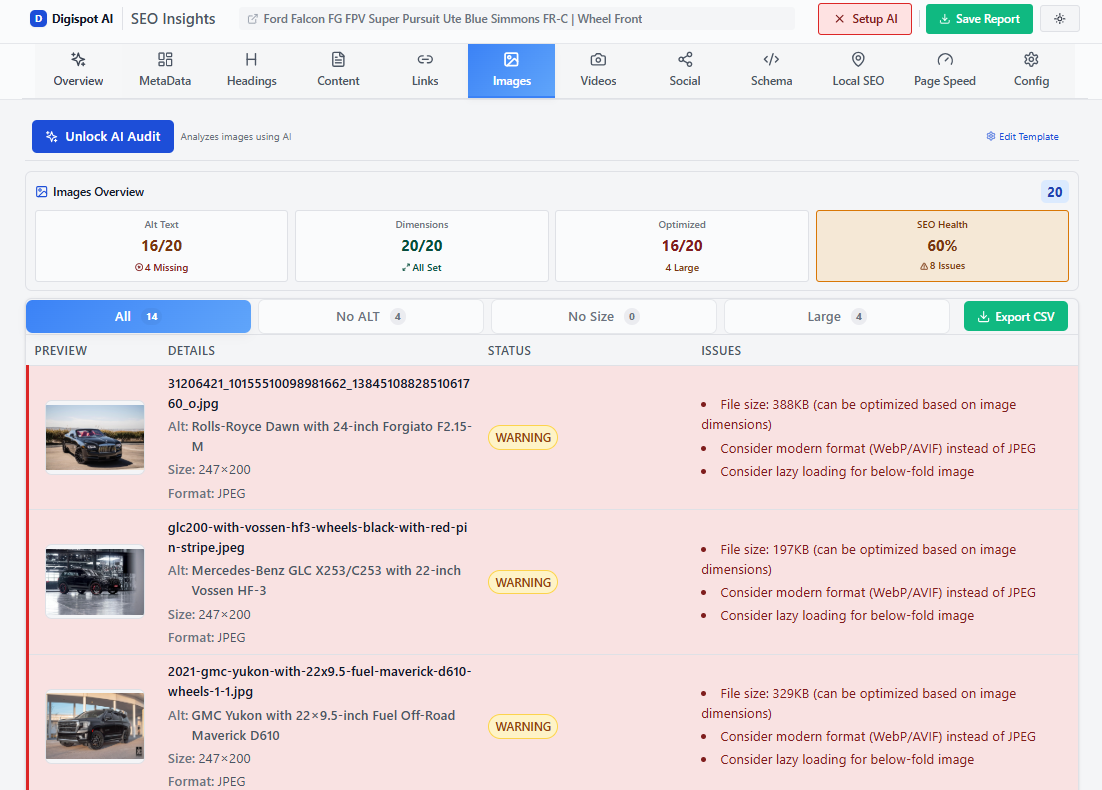
- Optimize Images and Media (The "Low Hanging Fruit"):
- Compression: Tools like TinyPNG or Squoosh can reduce image size by up to 70% without visible quality loss.
- Next-Gen Formats: Serve images in WebP or AVIF formats. These are superior to JPEG/PNG in compression and quality. Our guide to image compression for better SEO speed walks through the trade-offs.
- Lazy Loading: Add
loading="lazy"to images below the fold. This ensures the browser prioritizes the critical images at the top of the page first. - Explicit Dimensions: Always set
widthandheightto prevent CLS.
-
Leverage Browser Caching:
- Cache Policy: Configure your
.htaccessor server settings to set long expiry dates (e.g., 1 year) for static assets like logos, CSS, and JS. This means returning visitors load your site instantly from their disk cache rather than downloading everything again.
- Cache Policy: Configure your
-
Minify and Defer Code:
- Minification: Strip whitespace and comments from your code. It makes files lighter.
- Defer Non-Critical JS: If a script isn't needed for the initial page render (like a chat widget or analytics), use the
deferorasyncattribute. This clears the "main thread" for the browser to render the page content faster.
-
Use a Content Delivery Network (CDN):
- Reduce Latency: A CDN like Cloudflare or AWS CloudFront caches your content on servers worldwide. A user in London downloads your site from a London server, not your main server in New York. This drastically cuts Time to First Byte (TTFB). See why CDNs are important for SEO for a deeper breakdown of the ranking impact.
-
Server Response Time Improvements:
- Database Optimization: If you use a CMS like WordPress, clean your database of old revisions and spam comments.
- PHP/Server Versions: Ensure you are running the latest version of PHP or your server-side language. Newer versions are significantly faster.
-
Ensuring Responsive Design:
- Fluid Grids: Use percentage-based widths (CSS Grid/Flexbox) so elements resize naturally.
- Media Queries: Use CSS breakpoints to adjust layouts for tablets and mobile phones.
- Touch Targets: Ensure interactive elements have
paddingto increase their clickable area without changing their visual size.
-
Implementing Schema Markup:
- Context for AI: Schema is vital for AEO. It tells search engines "This is a Recipe," "This is a Review," or "This is a Product."
- Rich Snippets: Correct schema earns you star ratings and image thumbnails in search results, which can increase Click-Through Rate (CTR) by 30% or more.
- Tooling: Use the Schema Markup Generator to create valid JSON-LD code without writing it by hand. Then, verify it with the Digispot AI Chrome extension to ensure it's implemented correctly.
For a comprehensive checklist on technical audits, read our SEO Audit Checklist for 2026.
Digispot AI: Your Co-Pilot in the Page Experience Journey
Navigating the technical depths of Core Web Vitals, server configuration, and structured data can be overwhelming. Manually tracking these across thousands of pages is impossible.
This is where the Digispot AI cloud platform becomes your competitive advantage. It transforms SEO from a reactive guessing game into a proactive science.
Key Platform Capabilities:
- Automated Monitoring: Digispot AI crawls your site regularly. If a code update accidentally breaks your CLS or increases LCP, you get alerted immediately—not weeks later when traffic drops.
- Opportunity Finder: The platform doesn't just find errors; it finds growth opportunities. It identifies pages that are "almost" ranking well but are held back by poor page experience, giving you a prioritized "hit list" for maximum impact.
- Content Studio: Create content that ranks. Our AI agents help you draft content that is structurally sound and optimized for both readers and search engines, ensuring your new pages launch with excellent page experience scores from Day 1.
Digispot AI can help you identify and fix these issues automatically with AI-powered audits analyzing 300+ ranking factors.
Tangible Business Outcomes from Superior Page Experience
Why invest the resources? Because the ROI of Page Experience is documented and significant. It bridges the gap between "getting traffic" and "getting business."
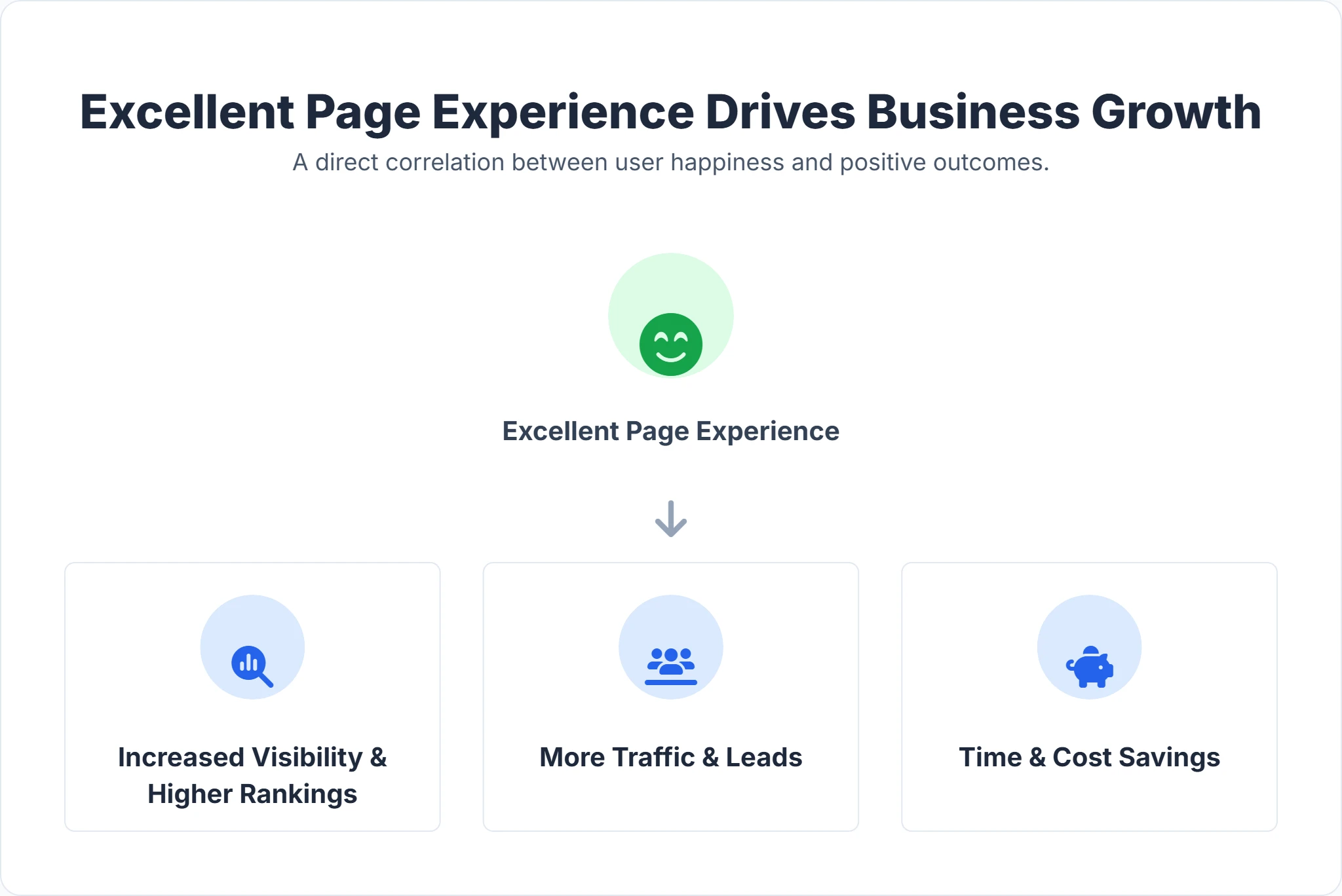
- Improving Business Visibility: Google explicitly states that page experience is a tie-breaker. In competitive niches, moving from position 4 to position 1 can triple your traffic. Superior UX is often the catalyst for that jump.
- Increase in Traffic and Business Leads: A study by Deloitte found that improving site speed by just 0.1s increased conversions by 8% for retail sites. Smooth experiences guide users down the funnel. When pages load fast and work well, users trust the brand and are more willing to fill out lead forms.
- Reduced Customer Acquisition Cost (CAC): Organic traffic is "free" compared to ads. By maximizing the conversion rate of your organic traffic through better UX, you lower your overall CAC. Furthermore, a high Quality Score (influenced by landing page experience) can lower your Cost Per Click (CPC) in Google Ads.
- Brand Loyalty: Users remember frustration. They also remember ease. A seamless digital experience reinforces your brand values of quality and reliability.
Conclusion: Start Improving Your Page Experience Today
Page Experience SEO is not a trend; it is the standard of the modern web. It represents a philosophy that places the user—your customer—at the center of your digital strategy.
In a world saturated with content, the experience of consuming that content is your differentiator. By optimizing Core Web Vitals, ensuring robust security with HTTPS, and designing for a mobile-first reality, you are not just ticking SEO boxes. You are building a faster, safer, and more enjoyable digital storefront.
The path to optimization is iterative. Start by auditing your most important pages. Fix the critical errors that block users. Then, move to finer optimizations like image formats and caching strategies.
Don't go it alone. Leverage intelligent tools to speed up your journey. Try Digispot AI for comprehensive website audits and actionable recommendations, or install our free Chrome extension to get instant insights right now. Your users are waiting for a better experience—give it to them, and watch your rankings follow.
Related deep-dives
Continue with these closely related guides:
- to improve user — How to Improve User Experience for Better SEO
- cookie consent seo — Cookie Consent SEO: Compliance & Visibility
- progressive web app seo — Progressive Web App SEO: PWA Optimization Guide
References
- Understanding Google Page Experience | Google Search Central | Documentation
- Understanding Core Web Vitals and Google search results | Google Search Central | Documentation
- Helping users find mobile-friendly pages | Google Search Central Blog
- HTTPS as a ranking signal - Google Online Security Blog
- Overview | Google Safe Browsing
- Avoid intrusive interstitials and dialogs - Google for Developers
- Google Search Console
- Google Analytics
- Digispot AI - FREE On Page SEO Audit Tool
- Digispot AI - FREE Chrome Extension for SEO Insights
Audit any page in seconds
300+ SEO checks including Core Web Vitals, schema markup, meta tags, and AI readiness — trusted by 1000+ SEO experts and marketers.
Frequently Asked Questions
Here are some of our most commonly asked questions. If you need more help, feel free to reach out to us.
Written by
Maya Krishnan
Digital growth expert
Maya is a seasoned expert in web development, SEO, and digital strategy, dedicated to helping businesses achieve sustainable growth online. With a blend of technical expertise and strategic insight, she specializes in creating optimized web solutions, enhancing user experiences, and driving data-driven results. A trusted voice in the industry, Maya simplifies complex digital concepts through her writing, empowering readers with actionable strategies to thrive in the ever-evolving digital landscape.