10 Common SEO Mistakes (And How to Avoid Them)
Avoid these 10 common SEO mistakes that hurt rankings. Get practical fixes for technical errors, content issues, and strategy gaps.
 Maya Krishnan
Search Engine Optimization (SEO) is the backbone of organic growth, yet it remains one of the most misunderstood marketing channels. Even seasoned marketers and developers often stumble into technical traps that hinder website rankings and degrade user experience.
Why does this happen? SEO is rarely a knowledge problem; it is an execution problem. The complexity of managing technical infrastructure, content velocity, and algorithmic updates often leads to fragmentation. You might have excellent content, but if your technical foundation is cracked, search engines won't index it correctly.
In this guide, we uncover 10 common SEO mistakes that actively sabotage rankings and provide actionable tips to fix them. These aren't just theoretical errors; they are the practical roadblocks we see daily in site audits.
Key Takeaways
- Prioritize the cheap technical wins first. Missing meta tags, broken internal links, and duplicate URLs affect the most pages and are the fastest to fix.
- Fix mobile before anything else. Google's mobile-first indexing means a broken mobile experience drags down rankings on every device.
- Treat Core Web Vitals as field data, not a lab score. Optimize LCP, INP, and CLS using real-user metrics from Google Search Central and web.dev.
- Match content to search intent, not just volume. Ranking for a keyword you can't satisfy invites pogo-sticking and negative engagement signals.
- Audit continuously. Run a repeatable website SEO audit so decay, link rot, and new issues surface before they compound.
How Often These Mistakes Actually Happen
These aren't hypothetical. We aggregated the issues flagged across 1,200 sites audited with Digispot AI — and the "common" mistakes below earn the name. Here's how often each shows up:
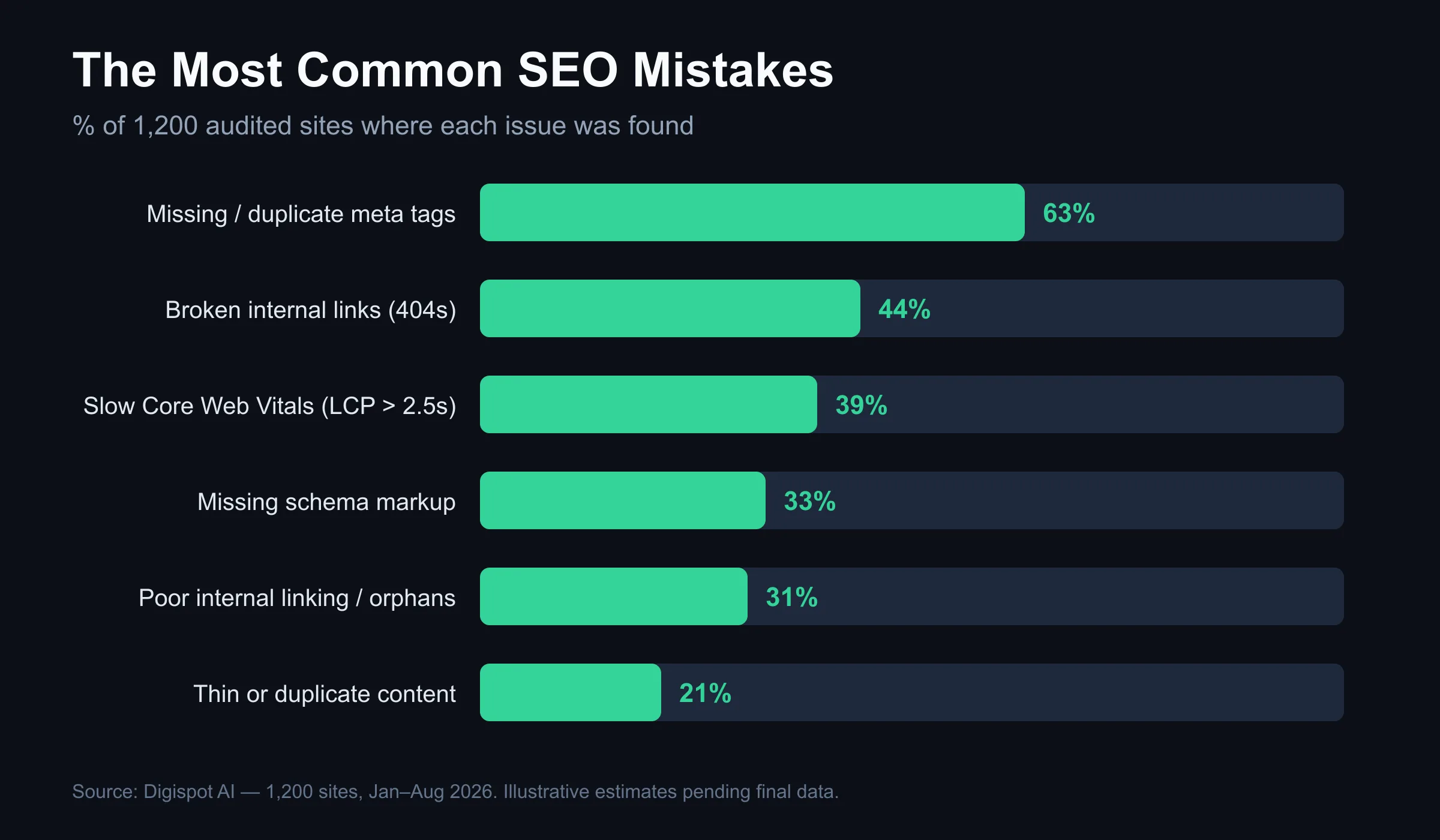
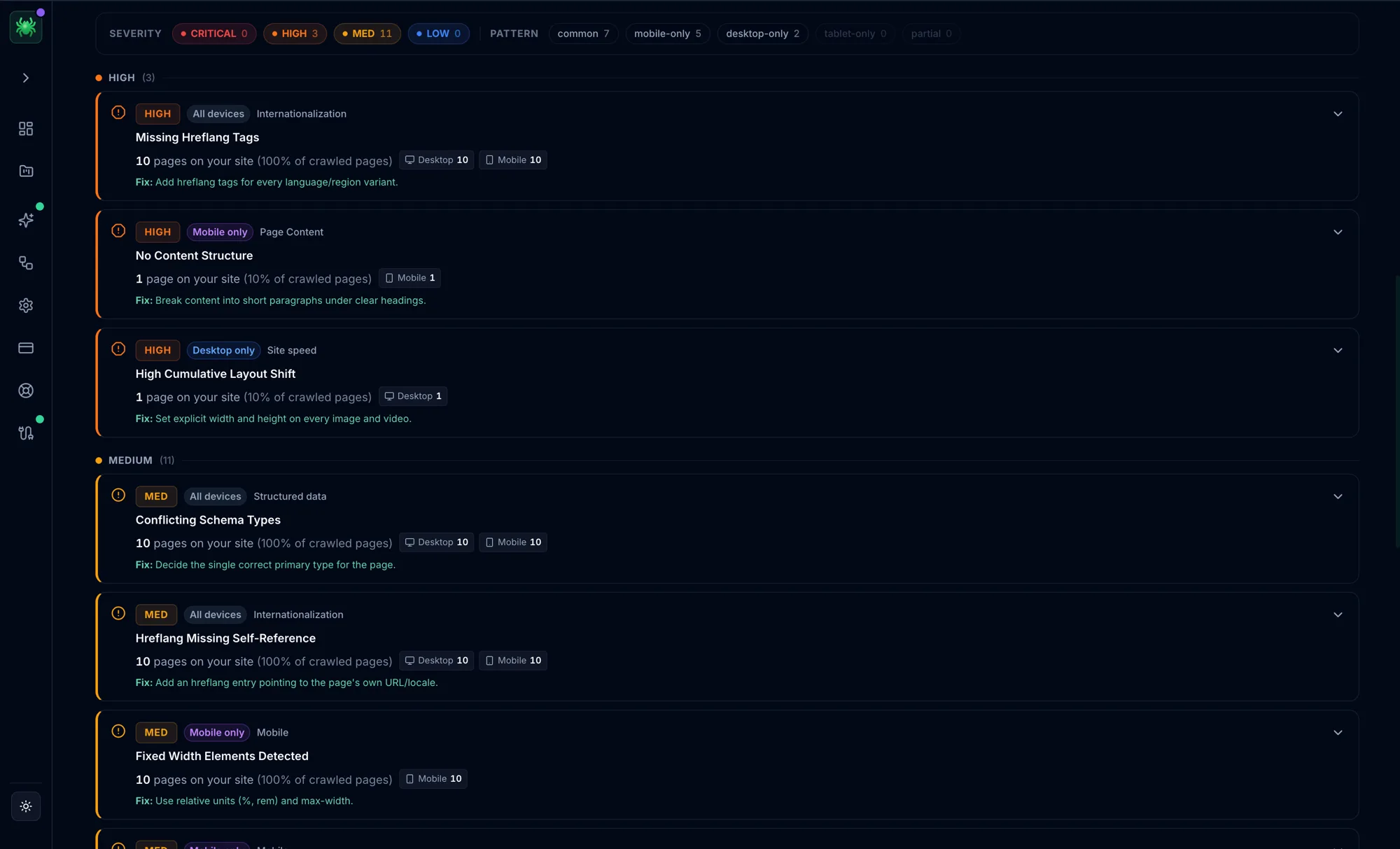
The pattern: the most damaging mistakes are also the most common — and nearly all are quick technical fixes, not strategy overhauls.
Methodology: aggregated from 1,200 sites audited with Digispot AI between January and August 2026, de-duplicated by domain. Percentages reflect the share of sites where the corresponding automated check fired.
1. Ignoring Mobile Optimization
Why It’s a Mistake: Google utilizes mobile-first indexing. This means Google predominantly uses the mobile version of the content for indexing and ranking. If your desktop site is perfect but your mobile site is broken, your rankings will suffer across all devices.
With over 58% of global web traffic coming from mobile devices, a non-responsive site is a conversion killer. Users today expect seamless navigation on smartphones. If text is too small, buttons are too close together ("fat-finger" errors), or content bleeds off the screen, users bounce immediately. High bounce rates signal to Google that your page does not satisfy user intent.
How to Avoid It:
- Implement Responsive Design: Ensure your CSS media queries adapt content fluidly to breakpoints (mobile, tablet, desktop).
- Check Viewport Configuration: Verify your
<meta name="viewport">tag is correctly set so browsers render the page width based on the device width. - Audit Tap Targets: Ensure buttons and links have enough padding (at least 48x48 pixels) to be easily clickable.
- Test with Google Lighthouse: Run a mobile audit to identify specific usability errors.
- Visual Validation: Manually check your site on real devices, not just browser emulators.
2. Overlooking Page Speed
Why It’s a Mistake: Page speed is a direct ranking factor and a critical component of User Experience (UX). Research indicates that 53% of mobile users abandon a page if it takes longer than 3 seconds to load.
Slow pages destroy conversion rates. Search engines have a limited "crawl budget" for your site. If your server response time is sluggish, bots crawl fewer pages, leaving valuable content unindexed. Heavy JavaScript execution and unoptimized assets are usually the culprits.
How to Avoid It:
- Optimize Media: Compress images using modern formats like WebP or AVIF. Tools like TinyPNG help, but automated pipelines are better.
- Leverage Browser Caching: Configure your server headers to tell browsers to store static assets locally, reducing load times for returning visitors.
- Minify Code: Strip unnecessary whitespace and comments from CSS and JavaScript files.
- Use a Content Delivery Network (CDN): Serve assets from servers geographically closer to your users.
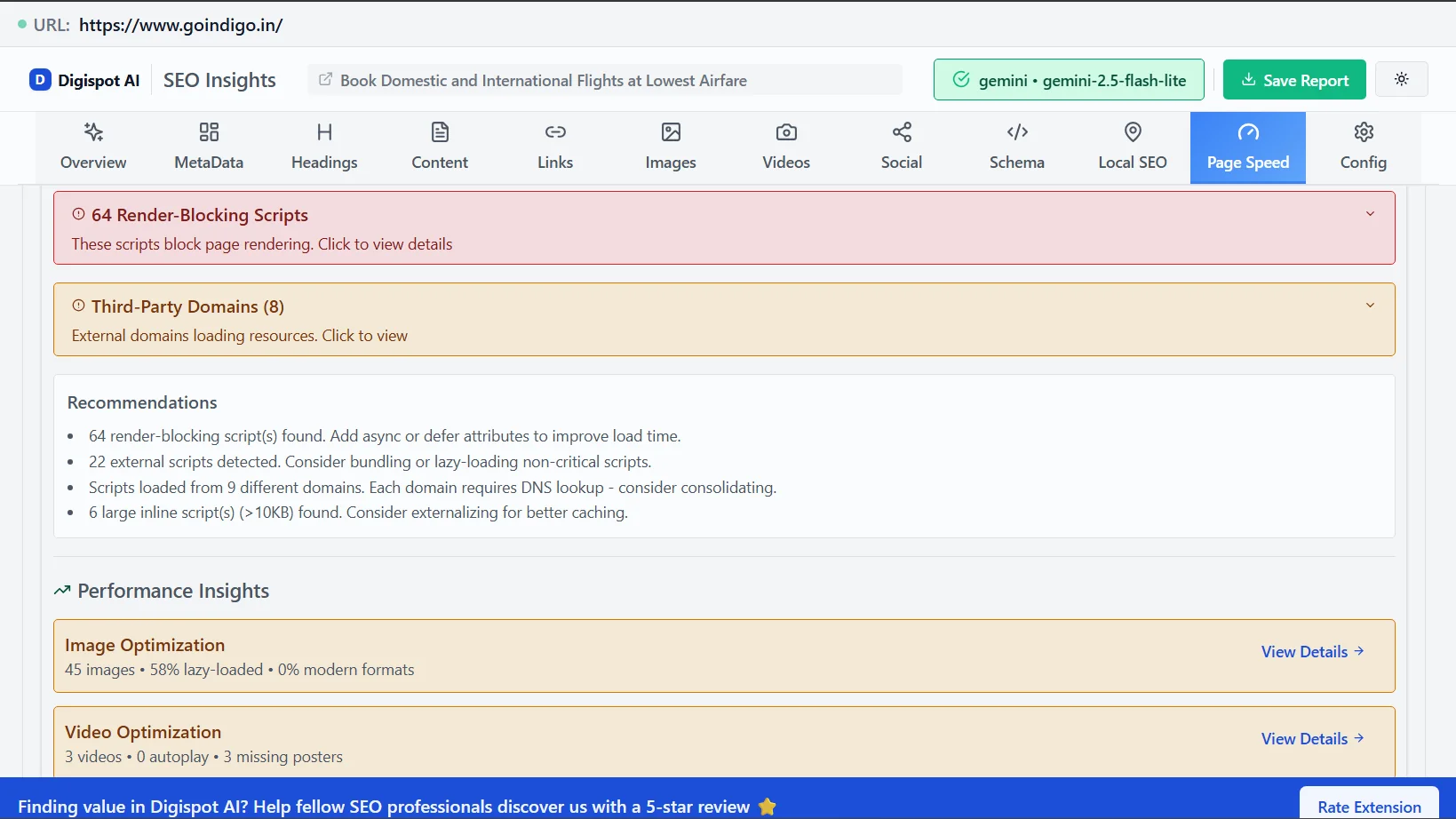
- Audit Regularly: Use Google PageSpeed Insights or the Digispot AI Chrome Extension to get instant speed scores and actionable fix lists while browsing any page.
3. Using Duplicate Content
Why It’s a Mistake: Duplicate content forces search engines to choose which version of a page is "authoritative." Often, they may pick the wrong one—or filter both out of search results entirely. Statistics show that 29% of websites face duplicate content issues, often unintentionally.
Common causes include:
- HTTP vs. HTTPS versions accessible simultaneously.
wwwvs.non-wwwversions.- E-commerce URL parameters (e.g.,
?color=red&size=medium) creating thousands of near-identical pages. - Trailing slashes (e.g.,
/page/vs./page).
How to Avoid It:
- Canonical Tags: Implement
rel="canonical"tags on every page to tell Google exactly which URL is the master version. - 301 Redirects: Enforce site-wide redirects to a single protocol (HTTPS) and subdomain preference.
- Parameter Handling: Configure URL parameters in Google Search Console to tell bots which parameters to ignore.
- Unique Content Creation: Ensure every page has distinct value. If you have thin content, consider consolidating it.
- Regular Audits: Digispot AI can help you identify and fix these issues automatically with AI-powered audits analyzing 300+ ranking factors.
4. Neglecting Meta Tags
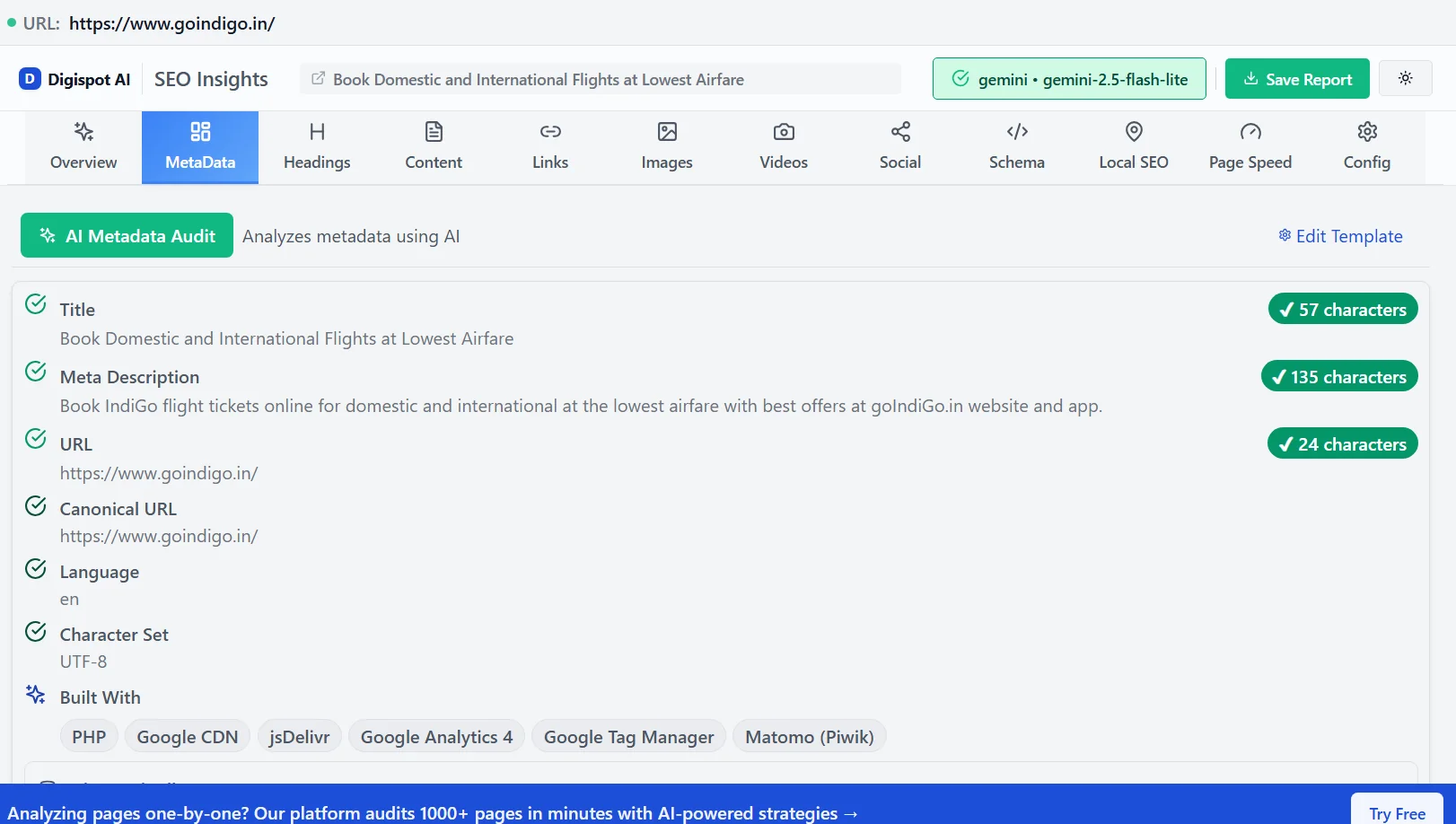
Why It’s a Mistake: Meta titles and descriptions do not always directly impact rankings (though titles do carry keyword weight), but they heavily influence Click-Through Rate (CTR). Your meta tags are your "ad copy" in the SERPs.
A generic or truncated meta description fails to compel the user to click. Pages with optimized, persuasive meta descriptions can achieve up to a 5.8% higher CTR. Conversely, missing tags force Google to auto-generate snippets, which are often irrelevant.
How to Avoid It:
- Front-Load Keywords: Place your primary keyword near the beginning of the title tag.
- Match Search Intent: Ensure the description promises exactly what the user is looking for (e.g., "Free Guide," "Best Price," "Step-by-Step").
- Watch Pixel Width: Google truncates titles based on pixel width (approx. 600px), not just character count.
- Preview Before Publishing: Use the Digispot Meta Preview tool to see exactly how your snippet will appear in search results before you hit publish.
- Grade the Whole Page: Meta tags rarely fail alone. Run the page through the free on-page SEO checker to see title, description, headings and keyword placement graded together against your target keyword.
5. Targeting Irrelevant Keywords
Why It’s a Mistake: High search volume is seductive. Many site owners optimize for broad terms like "shoes" or "software" without considering search intent. If you rank for a keyword but your content doesn't satisfy the user's specific need, they will bounce immediately.
This "pogo-sticking" behavior (users clicking your result and immediately returning to Google) sends a strong negative signal to algorithms. Targeting the wrong keywords can lead to as much as 60% of your traffic bouncing without engagement.
How to Avoid It:
- Analyze Search Intent: Before writing, Google your target keyword. Are the top results blogs, product pages, or tools? Align your content type with what's ranking.
- Focus on Long-Tail Keywords: These phrases (e.g., "best running shoes for flat feet") have lower volume but much higher conversion intent.
- Map Keywords to the Funnel: Ensure you have distinct pages for informational (top of funnel) and transactional (bottom of funnel) queries.
- Detailed Mapping: Learn how to align keywords with user needs in our SEO Audit Checklist.
6. Poor Internal Linking
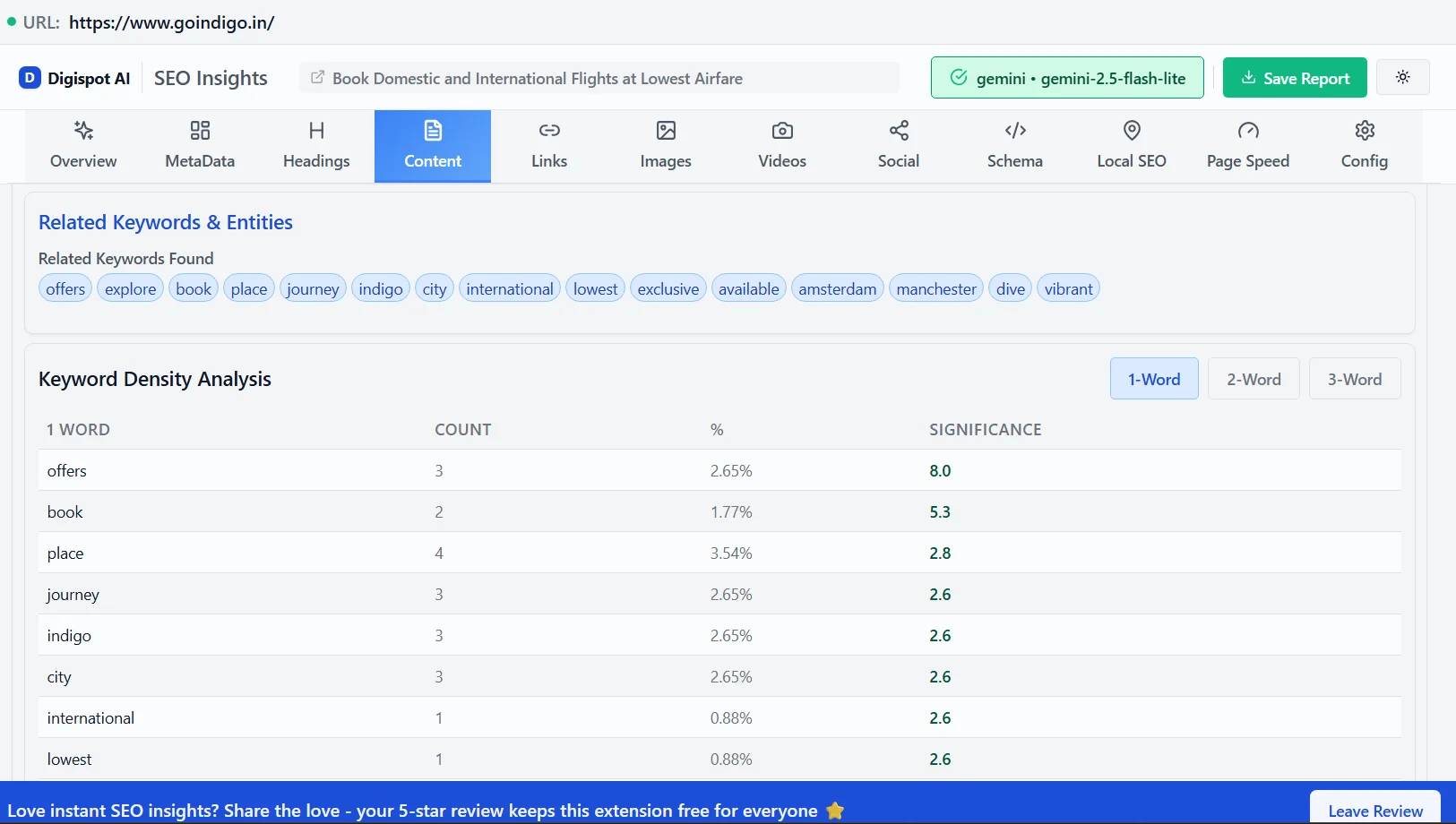
Why It’s a Mistake: Internal links are the highways of your website. They guide users to relevant content and, critically, pass "link equity" (authority) from high-ranking pages to new or deeper pages.
A weak internal linking structure results in orphan pages—pages that exist but have no incoming links. Search engine bots struggle to find these pages, and they rarely rank well. Effective linking can boost crawl rates by up to 40%.
How to Avoid It:
- Use Descriptive Anchor Text: Avoid "click here." Use anchors like "guide to technical SEO" that provide context to search engines.
- Create Content Hubs: Link related articles together in clusters to establish topical authority.
- Audit for Broken Links: Internal links pointing to 404 errors waste crawl budget and frustrate users.
- Strategic Placement: Place links high up in the content where they are more likely to be clicked.
- Deep Linking: Don't just link to your homepage; link deep into product pages or specific blog posts.
- Map It Out: Rather than adding links ad hoc, plan your architecture. Our internal linking strategy guide shows how to model source-to-target links and anchor text across a whole site.
7. Ignoring Core Web Vitals
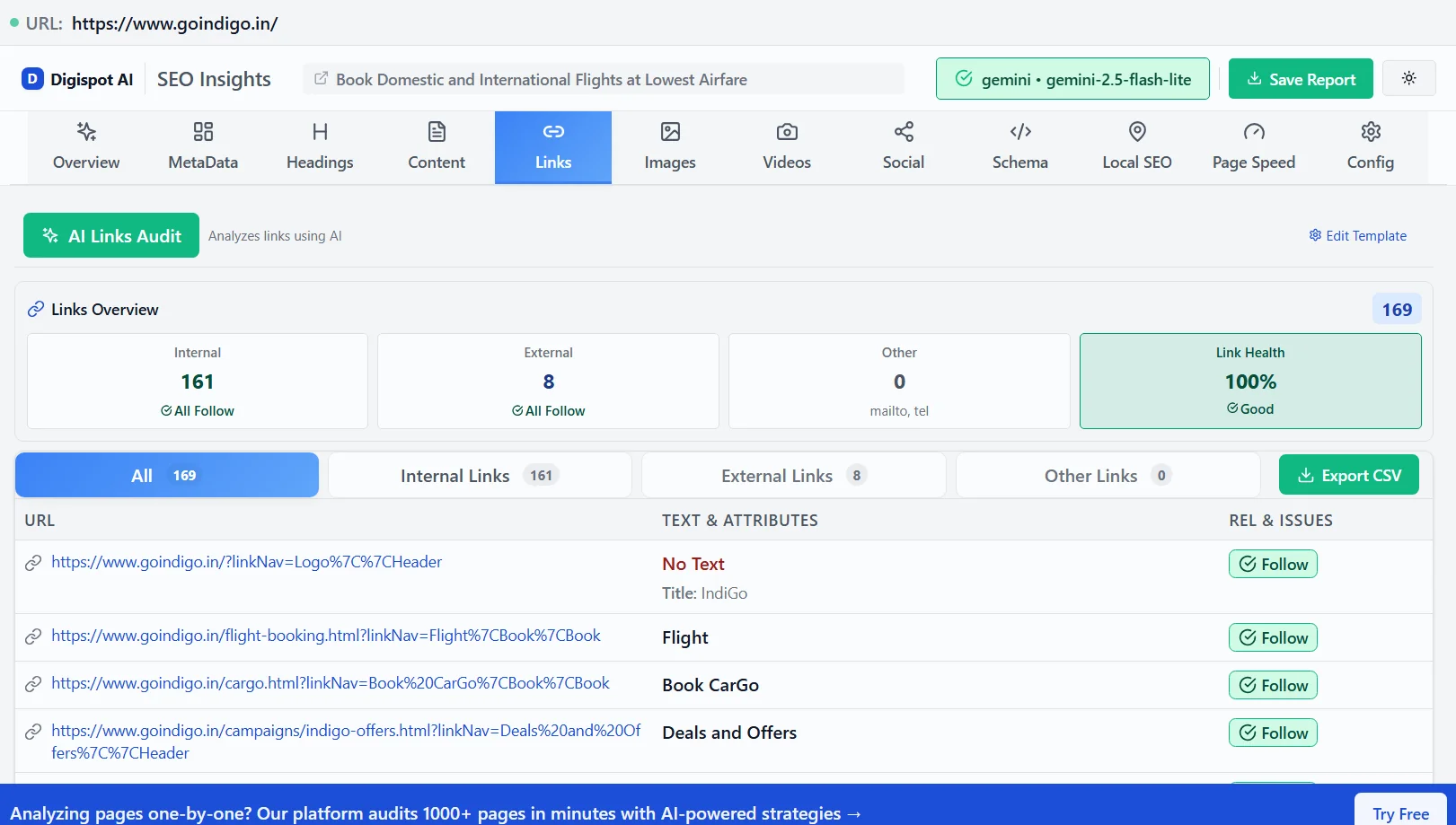
Why It’s a Mistake: Introduced as a major ranking signal, Core Web Vitals (CWV) quantify the user experience regarding loading, interactivity, and visual stability. Ignoring them is no longer an option.
The three pillars are:
- Largest Contentful Paint (LCP): How fast the main content loads.
- Interaction to Next Paint (INP): Replaced FID; measures responsiveness to clicks/taps.
- Cumulative Layout Shift (CLS): Measures visual stability (do elements jump around?).
Improving these metrics correlates directly with business success. Studies show that meeting CWV thresholds can boost engagement rates by 15% or more.
How to Avoid It:
- Identify Shifts: Use DevTools to find images without dimensions that cause layout shifts.
- Optimize LCP: Preload your hero image and ensure your server is fast.
- Monitor Real-World Data: Field data (from real users) matters more than lab data. Google's own guidance on web.dev defines the pass/fail thresholds you should be targeting.
- Dig Deeper: For a comprehensive breakdown of these metrics, read our guide on Core Web Vitals for SEO.
- Automated Tracking: You can use the paid version of Digispot AI to auto-track your Core Web Vitals historically and get code-level recommendations.
8. Lack of Schema Markup
Why It’s a Mistake: Schema markup (structured data) acts as a translator for search engines. It explains what your content is—a recipe, a product, a review, or an event. Without it, you rely on Google's AI to guess.
Missing schema means missing out on Rich Results (star ratings, prices, FAQs in search results). These visual enhancements command attention and can improve CTR by up to 30%.
Consider a simple example. A recipe page with no structured data is just a wall of text to a crawler. Add a Recipe schema block declaring cookTime, recipeIngredient, and aggregateRating, and the same page becomes eligible for a rich card showing cook time and a star rating right in the SERP. The content didn't change — only the machine-readable context did. The eligible types and required properties are documented in the Google Search Central structured data reference, which is the authoritative source for what actually earns a rich result.
How to Avoid It:
- Identify Opportunities: If you have reviews, events, products, or FAQs, you need schema.
- Use JSON-LD: This is Google's preferred format for implementation. Add it in a
<script type="application/ld+json">block in the head — it never touches your visible markup. - Validate Everything: Broken schema is worse than no schema. Run every block through Google's Rich Results Test before shipping.
- Watch the edge case: Marking up content that isn't visible on the page (or that contradicts what users see) can trigger a structured data manual action. Only describe what's actually on the page.
- Go beyond the basics: For nested entities,
sameAslinks, and Organization markup, follow our advanced schema markup guide. - Simplify Implementation: You can use the Digispot AI Schema Markup Generator to generate valid code without needing a developer.
- Check Existing Code: Use the Schema Markup Visualizer to see what search engines currently see on your page.
9. Failing to Monitor Backlinks
Why It’s a Mistake: Backlinks remain one of the strongest ranking signals. However, not all links are good. A sudden influx of spammy links (from gambling sites or link farms) can trigger a manual action or algorithmic devaluation.
Conversely, losing high-quality backlinks (link rot) can cause steady ranking declines that go unnoticed until it's too late. Google penalizes sites associated with spam networks, potentially causing a 20-30% drop in rankings.
A concrete monitoring routine looks like this: (1) pull your referring-domains list monthly and diff it against last month; (2) flag any sudden batch of new links from unrelated or low-quality domains; (3) check whether lost links came from pages that were removed or simply de-indexed; (4) review the anchor-text distribution for over-optimized, exact-match spikes. The watch-out edge case is a negative SEO attack — a competitor pointing a flood of toxic links at you — which is exactly why the diff step matters. Our step-by-step guide to auditing link profiles walks through each of these steps in detail.
How to Avoid It:
- Regular Profiling: Monitor your backlink profile monthly. Look for unusual spikes in referring domains.
- Disavow Toxic Links: If you find spam attacks, use Google's Disavow Tool to tell search engines to ignore those links.
- Anchor Text Analysis: Ensure your incoming links have natural, varied anchor text.
- Build Trust: Focus on earning links through high-quality content rather than buying them. Learn more about building a trustworthy profile in our E-E-A-T SEO Guide.
10. Forgetting to Update Content
Why It’s a Mistake: Content decay is real. Information becomes outdated, statistics change, and competitors publish fresher guides. Google’s "Query Deserves Freshness" (QDF) algorithm prioritizes up-to-date information for many queries.
Letting content sit stagnant is a wasted asset. Updating old content is often cheaper and more effective than creating new posts. Regularly refreshed content can lead to a 67% increase in organic traffic.
How to Avoid It:
- Content Audits: Identify posts that have lost traffic over the last 6 months.
- Refresh Data: Update years (e.g., "Best Tools for 2026"), statistics, and screenshots.
- Add Depth: Expand thin sections and answer new "People Also Ask" questions found in SERPs.
- Check Validity: Ensure all external links still work and point to relevant sources.
- Follow Best Practices: Ensure your updates align with current standards by reviewing our On-Page SEO Best Practices.
Start Improving Your SEO Today
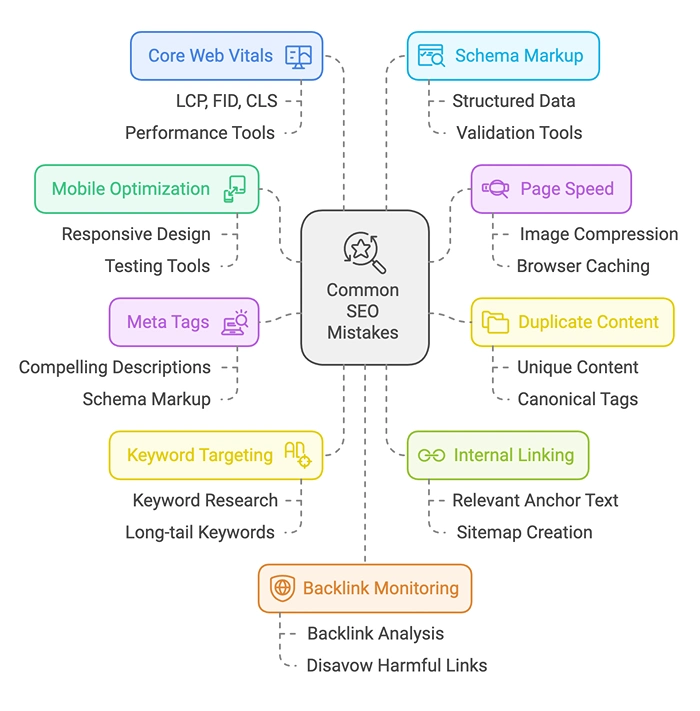
Avoiding these common SEO mistakes is the first step toward a healthier, high-ranking website. However, manual checks are time-consuming and prone to human error.
SEO is a continuous cycle of auditing, optimizing, and monitoring. Even the best strategies fail without consistent execution.
Ready to improve your search visibility? Try Digispot AI for comprehensive website audits and actionable recommendations. Our platform automates the heavy lifting, analyzing over 200 ranking factors to ensure your site isn't just error-free, but primed for growth.
Remember, SEO is not a knowledge problem, but mostly an execution problem due to the complexity of the tasks, number of teams involved and the overall tracking and reporting. Even the best of SEO knowledge is useless if it is not executed well.
Hope you find this article useful and if you have any questions, please reach out to us.
Related deep-dives
Continue with these closely related guides:
- product lifecycle seo — Product Lifecycle SEO: Optimize Every Stage
- personalization seo — Personalization SEO: Dynamic Content & Rankings
- educational seo — Educational SEO: Schools & eLearning Rankings
- pharmacy seo — Pharmacy SEO: Local Visibility for Drugstores
- importance of cdn — Importance of CDN in SEO: Boosting Website Speed & Rankings
- power of user-generated content — The Power of User-Generated Content (UGC) for SEO
- search box seo — Search Box SEO: Sitelinks & Schema Optimization
- visibility in meta ai — Visibility in Meta AI Search: The Ultimate Optimization Strategy
- seo site migration — SEO Site Migration Checklist: The Ultimate 2026 Guide
- microsoft bing seo — Microsoft Bing SEO: Ranking Factors & Optimization
- api documentation seo — API Documentation SEO: Developer Docs Guide
References
- Global mobile traffic statistics: Statista
- Duplicate content impact: Ahrefs Duplicate Content
- Meta descriptions CTR study: Backlinko
- Keyword relevance and bounce rates: Semrush
- Internal linking benefits: Moz
- Core Web Vitals impact: Web.dev
- Schema markup benefits: Google Search Central
- Backlink penalties and disavow tools: Google Search Console Help
- Updating old content to boost ranking: Neil Patel
Audit any page in seconds
300+ SEO checks including Core Web Vitals, schema markup, meta tags, and AI readiness — trusted by 1000+ SEO experts and marketers.
Frequently Asked Questions
Here are some of our most commonly asked questions. If you need more help, feel free to reach out to us.
Written by
Maya Krishnan
Digital growth expert
Maya is a seasoned expert in web development, SEO, and digital strategy, dedicated to helping businesses achieve sustainable growth online. With a blend of technical expertise and strategic insight, she specializes in creating optimized web solutions, enhancing user experiences, and driving data-driven results. A trusted voice in the industry, Maya simplifies complex digital concepts through her writing, empowering readers with actionable strategies to thrive in the ever-evolving digital landscape.