Fix 'Crawled - Currently Not Indexed': 2026 Solutions
Is your content stuck in 'Crawled - Currently Not Indexed' limbo? Discover the root causes and apply proven solutions to get your pages ranked.
 Maya Krishnan
Opening Google Search Console (GSC) to see your new content excludes specific pages can be demoralizing. Among the various exclusion reasons, "Crawled - currently not indexed" is often the most frustrating.
It means Google knows your page exists. It sent Googlebot to read it. But after analyzing the content, Google decided it wasn't worth adding to the search index.
This isn't just a technical glitch; it's a verdict on value.
Unlike "Discovered - currently not indexed," which is often a crawl budget issue, the "Crawled" status suggests your page failed a quality or uniqueness test. Googlebot came, saw, and passed.
This guide breaks down exactly why this happens and provides actionable solutions to get your hard work indexed and ranking. For the wider picture of how discovery, crawling, and indexing fit together, start with our guide on how to index your website on Google.
Key Takeaways
- "Crawled" is a quality verdict, not a crawl-budget problem. Google saw your page and chose to skip it, so the fix lives in the page itself—not in more backlinks or more waiting.
- Thin and near-duplicate content are the top offenders. Add genuine information gain, or consolidate overlapping pages into one authoritative version instead of publishing several weak variants.
- Orphaned pages get ignored. Support the URL with contextual internal links from strong, relevant pages so Google reads it as important.
- Rule out technical false signals before rewriting. Check for stray noindex tags, mismatched canonicals, soft 404s, and out-of-stock schema that can quietly suppress indexing.
- Make a substantial change, then request indexing once. Update the content meaningfully, refresh your sitemap
lastmod, and use "Validate Fix" only for template-wide problems.
Decoding the Status: What Google is Telling You
To fix the problem, you must understand the mechanical decision Google made.
When GSC reports "Crawled - currently not indexed," it confirms three things:
- Accessibility: Googlebot successfully accessed the URL (status code 200).
- Rendering: The page content was rendered and analyzed.
- Rejection: The algorithm decided the content did not meet the threshold for inclusion in the index at this time.
Google creates a massive database of the web. Storing every single page costs money in storage and compute resources. If a page doesn't add unique value, is a near-duplicate of existing content, or appears thin, Google saves resources by discarding it.
The Difference Between "Crawled" vs. "Discovered"
Mixing these two up leads to the wrong solutions.
- Discovered - currently not indexed: Google knows the URL exists (likely from a sitemap or link) but hasn't visited it yet. This is usually about crawl budget or server capacity.
- Crawled - currently not indexed: Google has visited and analyzed the page. This is usually about content quality or technical conflict.
You cannot solve a "Crawled" issue simply by building more backlinks or waiting. You must improve the page itself. If your pages are actually stuck on the earlier stage, our companion guide on fixing the "Discovered - currently not indexed" error walks through the crawl-budget and server-capacity fixes that apply there instead.
Root Cause 1: Thin or Low-Value Content
The most common reason for this status is that Google doesn't see enough unique value on the page compared to what's already in its index.
This doesn't always mean the word count is low. A 2,000-word page can still be "thin" if it repeats information found on ten other sites without adding new insights, data, or perspectives.
How to Identify Quality Issues
Review the affected URLs in GSC. Ask these hard questions:
- Does this page offer significant value beyond the manufacturer description?
- Is the content auto-generated or aggregated?
- Would a user complain if they landed here?
Digispot AI helps you identify these quality gaps objectively. Our AI-powered audits analyze over 200 ranking factors, including content depth and uniqueness, to pinpoint exactly why Google might view a page as low-value.
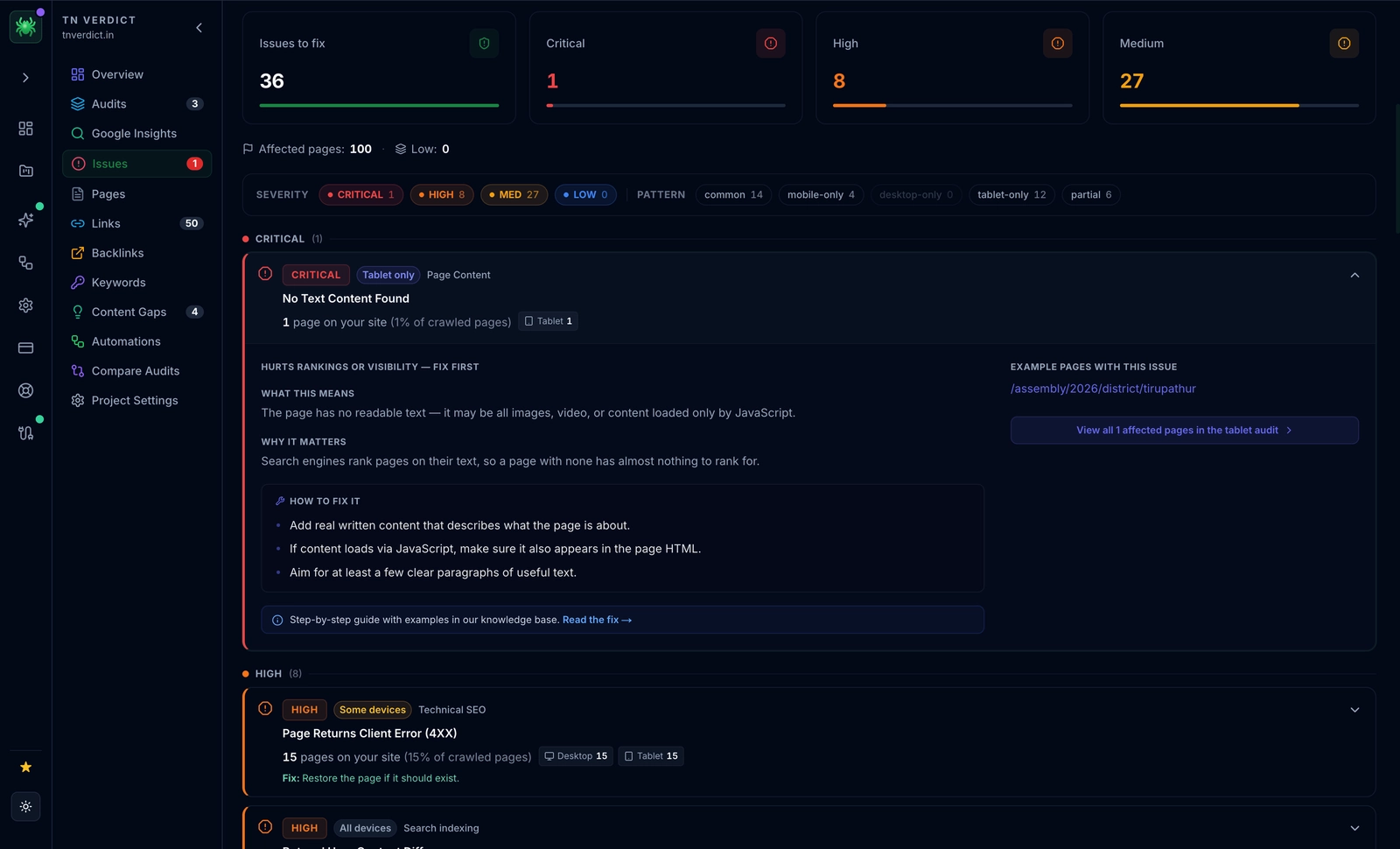
The Digispot AI Spider groups every detected problem by severity—flagging the critical and high-priority issues that hurt rankings first—then lists the affected pages alongside how-to-fix steps, so you can immediately see which quality or technical gap is keeping a URL out of the index.
The Solution: Deepen Thin Content
You need to inject unique value (Information Gain) into the page.
- Add Expert Insight: Don't just state facts; explain why they matter.
- Include Original Data: Use your own statistics, case studies, or customer surveys.
- Enhance Media: Add unique images, diagrams, or videos (not stock photos).
- Expand Scope: Cover subtopics that competitors miss.
For a repeatable bar to measure every draft against, align your process with a set of SEO content quality standards so "good enough" stops being a gut call and becomes a checklist.
If you have hundreds of thin pages (like empty product category pages), consider pruning them. Noindex or 404 pages that provide zero value to users. This consolidates your site's authority.
Root Cause 2: Near-Duplicate Content
Google hates redundancy. If you have five pages discussing "Red Running Shoes" with only slight variations in the text, Google will likely index one and mark the rest as "Crawled - currently not indexed."
This often happens with:
- eCommerce product variants (colors/sizes)
- Location pages with identical copy (swapping "Chicago" for "Houston")
- Paginated series
- Printer-friendly versions of URLs
The Solution: Differentiate Near-Duplicates
You have two primary paths to fix duplicate content issues:
1. Consolidation: Merge several weak, similar pages into one comprehensive "Power Page." A single authoritative guide on a topic is far more likely to index—and rank—than five fragmented posts.
2. Canonicalization: If you must keep the pages separate (e.g., for different ad landing pages), use the canonical tag. This tells Google, "Yes, this is a duplicate, but treat URL A as the main version."
Check your canonical tags instantly. Use our free Chrome extension to view the canonical tag on any page in real-time. If a page self-canonicalizes but is still not indexed, ensure the content is distinct enough.
Root Cause 3: Poor Internal Linking Structure
Sometimes, a page is high quality, but Google perceives it as unimportant because you haven't linked to it.
In Google's eyes, pages linked from your homepage or main navigation are critical. Pages buried six clicks deep with only one internal link are "orphans" or low-priority. If Google crawls a deep page and sees it has zero internal support, it may decide the page isn't worth indexing.
The Audit Process
- Crawl your site to visualize your architecture.
- Identify the "Crawled - not indexed" URLs.
- Check their Click Depth (how many clicks from the homepage).
- Check their Inlink Count (how many internal pages link to them).
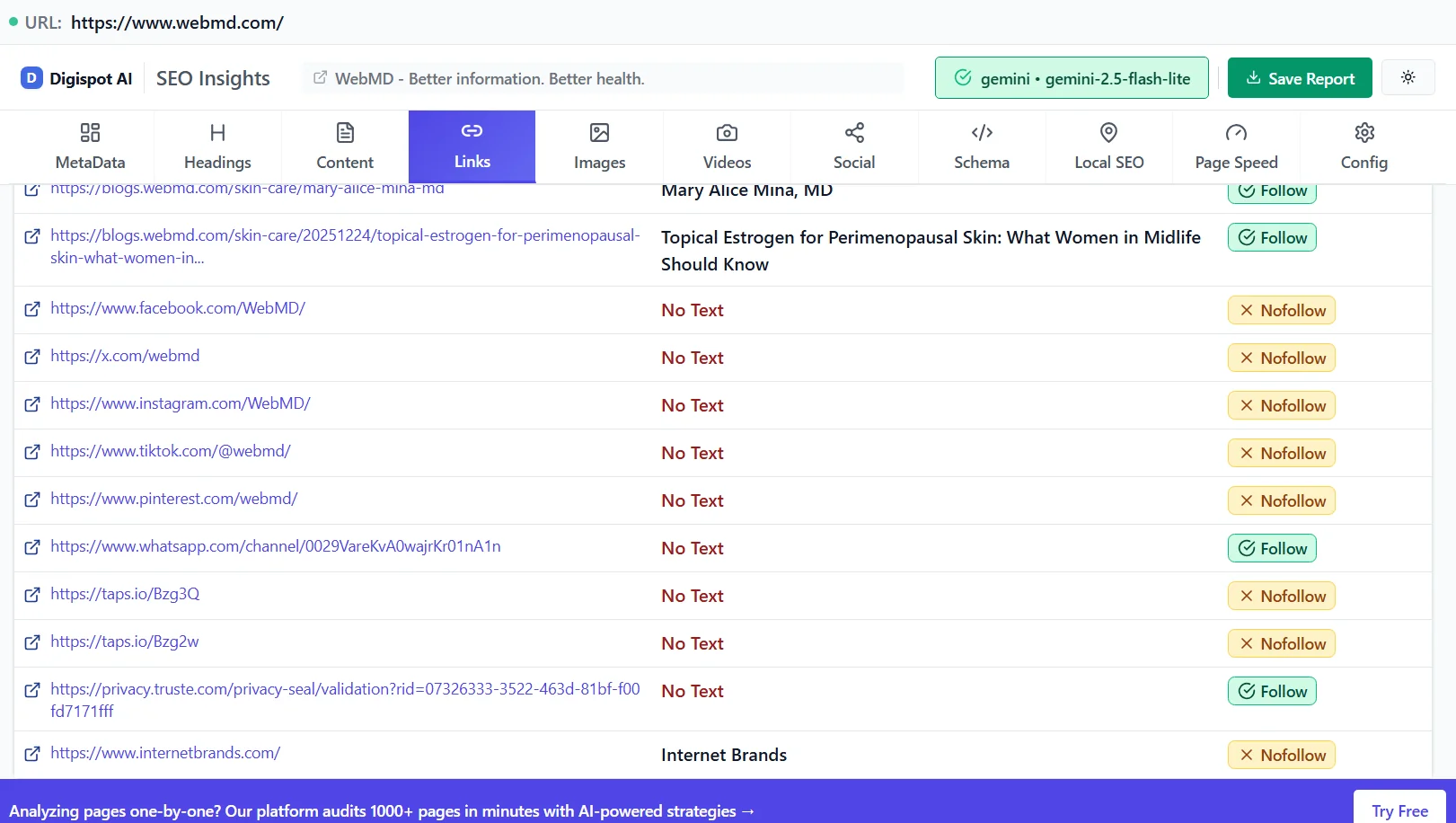
The Solution: Strengthen Internal Links
Bring these pages into the fold.
- Add Contextual Links: Find high-traffic relevant blog posts on your site and link to the unindexed page using descriptive anchor text.
- Update Navigation: If the page is a core service or product, ensure it's accessible via the menu or footer.
- Breadcrumbs: Implement schema-validated breadcrumbs to show Google the page's place in your hierarchy.
Learn more about internal linking strategies to distribute link equity effectively across your site.
Root Cause 4: False Technical Signals
Sometimes the content is great, but your technical setup is sending mixed signals to Googlebot.
Feed URLs and RSS
A common source of "Crawled - currently not indexed" bloat is RSS feed URLs (e.g., /feed/ or /rss/). Google crawls them to find new content but usually doesn't index the feed URL itself. This is normal behavior. You can safely ignore these or block them in robots.txt if they consume too much crawl budget.
Incorrect Availability
Check if the page accidentally has a noindex tag that was removed after Google crawled it. Google caches the last state it saw, so a directive you deleted last week can still be suppressing the URL until the next crawl. If this is a recurring pattern across your site, our guide on fixing the "Excluded by noindex tag" error covers how to find and clear stale directives at scale.
Similarly, check for availability status in structured data. If a product is marked out of stock in Schema markup, Google might delay indexing the page if it assumes the page is a soft 404 (a page that says "product not found" but returns a 200 code). The same soft-404 risk applies to empty search-result pages, filtered category views with zero products, and error states that render a friendly message while still returning a 200 status. Confirm these pages either return a genuine 404/410 when there is nothing to show, or carry enough persistent content to justify indexing.
Conflicting canonical tags are another silent culprit: if a page points its canonical at a different URL, you are explicitly telling Google not to index it. Make sure each page you want indexed self-canonicalizes to its own clean URL. If canonicalization behavior is fuzzy, review what a canonical URL is and how it works before changing tags in bulk.
Use the free Schema Markup Visualizer to ensure your structured data matches the visible content on your page.
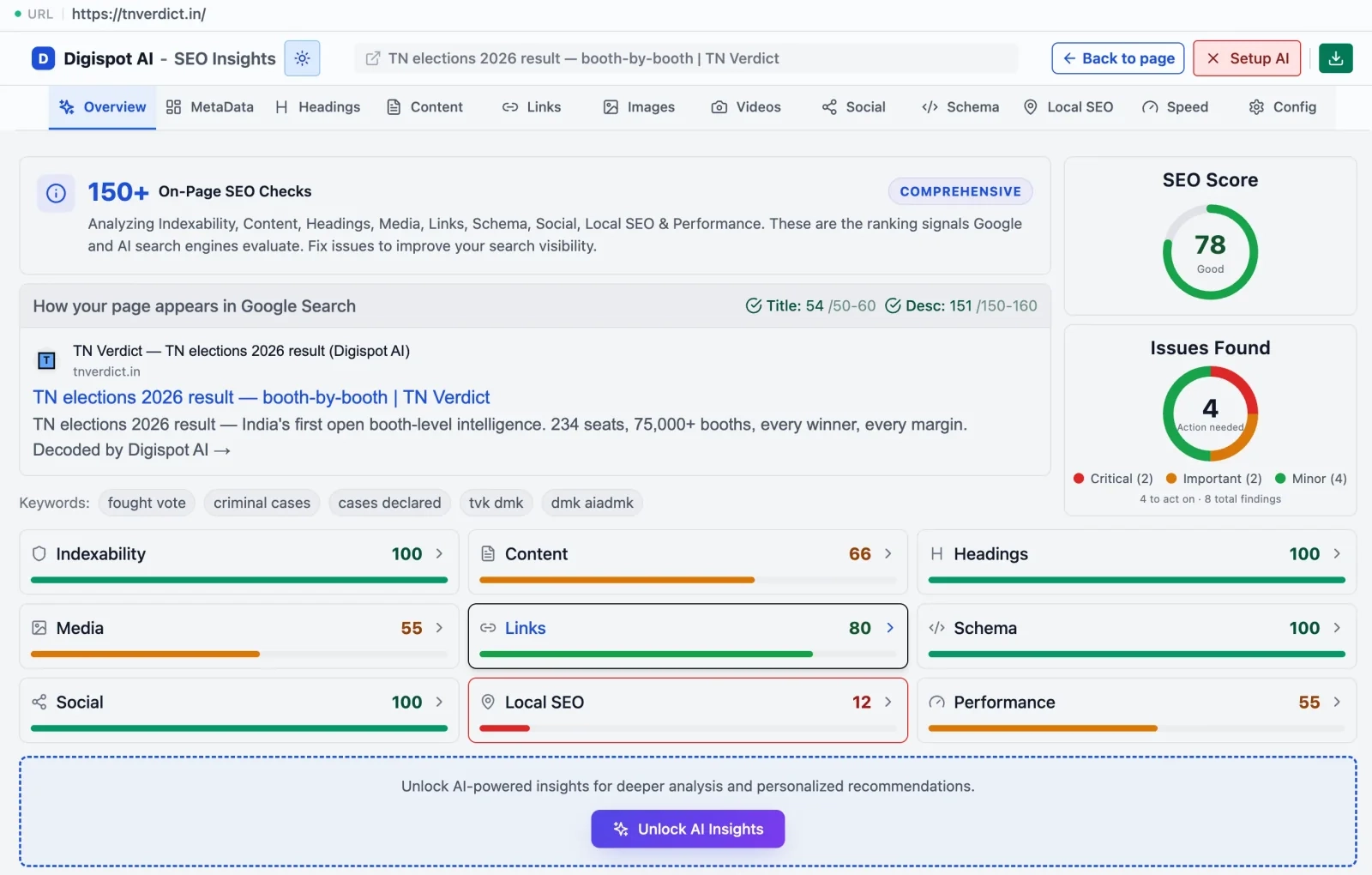
The free Digispot AI Chrome extension runs 150+ on-page checks in real time—including an Indexability score—so you can catch conflicting technical signals like stray noindex tags or mismatched schema on any page before Google decides to exclude it.
Root Cause 5: Keyword Cannibalization
If you write a new blog post about "SEO Audits" but you already have a ranking page for "SEO Audit Guide," Google might simply choose the older, authoritative page and ignore the new one.
This is keyword cannibalization. Google sees the new page as redundant.
The Solution: Consolidate Cannibalized Pages
Before creating content, search your own site (site:yourdomain.com keyword).
- If a strong page exists: Update that page instead of creating a new one.
- If the new page is necessary: Ensure it targets a distinctly different search intent (e.g., "SEO Audit Tool" vs. "SEO Audit Checklist").
When two pages already compete, merging or repositioning them is its own project—our step-by-step guide on how to fix keyword cannibalization shows how to pick the winner and redirect the rest without losing equity.
For a complete review of your site's health, consult our SEO audit checklist for 2026 to catch these structural overlaps early.
Advanced Recovery Strategy: The "Re-Optimization" Loop
If you've identified the problem, follow this step-by-step loop to get the URL indexed.
Step 1: Significant Update
Do not just change the title tag. You must signal to Google that the page has changed substantially.
- Rewrite the introduction.
- Add at least 300 words of new, data-driven content.
- Add a new image with optimized alt text.
- Update the
lastmoddate in your sitemap.
Step 2: Force a Signal
Create a fresh internal link to this page from one of your top-performing pages. This passes "link juice" and encourages Googlebot to recrawl sooner.
Step 3: Inspect and Request
- Go to Google Search Console.
- Paste the URL in the inspection tool.
- Click "Test Live URL" to ensure the current version is renderable.
- Click "Request Indexing."
Note: Do not spam the "Request Indexing" button. Do it once after your changes are live.
When to Use "Validate Fix" in GSC
In the "Pages" report in GSC, you can click on the "Crawled - currently not indexed" row and hit "Validate Fix."
Do this only after you have applied a widespread fix (like fixing a template issue that affected 500 pages).
- Good use: You fixed a canonical tag error on all product pages.
- Bad use: You updated one blog post.
Validation triggers a slow, site-wide recrawl of the affected URLs. For individual pages, the URL inspection tool is faster.
Preventing Future Indexing Issues
Prevention is cheaper than the cure. To keep your "Crawled - not indexed" bucket empty, you need a proactive content strategy.
1. Maintain High E-E-A-T
Experience, Expertise, Authoritativeness, and Trustworthiness are not just buzzwords; they are filters. Ensure every page displays clear authorship, accuracy, and depth. Read our guide on E-E-A-T SEO to align your content with quality rater guidelines.
2. Monitor Core Web Vitals
While rarely the sole cause of non-indexing, poor user experience signals can tip the scales against a borderline page. If a page takes 5 seconds to load, Googlebot may abandon rendering resources. Improve your scores using insights from our Core Web Vitals guide.
3. Use AI for Pre-Publishing Checks
Don't guess if your content is good enough. Try Digispot AI to run a comprehensive audit before you publish. Our platform predicts indexability issues by analyzing your draft against top-ranking competitors and technical constraints.
Conclusion: Turning "Crawled" into "Ranked"
The "Crawled - currently not indexed" status is a clear signal from Google: "Do better." It is an invitation to refine your content quality, sharpen your technical SEO, and clarify your site structure.
Don't let valuable content gather dust in the exclusion report.
- Audit your excluded pages to separate quality issues from technical ones.
- Enhance thin content with unique data and expert insights.
- Consolidate near-duplicates to focus your authority.
- Link internally to show Google which pages matter.
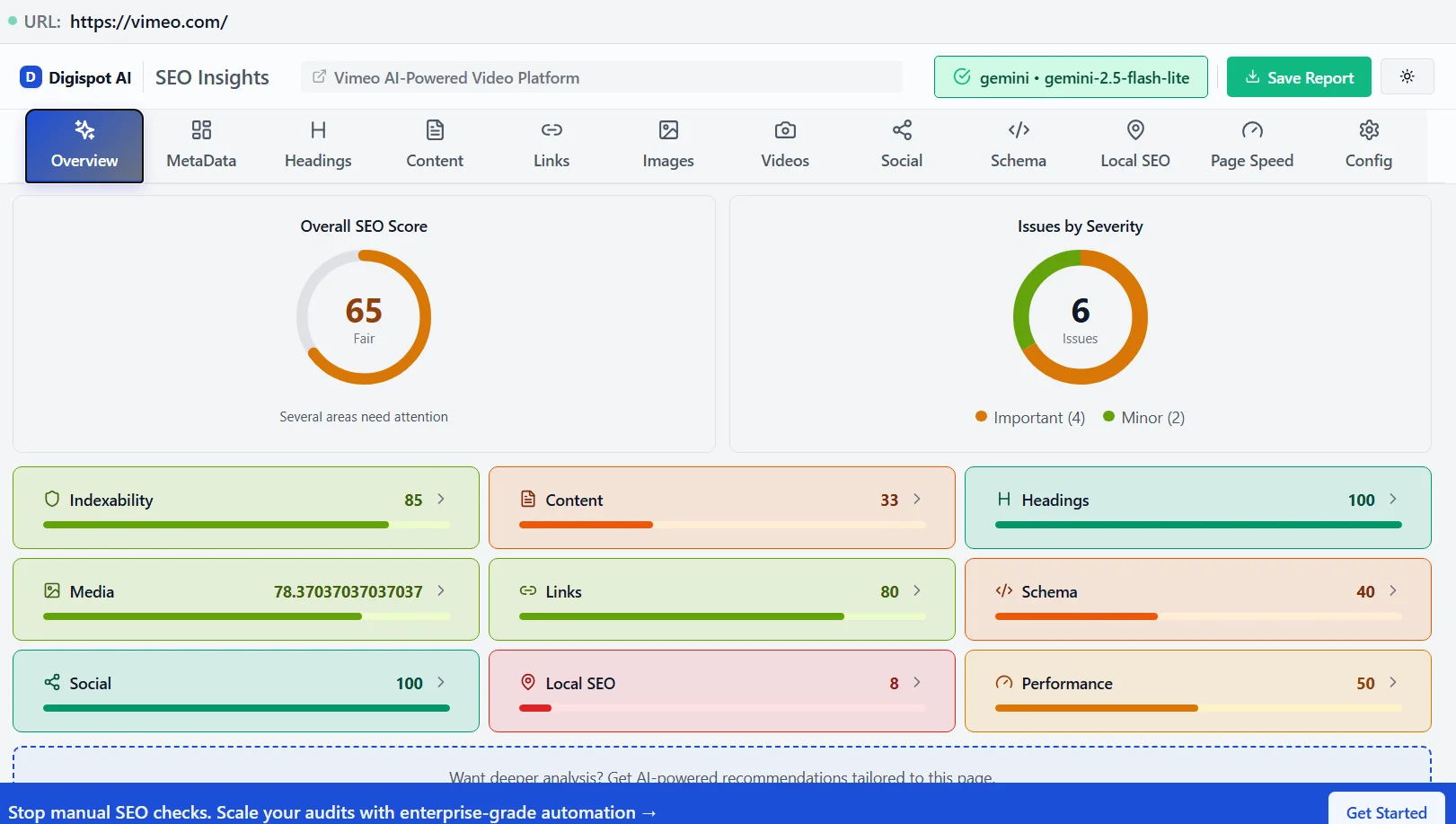
Turn invisible SEO data into clear visuals with our Free Chrome extension
Ready to improve your search visibility? Try Digispot AI for comprehensive website audits and actionable recommendations that take the guesswork out of indexing.
References
Audit any page in seconds
300+ SEO checks including Core Web Vitals, schema markup, meta tags, and AI readiness — trusted by 1000+ SEO experts and marketers.
Frequently Asked Questions
Here are some of our most commonly asked questions. If you need more help, feel free to reach out to us.
Written by
Maya Krishnan
Digital growth expert
Maya is a seasoned expert in web development, SEO, and digital strategy, dedicated to helping businesses achieve sustainable growth online. With a blend of technical expertise and strategic insight, she specializes in creating optimized web solutions, enhancing user experiences, and driving data-driven results. A trusted voice in the industry, Maya simplifies complex digital concepts through her writing, empowering readers with actionable strategies to thrive in the ever-evolving digital landscape.