Product Schema SEO: Implement Rich Snippets
Implement product schema markup for e-commerce SEO. Add structured data to earn rich results, display prices and reviews, and boost click-through rates.
 Maya Krishnan
Imagine your products shining brighter in search results, capturing immediate attention with star ratings, prices, and availability details right there on Google. This isn't magic; it's the power of Product Schema Markup, a secret weapon for e-commerce businesses to stand out and attract more qualified buyers. Ready to transform how your products appear online and boost your sales? This guide covers exactly how to implement Product Schema effectively to give your online store the competitive edge it deserves.
Every day, millions of potential customers search for products online. They scroll through pages of results, making split-second decisions based on visual cues. If your product listings don’t immediately convey value, availability, and social proof, you miss out on vital clicks. Product Schema makes your listings irresistible by pushing critical decision-making data directly to the search results page.
Key Takeaways
- Use JSON-LD, not Microdata. Google prefers JSON-LD injected into the page
<head>, and keeping structured data separate from your HTML makes it easier to maintain across design changes. - Cover the required fields first.
name,image,description, andoffers(withpriceandpriceCurrency) are mandatory for a product rich result;aggregateRating,gtin,shippingDetails, andhasMerchantReturnPolicyunlock richer Merchant Listing badges. - Never let schema drift from the page. Prices, availability, and review counts in your markup must match what the user sees, or Google may treat the mismatch as deceptive and disqualify the snippet.
- Validate before you ship, then monitor. Run every template through the Rich Results Test, then watch the Merchant Listings and Enhancements reports in Search Console to catch regressions after deploys.
- Treat schema as your AI-search API. Answer engines ingest structured data to build and cite product answers, so robust markup is now a prerequisite for visibility, not just a CTR boost.
What Exactly is Product Schema?
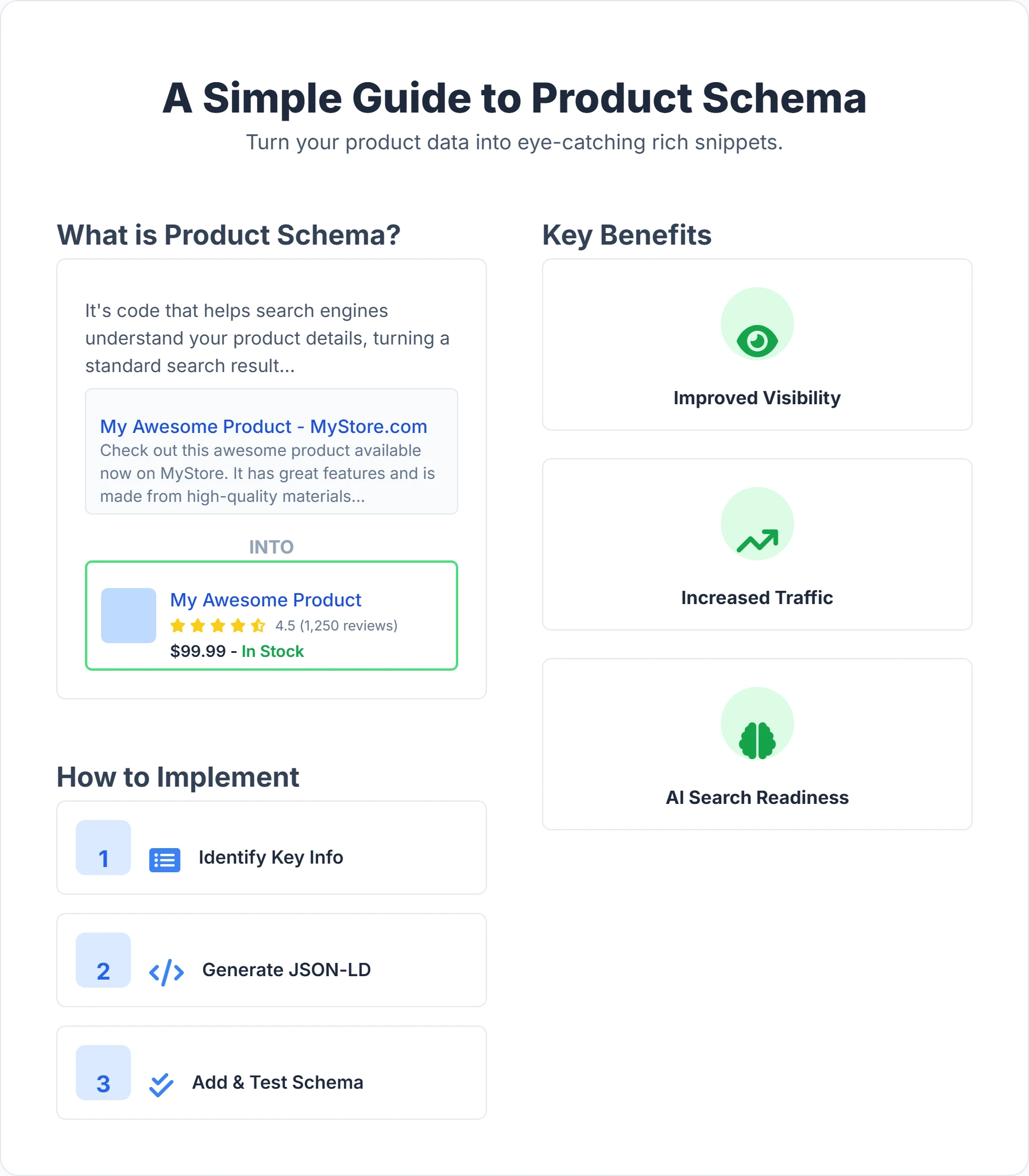
At its core, Product Schema is a standardized vocabulary of structured data added to your product pages. It acts as a translator between your website and search engines like Google, Bing, and emerging AI platforms. Instead of relying on algorithms to "read" your visual content and guess the price or stock status, you provide explicit machine-readable code (JSON-LD) that defines these entities clearly.
This data allows search engines to display "rich snippets" or "rich results." Rather than a standard blue link and text snippet, your result transforms into a visual card or enhanced listing.
A fully optimized Product rich snippet displays:
- Star Ratings: Visual yellow stars representing aggregate customer feedback.
- Price: The current selling price, often including currency.
- Availability: Clear status indicators like "In stock" or "Pre-order."
- Shipping & Returns: Details on delivery costs or return windows (e.g., "Free 30-day returns").
- Price Drops: A "Price drop" badge if the current price is lower than the historical average.
- Brand & Images: High-quality thumbnails and manufacturer attribution.
This extra information minimizes friction for the user. They see exactly what they need to know before they even click, which qualifies the traffic and reduces bounce rates.
Why is Product Schema Crucial for E-commerce?
Implementing Product Schema goes beyond technical housekeeping; it is a fundamental driver of modern SEO performance. The benefits ripple through every stage of the user journey.
1. Dominate Visual Real Estate (Rich Snippets) The most tangible benefit is the visual upgrade. In a sea of text, color draws the eye. Rich snippets occupy more vertical space and use contrasting colors (like yellow stars or green "In Stock" text) to grab attention. This distinction is critical on mobile devices where screen real estate is limited. If your competitor has rich snippets and you don't, their listing looks trustworthy and complete, while yours may appear generic.
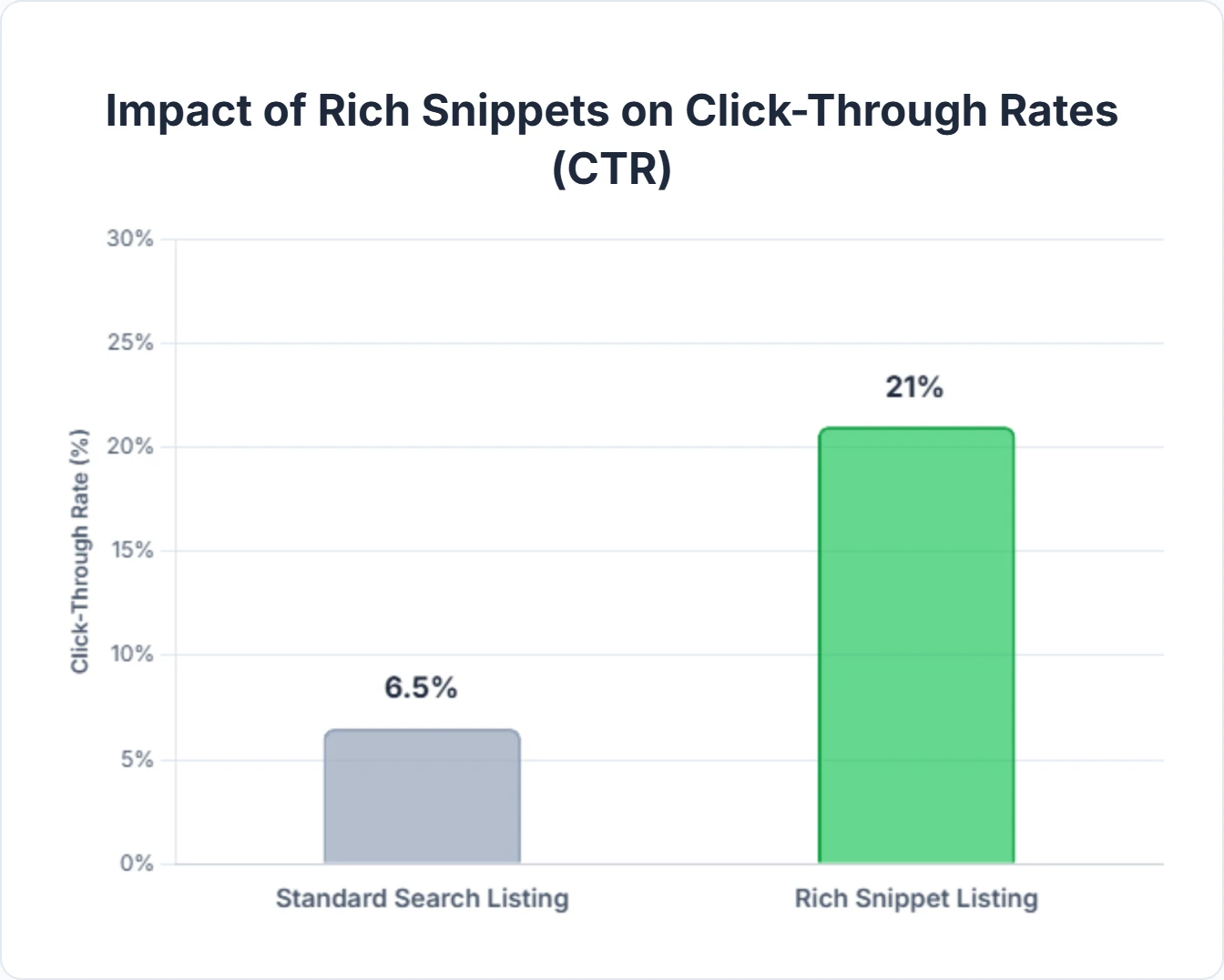
2. Drive Higher Click-Through Rates (CTR) Data confirms that users prefer listings with more information. By displaying price and ratings upfront, you attract users who are actually interested in your specific offer. A user seeing a $500 price tag who clicks anyway is a much hotter lead than someone clicking blindly. This pre-qualification boosts your CTR and improves the quality of visitors landing on your site. For tactics that compound with rich snippets, see our guide to CTR optimization for SEO.
3. Feed the AI Ecosystem (AEO) Search is shifting toward Answer Engine Optimization (AEO). Platforms like ChatGPT, Google's AI Overviews (SGE), and Perplexity don't just "crawl" text; they ingest structured data to construct answers. When a user asks an AI, "Find me highly-rated running shoes under $100," the AI relies heavily on Product Schema to filter and recommend items. Without structured data, your products are invisible to these next-generation search agents. You can learn more about the broader context of structured data in our guide to data schema SEO.
4. Enhance Google Shopping and Merchant Listings Google has merged the lines between traditional organic results and shopping experiences. Product Schema is now a primary method for feeding the "Merchant Listings" experiences, which include the "Popular Products" grids and knowledge panels. Proper schema implementation can get your products into these highly visual, free shopping placements without needing a paid Merchant Center feed for every single instance. If you are still building the fundamentals, our e-commerce SEO guide for beginners shows where schema fits alongside site structure and category optimization.
5. Operational Efficiency Automating your schema implementation saves time. By dynamically pulling data from your database into JSON-LD, you ensure search engines always have the latest info without manual page edits. Platforms like Digispot AI streamline this by auditing your existing setup and flagging inconsistencies instantly, allowing you to focus on strategy rather than code syntax.
How to Implement Product Schema: A Step-by-Step Guide
While the concept is technical, the implementation process follows a logical path. Whether you are coding manually or using a plugin, understanding the mechanics ensures you get the best results.
Step 1: Audit and Gather Data Before implementation, identify the data points you actually have. You cannot mark up data you don't display to the user. Ensure you have:
- Global identifiers: GTIN, MPN, or ISBN are critical for Google to match your product to its knowledge graph.
- Images: High-resolution URLs.
- Pricing: Base price, currency, and sale prices.
- Reviews: Access to your review platform's data (e.g., Yotpo, Judge.me) to pull rating counts.
Step 2: Construct the JSON-LD Google strongly prefers JSON-LD (JavaScript Object Notation for Linked Data) over Microdata. JSON-LD keeps your structured data separate from the visual HTML, making it easier to maintain and less prone to breaking when you change your site design.
Here is a robust example including the critical MerchantReturnPolicy and shippingDetails which are newer requirements for enhanced listings:
<script type="application/ld+json">
{
  "@context": "https://schema.org/",
  "@type": "Product",
  "name": "Super Comfy Ergonomic Chair",
  "image": [
    "https://www.example.com/images/ergonomic-chair-1x1.jpg",
    "https://www.example.com/images/ergonomic-chair-4x3.jpg"
  ],
  "description": "An incredibly comfortable ergonomic chair designed for long hours of work. Features lumbar support and breathable mesh.",
  "sku": "CHAIR-ERG-001",
  "mpn": "925872",
  "brand": {
    "@type": "Brand",
    "name": "ComfyWork"
  },
  "review": {
    "@type": "Review",
    "reviewRating": {
      "@type": "Rating",
      "ratingValue": "5",
      "bestRating": "5"
    },
    "author": {
      "@type": "Person",
      "name": "Jane Doe"
    }
  },
  "aggregateRating": {
    "@type": "AggregateRating",
    "ratingValue": "4.8",
    "reviewCount": "125"
  },
  "offers": {
    "@type": "Offer",
    "url": "https://www.example.com/products/ergonomic-chair",
    "priceCurrency": "USD",
    "price": "349.99",
    "priceValidUntil": "2025-12-31",
    "itemCondition": "https://schema.org/NewCondition",
    "availability": "https://schema.org/InStock",
    "hasMerchantReturnPolicy": {
      "@type": "MerchantReturnPolicy",
      "applicableCountry": "US",
      "returnPolicyCategory": "https://schema.org/MerchantReturnFiniteReturnWindow",
      "merchantReturnDays": 30,
      "returnMethod": "https://schema.org/ReturnByMail",
      "returnFees": "https://schema.org/FreeReturn"
    },
    "shippingDetails": {
      "@type": "OfferShippingDetails",
      "shippingRate": {
        "@type": "MonetaryAmount",
        "value": 0,
        "currency": "USD"
      },
      "deliveryTime": {
        "@type": "ShippingDeliveryTime",
        "handlingTime": {
          "@type": "QuantitativeValue",
          "minValue": 0,
          "maxValue": 1,
          "unitCode": "d"
        },
        "transitTime": {
          "@type": "QuantitativeValue",
          "minValue": 1,
          "maxValue": 3,
          "unitCode": "d"
        }
      }
    }
  }
}
</script>
Step 3: Generate and Validate You don't need to write this from scratch. Use the free Schema Markup Generator to build your base code. Select "Product" from the dropdown, fill in your fields, and copy the script.
Once generated, validation is non-negotiable. Paste your code into the Rich Results Test tool by Google. This tool simulates how Google sees the data. It will highlight:
- Errors: Critical issues that prevent the rich snippet from showing (e.g., missing price).
- Warnings: Recommended fields you missed (e.g., missing aggregate rating). While warnings won't block the snippet, fixing them improves your data quality.
Test the rendered URL, not just the raw code, if your schema is injected by JavaScript—the "Test URL" mode confirms Googlebot actually sees the markup after render. Keep in mind that passing this test only means you are eligible: it does not guarantee Google will display the snippet. For a full walkthrough of the toolchain, see our guide on how to validate and test schema markup.
Step 4: Deployment Strategies
- Shopify: Many themes have built-in schema, but they are often incomplete. Apps like "JSON-LD for SEO" or custom coding in the
theme.liquidfile are often required for full coverage. - WordPress/WooCommerce: Plugins like Yoast SEO or RankMath handle the basics well. For advanced custom fields (like specific material types or dimensions), you may need dedicated schema plugins.
- Custom Builds: Inject the JSON-LD script into the
<head>of your product templates dynamically using your server-side language (PHP, Python, Node.js).
Step 5: Monitor Performance After deployment, use the "Merchant listings," "Product snippets," and "Enhancements" reports in Google Search Console. These reports track valid items and flag new errors as they arise. Build monitoring into your release process:
- Check after every deploy. Template or theme changes are the most common cause of schema breaking. Re-validate a sample product URL immediately after each release.
- Watch the "Invalid" and "Valid with warnings" counts. A sudden spike usually points to a single template bug affecting many SKUs at once, not isolated data errors.
- Set a recrawl expectation. Errors and fixes can take days to reflect; use "Validate Fix" in the report to prompt Google to recheck affected URLs.
- Reconcile with sales data. Pair schema health with organic CTR trends so you can attribute rich-snippet wins. Our guide to using Google Search Console for e-commerce covers these reports in depth.
Deep Dive: Product Schema Properties
To truly optimize, you must understand what each property communicates. Here is an expanded breakdown of standard and advanced properties.
| Property Name | Description | Why It Matters |
|---|---|---|
name | The specific name of the product. | Should match the H1 tag. Avoid keyword stuffing here; keep it descriptive and accurate. |
description | Full product description. | Provides context for non-keyword queries (e.g., "chair with lumbar support"). |
image | URL(s) of product images. | Required for the visual thumbnail in SERPs. Google recommends multiple aspect ratios (1x1, 4x3, 16x9). |
sku / mpn | Stock Keeping Unit / Manufacturer Part Number. | Helps Google identify the specific product variation and match it to manufacturer data. |
gtin | Global Trade Item Number (UPC, EAN, ISBN). | Critical for Merchant Listings. Google uses GTIN to cluster sellers of the same product. |
brand | Brand or manufacturer name. | builds entity authority and helps brand loyalists find your products. |
offers | Nested object for price and sales data. | Separates the "product" (the physical item) from the "offer" (your specific deal). |
priceCurrency | ISO 4217 currency code (e.g., USD). | Essential for international SEO to ensure correct currency display. |
availability | InStock, OutOfStock, PreOrder. | Prevents user frustration by showing stock status before the click. Reduces bounce rate. |
hasMerchantReturnPolicy | Details on return windows and fees. | A newer requirement for the "Merchant Listing" badge. Builds high trust with users. |
shippingDetails | Cost and speed of delivery. | Allows Google to calculate "Total Price" (Price + Shipping) for comparison shopping. |
aggregateRating | Average score and review count. | The source of the "Star Rating" snippet. Requires valid review data. |
Accurate mapping of these properties ensures your products are eligible for the widest range of search features.
Digispot AI: Your Partner in Schema Optimization
Managing schema across hundreds or thousands of SKUs is daunting. Errors can creep in during site updates, pricing changes, or platform migrations. Digispot AI provides the infrastructure to manage this complexity.
Automated Schema Auditing
Digispot AI doesn't just check if your tags exist; it validates the logic. Our platform performs 150+ page-level checks to ensure your Product Schema aligns with Google's latest requirements and Merchant Center policies. If your price in schema conflicts with the visible price on the page (a common cause for penalties), Digispot AI flags it immediately.
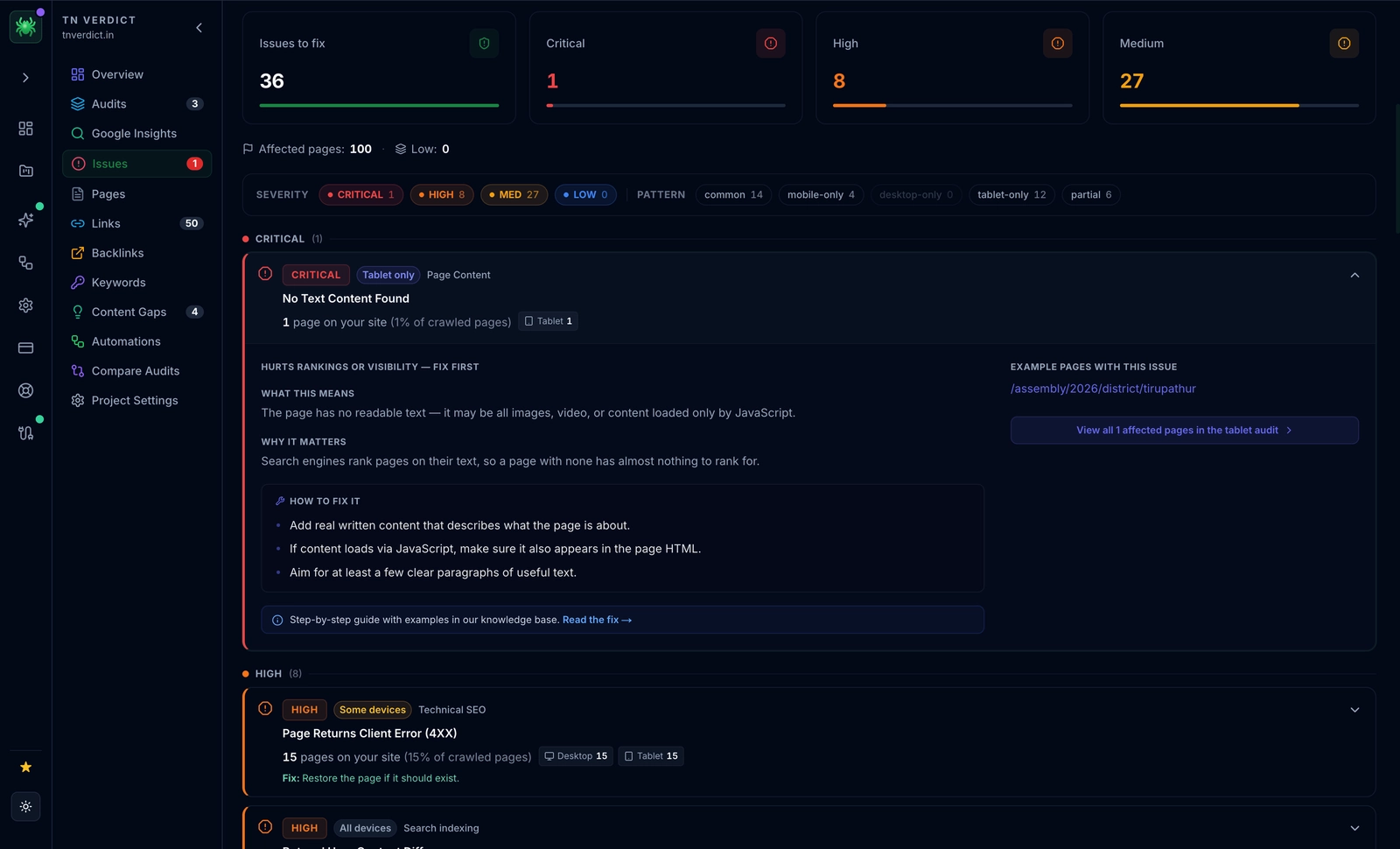
Visualizing the Invisible Code can be abstract. Digispot AI's visualization tools render your JSON-LD into a clear, structured view. This allows marketing teams—not just developers—to verify that the brand name, pricing tiers, and return policies are accurate. You can see exactly how search engines interpret your data structure.
Competitor Intelligence
Wondering why a competitor has a rich snippet for "Free Shipping" and you don't? Digispot AI allows you to analyze competitor pages to reverse-engineer their schema strategy. You can spot gaps in your own implementation, such as missing shippingDetails or hasVariant properties. To ensure your overall on-page strategy is sound, review our SEO audit checklist for 2026 to see how schema fits into the bigger picture.
Content Synergy Schema works best when supported by high-quality content. Our Content Studio helps you write product descriptions that align with your structured data entities, reinforcing the signals sent to Google. This holistic approach ensures that your code and your content tell the same story.
Get instant SEO insights on any page you visit with our free Chrome extension. It brings the power of Digispot's analysis directly to your browser.
Maximizing Impact with the Digispot AI Chrome Extension
For SEO professionals and store owners, the Digispot AI free community Chrome extension is a daily driver for quality assurance.
Real-Time Schema Detection When you land on a product page, the extension instantly parses the HTML to find structured data. It categorizes it by type (Product, Breadcrumb, Organization) and displays the raw values. This is incredibly faster than viewing the page source and searching for "json".
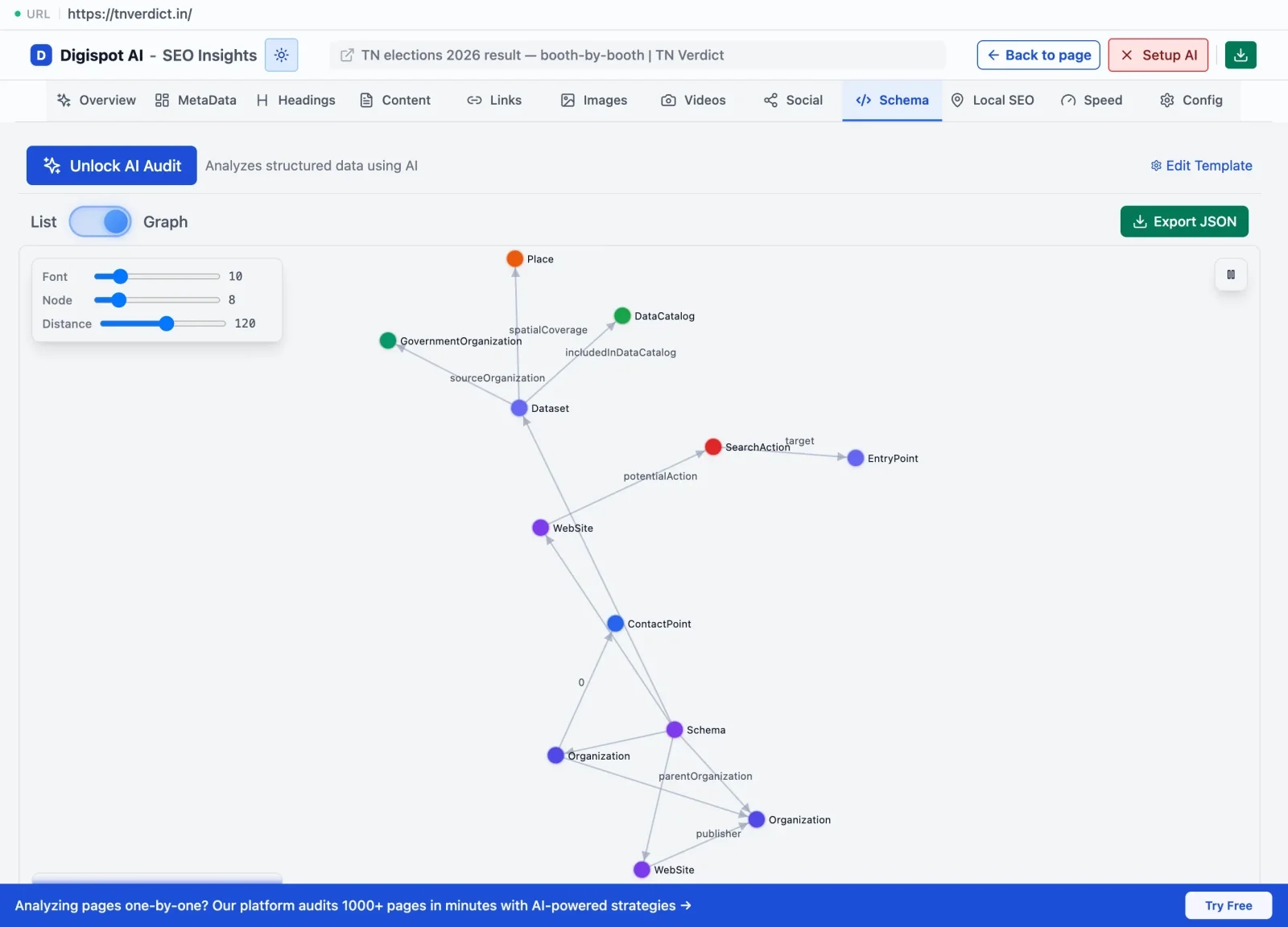
Issue Highlighting
The extension uses the same logic as our core platform to identify errors. If your aggregateRating is missing the ratingValue, or if you've used an invalid availability format, the extension alerts you right in the sidebar. This immediate feedback loop is perfect for developers testing changes in a staging environment before pushing to live.
LLM-Powered Insights Uniquely, our extension leverages advanced Large Language Models (LLMs) to explain why an error matters. Instead of a cryptic error code, you get a natural language explanation of the issue and a suggestion for fixing it. This bridges the gap between technical SEO and actionable fixes.
Advanced Strategies for Product Schema
To move beyond the basics and truly outperform competitors, consider these advanced implementations:
1. Handling Product Variants (The ProductGroup approach)
If you sell a t-shirt in 5 sizes and 3 colors, you have 15 variants. Simply marking up the main page as a single product can be confusing.
- Strategy: Use
ProductGroupschema. Define a parent product and usehasVariantto link to individualProductobjects for each SKU. - Benefit: This allows Google to show a price range (e.g., "$19.99 - $24.99") and ensures that if a user searches for the "Blue" version, the correct variant image and stock status appear.
2. Leveraging isVariantOf
Alternatively, on individual variant URLs (e.g., ?color=blue), use the isVariantOf property to point back to the main parent product. This consolidates ranking signals while allowing for specific variant rich snippets.
3. Merchant Listing Enhancements Google now supports specific properties for merchant experiences that were previously only available via XML feeds.
shippingDetails: define shipping destinations, delivery times, and costs directly in JSON-LD.hasMerchantReturnPolicy: Explicitly state if returns are free and for how long.- Benefit: These properties are often the deciding factor for the "Free delivery" or "30-day returns" badges in SERPs.
4. Review Snippet Optimization
Don't just use aggregate ratings. Embed individual Review objects within your product schema. This allows Google to potentially pull a snippet of text from a positive review to display in the Knowledge Panel or AI overview. Note: Only mark up reviews that are visible on the page.
5. Price Drop Alerts
Google automatically calculates price drops based on historical data it crawls. However, ensuring your price property is updated instantly during a sale is crucial. You can also use priceType (in beta or pending schema.org approval) or standard priceValidUntil to indicate limited-time offers, creating urgency.
For more complex implementations involving nested data types, consult our guide on advanced schema markup strategies.
Common Product Schema Mistakes to Avoid
Even seasoned SEOs make mistakes with schema. These errors can disqualify you from rich snippets or lead to manual actions.
- Drifting Data (Price Mismatch): This is the most common violation. If your schema says $50 but the visible price on the page is $55, Google considers this deceptive. Ensure your caching plugins don't serve old schema with new HTML content.
- Marking Up Category Pages: Product schema is for individual products. Do not put Product schema on a category listing page unless it is an
ItemViewof a list, but generally, Google ignores Product schema on list pages. Only the specific product detail page should carry the markup. - Self-Serving Reviews: You cannot mark up reviews for your own business (LocalBusiness schema) on your own site. However, for Products, you CAN mark up reviews collected on your site, provided they are genuine customer feedback about the specific item, not the general service.
- Hidden Content: Don't include data in schema that isn't visible to the user. If you mark up a description in JSON-LD, that text should appear somewhere on the page. Hiding data solely for search engines is a violation of Google's spam policies.
- Ignoring Warnings: While warnings don't break snippets immediately, they often signal future requirements. For example,
priceValidUntilwas once optional but is now essential for preventing "expired" price data in search results. Check our common SEO mistakes guide for more pitfalls to avoid.
The Future: Schema in the Age of AI
The role of schema is expanding. As we move toward a web navigated by AI agents, structured data becomes the API for your website.
AI models like Gemini and GPT-4 use structured data to ground their responses in fact. If a user asks a chatbot, "Compare the battery life of Phone A and Phone B," the AI looks for structured specifications. If your product page relies solely on unstructured text, the AI might hallucinate or ignore your product entirely. By implementing robust Product Schema, you are essentially "training" these AI models on your product catalog, ensuring accurate representation in the answer engines of tomorrow. To align your wider strategy with this shift, pair your schema work with the tactics in our answer engine optimization (AEO) guide.
Digispot AI is built for this future. Our platform analyzes how your site communicates with these AI entities, ensuring your on-page SEO best practices align with the technical requirements of AEO. By validating your schema today, you are future-proofing your business for the search landscape of the next decade.
Start Improving Your Product Visibility Today
Product Schema is a high-leverage SEO activity. The effort required to implement it is small compared to the lasting benefits of higher click-through rates, better qualified traffic, and future-readiness for AI search.
Don't leave your search appearance to chance. Take control of how your brand is presented on Google. Start by auditing your current status using the Digispot AI On-Page Analysis tool. Identify your gaps, generate your code, and watch your listings transform from standard links into compelling, rich product cards.
Ready to improve your search visibility across the board? Try Digispot AI for comprehensive website audits, automated schema monitoring, and actionable recommendations that drive real growth.
Related deep-dives
Continue with these closely related guides:
- product lifecycle seo — Product Lifecycle SEO: Optimize Every Stage
References
- Understand how structured data works | Google Search Central
- Product rich result | Google Search Central
- Rich Results Test - Google Search Central
- Structured Data Markup Helper - Google Search Central
- Schema Markup Validator - Schema.org
- JSON-LD (JavaScript Object Notation for Linked Data)
- Digispot AI - FREE On Page SEO Audit Tool
- Digispot AI - FREE Chrome Extension for SEO Insights
- AggregateRating - Schema.org
- Offer - Schema.org
Audit any page in seconds
300+ SEO checks including Core Web Vitals, schema markup, meta tags, and AI readiness — trusted by 1000+ SEO experts and marketers.
Frequently Asked Questions
Here are some of our most commonly asked questions. If you need more help, feel free to reach out to us.
Written by
Maya Krishnan
Digital growth expert
Maya is a seasoned expert in web development, SEO, and digital strategy, dedicated to helping businesses achieve sustainable growth online. With a blend of technical expertise and strategic insight, she specializes in creating optimized web solutions, enhancing user experiences, and driving data-driven results. A trusted voice in the industry, Maya simplifies complex digital concepts through her writing, empowering readers with actionable strategies to thrive in the ever-evolving digital landscape.