How to Rank Higher in Google Maps (2026 Local SEO Guide)
A senior strategist's guide to ranking #1 in Google Maps. Learn the 2026 ranking factors, advanced schema tactics, and how to optimize for AI Overviews.
 Maya Krishnan
If you are a local business owner or marketer, the "Map Pack"—those top three listings in Google Maps—is your most valuable digital real estate. In 2026, however, the rules have shifted. It is no longer just about keywords and proximity; it is about proving entity trust to both Google’s traditional algorithms and its new AI-driven search models.
The difference between ranking #1 and ranking #10 often comes down to technical precision: how clearly you communicate your location data to search engines.
This guide moves beyond basic advice like "get more reviews." We will break down the mechanical steps to engineer a dominant local presence, from advanced schema implementation to optimizing for Google's AI Overviews. For a grounding in the fundamentals, see our overview of what local SEO is and how it works.
The 3 Pillars of Local Ranking in 2026
Google has openly stated that local algorithms rely on three core pillars: Relevance, Distance, and Prominence. Understanding how these interact with modern AI models is the first step to improving your visibility.
1. Relevance: "Do you do what they need?"
Relevance is how well your business profile matches a user's search intent. If someone searches for "24-hour emergency plumber," a profile optimized only for "plumbing supplies" will not rank, regardless of how close it is.
- Action: Audit your Primary Category in your Google Business Profile (GBP). This single field has the highest impact on relevance.
- Digispot Tip: Use our Competitor Analysis tools to see exactly which primary and secondary categories your top-ranking competitors are using.
2. Distance: "Are you close enough?"
Distance is the most rigid factor. You cannot optimize your physical location without moving. However, you can optimize your Service Area settings to ensure you aren't being penalized for claiming areas you don't actually serve.
- Note: Don't try to "trick" distance by creating fake virtual offices. Google's verification AI is now extremely aggressive in suspending listings that share addresses with UPS stores or co-working spaces without permanent signage.
3. Prominence: "Do people trust you?"
This is where you have the most control. Prominence is based on information Google has about your business from across the web (links, articles, directories). In 2026, this also includes "AI Citations"—how often your business is mentioned as a trusted entity in AI-generated answers.
- Key Driver: Review velocity (getting a steady stream of reviews) matters more than just total count. A business with 50 reviews that gets 2 new ones every week will often outrank a business with 200 reviews that hasn't had a new one in six months.
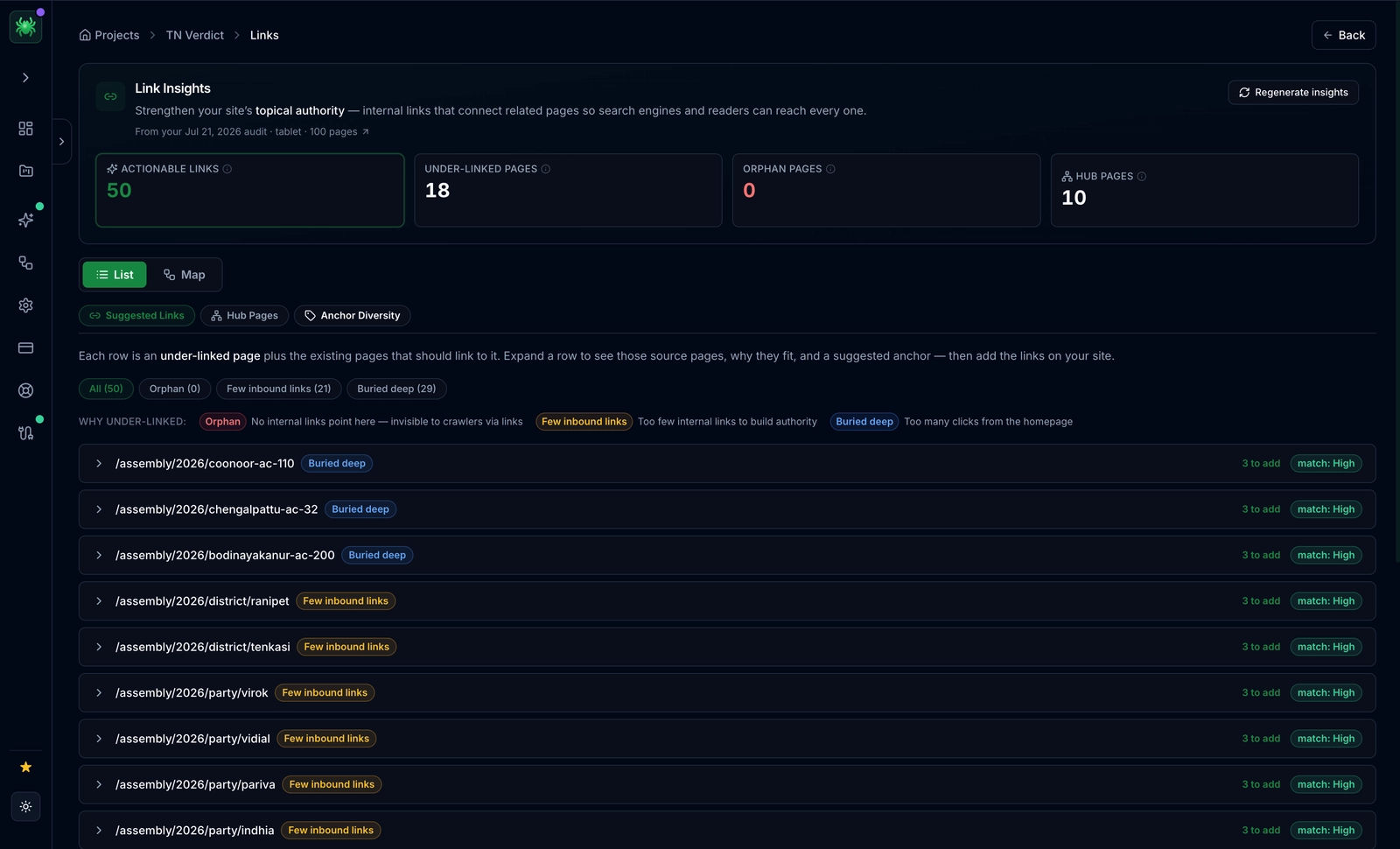
Prominence is largely driven by links and authority, so map how equity flows through your site. Digispot AI's Spider surfaces this directly.
Step 1: Technical Foundation & Schema Markup
Most local SEO guides skip this, but it is the differentiator for senior strategists. You must speak Google's language using Schema Markup (structured data).
For local SEO, you need to implement LocalBusiness schema. This code lives in the <head> of your website and explicitly tells Google your coordinates, hours, and relationship to other platforms.
The "Golden Standard" JSON-LD Structure
Don't rely on plugins to do this perfectly. You want a robust JSON-LD script that includes geo coordinates and sameAs properties.
<script type="application/ld+json">
{
  "@context": "https://schema.org",
  "@type": "LocalBusiness",
  "name": "Digispot Plumbing Services",
  "image": "https://example.com/logo.jpg",
  "telephone": "+1-555-010-0202",
  "url": "https://example.com",
  "address": {
    "@type": "PostalAddress",
    "streetAddress": "123 SEO Street",
    "addressLocality": "Austin",
    "addressRegion": "TX",
    "postalCode": "78701",
    "addressCountry": "US"
  },
  "geo": {
    "@type": "GeoCoordinates",
    "latitude": 30.2672,
    "longitude": -97.7431
  },
  "openingHoursSpecification": [
    {
      "@type": "OpeningHoursSpecification",
      "dayOfWeek": ["Monday", "Tuesday", "Wednesday", "Thursday", "Friday"],
      "opens": "08:00",
      "closes": "18:00"
    }
  ],
  "sameAs": [
    "https://www.facebook.com/yourbusiness",
    "https://twitter.com/yourbusiness",
    "https://www.instagram.com/yourbusiness"
  ]
}
</script>
Why this works: The geo property gives Google your exact pin location, removing ambiguity. The sameAs property connects your website to your social profiles, building a cohesive "Knowledge Graph" entity.
Pro Tip: You can generate this code instantly without errors using the Digispot AI Schema Markup Generator.
Step 2: Optimizing for Google AI Overviews (AEO)
Local search is shifting toward Answer Engine Optimization (AEO). When a user asks, "Who is the best affordable dentist in downtown?", Google's AI Overview often synthesizes an answer before showing the map pack.
To get cited in these AI summaries, you need to structure your website content differently:
-
Front-Load the Answer: On your service pages, place a clear, 40-60 word definition of what you do and where you do it near the top of the page.
- Bad: "We have been serving the community for 50 years with passion..."
- Good: "Digispot Dental provides affordable, emergency dental care in Downtown Austin. We specialize in same-day crowns and root canals for patients without insurance."
-
Use "Q&A" Heading Structures: AI models look for questions and answers. Use H2s or H3s that mirror user queries.
- Example H2: "How much does emergency plumbing cost in Seattle?"
- Follow immediately with a direct answer or price range table.
-
Entity Consistency: Ensure your business name, address, and phone number (NAP) are identical on your website, Google Business Profile, and major directories (Yelp, YellowPages). AI uses this consistency to verify you are a real, trustworthy business.
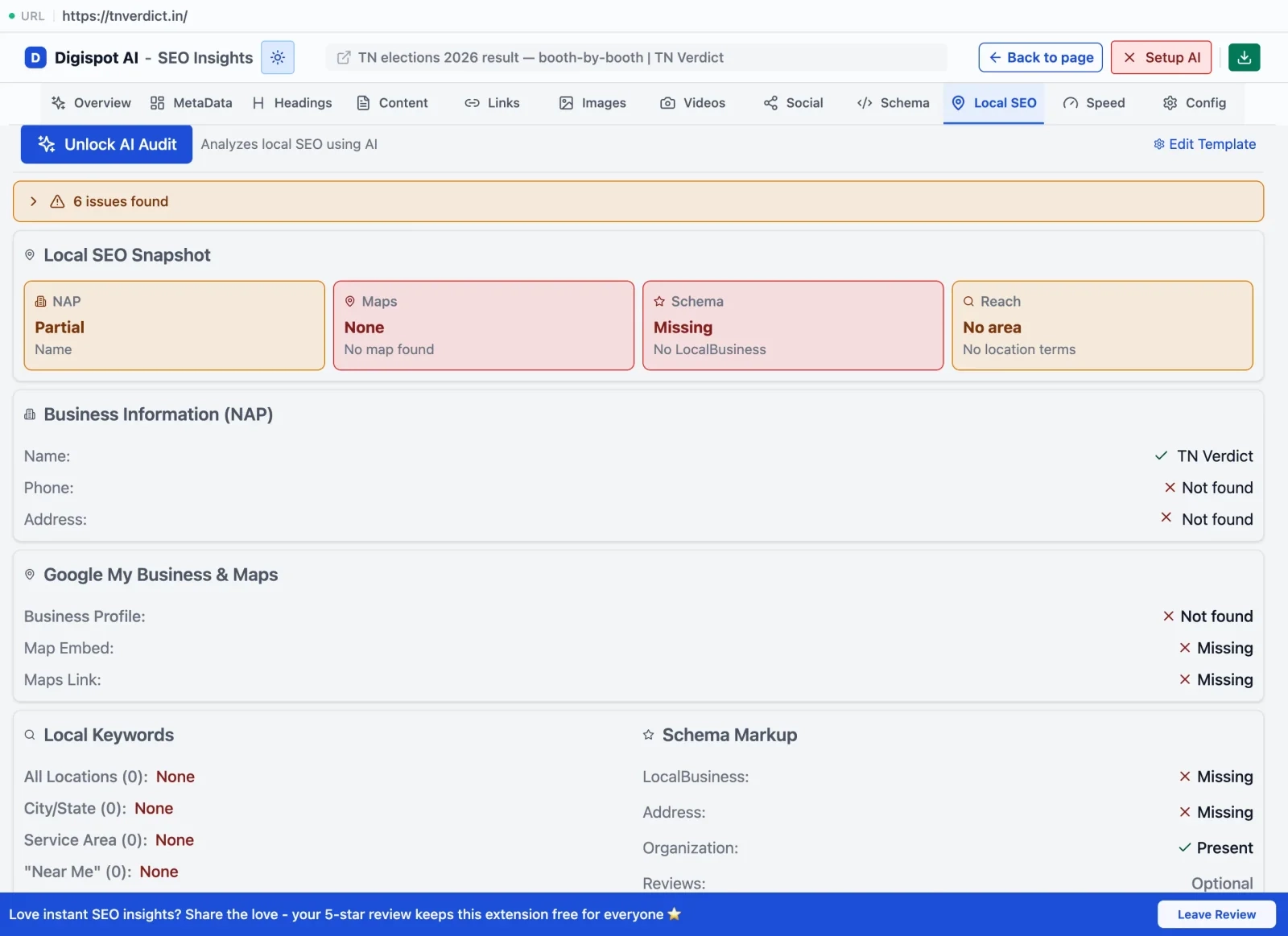
The Digispot AI Chrome extension's Local SEO tab checks these NAP and local-business signals on any page, so you can spot inconsistencies before Google's AI does.
For a deeper dive into establishing authority, read our guide on E-E-A-T SEO signals.
Step 3: Google Business Profile (GBP) Optimization Checklist
Your GBP is your digital storefront. An incomplete profile is the fastest way to lose rankings.
| Element | Optimization Action |
|---|---|
| Business Name | Use your real legal name. Adding keywords (e.g., "Best Pizza NY") is a violation and risks suspension. |
| Categories | select 1 primary category (critical) and up to 4-5 relevant secondary categories. |
| Services | Fill this out completely. Pre-defined services help rankings; custom services help conversion. |
| Products | If applicable, add products with images. These often appear directly in search results. |
| Photos | Upload new photos weekly. Profiles with 100+ images get 520% more calls (Source: Google). |
Digispot AI can help you identify and fix these issues automatically with AI-powered audits analyzing 300+ ranking factors.
Step 4: The Review Velocity Strategy
Reviews are a ranking factor, but velocity and keywords within reviews matter most.
Don't just ask for a review. Ask for a review that mentions the service performed.
- Weak: "Great service, thanks!"
- Strong: "The team did an amazing job with my kitchen faucet installation in North Austin."
How to get these reviews: Send a post-service email or text: "Hi [Name], it was great helping you with your [Service]. Could you take 30 seconds to mention [Service] in a Google review? It helps neighbors find us."
Google's AI analyzes the text of reviews to understand what you actually do. If 50 people mention "pizza," Google is very confident you are a pizza place.
Step 5: On-Page Local Signals
Your website must reinforce your local relevance. A common mistake is having a generic "Services" page that doesn't mention the city.
Create "Location + Service" Pages
If you serve multiple cities, create a unique landing page for each major location.
- URL Structure:
domain.com/plumber-austin-tx - Title Tag: "Emergency Plumber in Austin, TX | [Brand Name]"
- Content: distinct content about your work in that specific city. Mention local landmarks, neighborhoods, or specific local regulations.
Internal Linking: Link to these location pages from your home page and footer. This creates a clear path for crawlers. Learn more about internal linking strategies to distribute authority effectively.
Get instant SEO insights on any page to check your title tags and headers with our free Chrome extension.
Step 6: Audit Your Competitors
Why is a competitor ranking above you? Usually, it's one of three things:
- More strong citations: They are listed on more local directories (Chamber of Commerce, BBB, local news sites).
- Better keywords in reviews: Their customers are using service-related keywords more often.
- Stronger backlinks: They have links from other local businesses or organizations.
Don't guess. Use the free On-Page SEO Analysis tool to scan their top-ranking pages. Look at their heading structure and schema usage. If they are using LocalBusiness schema and you aren't, that's your first fix.
Start Improving Your Local Rankings Today
Ranking higher in Google Maps is a game of consistency and technical accuracy. By implementing valid schema markup, maintaining a steady stream of keyword-rich reviews, and optimizing your content for AI answers, you build a "moat" around your business that competitors can't easily cross.
Your Action Plan:
- Verify your Google Business Profile is 100% complete.
- Generate and install LocalBusiness JSON-LD schema.
- Audit your website's service pages for "AI-friendly" Q&A structures.
- Start a weekly review generation campaign.
Ready to improve your search visibility? Try Digispot AI for comprehensive website audits and actionable recommendations that take the guesswork out of local SEO.
Related deep-dives
Continue with these closely related guides:
- local seo — Local SEO Checklist 2026: The Ultimate Guide to Ranking in Maps & AI Search
References
Audit any page in seconds
300+ SEO checks including Core Web Vitals, schema markup, meta tags, and AI readiness — trusted by 1000+ SEO experts and marketers.
Frequently Asked Questions
Here are some of our most commonly asked questions. If you need more help, feel free to reach out to us.
Written by
Maya Krishnan
Digital growth expert
Maya is a seasoned expert in web development, SEO, and digital strategy, dedicated to helping businesses achieve sustainable growth online. With a blend of technical expertise and strategic insight, she specializes in creating optimized web solutions, enhancing user experiences, and driving data-driven results. A trusted voice in the industry, Maya simplifies complex digital concepts through her writing, empowering readers with actionable strategies to thrive in the ever-evolving digital landscape.