Infinite Scroll SEO: Fix Crawling & Indexing Issues
Optimize infinite scroll for SEO without losing rankings. Solve crawlability issues, add pagination alternatives, and get all content indexed.
 Maya Krishnan
Users love the frictionless experience of gliding through content. Infinite scroll feels magical on mobile devices, removing the clunky barrier of "Next Page" buttons and keeping engagement high. But for search engines, this seamless stream of information often acts as a silent killer for visibility.
When you implement infinite scroll without a robust technical strategy, you risk hiding vast amounts of content from Googlebot. The crawler sees the top of your page, but the dynamic content waiting below the fold might as well not exist.
This guide tackles the technical reality of Infinite Scroll SEO. We will move beyond basic definitions to cover specific implementation strategies, the mechanics of the History API, and how to audit your setup. With the right approach—and tools like Digispot AI—you can combine the engagement of infinite scroll with the crawlability of traditional pagination.
What is Infinite Scroll?
Infinite scroll is a web design pattern where content loads continuously as the user reaches the bottom of the viewport. Instead of clicking a pagination link to load a new document, the browser executes a JavaScript function to fetch the next set of data (usually via AJAX/Fetch API) and appends it to the current Document Object Model (DOM).
Where You See It Most:
- Social Platforms: The feeds on X (Twitter), Instagram, and LinkedIn are the archetypal examples.
- E-commerce: Category pages displaying hundreds of products without interruption.
- Publishing: News sites that auto-load the next article as you finish reading the current one.
- Visual Discovery: Pinterest and image stock sites where visual flow is paramount.
While this pattern excels at keeping users on the page—often referred to as "sticky" UX—it fundamentally breaks the traditional web model of "one URL = one document" that search engines were built to understand.
What is Infinite Scroll SEO?
Infinite Scroll SEO creates a bridge between the continuous user experience and the discrete nature of search engine crawling. It involves technical configurations that trick the browser into behaving like a single long page for the user, while presenting a structured, paginated series of URLs to search bots.
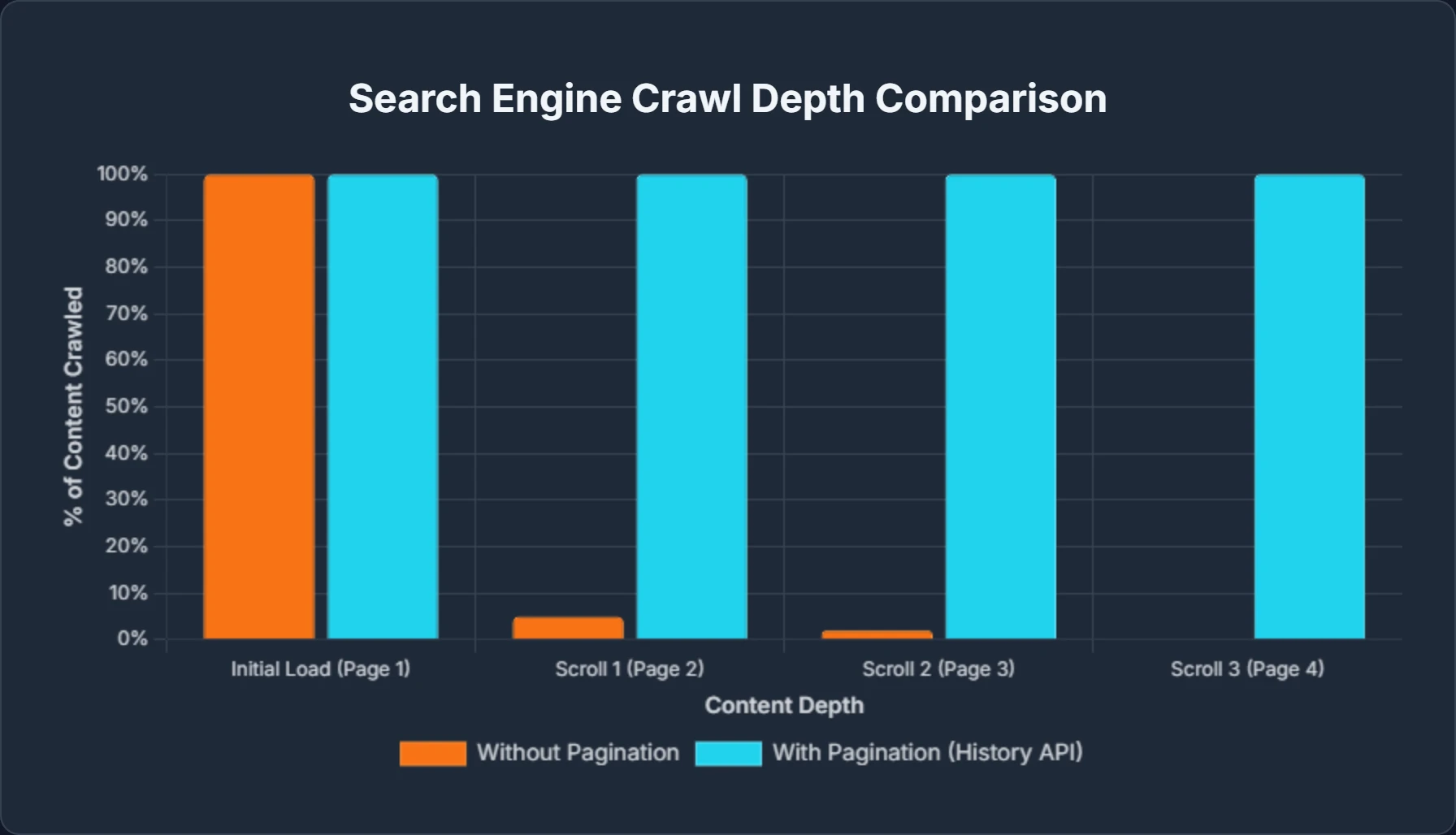
Without these specific SEO interventions, search engines cannot "see" past the initial load. They generally do not trigger scroll events, meaning any content that relies solely on a user scrolling to appear is effectively invisible to organic search.
Why is Infinite Scroll Challenging for SEO?
The core conflict lies in how bots render pages versus how humans interact with them. Googlebot (and other AI crawlers like Bingbot or GPTBot) typically renders a page with a very tall viewport, but it does not "scroll" down to trigger JavaScript event listeners tied to the scroll position.
If your website waits for a scroll event to fetch more data, the bot simply captures the initial snapshot and leaves. This leads to massive gaps in your index coverage—a classic technical SEO pitfall that keeps otherwise valuable content out of search.

Table: specific Technical Challenges
| Challenge | Technical Root Cause | SEO Consequence |
|---|---|---|
| Crawlability Blind Spots | Bots do not trigger window.onscroll events. Content loaded via JavaScript injection after the load event is often missed. | Only the first 10-20 items on a page get crawled. The rest of your catalog or archive is invisible. |
| Indexing Fragmentation | Without unique URLs, search engines cannot index Page 2, Page 3, etc. They merge all content into the root URL signal or ignore it entirely. | Deep content fails to rank for specific long-tail keywords because it lacks a distinct address. |
| Link Equity Dilution | If deep pages aren't crawlable, the internal links on those pages (to products or articles) aren't followed. | Orphan pages increase, and link authority fails to flow throughout your site structure. |
| Core Web Vitals Decay | Continuously appending DOM nodes increases memory usage. Layout shifts (CLS) occur if content pushes elements down. | Poor Core Web Vitals scores can negatively impact rankings and frustrate users on low-end devices. |
| Footer Inaccessibility | The footer is constantly pushed down by new content, making it physically impossible to click footer links. | Users (and bots) cannot access critical trust pages like Privacy Policy, About Us, or HTML Sitemaps. |
For a deeper dive into common pitfalls that plague modern websites, check our guide on common SEO mistakes to avoid.
The Benefits of Infinite Scroll (When Done Right)
Despite the technical hurdles, the potential upside for engagement is significant. If you can solve the crawlability puzzle, infinite scroll can improve user metrics that indirectly signal quality to search engines.
Table: UX and Engagement Wins
| Benefit | Why It Matters |
|---|---|
| Frictionless Browsing | Removing the click-and-wait mechanic keeps users in a "flow state," encouraging them to consume more content. |
| Mobile Optimization | Thumb-scrolling is the native gesture of mobile. Infinite scroll aligns perfectly with mobile-first indexing behavior. |
| Reduced Bounce Rate | Users are less likely to leave immediately if they are presented with a continuous stream of relevant options. |
| Discovery of Archive Content | Older content gets more eyeballs as users effortlessly scroll past recent posts, revitalizing your archive traffic. |
How to Implement Infinite Scroll SEO: Best Practices
Achieving the perfect balance requires a specific architectural pattern often called "Infinite Scroll with Paginated Backup." Here is the step-by-step technical implementation strategy.
1. Implement Pagination with History API
The gold standard for infinite scroll SEO is to maintain a paginated structure in the background. Your server should be able to serve ?page=2, ?page=3, etc., as distinct documents, even if users rarely visit them directly.
The Technical Workflow:
- Chunk Your Content: Organize your database queries to return content in chunks (e.g., 20 items per chunk).
- Assign Unique URLs: Ensure
example.com/category(page 1) exists, as well asexample.com/category?page=2. - Use
pushStateandreplaceState:- As the user scrolls and triggers the load of chunk #2, use
history.pushState()to update the browser URL to?page=2without reloading the page. - If the user scrolls back up to the top items, use
history.replaceState()to revert the URL to the root or?page=1. - This ensures that if a user copies the URL and shares it, the recipient lands on the correct section of content.
- As the user scrolls and triggers the load of chunk #2, use
- Implement
rel="next"andrel="prev": Even though Google has stated they no longer use these link types for indexing signals as heavily, they remain a strong hint for other search engines (like Bing) and help clarify the relationship between document sequences.
Example Code Concept:
// When user scrolls to the bottom and new content loads:
history.pushState({page: 2}, "Page 2", "?page=2");

// Update the canonical and rel tags dynamically in the head (optional but good for consistency)
2. Utilizing a "Load More" Button (The Hybrid Approach)
Pure infinite scroll can be aggressive. A "Load More" button serves as an excellent middle ground, particularly for e-commerce sites.
- Bot Behavior: Bots can often follow the
hrefon a "Load More" button if it is a standard anchor tag pointing to the next paginated URL (<a href="?page=2">Load More</a>). You can intercept the click with JavaScript to load content dynamically for users, while letting bots follow the standard link. - User Control: It respects user intent. They choose to see more, which saves bandwidth and battery life.
- Footer Access: It prevents the footer from running away, ensuring your legal and navigation links remain crawlable.
3. Optimize Performance for Dynamic Content Loading
Continuously adding DOM elements can cause the browser to consume excessive memory, leading to laggy scrolling and crashes.
- DOM Virtualization: If your list is very long (hundreds of items), consider using DOM virtualization (or "windowing"). This technique only renders the DOM nodes currently visible in the viewport (plus a small buffer) and recycles nodes as the user scrolls. This keeps the DOM lightweight.
- Prevent Layout Shifts (CLS): Pre-allocate space for images or content blocks before they load. If a new chunk loads and pushes existing content down while the user is reading, your Cumulative Layout Shift score will spike, hurting your SEO.
- Efficient Asset Loading: Use lazy loading for images in the new chunks. Do not load images for "Page 5" until the user is approaching that section.
For a detailed breakdown of performance metrics, read our Core Web Vitals SEO Guide.
4. Leverage Schema Markup for Enhanced Visibility
Structured data helps search engines understand the entities within your infinite scroll.
- ItemList Schema: Wrap your list in
ItemListschema. As new items load, ensure the underlying data structure represents the ordered list. - Individual Entities: Each product or article loaded should have its own
ProductorArticleschema. - Automation: Manually coding this for dynamic content is error-prone. Use the Digispot AI Schema Markup Generator to create valid JSON-LD structures that you can inject dynamically.
Pro Tip: Validate that your schema is present in the rendered HTML (not just the source) using the Schema Markup Visualizer.
5. Ensure Accessibility (A11y)
Accessibility overlaps significantly with SEO. If a screen reader can navigate your content, a search bot likely can too.
- Focus Management: When a user clicks "Load More," the focus should shift to the first item of the new content, not reset to the top of the page.
- Screen Reader Announcements: Use ARIA live regions (
aria-live="polite") to announce when new content has been loaded so users relying on assistive tech aren't left wondering if the action worked. - Keyboard Navigation: Ensure the infinite scroll trigger or "Load More" button is reachable via the Tab key.
6. Utilize XML Sitemaps
Your XML sitemap is the map that guides crawlers to your deep content.
- Include Paginated URLs: Do not just list the root category page. Include
category?page=2,category?page=3, etc., in your XML sitemap. This explicitly tells Google that these URLs exist and are valid destinations. - Last Modified Dates: Update the
<lastmod>tag when content on those specific pages changes.
If you are unsure if your sitemaps are optimized, you can verify your setup using our SEO Audit Checklist.
7. Handle rel="canonical" Tags Correctly
Canonicalization prevents duplicate content issues, which are common with paginated parameters.
- Self-Referencing Canonicals: The URL
example.com/category?page=2should have a canonical tag pointing toexample.com/category?page=2. - Avoid Pointing to Root: Do not canonicalize page 2, 3, and 4 back to page 1. This tells Google to ignore the deep pages entirely, meaning the unique content on those pages won't be indexed.
- View-All Pages: If you have a "View All" version, this is often the preferred canonical version for some SEOs, but it can be heavy to load. For infinite scroll setups, self-referencing pagination is usually the safest bet.
Digispot AI: Your Catalyst for Infinite Scroll SEO Success
Implementing infinite scroll correctly involves complex JavaScript, state management, and precise SEO tagging. A mistake in any of these areas can de-index your content. This is where Digispot AI becomes essential for modern technical SEO.
How Digispot AI Elevates Your Infinite Scroll SEO:
- JavaScript Rendering Audits: Unlike basic crawlers, Digispot AI's auditing engine renders JavaScript just like Googlebot. It can detect if your infinite scroll content is actually visible to bots or if it's locked behind client-side scripts.
- Automated Schema Validation: We detect the JSON-LD injected into your dynamic pages to ensure
ItemListandProductschemas are firing correctly as new content loads. - Crawl Depth Analysis: Our platform visualizes your site structure, showing you exactly how deep bots have to go to find your content. If your infinite scroll implementation is burying pages, you'll see it in the audit visualization.
- Integration with Google Search Console: By connecting your GSC account, Digispot AI correlates your crawl stats with actual indexing data. You can see immediately if your paginated URLs (
?page=2, etc.) are being indexed or excluded. - Performance Monitoring: We track Core Web Vitals across your site. If your infinite scroll script causes Layout Shifts (CLS) or delays First Input Delay (FID), our AI recommendations will pinpoint the exact script responsible.
For ongoing maintenance, checking your on-page SEO best practices regularly ensures that new updates don't break your scroll implementation.
Digispot AI Free Community Chrome Extension: On-the-Go Audits
You don't always need a full site crawl to spot issues. The Digispot AI Free Community Chrome Extension allows you to inspect infinite scroll implementations right from your browser tab.
- Live DOM Inspection: See the page exactly as the browser renders it. Check if the canonical tags update dynamically when you scroll.
- Schema Visualization: Instantly visualize the structured data on the current "state" of the page.
- JavaScript Audit: Identify heavy scripts that might be slowing down the scroll experience.
Get instant SEO insights on any page with our free Chrome extension.
Business Outcomes of Optimized Infinite Scroll SEO
Moving from a "broken" infinite scroll to an optimized setup delivers measurable ROI:
- Explosion in Indexation: We typically see a massive increase in the number of indexed pages (often 200-300% more) as Google finally discovers the deep content that was previously hidden.
- Long-Tail Traffic Growth: With deep content indexed, your site starts ranking for specific, lower-volume keywords found on "Page 5" or "Page 10" of your archives.
- Improved Crawl Budget Efficiency: By providing clear paginated paths, bots waste less time trying to figure out your site structure and spend more time indexing valuable content.
Conclusion
Infinite scroll offers an undeniably engaging user experience, but it is a double-edged sword. Without a solid technical foundation, it can render your best content invisible to the search engines that drive your traffic. By treating infinite scroll as a visual layer on top of a solid, paginated architecture, you get the best of both worlds: sticky UX and comprehensive indexing.
Don't guess whether Google can see your content. Use the free On-Page SEO Analysis tool to audit your URLs instantly.
Ready to secure your search visibility? Try Digispot AI for comprehensive website audits that solve the complex challenges of modern JavaScript SEO.
Related deep-dives
Continue with these closely related guides:
- authentication seo — Authentication SEO: How Login Walls Affect Search Visibility
References
- Infinite Scroll Search-Friendly Recommendations | Google Search Central
- Handle pagination for Google Search | Google Search Central
- Understand how JavaScript affects Google Search | Google Search Central
- Introduction to Structured Data | Google Search Central
- Core Web Vitals | Google Search Central
- Lazy loading | web.dev
- Google Search Console
- Digispot AI - Official Website
- Digispot AI - FREE On Page SEO Audit Tool
- Digispot AI - FREE Chrome Extension for SEO Insights
Audit any page in seconds
300+ SEO checks including Core Web Vitals, schema markup, meta tags, and AI readiness — trusted by 1000+ SEO experts and marketers.
Frequently Asked Questions
Here are some of our most commonly asked questions. If you need more help, feel free to reach out to us.
Written by
Maya Krishnan
Digital growth expert
Maya is a seasoned expert in web development, SEO, and digital strategy, dedicated to helping businesses achieve sustainable growth online. With a blend of technical expertise and strategic insight, she specializes in creating optimized web solutions, enhancing user experiences, and driving data-driven results. A trusted voice in the industry, Maya simplifies complex digital concepts through her writing, empowering readers with actionable strategies to thrive in the ever-evolving digital landscape.