Custom 404 SEO: How to Turn Errors Into SEO Opportunities
Design SEO-friendly custom 404 pages that retain users and recover link equity. Turn broken links into engagement opportunities with proven UX best practices.
 Maya Krishnan
We've all been there: clicking a link only to land on that unhelpful, often stark "404 Page Not Found" message. It's a universal online experience. For anyone running a website, these digital dead ends can feel like a genuine roadblock – frustrating for users, a missed chance for your business, and even a potential ding to your search engine visibility.
But what if we could flip that script? What if these common errors could actually become engaging detours, gently guiding visitors back to valuable content and strengthening your brand along the way? That's precisely where the often-underestimated power of custom 404 SEO comes into play.
Forget thinking of it as just an error message. A well-designed and strategically optimized custom 404 page is actually a vital piece of any strong website strategy. It's a golden opportunity to soften user frustration, keep visitors engaged on your site, and surprisingly, even boost your overall search engine optimization (SEO) efforts.
When you ignore your 404 strategy, you leak traffic. Users hit the back button immediately, signaling to Google that your site might not satisfy user intent. By optimizing this specific endpoint, you can retain that traffic and turn a negative signal into a positive interaction. Handling error pages correctly is also part of keeping your site fully crawlable when you index your website on Google.
Key Takeaways
- 404 pages don't rank, so don't try to optimize them for search. The real goal is retention and technical hygiene, not ranking the error page itself.
- Always return a true 404 (or 410) status code. A "Page Not Found" screen that serves a 200 OK creates a soft 404 and invites Google to index junk.
- Design for the human first. Keep your branding, navigation, and a prominent search bar so users can recover instead of bouncing.
- Reclaim link equity with targeted 301 redirects. Send deleted URLs that hold backlinks to the closest relevant page, never a blanket redirect to the homepage.
- Make 404 detection routine. Monitor Google Search Console, run regular crawls, and triage errors monthly so link rot never compounds.
What is a 404 Error, and Why Do They Occur?
Before diving into the "how-to" of custom 404 pages, let's understand the basics of the technical handshake happening behind the scenes.
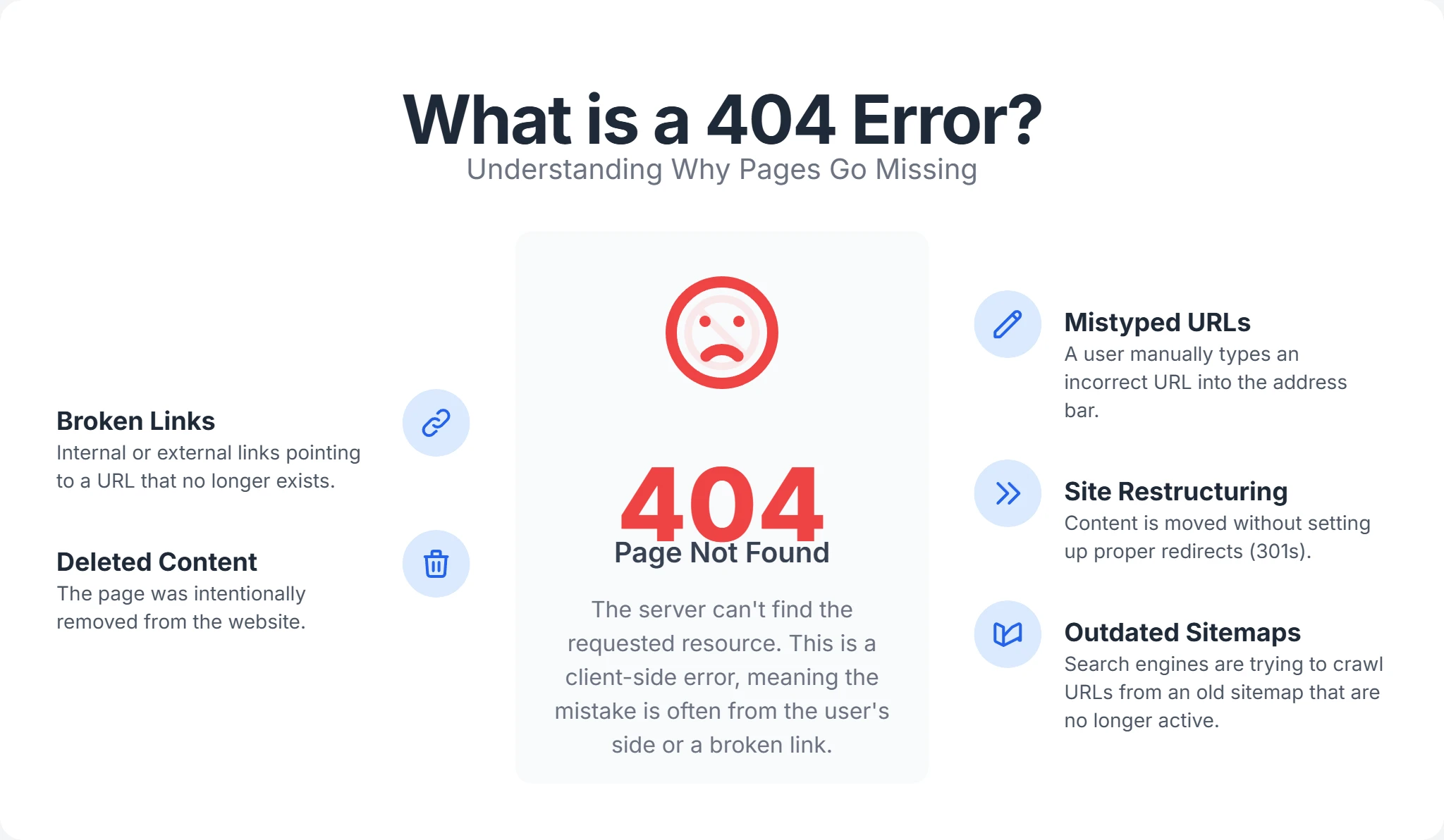
What is a 404 Error?
A 404 error, specifically an HTTP 404 status code, is a standard response from a web server indicating that the requested page (URL) cannot be found on the server. It essentially tells the user (the browser) and search engine crawlers that the page they tried to access doesn't exist at that particular address.
Unlike a 500 error (which means the server blew up) or a 503 (maintenance mode), a 404 means the server itself is working perfectly fine. It simply looked through its file directory or database for the specific resource requested and came up empty-handed.
Why do 404 errors occur?
There are several common reasons a user might encounter a 404 page. Understanding these root causes is the first step in your technical SEO audit.
- Broken Links (Link Rot): These can be internal links within your own website that point to a page that no longer exists, or external links from other websites pointing to an outdated or moved page on your site. Over time, the web changes, and what was once a valid resource becomes a dead end.
- Deleted or Moved Content: This is a classic issue in e-commerce. If a product goes out of stock and you delete the page without a redirect plan, users following old bookmarks or ads will hit a 404. Similarly, changing a blog post's URL slug from
/blog/2023/post-nameto/blog/post-namewithout a 301 redirect will break all incoming links. - Mistyped URLs: Humans make mistakes. A user might try to type a URL manually from a business card or slide deck and miss a character.
- Website Restructuring/Migration: During a website redesign or platform migration (e.g., WordPress to Shopify), URL structures often change. If you don't map the old URLs to the new ones, you could generate thousands of 404s overnight. Following a site migration checklist with a complete redirect map is the single best way to prevent this.
- Outdated Sitemaps: Your XML sitemap might still list URLs that no longer exist, causing search engines to attempt to crawl them. This wastes your crawl budget on dead ends.
- Malware or Hacking: Sometimes, malicious scripts create thousands of spam URLs on your domain that eventually get deleted, leaving behind a massive trail of 404 errors.
While an individual 404 error might seem minor, a high number of them across your site can significantly impact user experience and SEO. It signals to search engines that the site may be neglected.
Why a Custom 404 Page Matters (Beyond the Default)
Imagine trying to find a specific book in a library, only to be met with a blank, unhelpful sign saying "Book Not Found." Frustrating, right? You would probably walk out. That's akin to a generic, unstyled 404 page provided by a server like Apache or Nginx. These default pages are often unbranded white screens with black text, offer no further information, and provide no clear path forward.
They are digital dead ends.
The Problem with Generic 404s:
- Poor User Experience (UX): Users are left confused and stranded. The immediate psychological reaction is "this site is broken" or "I am in the wrong place." This leads to a rapid exit.
- High Bounce Rate: When a user lands on a generic 404, they almost invariably hit the "Back" button. In Google's eyes, this is a "short click," which can negatively impact the rankings of the page that sent the user there if it was an internal link, or general site authority signals.
- Lost Revenue: For e-commerce sites, a 404 page is a leak in your sales funnel. A user looking for a specific product who hits a 404 without alternative suggestions is a lost sale.
- Negative Brand Perception: A bland, unhelpful error page makes your website appear unprofessional or poorly maintained. It breaks the immersion of your brand experience.
How a Custom 404 Page Transforms the Experience: A well-designed custom 404 page acts as a "communication bridge." It acknowledges the error while keeping the user within your website's ecosystem. It says, "We made a mistake (or you did), but don't worry, here is how we can fix it."
By keeping the navigation menu, search bar, and footer visible, you remind the user that the site works, even if the page doesn't.
What is Custom 404 SEO?
There is a common misconception that 404 pages need to be optimized to rank in Google. They do not. Custom 404 SEO isn't about ranking the error page itself; it's about minimizing the collateral damage of broken links and enhancing overall site health.
Google does not index pages that return a 404 status code. In fact, if your 404 page does get indexed, you likely have a "Soft 404" problem (more on that later). The goal here is retention and technical hygiene.
Key Aspects of Custom 404 SEO:
- Maintaining User Engagement: By offering helpful navigation and a positive experience, you encourage users to stay on your site. This improves "dwell time" and reduces "pogo-sticking" (bouncing back to search results), which are critical user interaction signals for SEO.
- Guiding Crawlers (Indirectly): While Google won't index a true 404 page, the way you handle 404 errors across your site ensures that search engine crawlers don't waste their limited "crawl budget" on non-existent pages. If Googlebot spends its time crawling 404s, it spends less time discovering your new, valuable content. This matters most on large sites, where clean crawl budget optimization can be the difference between fast and slow indexing.
- Retaining Link Equity: This is the biggest SEO opportunity. If a high-authority website links to a page on your site that now returns a 404, that "link juice" (PageRank) hits a wall and evaporates. By identifying these 404s and implementing 301 redirects to relevant content, you reclaim that authority and channel it to live pages.
- Trust Signals: A helpful error page is part of E-E-A-T (Experience, Expertise, Authoritativeness, and Trustworthiness). It shows you care about the user journey, even when things go wrong. Learn more about how E-E-A-T impacts SEO.
Benefits of a Well-Optimized Custom 404 Page
Creating an SEO-optimized custom 404 page offers a multitude of benefits for both your users and your website's performance. It turns a "Goodbye" into a "What's next?".
| Benefit Category | Specific Benefit | Description / SEO & UX Impact |
|---|---|---|
| User Experience | Reduced Frustration | Acknowledges the error politely and provides direction. Keeps users engaged and reduces the immediate urge to leave. |
| Improved Engagement | Suggests alternative content or navigation options. Lowers bounce rate and increases pages per session. | |
| Enhanced Brand Image | Reflects professionalism and brand personality. Builds user trust even during errors. | |
| SEO Advantages | Mitigates Crawl Budget Waste | Ensures crawlers index valuable content via proper 404 handling. A clean crawl path improves indexation speed. |
| Retains Link Equity | Uses 301 redirects for old pages with backlinks to transfer SEO value. Prevents authority loss from external links. | |
| Signals Website Health | Proactive 404 handling signals a well-maintained, user-first site. This correlates with higher rankings over time. | |
| Business Opportunities | Lead Generation | Incorporate CTAs or forms to turn lost traffic into conversions. You can capture emails even on error pages. |
| Content Discovery | Highlights featured or related content to encourage exploration. Increases page views and introduces users to new topics. |
How to Create an SEO-Optimized Custom 404 Page
Crafting an effective custom 404 page requires a blend of user-centric design and on-page SEO best practices. You want the page to be helpful, lightweight, and functionally distinct from a regular content page.
Essential Elements of a Great Custom 404 Page
A truly effective 404 page is much more than just an "error" notification. It's a rescue mission for your users.
-
Clear, Friendly, and Simple Message: Start with a polite apology and a straightforward explanation. Avoid technical jargon like "404 Not Found" or "Server Error."
- Corporate Example: "We're sorry, the page you requested cannot be found. It may have been moved or deleted."
- Playful Example: "Oops! Looks like this page took a vacation. Let's get you back on track."
-
Consistent Branding: Your 404 page should visually align with the rest of your website. Keep your header, footer, logo, and fonts identical to your main pages. If the 404 page looks completely different, users might think they've been redirected to a suspicious site or a parked domain.
-
Prominent Search Bar: A search bar is one of the most useful features on an error page. It puts the control back in the user's hands.
- Pro Tip: Analyze the search queries made specifically from your 404 page. This data reveals exactly what users were looking for when they hit the dead end, helping you identify broken URLs or content gaps.
-
Helpful Navigation Options: Don't just dump the user there. Provide clear links back to important areas. This typically includes:
- Home: The safest reset button.
- Popular Categories: For e-commerce, link to "Best Sellers" or "New Arrivals."
- Curated Content: For blogs, link to "Most Read Articles" or "Editor's Picks."
- HTML Sitemap: A link to your full HTML sitemap helps users manually find the hierarchy they were looking for.
-
Optional Engaging Elements:
- Humor or Creativity: A light-hearted image, a funny animation (like the famous Pixar or Discord 404 pages), or witty text can diffuse frustration.
- Lead Capture/Offers: If you run an e-commerce store, why not offer a "Sorry for the trouble" discount code? "We can't find that page, but here is 10% off your next order." This turns a negative into a conversion.
- Feedback Option: A simple "Report Broken Link" button can crowdsource your site maintenance.
Technical Considerations for SEO-Friendly 404 Pages
While the design handles the user experience, the technical setup is critical for SEO. If you get this wrong, you risk Google indexing thousands of junk pages.
- Returning a True 404 HTTP Status Code:
This is paramount. Your custom 404 page must return a 404 (Not Found) or 410 (Gone) HTTP status code in the header.
- The Mistake: Many sites serve a "Page Not Found" page that actually returns a 200 (OK) status code. This tells Google, "This is a valid page, please index it." This creates duplicate content issues and wastes crawl budget. If Search Console is flagging these, work through the steps to find and fix soft 404 errors.
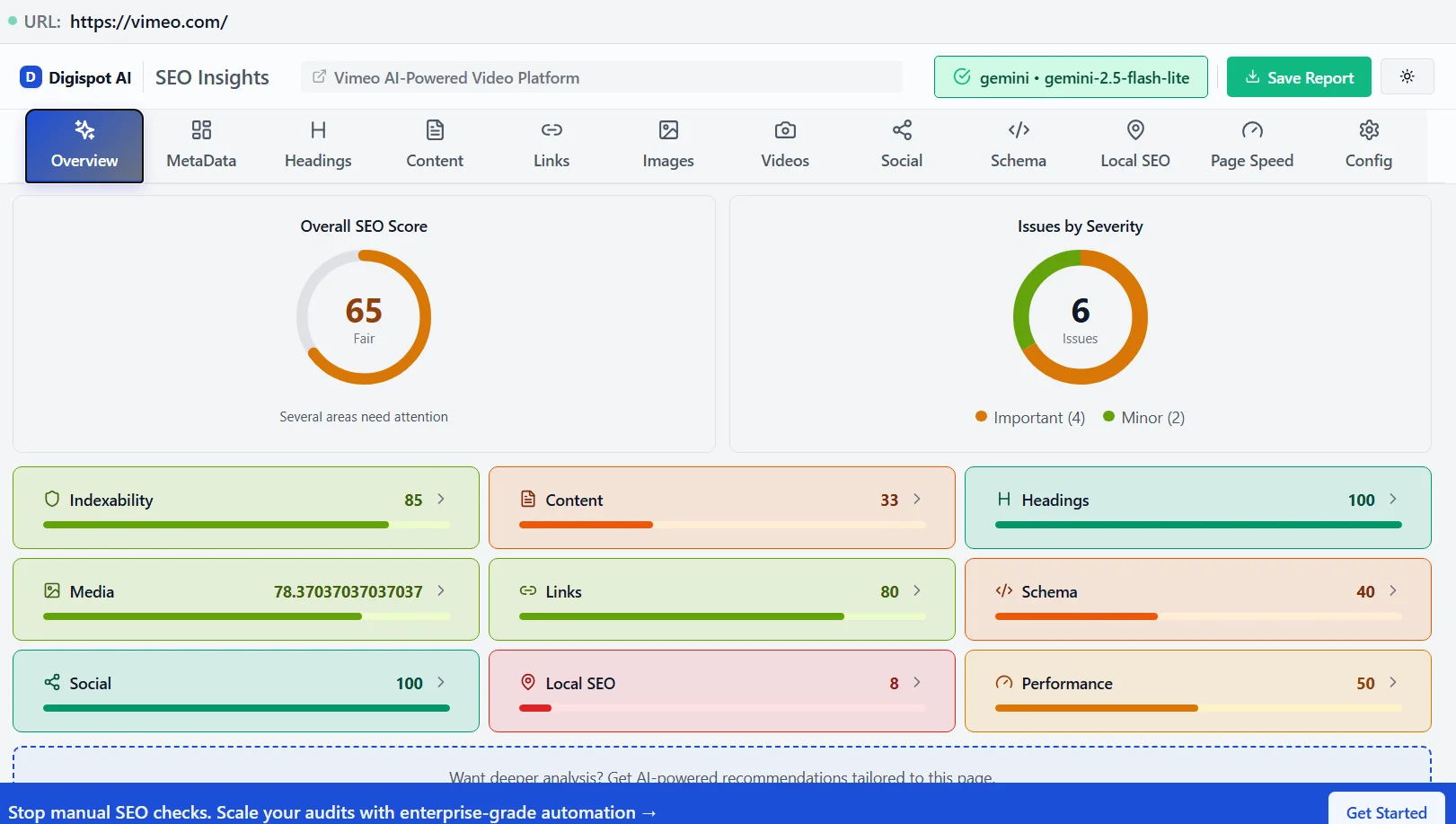
- How to Check: You can use the Digispot AI Chrome Extension to instantly view the HTTP status code of any page you visit.
-
Fast Loading Speed: Your 404 page should be lightweight. Avoid heavy scripts or massive images. If a user is already frustrated by a broken link, a slow-loading error page is the final straw. Fast load times are part of Core Web Vitals, which impacts overall site ranking.
-
Mobile-Friendliness: Ensure your custom 404 page is fully responsive. Broken links happen on mobile devices too, and pinch-zooming to read an error message is poor UX.
-
Noindexing: While a true 404 status code naturally prevents indexing, adding a
noindexmeta tag is a safety net. This ensures that even if your server misconfigures the status code (accidentally sending a 200), Google is explicitly told not to add this error page to its search results. -
Schema Markup (where applicable): You don't need "404 Schema," but your global navigation schema (Breadcrumbs, SiteNavigationElement) should remain intact. You can use the Schema Markup Generator to ensure your global elements are correctly structured, even on error templates.
How to Implement a Custom 404 Page
Implementation varies based on your website's platform:
- WordPress: Most themes have a
404.phpfile. You can edit this file to customize the layout. Alternatively, SEO plugins often allow you to designate a specific WordPress page as your 404 redirect target (while maintaining the status code). - Shopify: Shopify handles 404s automatically, but you can customize the text and layout by editing the
404.liquidfile in your theme code. - Server-Side (.htaccess): For custom sites on Apache servers, you can add this line to your
.htaccessfile:ErrorDocument 404 /404-page.htmlThis tells the server to load a specific HTML file whenever a resource isn't found.
Detecting and Monitoring 404 Errors
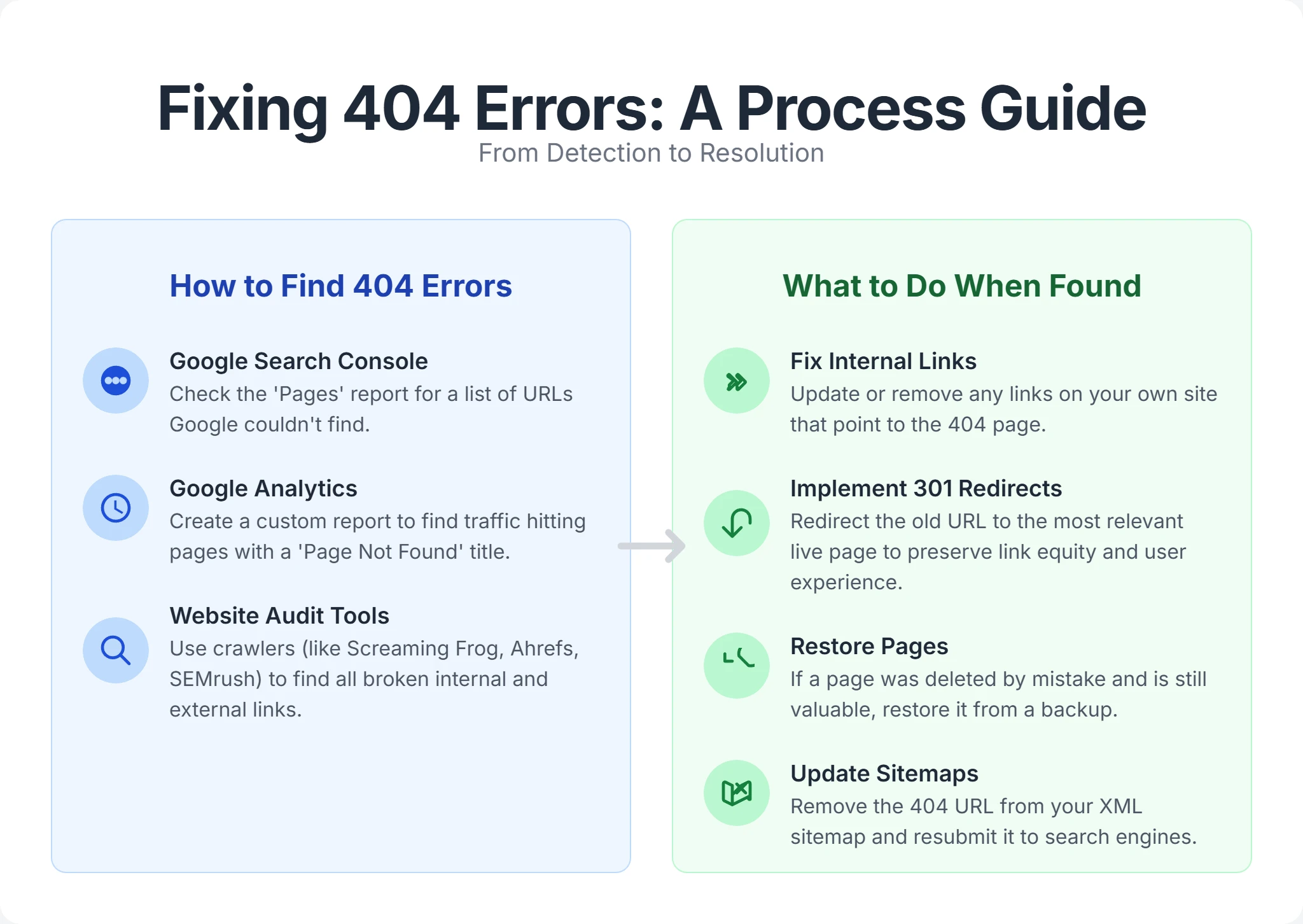
Creating a great custom 404 page is only half the battle. You must actively monitor your site to fix the broken links causing these errors in the first place. A healthy site should have very few internal 404s.
How to find 404 errors:
-
Google Search Console (GSC): This is your primary source of truth.
- Navigate to Indexing > Pages.
- Look for "Not found (404)" and "Soft 404".
- GSC shows you exactly which URLs Googlebot tried to crawl but failed. It often indicates where the broken link was found (the "Referrer").
-
Digispot AI Audits: Manual GSC checks can be tedious. Digispot AI automates this process.
- The platform crawls your site like a search engine, identifying every broken internal link, image, and script.
- It highlights "orphan pages" (pages with no internal links) which often become 404s during migrations.
- Use the Free On-Page Analysis Tool to spot-check individual pages for broken outgoing links.
-
Log File Analysis: For advanced technical SEO, analyzing server log files reveals exactly what Googlebot is hitting. This can uncover 404 errors that JavaScript-based tracking tools might miss, because logs record every raw server request, not just the ones your analytics script fires on.
- What to look for: Filter your access logs for
404response codes and sort by frequency. High-frequency 404s from Googlebot's user agent are your priority fixes, since they are actively wasting crawl attempts. - Spotting bot vs. human traffic: Separate crawler hits from real-user hits. A URL that only bots request usually points to a stale sitemap entry or an old link elsewhere on the web, while URLs real users hit signal broken internal navigation you should repair right away.
- Referrer clues: Where your log format captures it, the referrer field tells you which page contained the broken link, letting you fix the source anchor tag rather than just patching the symptom.
- What to look for: Filter your access logs for
-
Google Analytics (GA4): You can track 404s as they happen to real users.
- Create a custom event that fires when the page title equals "Page Not Found".
- This data is invaluable because it prioritizes fixes based on traffic. If 500 users a day are hitting a specific broken link, that is a high-priority fix compared to a 404 that zero users see.
What to do when you find them:
Once you have your list of 404s, triage them using this decision matrix:
-
Is the content gone forever with no replacement?
- Action: Let it 404 (or use a 410 "Gone" status). This tells Google to de-index it. Do not redirect to the homepage.
- Why? Redirecting irrelevant content to the homepage is treated as a "Soft 404" by Google and passes no real value.
-
Has the content moved to a new URL?
- Action: Implement a 301 Redirect to the new URL.
- Result: Users land on the right page, and link equity is passed to the new URL.
-
Is there a relevant alternative page?
- Action: Redirect to that category or similar product.
- Example: If "Red Nike Shoes" is deleted, redirect to the general "Nike Shoes" category, not the homepage.
-
Is the 404 caused by a typo in an internal link?
- Action: Fix the link on the source page. Do not redirect the typo URL; just correct the HTML anchor tag. A disciplined internal linking strategy with periodic link audits keeps these self-inflicted 404s from creeping back in.
Common SEO mistakes often include ignoring these errors for too long. Check our guide on Common SEO Mistakes to see how link rot can degrade your site authority.
Leveraging AI for 404 Page Optimization and Beyond
In today's fast-evolving search environment, "Answer Engines" like ChatGPT and Perplexity are becoming major traffic sources. These AI platforms rely on valid citations. If an AI tries to cite your page and hits a 404, it drops your site as a source, damaging your visibility in AI Overviews. Keeping URLs stable and citable is a core part of answer engine optimization.
AI-powered SEO platforms are revolutionizing how we manage these technical details.
How Digispot AI assists with 404 management and overall SEO:
-
Comprehensive Website Auditing: The platform audits your website using a multi-LLM engine (GPT-4, Claude, Gemini). It goes beyond simple status code checks. It analyzes the context of the 404. For example, if a high-value product page returns a 404, the AI alerts you immediately because it understands that page's revenue potential based on historical data.
-
Predictive Link Rot Analysis: Digispot AI can identify patterns that lead to 404s, such as unstable URL parameters or poor migration mapping. It helps you fix issues before they become 404s.
-
Content Regeneration: If you discover you've lost a high-traffic page, the Content Studio can help you recreate that content. Using AI agents, you can generate a new, optimized version of the lost page that fills the content gap, recovering that traffic.
-
Free Community Chrome Extension: You don't need to be a platform subscriber to get help. The Digispot AI Chrome Extension allows you to audit pages in real-time.
- Instant Status Checks: See if a page is a 200, 301, 302, or 404 instantly.
- Broken Link Highlighter: The extension visually highlights broken links on any page you view, making manual cleanup incredibly fast.
- Schema Verification: Ensure your 404 page isn't accidentally outputting Product or Article schema, which would confuse search engines.
This proactive approach moves you from "fixing errors" to "optimizing opportunities." It ensures your site is ready for both traditional search crawlers and the new wave of AI search agents.
Conclusion: The Power of a Proactive Approach
In the journey of digital presence, 404 errors are an unavoidable reality. The web is fluid; content moves, products expire, and humans make typos. However, by embracing Custom 404 SEO, you transform these minor setbacks into significant opportunities for retention and branding.
A well-designed custom 404 page is not merely a polite notification; it's a strategic asset. It preserves user experience, strengthens your brand voice, and supports your overall SEO health by managing crawl budget and conserving link equity.
Start Improving Your 404 Strategy Today:
- Audit: Use Digispot AI or GSC to find your current 404 errors.
- Design: Review your current 404 page. Is it branded? Does it have a search bar?
- Redirect: Map valuable broken links to relevant content using 301 redirects.
- Monitor: Make 404 checks a monthly part of your SEO hygiene.
Don't let dead ends define your user journey. Turn them into open doors.
References
- Make your 404 pages more useful | Google Search Central Blog
- Do 404 errors hurt my site? | Google Search Central Blog
- Google Search Console Help: About the Pages indexing report
- Understand and fix soft 404 errors | Google Search Central Documentation
- Track and View 404 Errors with Google Analytics 4 | Analytics Mania
- Digispot AI - FREE On Page SEO Audit Tool
- Digispot AI - FREE Chrome Extension for SEO Insights
Audit any page in seconds
300+ SEO checks including Core Web Vitals, schema markup, meta tags, and AI readiness — trusted by 1000+ SEO experts and marketers.
Frequently Asked Questions
Here are some of our most commonly asked questions. If you need more help, feel free to reach out to us.
Written by
Maya Krishnan
Digital growth expert
Maya is a seasoned expert in web development, SEO, and digital strategy, dedicated to helping businesses achieve sustainable growth online. With a blend of technical expertise and strategic insight, she specializes in creating optimized web solutions, enhancing user experiences, and driving data-driven results. A trusted voice in the industry, Maya simplifies complex digital concepts through her writing, empowering readers with actionable strategies to thrive in the ever-evolving digital landscape.