Next.js SEO: Complete Optimization Guide for React
Master Next.js SEO with this comprehensive guide. Learn SSR, metadata, sitemaps, structured data, and performance optimization for React applications.
 Maya Krishnan
You built a stunning React application. The UI is sleek, the transitions are buttery smooth, and the component architecture is flawless. But after deployment, you notice a problem: the traffic isn't coming. Despite the superior user experience, your application is invisible in search results. This is the classic "React SEO paradox"—where modern JavaScript frameworks inadvertently hide content from search engine crawlers that expect traditional HTML.
For businesses relying on organic search to drive revenue, this invisibility is costly. If Google cannot index your content, you do not exist.
What is Next.js SEO? Next.js SEO refers to the specific optimization techniques used to make React applications crawlable and indexable by search engines. While standard React apps render content on the client-side (often resulting in empty HTML shells for crawlers), Next.js solves this by rendering content on the server (SSR) or at build time (SSG), delivering fully populated HTML that Googlebot can instantly read and rank.
If you have chosen Next.js, you have already solved the hardest part of the equation: technical renderability. Now, the challenge shifts from "getting Google to read the page" to "proving this page deserves to rank #1."
This guide breaks down the mechanics of Next.js SEO, from advanced rendering strategies to the granular implementation of metadata in the modern App Router. We will strip away the complexity and focus on actionable code and strategies that drive measurable traffic.
Why React Often Fails at SEO (And How Next.js Fixes It)
To understand the power of Next.js, you must first understand the limitations of a standard Single Page Application (SPA).
In a typical Create React App (CRA) environment, the server sends a mostly empty HTML file containing a single <div> and a massive bundle of JavaScript. The browser downloads the JS, executes it, and then populates the content. This is Client-Side Rendering (CSR).
While Googlebot creates a "second wave" of indexing where it attempts to execute JavaScript, this process is resource-intensive, often delayed, and unreliable. If your JavaScript throws an error or takes too long to load, the crawler sees nothing but a blank page.
The Next.js Advantage: Pre-rendering Next.js shifts the heavy lifting from the user's browser (and the Googlebot crawler) to your server. By the time the crawler hits your URL, the HTML is already fully formed.
- Crawl Budget Efficiency: Bots don't waste time waiting for scripts to load. They scan the HTML and move on, allowing them to index more pages on your site in less time.
- Immediate Content Availability: Keywords, headings, and links are visible immediately in the initial HTTP response.
- Improved Core Web Vitals: Pre-rendered HTML paints faster (better LCP), leading to better user signals which indirectly boost rankings.
Mastering Rendering Strategies for Search Visibility
Next.js offers a hybrid approach to rendering. Choosing the wrong strategy can hurt your Time to First Byte (TTFB) or serve stale content, both of which impact SEO.
| Rendering Strategy | How it Works | SEO Impact & Benefits | Ideal Use Cases |
|---|---|---|---|
| Server-Side Rendering (SSR) | Pages are generated on the server at the moment a request comes in. | High. Guarantees search engines always see the most up-to-date content. Essential for dynamic data. | News feeds, personalized dashboards, e-commerce inventory, forums with active comments. |
| Static Site Generation (SSG) | HTML is built once at deploy time. The same file is served to every user via CDN. | Highest. Extremely fast TTFB (Time to First Byte). Google loves the speed and stability of static HTML. | Marketing landing pages, blog posts, documentation, "About Us" pages, policy pages. |
| Incremental Static Regeneration (ISR) | Pages are built statically but re-generated in the background after a specific time interval. | High. Solves the "stale content" issue of SSG without losing the speed benefits. Google sees fresh content upon re-crawl. | Large e-commerce sites (millions of products), listing sites, event calendars. |
| Client-Side Rendering (CSR) | Content is rendered in the browser via JavaScript after page load. | Low to Moderate. Risky for SEO-critical pages. Relies on Google's ability to render JS perfectly. | Private user profiles, complex calculators behind logins, admin panels. |
Deep Dive: Incremental Static Regeneration (ISR)
ISR is arguably Next.js's "killer feature" for SEO scaling. Imagine you have a blog with 10,000 posts. Building all of them at deployment (SSG) might take an hour. With ISR, you can build the most popular 100 pages at build time and let the others build on-demand when a user (or bot) requests them.
Furthermore, by setting a revalidate prop (e.g., 60 seconds), you tell Next.js: "If a request comes in and the page is older than 60 seconds, serve the old page one last time, but trigger a background rebuild." The next visitor gets the fresh version. This keeps your server response times instant—a massive factor in Core Web Vitals.
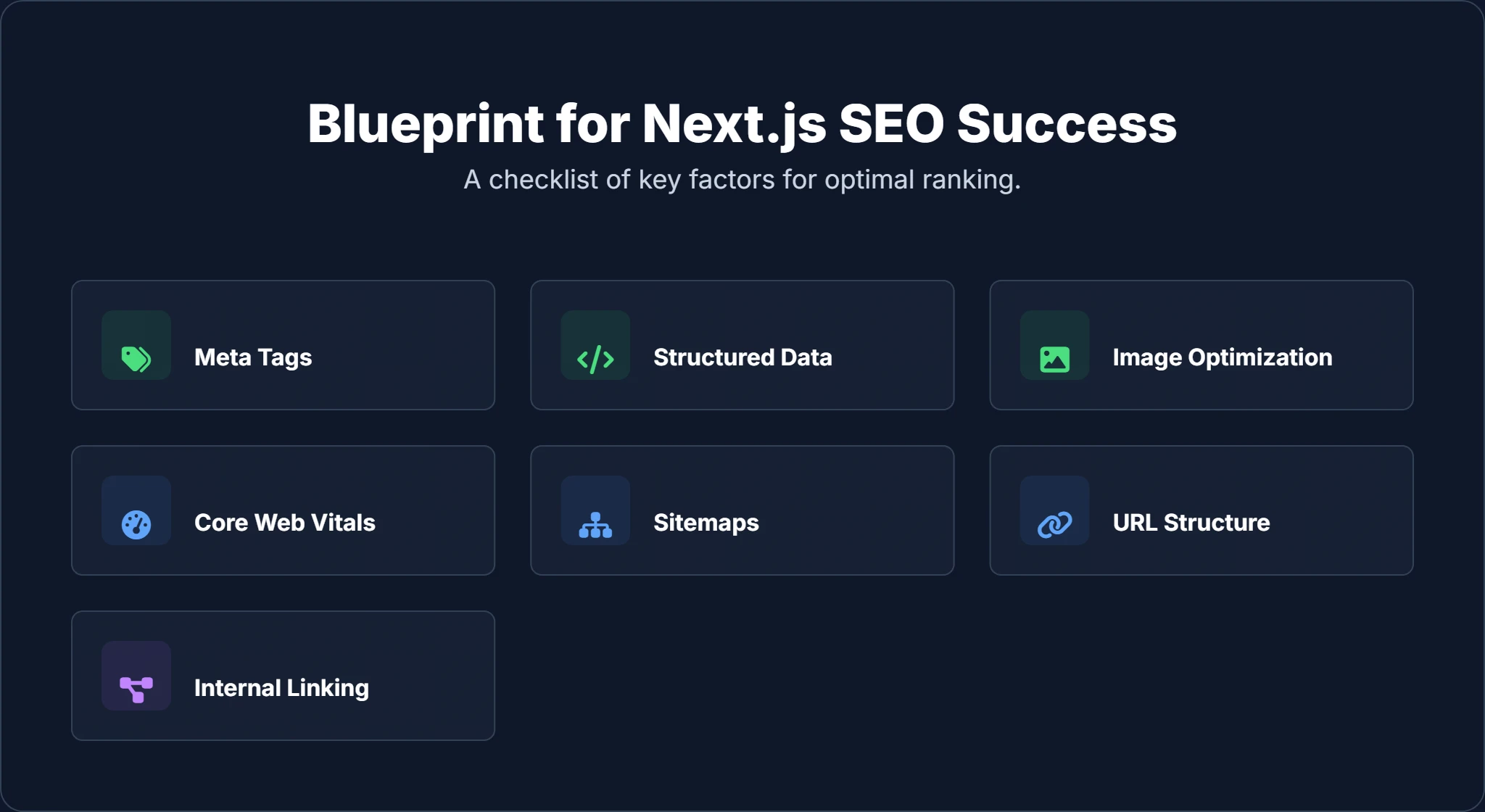
Essential Optimization: The Next.js SEO Checklist
A fast site is useless if Google doesn't know what it's about. You must translate your content into a language crawlers understand.
1. Managing Metadata (Head vs. Metadata API)
Proper metadata—titles, descriptions, and Open Graph tags—is non-negotiable for click-through rates (CTR). Next.js handles this differently depending on whether you are using the Pages Router (older) or the App Router (newer).
Scenario A: The Pages Router (pages directory)
You use the next/head component to inject tags into the <head> of your HTML.
// pages/blog/[slug].js
import Head from 'next/head';

function BlogPost({ post }) {
  return (
    <>
      <Head>
        <title>{post.title} | Digispot AI</title>
        <meta name="description" content={post.excerpt} />
        <meta property="og:title" content={post.title} />
        <meta property="og:image" content={post.coverImage} />
        <link rel="canonical" href={`https://digispot.ai/blog/${post.slug}`} />
      </Head>
      <article>
        <h1>{post.title}</h1>
        {/* Post content */}
      </article>
    </>
  );
}
Scenario B: The App Router (app directory)
In Next.js 13+, next/head is replaced by the Metadata API. This is more powerful as it allows you to export a metadata object or a generateMetadata function for dynamic SEO.
// app/blog/[slug]/page.js

// Dynamic metadata generation
export async function generateMetadata({ params }) {
  const post = await getPost(params.slug);

  return {
    title: post.title,
    description: post.excerpt,
    openGraph: {
      title: post.title,
      description: post.excerpt,
      images: [
        {
          url: post.coverImage,
          width: 1200,
          height: 630,
        },
      ],
    },
    alternates: {
      canonical: `/blog/${params.slug}`,
    },
  };
}

export default function Page({ params }) {
  return <article>{/* Content */}</article>;
}
Pro Tip: Always define a "default" metadata set in your root layout (layout.js) so that pages without specific SEO overrides still have fallbacks for titles and OG images.
2. Structured Data: Speaking Google's Native Language
Schema markup (JSON-LD) is one of the most underutilized strategies for gaining "Rich Snippets"—those eye-catching search results with star ratings, FAQs, or event dates. Learn more about effective schema usage in our guide to on-page SEO best practices.
Implementation Strategy: Do not hardcode schema. Create a helper function that accepts your data (like a product or blog post) and returns the formatted JSON-LD object.
// components/JsonLd.js
export default function JsonLd({ data }) {
  return (
    <script
      type="application/ld+json"
      dangerouslySetInnerHTML={{ __html: JSON.stringify(data) }}
    />
  );
}

// Usage in a page
const articleSchema = {
  "@context": "https://schema.org",
  "@type": "Article",
  "headline": title,
  "image": imageUrl,
  "datePublished": date,
  // ...
};

// In your return JSX
<JsonLd data={articleSchema} />
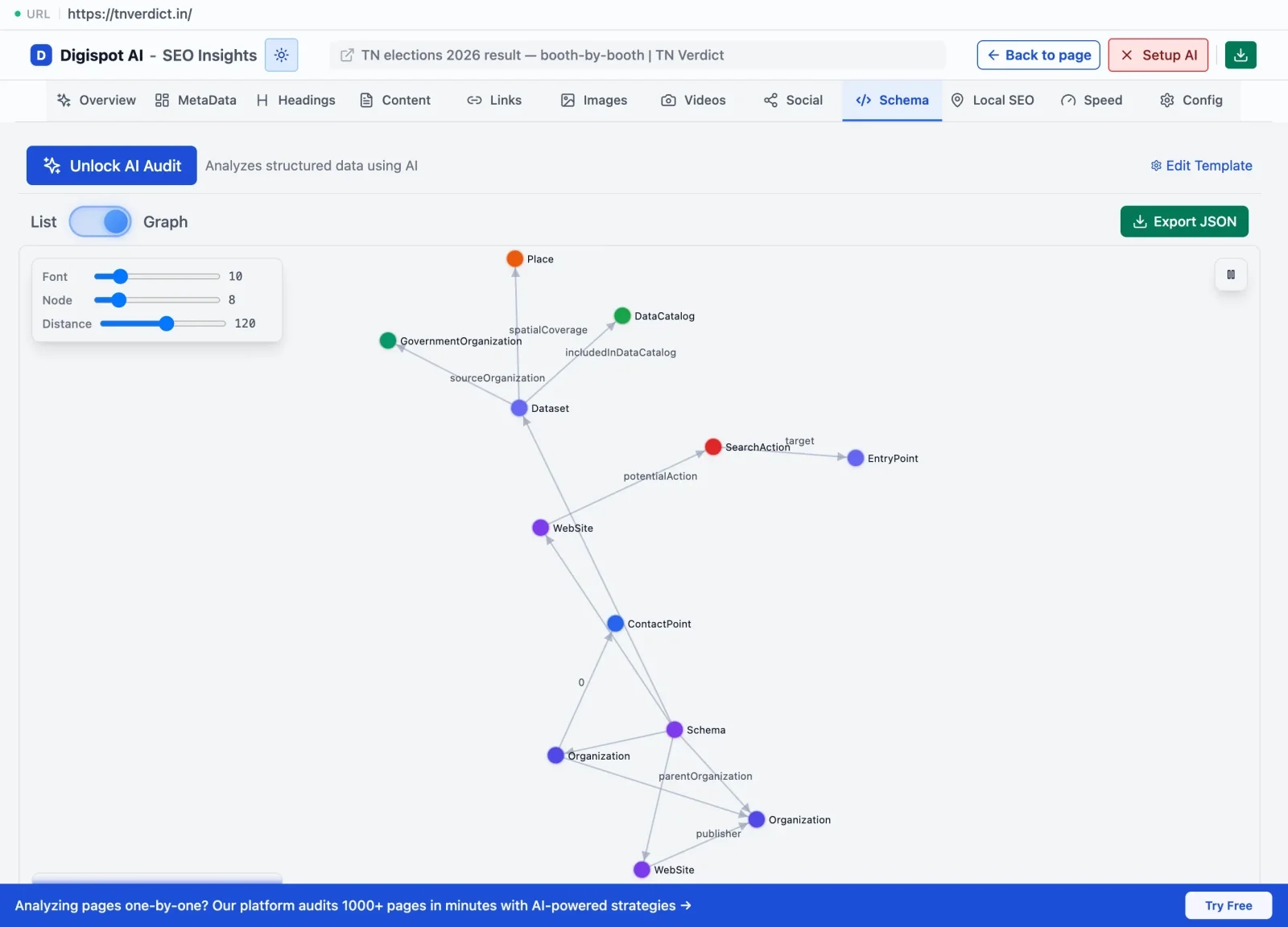
Manually writing JSON-LD is prone to syntax errors. A missing comma can invalidate the entire block. If you are unsure if your schema is valid, the Digispot AI Chrome extension can inspect any page on your site (or your competitor's) to visualize the schema structure and flag errors instantly.
3. Next-Level Image Optimization
Large images are the primary cause of slow Largest Contentful Paint (LCP) scores. The next/image component is not just a standard <img> tag; it is an image processing powerhouse.
- Automatic Resizing: It creates multiple versions of your image (thumbnails for mobile, full-res for desktop) and serves the correct size based on the user's viewport.
- Format Conversion: It automatically converts JPEGs or PNGs to WebP or AVIF (modern, highly compressed formats) if the user's browser supports them.
- Layout Shift Prevention: It reserves the space for the image before it loads, preventing the dreaded Cumulative Layout Shift (CLS).
The priority Prop:
For the "hero" image on your homepage or the main image on a blog post, always add the priority prop. This tells Next.js to preload this image immediately, significantly boosting your LCP score.
<Image
  src="/hero-banner.webp"
  alt="AI SEO Dashboard Interface"
  width={1200}
  height={600}
  priority={true} // Crucial for LCP
/>
4. Core Web Vitals: The Performance Ranking Factor
Google's Core Web Vitals (CWV) are a set of metrics that measure real-world user experience. Next.js gives you a head start, but you can still ruin it with bad code.
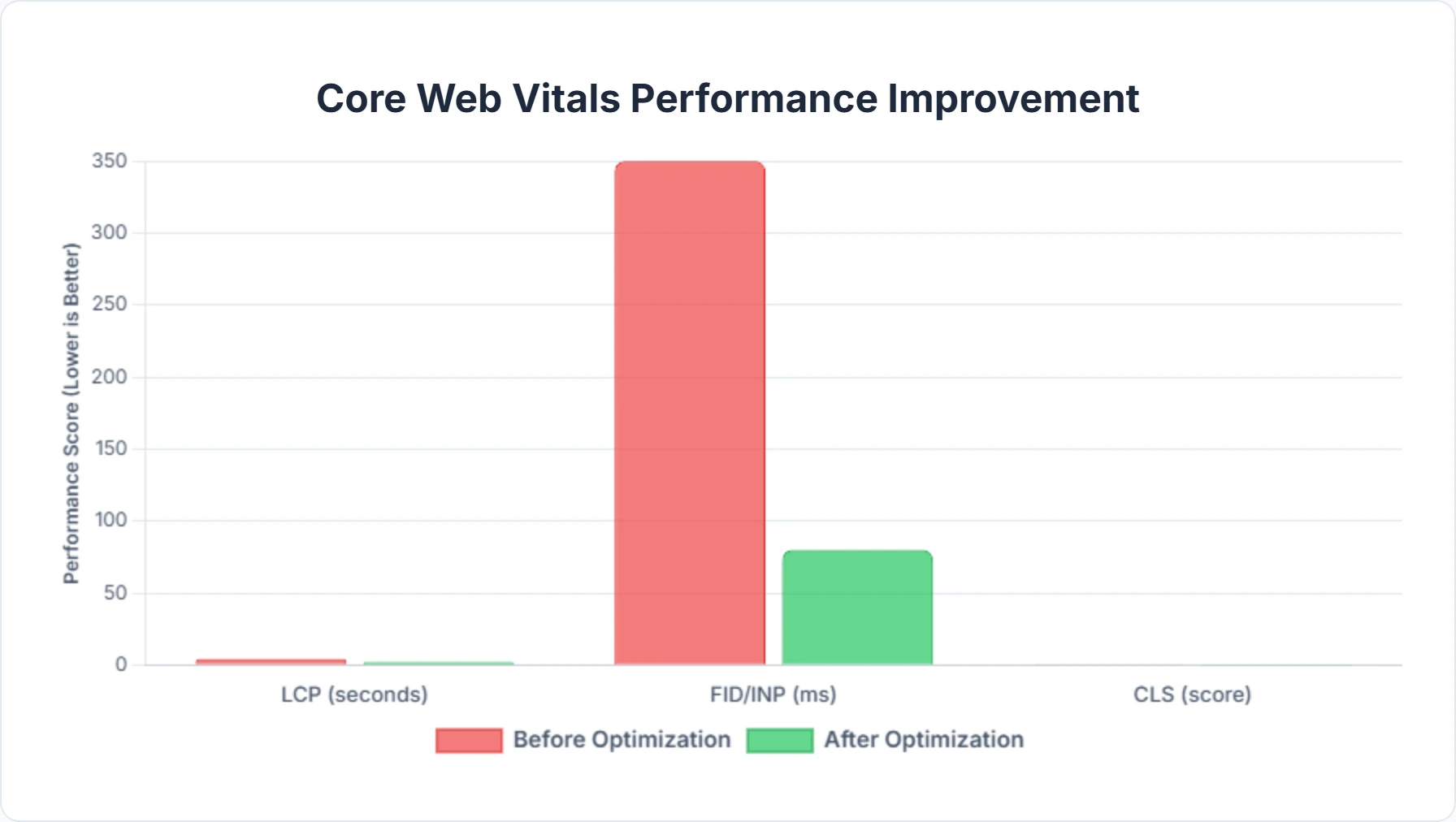
- Largest Contentful Paint (LCP): Target under 2.5s. Use SSG/ISR and optimize images.
- Interaction to Next Paint (INP): This replaces FID in 2024. It measures responsiveness. Heavy JavaScript execution on the main thread kills INP. Use Next.js dynamic imports (
next/dynamic) to lazy-load heavy components (like maps or complex charts) so they don't block the main thread during initial load. - Cumulative Layout Shift (CLS): Target 0.1 or less. Always define width and height attributes for images and video containers.
For a deeper dive into optimizing these metrics, read our Core Web Vitals SEO guide.
5. Sitemaps and Robots.txt
You need to tell Google where your content is. Since Next.js routes can be dynamic (e.g., /blog/[slug]), you cannot just write a static sitemap manually.
Dynamic Sitemaps:
The next-sitemap package is the industry standard here. It scans your build folder and your dynamic routes to generate a sitemap.xml and robots.txt automatically post-build.
Configuration typically looks like this (next-sitemap.config.js):
module.exports = {
  siteUrl: 'https://www.yourdomain.com',
  generateRobotsTxt: true,
  exclude: ['/server-sitemap.xml', '/admin/*'], // Hide admin routes
  robotsTxtOptions: {
    additionalSitemaps: [
      'https://www.yourdomain.com/server-sitemap.xml', // For highly dynamic content
    ],
  },
}
This automation ensures that every time you publish a new blog post via your CMS, the sitemap is updated on the next build, and Google discovers the new URL.
6. Canonicalization and URL Structure
Duplicate content causes "keyword cannibalization," where Google doesn't know which of your pages to rank, so it ranks none of them. This often happens with parameterized URLs (e.g., /shop?sort=price vs /shop).
Self-Referencing Canonicals: Every page should point to itself as the "canonical" version unless it is a direct duplicate of another page. In Next.js, you can handle this globally in your Layout or Metadata configuration.
Trailing Slashes:
Next.js allows you to configure how URLs end. Consistency is key. example.com/about and example.com/about/ are treated as two different pages by Google.
In next.config.js, enforcing trailing slashes is often recommended for consistency:
module.exports = {
  trailingSlash: true,
}
This forces a redirect to the version with the slash, consolidating your link equity to a single URL.
7. Internal Linking with next/link
Internal links are the highways for crawler bots. If a page isn't linked to, it's an "orphan page" and likely won't get indexed.
Why next/link matters for SEO:
Standard <a> tags trigger a full page refresh. The <Link> component in Next.js prefetches the linked page in the background when the user hovers over it. This makes the transition instant. While the speed is a user experience benefit, the structure of your internal links helps Google understand your site hierarchy.
Ensure you use descriptive anchor text.
- ❌ Bad: "Click here"
- ✅ Good: "Check out our 2026 SEO audit checklist"
8. Internationalization (i18n)
If you are targeting global markets, hreflang tags are essential. They tell Google: "This page is for English speakers in the US, and this alternative version is for French speakers in Canada."
Next.js has built-in support for Internationalized Routing. By configuring your i18n object in next.config.js (for Pages Router) or using Middleware (for App Router), you can automatically serve the correct localized content and generate the necessary hreflang headers or tags without complex logic.
Auditing and Monitoring: The Feedback Loop
You can't improve what you don't measure. Launching your Next.js site is just day one. Regular auditing is required to catch regressions—like a new feature update accidentally breaking your canonical tags or a large image killing your mobile score.
Essential Monitoring Metrics:
- Crawl Stats: Is Googlebot hitting 404s? (Check Search Console)
- Indexing Status: Are your dynamic pages actually getting into the index?
- Core Web Vitals: Are real users experiencing lag?
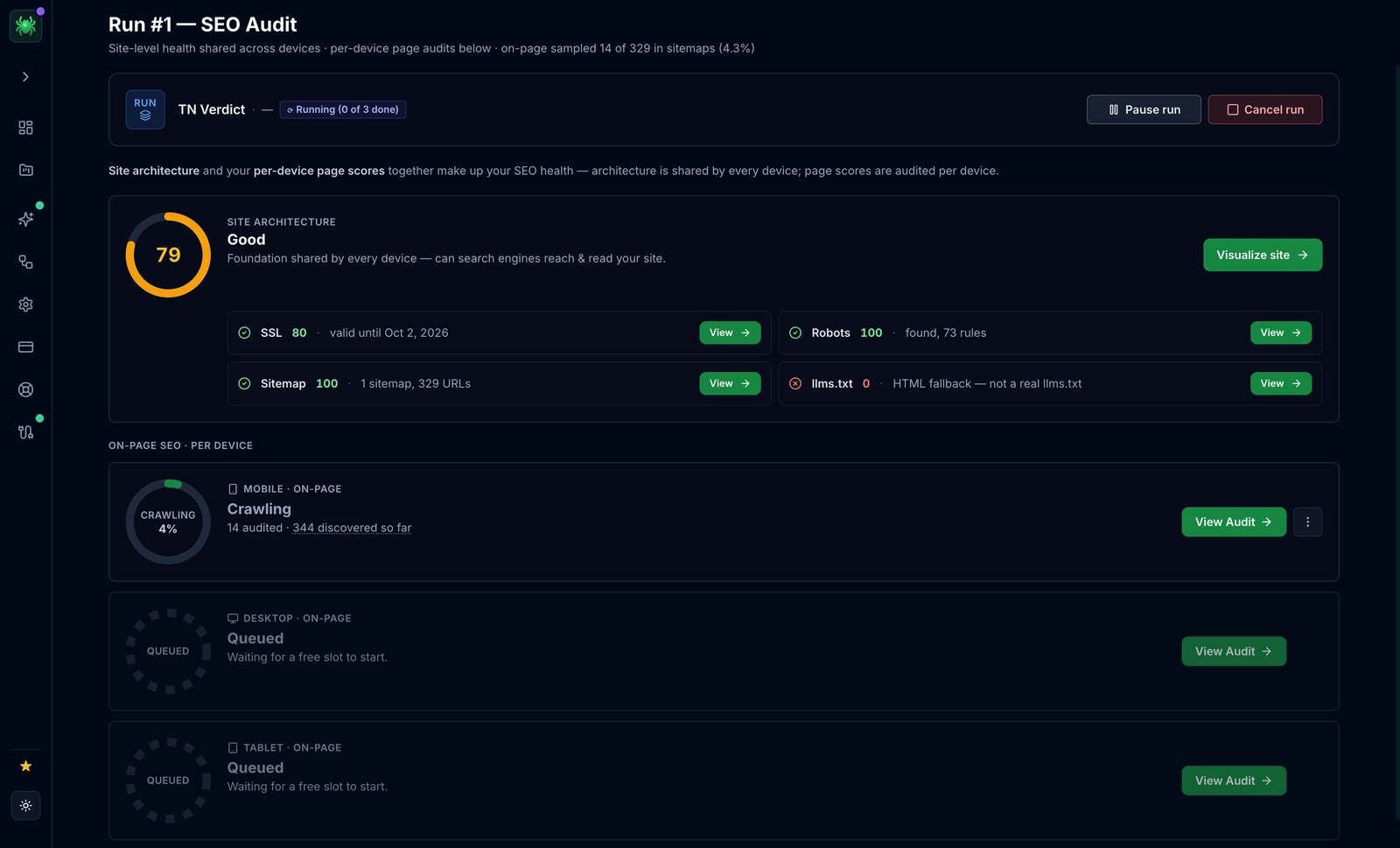
This is where automation becomes your best friend. Digispot AI provides automated monitoring that integrates directly with your workflow. Instead of manually checking page speeds, Digispot can crawl your site periodically, identifying "SEO drift" where optimizations slowly degrade over time.
How Digispot AI Supercharges Next.js SEO
While Next.js provides the technical capability to rank, it doesn't provide the strategy or the content intelligence. This is the gap Digispot AI fills.
From Framework to Strategy:
- Technical Audits: Next.js is complex. Digispot's crawler mimics Googlebot to render your JavaScript and audit the final HTML, catching issues that static code analysis misses (like hydration errors affecting SEO content).
- Schema Visualization: We don't just tell you schema is missing; we visualize how search engines interpret your existing JSON-LD, ensuring your entities are connected correctly.
- Opportunity Discovery: Your Next.js blog might be fast, but is it covering the right topics? Digispot analyzes competitor gaps to suggest content that uses your site's authority to capture new keywords.
- Instant Browser Insights: Our free Chrome extension is a favorite among React developers. It allows you to debug meta tags, canonicals, and header structures on the fly, directly on your production or localhost environment.
Common Next.js SEO Mistakes to Avoid
Even senior developers fall into these traps. Awareness is prevention.
| SEO Mistake | The Technical Error | The Next.js Fix |
|---|---|---|
| The "Loading..." Trap | Fetching critical SEO content (like H1 or product descriptions) inside a useEffect hook. Google might only index the "Loading..." spinner. | Move data fetching to getServerSideProps (Pages) or use async Server Components (App Router) to fetch data before rendering. |
| Missing Meta Fallbacks | Forgetting to handle cases where dynamic data fails, resulting in "undefined" in title tags. | Implement error boundaries and default metadata values in your root layout or _app.js. |
| Unoptimized Custom Fonts | Loading fonts via CSS @import causing Flash of Invisible Text (FOIT) and layout shifts. | Use next/font. It automatically self-hosts Google Fonts and optimizes loading strategies to zero layout shift. |
| Bloated Bundle Size | Importing massive libraries (like Moment.js or Lodash) for simple tasks, hurting TTI (Time to Interactive). | Use @next/bundle-analyzer to spot heavy dependencies. Switch to lighter alternatives or lazy load them with dynamic imports. |
| Hash Links for Navigation | Using <a href="#"> for buttons or interactive elements that look like links but aren't. | If it navigates to a new URL, use <Link>. If it's an action (like "Open Modal"), use a <button>. Do not confuse crawlers with fake links. |
| Neglecting 404 Pages | Using the default, generic 404 page which encourages users to bounce back to Google. | Create a custom not-found.js or 404.js. Include a search bar and links to popular content to keep the user on your site. |
For a comprehensive list of pitfalls, refer to our detailed analysis of common SEO mistakes developers make when scaling applications.
The Future: AI Search and Next.js
The search landscape is shifting rapidly. With the rise of Search Generative Experience (SGE) and AI-driven answers, the goal is no longer just "ranking links"—it's "being the answer."
AI engines rely heavily on structured data and clear semantic HTML to understand facts and relationships. Next.js is uniquely positioned for this future because of its support for Server Components. By rendering HTML on the server, you provide the raw, semantic data that AI models crave, without the obfuscation of client-side JavaScript.
Furthermore, as "page speed" becomes synonymous with "quality" in the eyes of AI, the performance benefits of Next.js SSG and ISR will become even more critical weightings in algorithms.
Conclusion: Your Path to Next.js SEO Mastery
Building a high-ranking website isn't magic; it's a strategic blend of technical excellence, compelling content, and continuous optimization. Next.js offers an incredible toolkit, providing the foundational speed and rendering capabilities that search engines adore. From its powerful rendering options like SSR, SSG, and ISR to its built-in image optimization and routing, Next.js significantly simplifies many complex SEO challenges.
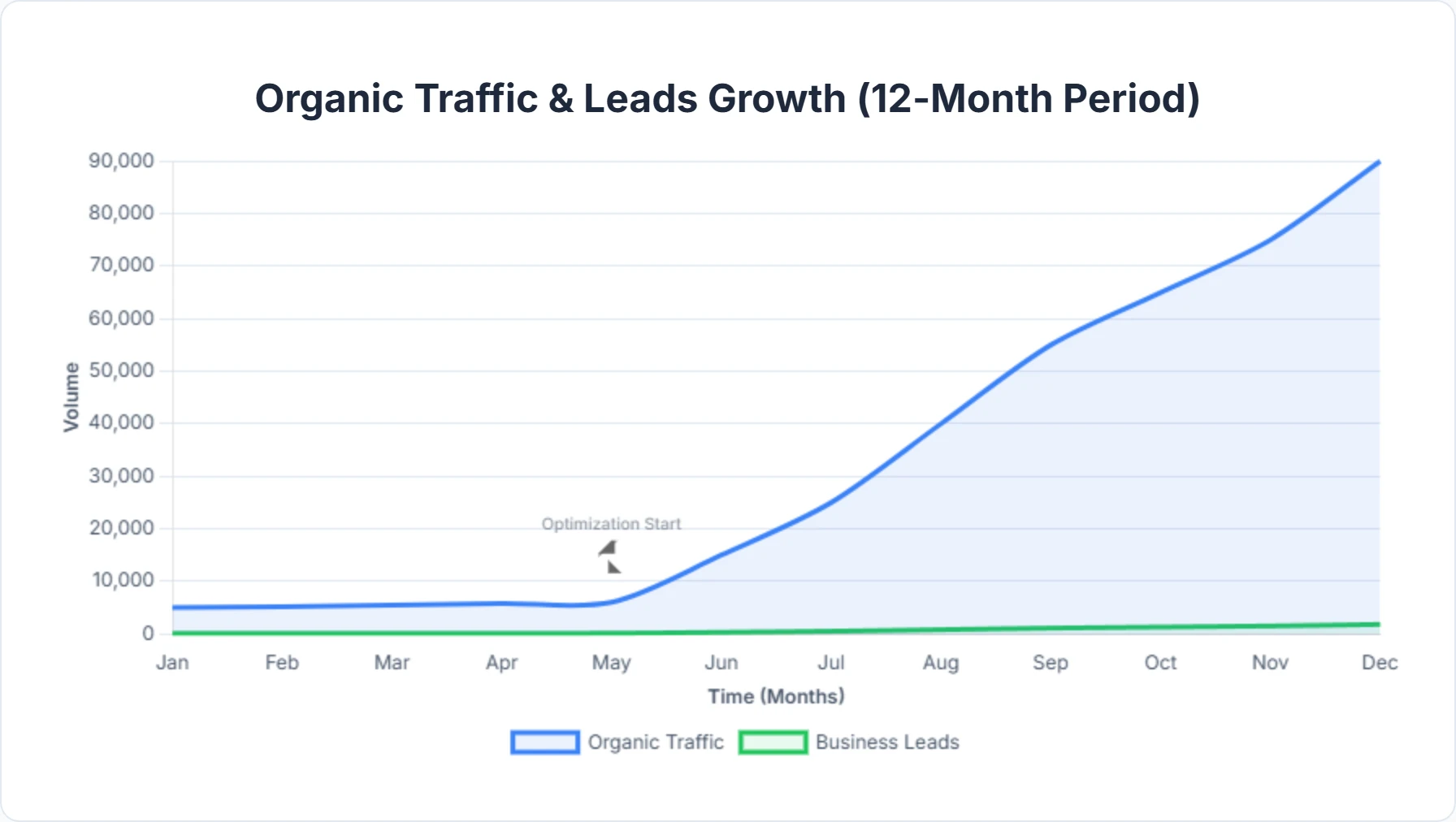
However, the tool is only as good as the craftsperson using it. By meticulously crafting your meta tags, implementing robust structured data, optimizing images, and ensuring a logical site structure, you empower your Next.js application to speak directly to search engines.
Remember, the journey to top rankings is iterative. You must test, measure, and refine. Regularly audit your site, monitor your performance through tools like Google Search Console, and leverage advanced platforms like Digispot AI to uncover hidden opportunities and address emerging issues before they impact your revenue.
With a strong Next.js foundation and intelligent optimization, your business can achieve greater visibility, attract more traffic, and ultimately convert more leads. Stop building invisible websites. Start building engines of growth.
References
- Data Fetching in Next.js | Next.js Documentation
- Create good titles and snippets in Search results | Google Search Central
- Understand how structured data works | Google Search Central
- Image best practices | Google Search Central
- Core Web Vitals | web.dev
- Build and submit a sitemap | Google Search Central
- Consolidate duplicate URLs using canonicals | Google Search Central
- Tell Google about localized versions of your page | Google Search Central
- Google Search Console
- Digispot AI - FREE On Page SEO Audit Tool
- Digispot AI - FREE Chrome Extension for SEO Insights
- Digispot AI - AI SEO Platform
Audit any page in seconds
300+ SEO checks including Core Web Vitals, schema markup, meta tags, and AI readiness — trusted by 1000+ SEO experts and marketers.
Frequently Asked Questions
Here are some of our most commonly asked questions. If you need more help, feel free to reach out to us.
Written by
Maya Krishnan
Digital growth expert
Maya is a seasoned expert in web development, SEO, and digital strategy, dedicated to helping businesses achieve sustainable growth online. With a blend of technical expertise and strategic insight, she specializes in creating optimized web solutions, enhancing user experiences, and driving data-driven results. A trusted voice in the industry, Maya simplifies complex digital concepts through her writing, empowering readers with actionable strategies to thrive in the ever-evolving digital landscape.