React SEO: The Complete Guide to Optimizing React Apps
React SEO optimization guide. Fix JavaScript rendering, implement SSR/SSG, and get Google to index your React app. Covers Next.js, React 19, and best practices.
 Maya Krishnan
You have built a high-performance React application. It is fast, interactive, and provides a seamless user experience. But there is a silent problem: search engines might be ignoring it. If Googlebot cannot efficiently crawl, render, and index your JavaScript-heavy pages, your digital storefront is effectively invisible. This is the core challenge of React.js SEO: Optimize Single Page Applications.
For developers and marketers alike, the realization that a technically superior product is failing in organic search is frustrating. Unlike traditional static HTML sites, React Single Page Applications (SPAs) rely heavily on client-side JavaScript execution. This architectural choice, while excellent for interactivity, creates significant friction for search crawlers that expect content to be immediately available in the initial server response.
This guide is not just a surface-level overview. It is a deep dive into the mechanics of how search engines interact with JavaScript frameworks. We will explore actionable strategies to bridge the gap between React's dynamic nature and Google's indexing requirements, ensuring your application doesn't just function beautifully but also ranks competitively.
What is React.js SEO? Demystifying the Rendering Process
To fix SEO issues in React, you must first understand the disconnect between modern web app architecture and traditional search engine crawling. SEO for React is the process of optimizing your application's code structure, rendering method, and metadata delivery so that search engine bots can access and understand your content as easily as a human user does.
The Traditional vs. SPA Workflow
In a traditional website (like a WordPress blog), when a user or bot requests a URL, the server responds with a complete HTML document containing all the text, images, and links. The browser simply displays what it receives. Search engines love this because the content is immediate and easy to parse.
React, by default, operates differently. It typically uses Client-Side Rendering (CSR). Here is what happens when a bot visits a standard React SPA:
- The Request: The bot requests a page.
- The Response: The server sends a nearly empty HTML shell, often containing just a single
divwith an ID likerootand a link to a JavaScript bundle. - The Execution: The browser (or bot) must download and execute the JavaScript.
- The Rendering: Only after the JavaScript runs does the content (text, images, metadata) appear in the DOM.
This delay is critical. While Google has improved its ability to render JavaScript (using a headless Chromium browser often referred to as the "Web Rendering Service"), it is not perfect. It is resource-intensive. If your JavaScript throws an error, takes too long to load, or if the bot decides it doesn't have the "crawl budget" to wait for rendering, your content remains invisible. The bot sees an empty page, and an empty page cannot rank.
Why ReactJS SEO Poses a Unique Challenge
The challenges of optimizing React applications go beyond simple keyword placement. They are fundamentally technical, rooted in how data is delivered to the client—which is why a solid grasp of technical SEO fundamentals is essential before you tackle a JavaScript framework.
1. The Crawl Budget and Indexing Latency
Google assigns a "crawl budget" to every site—a limit on the number of pages it will crawl within a given timeframe. JavaScript-heavy sites consume more of this budget because rendering requires significantly more computational power than parsing static HTML.
When Googlebot encounters a JavaScript site, it often defers the rendering phase. It might index the initial empty HTML first (finding nothing) and queue the rendering for later. This "two-wave indexing" process can delay the discovery of your content by days or even weeks. For news sites or e-commerce stores with rapidly changing inventory, this latency is unacceptable.
2. The "Soft 404" Problem
In a Single Page Application, routing is handled on the client side. If a user visits a non-existent URL (e.g., /products/does-not-exist), React might display a "Page Not Found" component, but the server often still returns a 200 OK HTTP status code because the app shell loaded successfully.
To a search engine, a 200 OK status means the page is valid. Google may index thousands of these "blank" or error pages, diluting your site's authority and wasting crawl budget. A proper SEO setup ensures the server returns a 404 status code for non-existent routes, which is tricky to implement in a pure CSR environment.
3. Core Web Vitals and Interaction to Next Paint (INP)
Google's Core Web Vitals are a direct ranking factor. React apps, with their large JavaScript bundles, often struggle with:
- Largest Contentful Paint (LCP): The time it takes for the main content to load. Client-side fetching of data delays this significantly.
- Interaction to Next Paint (INP): Replacing FID, INP measures the responsiveness of your page to user interactions. Heavy main-thread activity caused by React's hydration process can lead to poor INP scores, signaling a sluggish experience to Google.
To see exactly how your React app is performing against these metrics right now, you can use the Digispot AI platform for a comprehensive technical analysis.
The table below illustrates the stark difference between a standard approach and a lifecycle-optimized SEO approach for React apps.
| Business Outcome | How Product-Lifecycle-SEO Achieves It |
|---|---|
| Improving Business Visibility | Ensures consistent high rankings across all product stages, making your offerings constantly discoverable to relevant searches. |
| Increase in Traffic & Leads | Drives more qualified organic traffic by continuously optimizing for evolving search queries and user intent, converting visitors into valuable prospects. |
| Time and Cost Savings | Proactive SEO integration prevents costly fixes post-launch, streamlines content creation, and maximizes the ROI of marketing efforts. |
| Enhanced Brand Authority | Builds a strong, credible online presence by consistently providing valuable, optimized content that answers user questions and establishes your brand as a leader. |
| Deeper Market Insights | Continuous monitoring of SEO performance and search trends provides invaluable data on customer behavior and market shifts, informing product and marketing strategies. |
| Sustainable Competitive Edge | Establishes a long-term, adaptive SEO strategy that is harder for competitors to replicate, ensuring your product maintains its leading position. |
| Optimized User Experience | Focuses on delivering fast, relevant, and engaging content that satisfies user intent at every touchpoint, reducing bounce rates and improving engagement metrics. |
The Undeniable Benefits of a Search-Engine-Optimized React Application
Investing in the technical migration from a standard Client-Side Rendered app to an SEO-friendly architecture (like SSR or SSG) is a significant undertaking. However, the ROI is substantial.
- Holistic Discoverability: When you serve pre-rendered HTML, you aren't just helping Google. You are helping Bing, DuckDuckGo, and social media bots (Facebook, Twitter/X, LinkedIn) which often struggle even more than Google with JavaScript. This ensures that when users share your links, rich previews (images, titles, descriptions) appear correctly, driving higher click-through rates from social channels.
- Improved Quality Score for PPC: If you run Google Ads, your landing page experience affects your Quality Score. Faster load times and readable content improve this score, potentially lowering your Cost Per Click (CPC).
- Future-Proofing: Search engines are evolving, but the preference for fast, declarative HTML remains constant. By aligning your tech stack with these fundamentals, you insulate your business against future algorithm changes that might penalize heavy client-side execution.
Essentially, you are moving from a "build it and hope they can read it" strategy to a "serve it exactly how they want it" strategy. This leads to improved business visibility and a tangible increase in traffic and business leads.
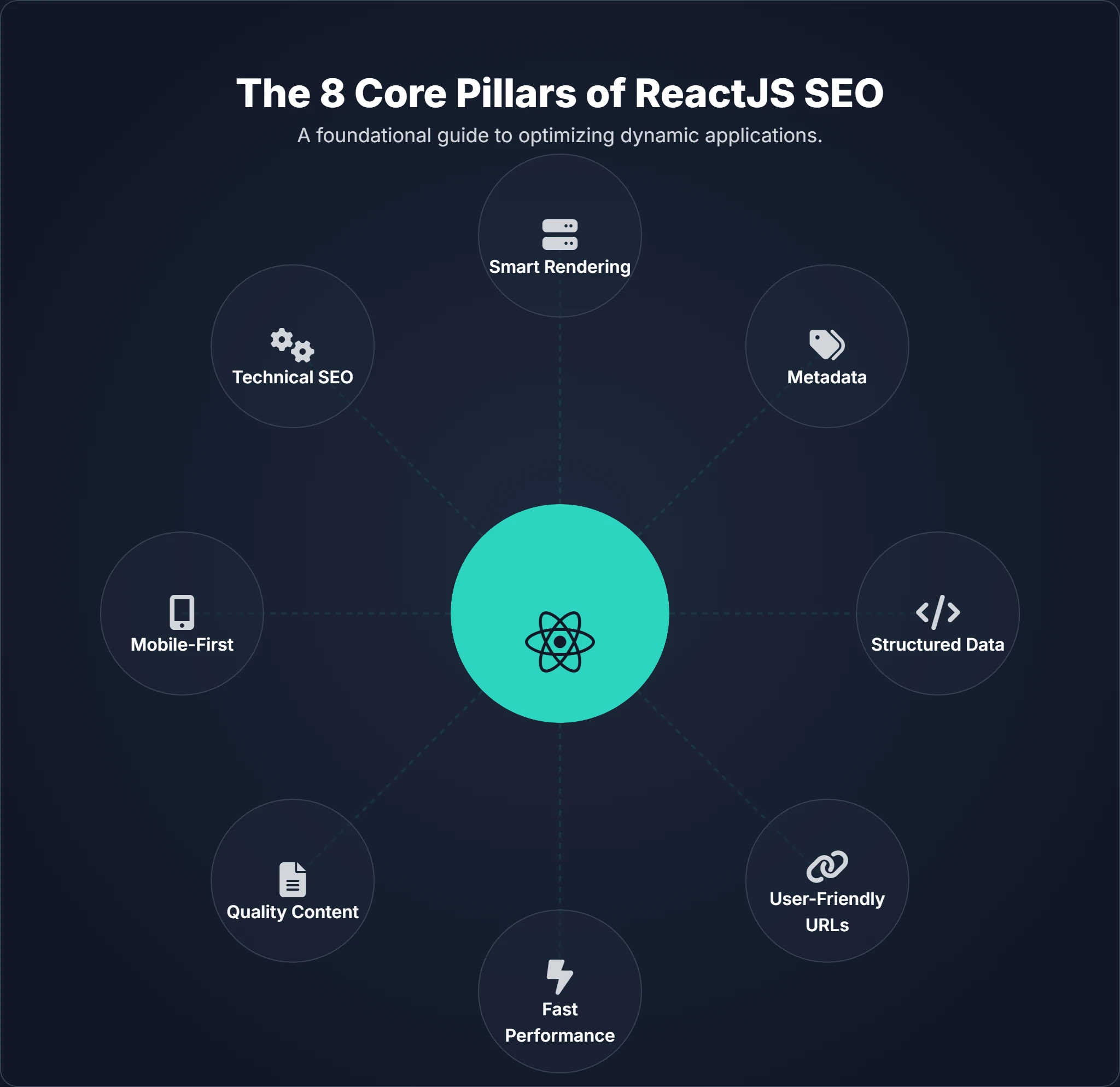
How to Master ReactJS SEO: The Core Pillars of Success
Optimizing a React application requires a strategic blend of architectural decisions and on-page tactics. We have identified eight core pillars that form the foundation of a high-ranking SPA.
Pillar 1: Smart Rendering Strategies (SSR, SSG, and ISR)
The most effective way to solve React SEO issues is to change where the rendering happens. You have three primary robust options, largely facilitated by frameworks like Next.js or Remix.
1. Server-Side Rendering (SSR): With SSR, every time a user requests a page, the server executes the React code, fetches the necessary API data, and generates the full HTML string. This HTML is sent to the browser.
- Pros: Search engines see content immediately. Users see the "First Contentful Paint" much faster.
- Cons: Higher server load. The user sees the content quickly, but the page might not be interactive until the JavaScript bundle downloads and "hydrates" the page.
2. Static Site Generation (SSG): This is the gold standard for performance. You generate all your HTML pages at build time. When a user requests a page, the server simply serves a static file.
- Pros: Extremely fast (can be served via CDN). Zero server-side processing per request. Perfect for blogs, documentation, and marketing pages.
- Cons: Not suitable for highly dynamic content that changes every minute (like a stock ticker) unless you rebuild the site constantly.
3. Incremental Static Regeneration (ISR): ISR offers the best of both worlds. It allows you to update static pages after you have built your site. You can generate static pages at build time but also specify a "revalidation" interval. If a request comes in after that interval, Next.js will regenerate the page in the background, updating the static file for future visitors.
Recommendation: For most SEO-focused React apps, use Next.js. It abstracts the complexity of SSR and SSG. If you are stuck with a legacy Create React App (CRA) and cannot migrate, consider Prerendering services (like Prerender.io) which act as middleware to render pages specifically for bots.
Pillar 2: Metadata That Matters (Titles, Descriptions, and Open Graph)
In a standard HTML file, <title> and <meta> tags live in the <head>. In React, the "body" changes as you navigate, but the "head" often remains static unless explicitly managed. This results in every page of your app having the same title (e.g., "My React App"), which is disastrous for SEO.
The Solution: Use react-helmet-async or the built-in <Head> component in Next.js.
These libraries allow you to inject dynamic metadata based on the current component.
- Dynamic Titles: Ensure every product page includes the product name in the title tag (e.g., "Blue Running Shoes | BrandName").
- Canonical Tags: Critical for avoiding duplicate content issues, especially if your URLs accept query parameters for tracking.
- Open Graph & Twitter Cards: Don't forget social SEO. Dynamic OG tags ensure that when your link is shared on Slack or WhatsApp, it displays the correct image and description, not a generic site logo.
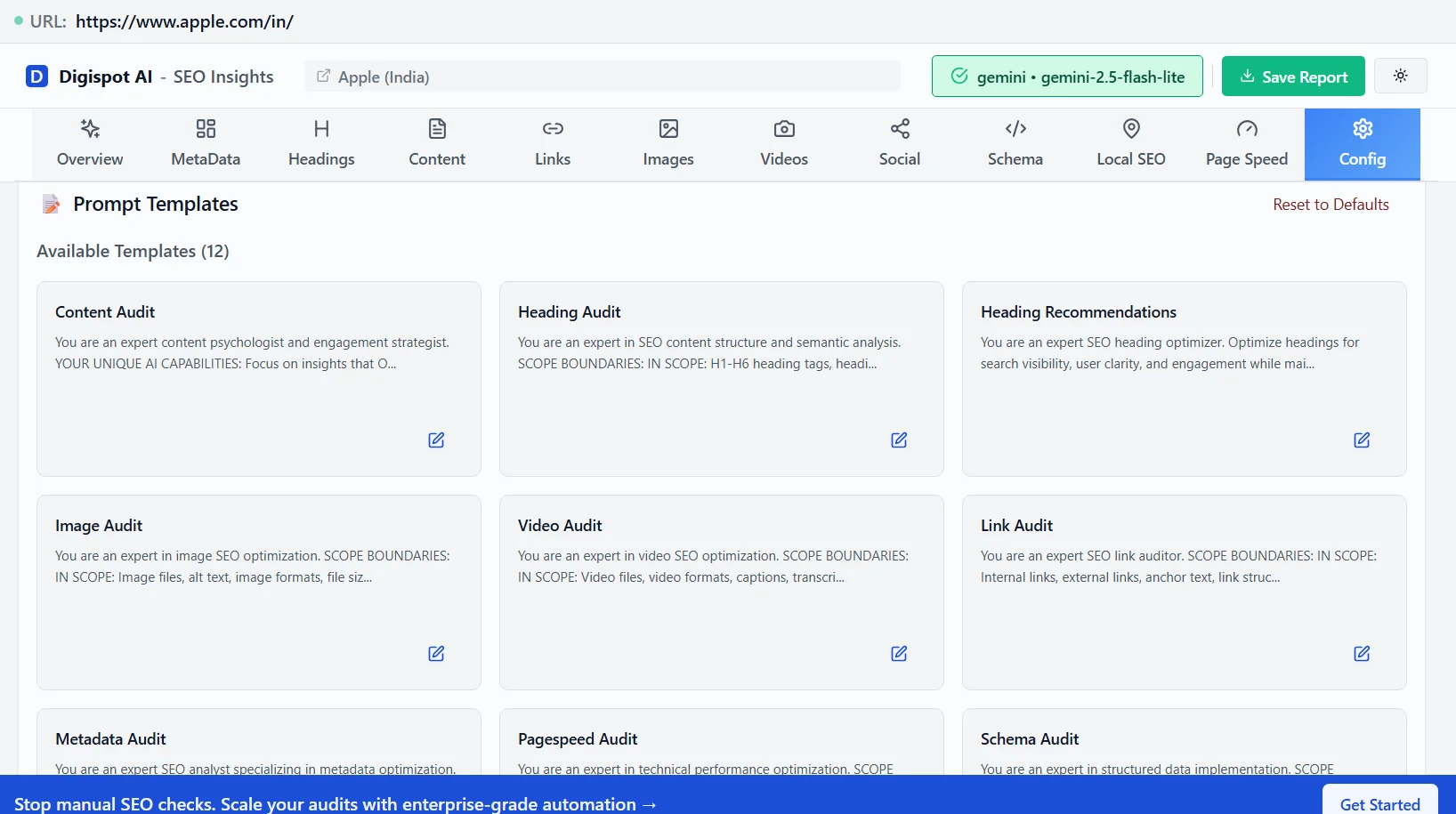
Pro Tip: Verify that your metadata injection is working by using the "Inspect Element" tool in your browser, or better yGet instant SEO insights on any page with our free Chrome extension.
Pillar 3: The Power of Structured Data (Schema Markup)
Structured data (JSON-LD) is one of the most underutilized SEO levers for React apps. It helps search engines understand the context of your content, not just the text.
For a React app, you can inject a JSON-LD script block into the head of your document.
- E-commerce: Use
Productschema to display price, availability, and review ratings directly in search results (Rich Snippets). - Blogs: Use
Articleschema to specify the author, publish date, and headline. - Local Biz: Use
LocalBusinessschema to clarify your address and opening hours.
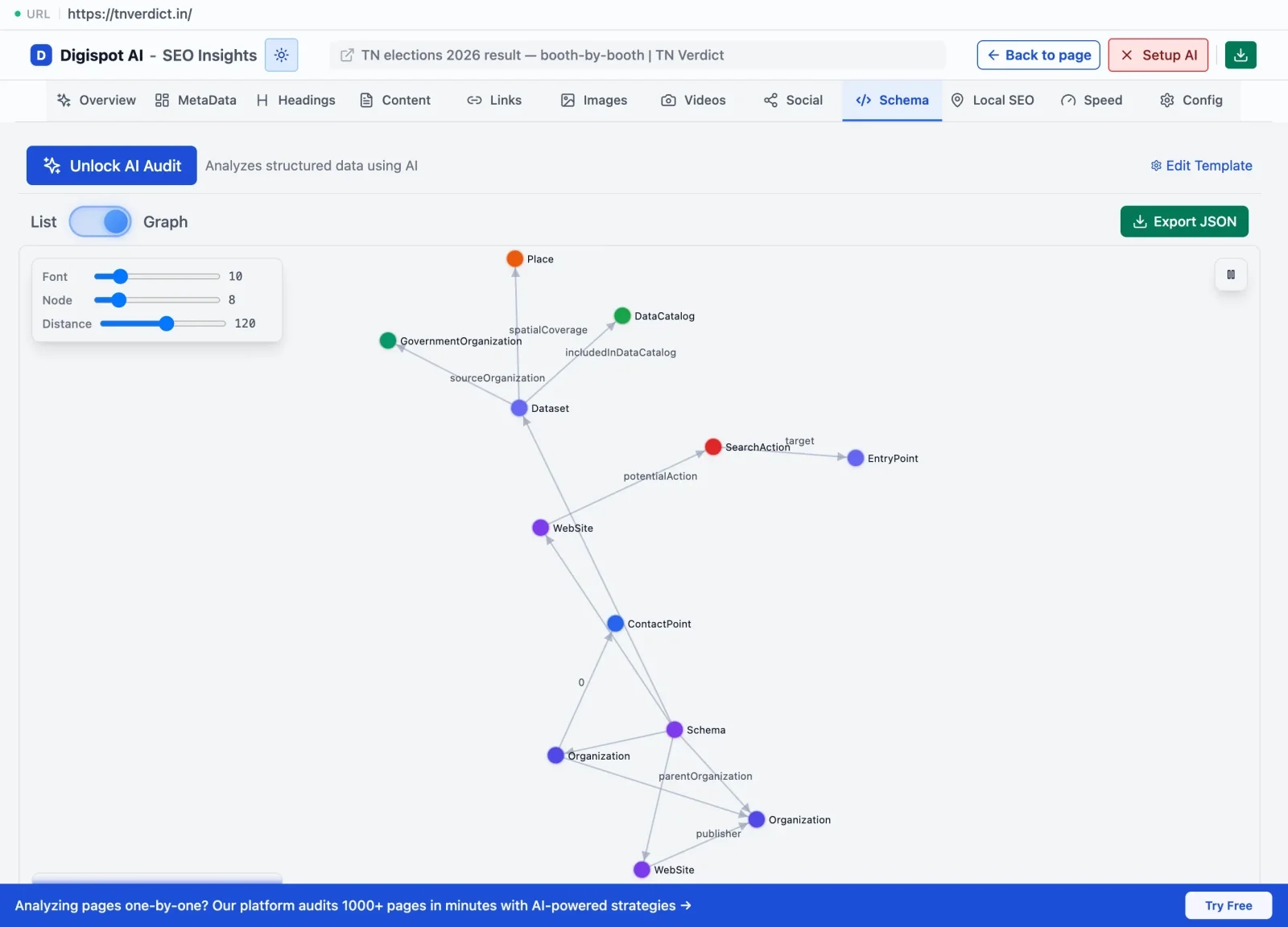
Implementation Caveat: Ensure your JSON-LD is properly sanitized to prevent XSS attacks if you are populating it with user-generated content. Validating this markup is crucial. The Digispot AI Free Community Chrome Extension excels here, allowing you to audit your page in real-time. It visualizes the schema markup detected, ensuring search engines interpret your data correctly. This feedback loop is essential for securing those valuable rich snippets.
Pillar 4: User-Friendly URLs and Routing
React Router is the standard for navigation, but it needs to be configured with SEO in mind.
- Clean URLs: Avoid hash routing (
yourdomain.com/#/about). Google creates a separate URL for everything after the hash, but historically, hash-bang URLs are less reliable for SEO than the History API. UseBrowserRouterto ensure clean paths likeyourdomain.com/about. - Trailing Slashes: Decide on a convention (trailing slash vs. no trailing slash) and stick to it. Enforce consistency via server-side redirects to prevent "duplicate content" confusion.
- Handling 404s: As mentioned earlier, ensure that when a route is not found, you aren't just showing a "Not Found" component but are also communicating a 404 status to the bot (if using SSR) or using a
noindexmeta tag on the error component (if using CSR).
For more on structuring your site architecture, check out our guide on category page SEO, which applies heavily to how you structure React routes.
Pillar 5: Blazing Fast Performance (Core Web Vitals)
Performance is no longer just a "nice to have"; it is a ranking factor. React apps are prone to "code bloat."
Optimization Strategies:
- Code Splitting: Do not send the JavaScript for the "Settings" page when the user is on the "Homepage." Use
React.lazy()andSuspense(or Next.js dynamic imports) to split your bundle. This reduces the initial payload and speeds up LCP. - Tree Shaking: Ensure your build process (Webpack, Vite, Turbopack) removes unused code.
- Image Optimization: Use the
next/imagecomponent if using Next.js. It automatically serves images in modern formats like WebP and AVIF, resizes them for the device, and lazy loads them to prevent layout shifts (CLS). - Font Optimization: Self-host fonts or use optimal loading strategies (
font-display: swap) to prevent invisible text during loading.
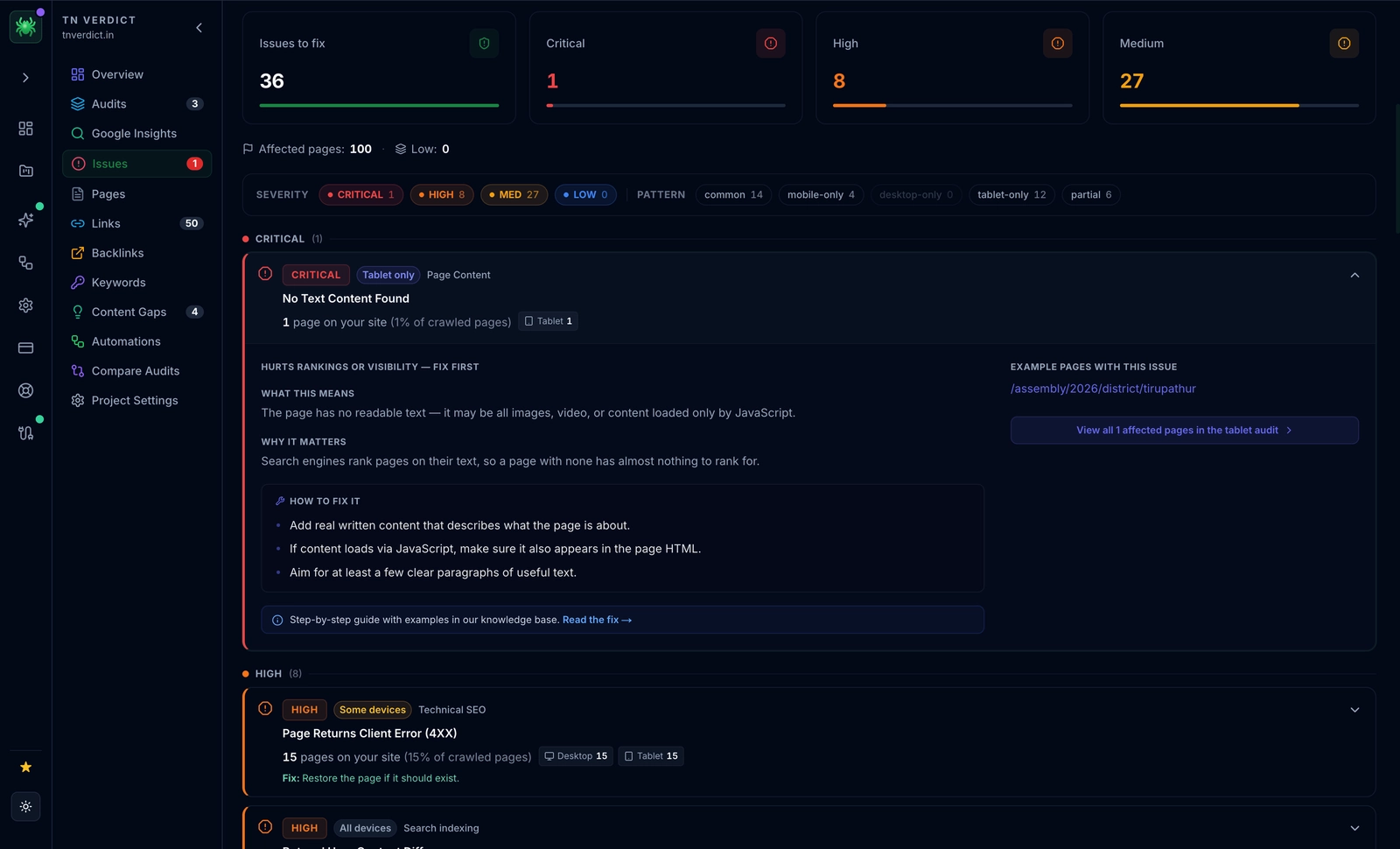
The Digispot AI platform is indispensable here. It audits websites in both mobile and desktop modes to pinpoint precise performance bottlenecks, such as unused JavaScript files or unoptimized assets that are dragging down your INP and LCP scores.
Pillar 6: Content is King (Even for React Apps)
You can have perfect code, but without great content, you won't rank. In React, "content injection" is a risk. Sometimes developers load content via an API call that triggers after the initial render. If this API is slow, Googlebot might timeout before seeing the text.
Best Practices:
- Server-Side Data Fetching: Whenever possible, fetch critical text content on the server so it arrives in the initial HTML.
- Avoid Layout Shifts: If you must load content client-side, reserve space for it (skeleton loaders) so the layout doesn't jump around when the text appears. This protects your CLS score.
- Semantic HTML: Don't just use
<div>for everything. Use<header>,<main>,<article>,<nav>, and<aside>. Semantic HTML helps screen readers and search bots understand the hierarchy and importance of your content.
Finding the right content topics is another challenge. The Digispot AI Opportunity Finder can uncover hidden gaps in your strategy, identifying high-value keywords your competitors are missing. Pair this with our Content Studio to generate SEO-optimized drafts that are ready to drop into your React components.
Read more about structuring your content in our article on on-page SEO best practices.
Pillar 7: Mobile-First is Not Optional
Google uses mobile-first indexing. This means Googlebot crawls your site pretending to be a mobile device (usually an Android smartphone). If your React app hides content on mobile to save space (e.g., "click to read more" accordions), Google might devalue that hidden content.
React Specifics:
- Ensure click targets (buttons, links) are large enough for touch screens.
- Verify that your viewport meta tag is correctly set:
<meta name="viewport" content="width=device-width, initial-scale=1" />. - Test that pop-ups or interstitials (like cookie banners) don't cover the main content on mobile, as this incurs an SEO penalty.
For a deeper dive into mobile optimization and experience, refer to our guide on page experience SEO.
Pillar 8: Technical SEO Beyond the Basics
Technical SEO is the bedrock that allows your content to be found.
- XML Sitemaps: React apps don't have a file system structure that crawlers can easily guess. You must dynamically generate a
sitemap.xmlthat lists all your routes (products, blog posts, categories). Next.js has plugins to automate this. - Robots.txt: Ensure you aren't accidentally blocking your API endpoints or JS assets. Googlebot needs to access your CSS and JS files to render the page correctly.
- Hreflang Tags: If you are running a multi-language React app, implementing
hreflangattributes correctly in the<head>is notoriously difficult but essential for international SEO.
Managing these 300+ ranking factors manually is impossible. The Digispot AI platform streamlines this by analyzing your site's architecture, sitemaps, and crawlability at scale, ensuring no technical debt holds you back. Learn more about what to look for in our SEO audit checklist for 2026.
Bridging the Gap: How Digispot AI Elevates ReactJS SEO
While the principles of ReactJS SEO are clear, the execution can be complex and time-consuming. Developers often lack deep SEO knowledge, and SEO specialists often lack the React coding skills to implement fixes. This gap is where projects fail.
Digispot AI acts as the bridge. Our cloud platform is designed to bring all SEO best practices into an automated, user-friendly model that speaks the language of both developers and marketers.
Here's how Digispot AI helps to seamlessly integrate advanced SEO capabilities into your ReactJS strategy:
- Automated, Comprehensive Audits: Imagine a tool that meticulously examines your React app for over 200 ranking factors. This includes not just the obvious ones like content quality and keyword density, but also deep dives into technical SEO elements, local SEO considerations, and page performance metrics—all rigorously assessed in both mobile and desktop environments. That’s precisely what the Digispot AI cloud platform delivers, providing an unparalleled, holistic overview of your site's SEO health.
- Intelligent Issue Identification and Resolution: Beyond simply pointing out problems, Digispot AI focuses on actionable insights. When an issue is detected—whether it's a slow loading script affecting your React app's Core Web Vitals or a missing schema markup—the platform doesn't just flag it. It provides clear guidance and suggested solutions. For a React developer, this means specific instructions on which component is causing the issue, transforming abstract SEO problems into manageable code tasks.
- Seamless Performance Tracking and Improvement: To truly improve, you need to measure. Digispot AI integrates directly with crucial tools like Google Search Console and Google Analytics. This powerful integration means you can track the impact of your SEO efforts, monitor keyword rankings, analyze traffic growth, and understand user behavior patterns—all within a single platform. It ensures your hard work translates into tangible results.
- Opportunity Discovery and AI-Powered Content Creation: The digital marketing landscape is competitive, and finding your niche requires sharp insight. Digispot AI’s Opportunity Finder helps you spot lucrative gaps and identify valuable keywords your competitors might be missing. Once opportunities are identified, the Content Studio, powered by sophisticated AI agents, steps in. It assists in generating highly SEO-optimized content that aligns with search engine algorithms, helping you avoid common SEO mistakes like keyword stuffing or thin content.
- On-the-Go Auditing with the Free Chrome Extension: For developers, marketers, and business owners who need quick insights, the Digispot AI Free Community Chrome Extension is an invaluable companion. Powered by popular LLM (Large Language Model) models, it allows you to audit any webpage directly in your browser. This extension provides instant insights into schema markup implementation, detects potential SEO issues, and even visualizes how elements are structured—a true testament to real-time, accessible SEO support for your ReactJS pages. It simplifies the process of checking specific page-level issues without needing to leave your current tab.
Crawl Your React App the Way Googlebot Sees It: The Digispot AI SEO Spider
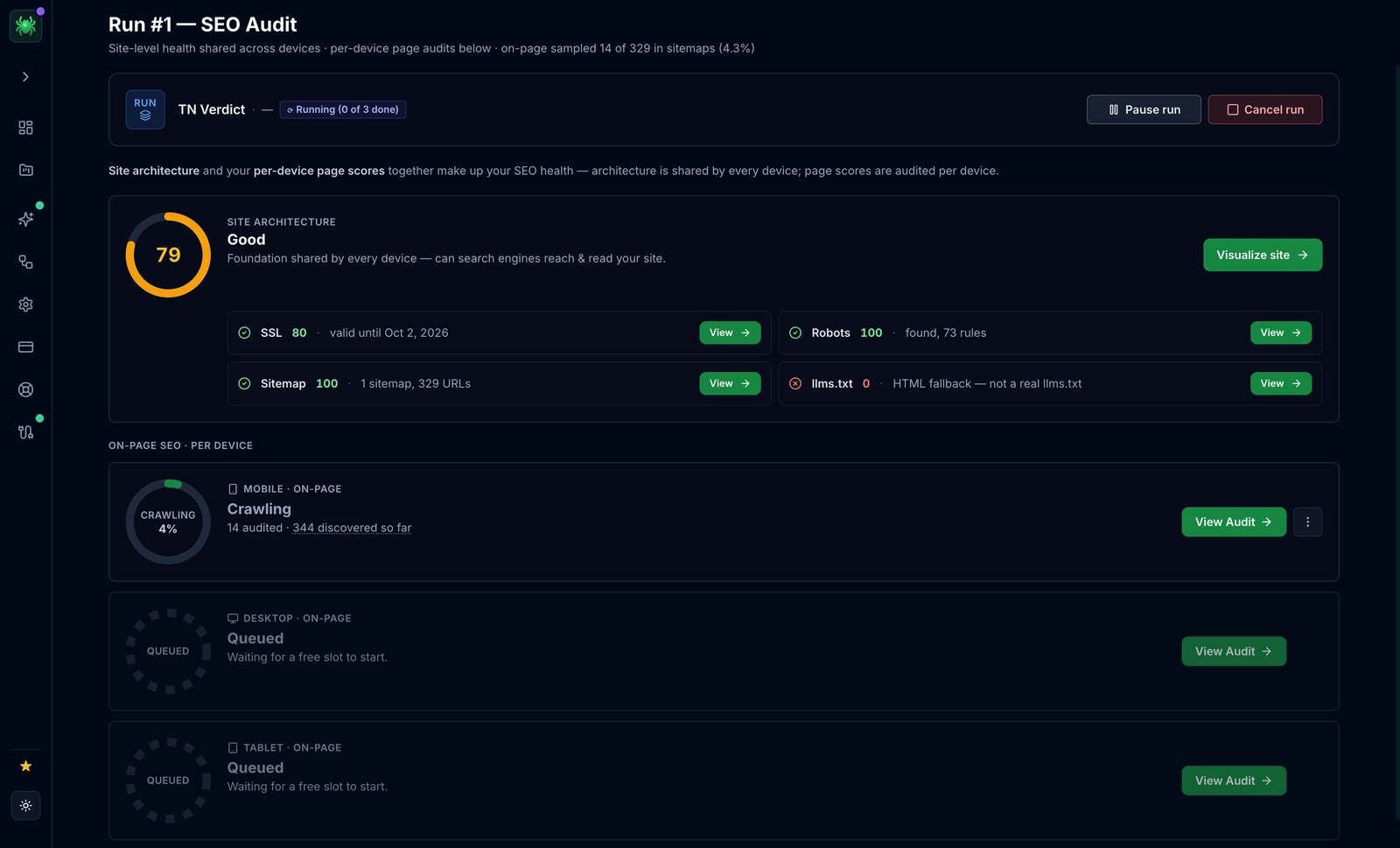
The hardest part of React SEO is that most crawlers fetch raw HTML and never execute your JavaScript—so hydrated content, client-side routes, and any meta or JSON-LD injected after mount simply vanish from the report. The Digispot AI SEO Spider closes that blind spot. It's a desktop crawler and auditor—"the only SEO crawler your AI agent can run"—that renders every URL in a real browser, exactly like Googlebot, then runs 300+ SEO and AEO checks per page. Because it waits for hydration, it sees the content your users see: it catches routes that never resolve to indexable HTML, surfaces client-side-only titles and structured data, and flags Core Web Vitals regressions like INP and LCP that SPA and Next.js bundles quietly introduce. Every issue is ranked by the organic traffic it's putting at risk, and the crawl syncs with Google Search Console and GA4 so you can tie rendering problems to real performance. It also ships an MCP server, so a developer can trigger a full crawl—and apply the recommended fixes—straight from an AI agent like Claude or Cursor inside their normal dev workflow. For large React apps, that traffic-at-risk lens also helps you spend crawl budget on the routes that actually earn rankings. It starts at $14/mo.
Realizing the Rewards: Business Outcomes of Smart ReactJS SEO
Implementing a robust SEO strategy for your ReactJS application, especially with the aid of intelligent platforms like Digispot AI, translates directly into compelling business outcomes. This is not just about vanity metrics; it is about revenue and growth.
- Improving Business Visibility: Your React app, once potentially buried by technical SEO challenges, becomes a prominent feature in search results. This increased visibility ensures that when potential customers search for solutions, your application is the first one they see.
- Increase in Traffic and Business Leads: Higher visibility naturally leads to more organic traffic. This isn't just any traffic; it's traffic from users actively seeking what you offer. These highly qualified visitors are more likely to convert into valuable business leads.
- Time and Cost Savings: Manual SEO audits on complex SPAs are notoriously time-consuming and expensive. By leveraging Digispot AI for automated audits and issue detection, you significantly reduce the manual workload. This translates into considerable cost savings, allowing your engineering team to focus on building features rather than hunting down meta tag bugs.
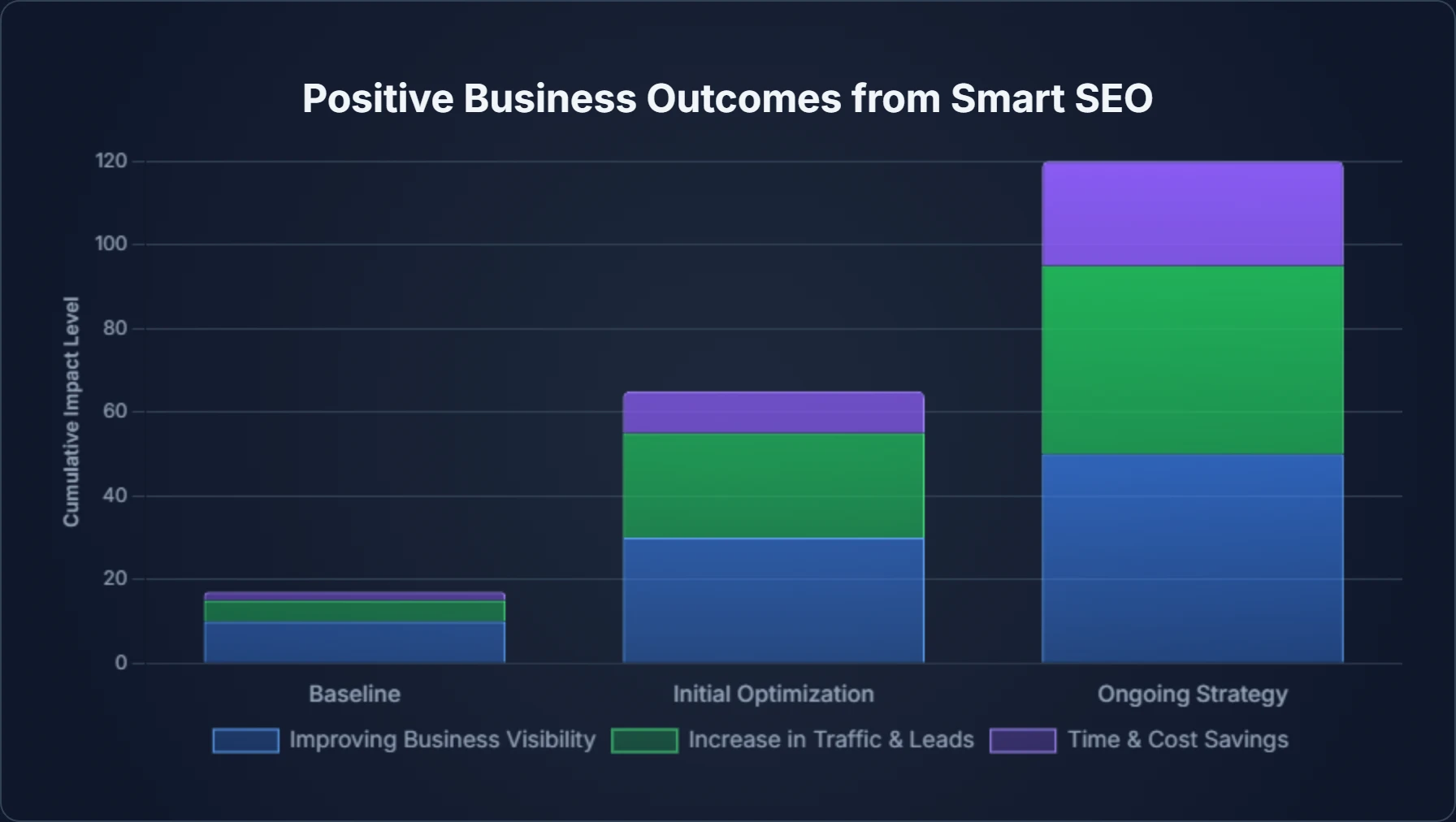
Ultimately, by embracing SEO best practices for your ReactJS app and utilizing advanced tools, you are building a foundation for sustainable, long-term business growth. You are ensuring that the amazing application you built actually gets the audience it deserves.
Conclusion: Your React App, Optimized and Ready to Shine
ReactJS applications offer unparalleled interactivity and user experiences, but their client-side nature presents unique SEO considerations that cannot be ignored. As we have explored, mastering ReactJS SEO isn't about circumventing search engines or using "hacks"; it is about architecture. It is about providing search engines with the clear, structured, and performant content they need to properly crawl, index, and rank your site.
From choosing the right rendering strategy (like SSR or SSG) and meticulously managing metadata to optimizing for speed, creating high-quality content, and leveraging structured data, each pillar plays a vital role. It is a rigorous process, but you do not have to do it alone.
Modern tools and platforms like Digispot AI are revolutionizing how businesses approach ReactJS SEO. By automating audits across 300+ ranking factors, integrating with essential performance tracking tools, and offering a convenient free community Chrome extension for on-the-go analysis, Digispot AI empowers you to transform complex SEO challenges into clear pathways for success.
Ready to improve your SEO? Try Digispot AI today for comprehensive website audits and actionable recommendations that bridge the gap between code and content. Your React app is a powerhouse of innovation; let's ensure it is also a beacon of discoverability in the bustling digital world.
Related deep-dives
Continue with these closely related guides:
- next.js seo — Next.js SEO: Complete Optimization Guide for React
References
- Understand JavaScript SEO Basics | Google Search Central
- Crawl Budget Management For Large Sites | Google Search Central
- Title tags and descriptions | Google Search Central
- Understand how structured data works | Google Search Central
- Define canonical URLs | Google Search Central
- Improve your page speed and crawl efficiency | Google Search Central
- Core Web Vitals | Google Search Central
- Mobile-first indexing | Google Search Central
- About XML sitemaps | Google Search Central
- Robots.txt Introduction and Guide | Google Search Central
- Google Search Console
- Digispot AI - FREE On Page SEO Audit Tool
- Digispot AI - FREE Chrome Extension for SEO Insights
Audit any page in seconds
300+ SEO checks including Core Web Vitals, schema markup, meta tags, and AI readiness — trusted by 1000+ SEO experts and marketers.
Frequently Asked Questions
Here are some of our most commonly asked questions. If you need more help, feel free to reach out to us.
Written by
Maya Krishnan
Digital growth expert
Maya is a seasoned expert in web development, SEO, and digital strategy, dedicated to helping businesses achieve sustainable growth online. With a blend of technical expertise and strategic insight, she specializes in creating optimized web solutions, enhancing user experiences, and driving data-driven results. A trusted voice in the industry, Maya simplifies complex digital concepts through her writing, empowering readers with actionable strategies to thrive in the ever-evolving digital landscape.