Geo-Targeting SEO: Location-Based Search Optimization
Master geo-targeting SEO for location-based visibility. Learn hreflang implementation, regional content strategies, and local personalization.
 Maya Krishnan
Every online search today represents a direct opportunity for revenue, but only if the searcher can actually utilize your service. For a plumber in Seattle, 10,000 site visits from London are effectively worthless. Simply having a website is no longer sufficient. Companies must ensure they are discoverable by the right people at the precise moment they are looking and in the precise location where they operate.
This is where Geo-targeting SEO moves from a "nice-to-have" to a critical revenue driver. It is the strategic process of elevating your visibility in search results for specific geographic coordinates, regions, or countries. If you have ever typed "coffee shop near me" or "emergency dentist [your city]," you have triggered complex geo-targeting algorithms.
This guide covers the full spectrum of geo-targeting—from hyper-local Map Pack strategies to international server configuration. We will detail how search engines determine location, the technical implementation required for success, and actionable steps to dominate your local market. We will also explore how advanced AI tools, including Digispot AI, can streamline this process.
What is Geo-targeting SEO?
Geo-targeting is the practice of delivering different content or search results to users based on their geographic location. In the context of SEO, it involves optimizing your site signals so search engines understand exactly which areas you serve. This allows them to surface your pages to users in those areas while filtering them out for users outside your scope.
While often used interchangeably with "Local SEO," geo-targeting is actually a broader discipline that encompasses two distinct strategies:
- Local SEO: Targeting a physical vicinity (e.g., a city radius) usually tied to a brick-and-mortar presence. The goal is often to appear in the "Local Pack" (the map section of Google results). For a full breakdown of this discipline, see our guide to what local SEO is and how it works.
- Regional/International SEO: Targeting entire countries or linguistic regions without necessarily having a physical shop there (e.g., an e-commerce store with a UK-specific subdomain selling to British customers).
How Search Engines Determine User Location
To serve relevant results, algorithms like Google's or Bing's need to know where the searcher is standing. They rely on a hierarchy of signals:
- GPS Data (Strongest Signal): For mobile users, precise coordinates provided by the device's GPS offer the most accurate location data. This drives the "near me" phenomenon.
- IP Address: Every internet connection has an IP address that maps to a general geographic location (usually city or region level).
- Wi-Fi Access Points: Google maintains a massive database of Wi-Fi networks. When a device is near a known Wi-Fi point, its location can be triangulated even without GPS.
- Search History & Context: If a user frequently searches for "Chicago restaurants," Google may default to Chicago results for generic queries like "weather" or "pizza" even if the user is temporarily traveling.
- Google Business Profile: For the business side, this profile acts as the verified "anchor" on the map, confirming physical existence.
By aligning your website's technical and content signals with these detection methods, you bridge the gap between your business and the user's immediate need.
Why is Geo-targeting SEO Important? (The Benefits)
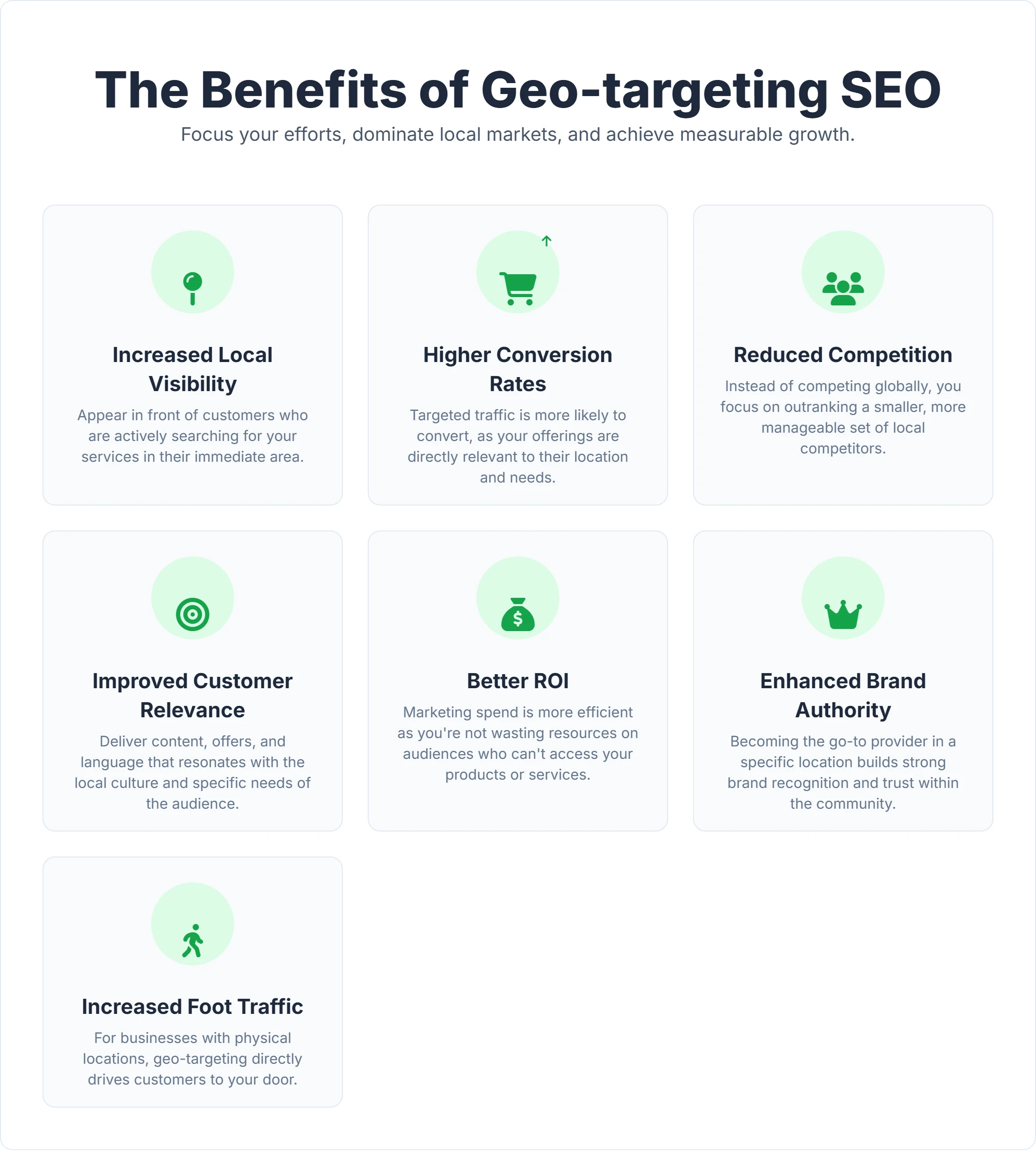
For businesses, geo-targeting SEO isn't just an option; it's a necessity for thriving in the digital landscape. Generic, non-localized traffic rarely converts for service-based businesses. Here are the key benefits it brings:
| Benefit | What it Means for Your Business |
|---|---|
| Increased Local Visibility | Your business appears in "near me" searches and local map results (like Google's Local Pack), drastically increasing exposure to users with immediate intent. |
| Higher Conversion Rates | Local searchers often have "transactional" intent. 76% of people who search on their smartphones for something nearby visit a business within a day. Geo-targeting captures this high-intent traffic. |
| Reduced Competition | Instead of battling global giants for generic keywords like "best running shoes," you compete for "running shoe store in Austin." The pool of competitors shrinks, making it easier to dominate. |
| Improved Customer Relevance | By tailoring content to local needs (e.g., winterproofing tips for Minnesota customers vs. hurricane prep for Florida customers), you build immediate trust. |
| Better Return on Investment (ROI) | Geo-targeting focuses your resources on the demographics that can actually buy from you, eliminating wasted impressions on users outside your service area. |
| Enhanced Brand Authority | Consistently appearing for local searches establishes you as the market leader in your specific region. This local authority often flows up, improving your organic rankings for broader terms. |
| Increased Foot Traffic | For brick-and-mortar stores, geo-targeting is the primary driver of physical visits. It acts as a digital signpost pointing directly to your door. |
The insights gained from geo-targeting also help businesses understand local market trends. For instance, you might notice that users in one city search for "emergency repair" while another city searches for "maintenance services," allowing you to adjust your offerings accordingly.
How Does Geo-targeting SEO Work? Key Elements to Master
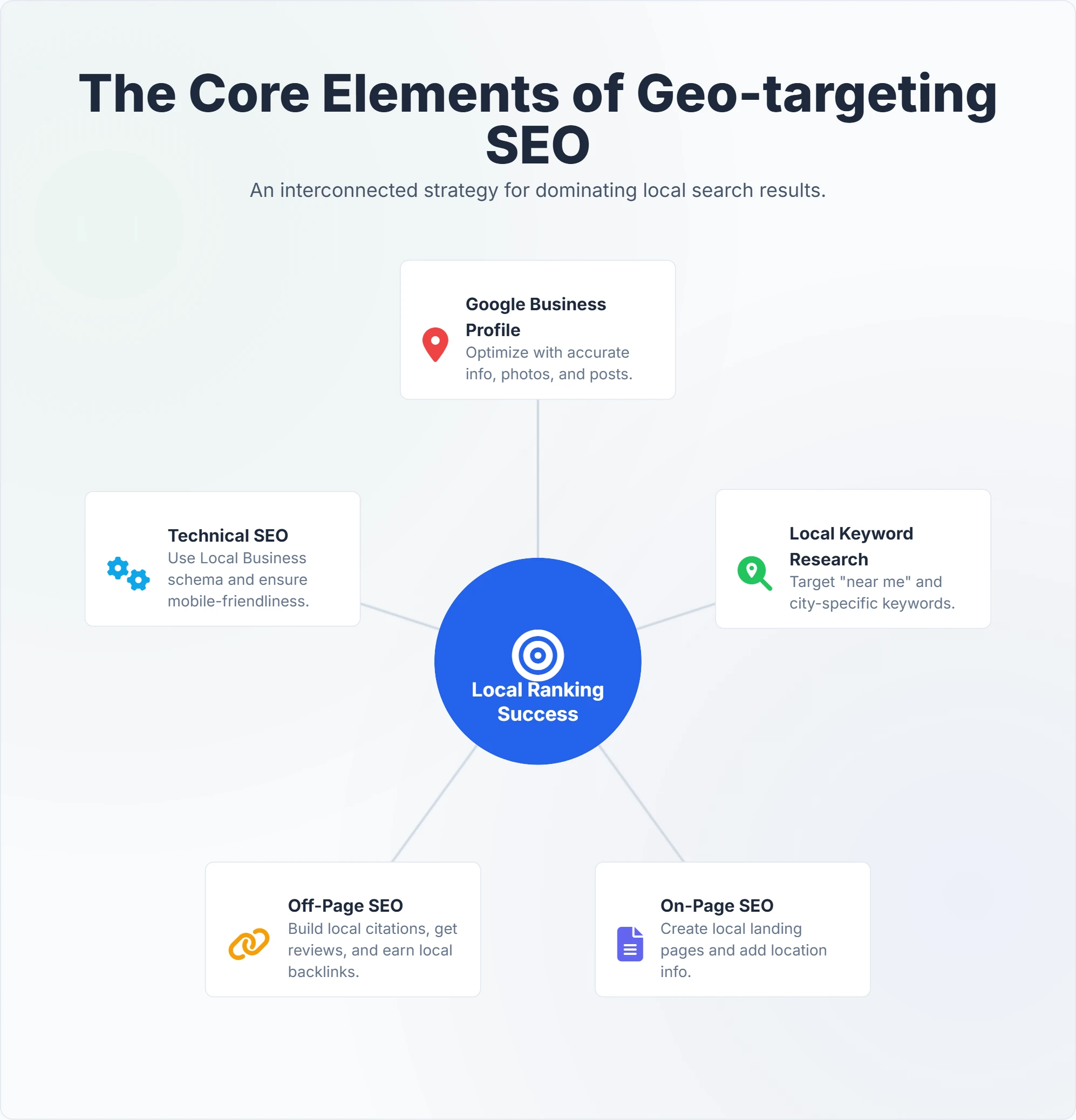
Implementing an effective geo-targeting strategy requires a holistic approach, blending technical configuration with content localization. It is not enough to simply mention your city name in the footer.
1. Google Business Profile (GBP) Optimization
Your Google Business Profile is the heart of local geo-targeting. It serves as your primary data source for Google Maps and the Local Pack.
What to do:
- Claim and Verify: This is non-negotiable. Verification proves to Google that your business exists at the stated location.
- Accuracy is King: Ensure your Name, Address, and Phone (NAP) data matches your website exactly. Even small variations (e.g., "St." vs "Street") can cause data mismatches across the web.
- Select Categories Carefully: Your "Primary Category" has the biggest impact on rankings. Use secondary categories to capture related searches (e.g., a "Pizza Restaurant" should also list "Italian Restaurant" and "Restaurant Delivery").
- Utilize Attributes: Attributes like "Wheelchair accessible," "Woman-owned," or "Outdoor seating" can trigger appearance in specific filtered searches.
- Q&A Section: Many businesses ignore this. Populate your Q&A with common local questions (e.g., "Is there parking on Main Street?") to assist users and add local context.
2. Local Keyword Research & Intent Mapping
Local keyword research differs from standard research because the intent is often implicit.
Understanding Intent Types:
- Explicit Local Queries: The user types the location. Example: "SEO agency in Boston."
- Implicit Local Queries: The user types a generic term, but expects local results. Example: "pizza place." Google assumes they mean "pizza place near me."
How to execute:
- Service + Location Modifiers: Combine your core services with every variation of your location name (City, Neighborhood, County, Zip Code, "near [Landmark]").
- Vernacular & Slang: Does your target area use specific terms? For example, people in San Francisco might search for "Bay Area rentals," while New Yorkers might search for "Tri-state movers."
- Competitor Analysis: Analyze what keywords your local competitors are ranking for. If you need help identifying gaps, Digispot AI can analyze competitor pages to reveal which local terms are driving their traffic.
3. On-Page SEO for Local Relevance
Your website content must signal to Google that you are relevant to the area, not just located there.
Strategic Content Elements:
- Location Landing Pages: If you serve multiple cities, do not just list them in a comma-separated line. Create unique pages for "Plumber in [City A]" and "Plumber in [City B]." These pages should feature specific testimonials, photos of projects in that city, and mentions of local regulations or landmarks.
- Localized Meta Data: Ensure your Title Tags and Meta Descriptions include the location and the service.
- Bad: Best Home Insurance
- Good: Affordable Home Insurance in Denver, CO | Free Quotes
- Content Localization: Adapt your language. If targeting the UK, use "colour" and "£". If targeting the US, use "color" and "$". This signals cultural relevance to both users and bots.
For a deeper dive into structuring your content, check our guide on on-page SEO best practices.
4. Technical Configuration: URL Structures & Hreflang
For businesses targeting international regions or distinct language groups, technical architecture is paramount. You must tell Google explicitly which version of your site is for which country.
URL Structures for International Targeting:
- ccTLDs (Country Code Top-Level Domains):
example.de(Germany),example.fr(France).- Pros: Strongest geo-signal to Google; high user trust locally.
- Cons: Expensive (separate domains), harder to maintain authority across split domains.
- Subdomains:
de.example.com,fr.example.com.- Pros: Easy to set up; hosts can be in different locations.
- Cons: Search engines may treat subdomains as separate entities, diluting link equity.
- Subdirectories:
example.com/de/,example.com/fr/.- Pros: Consolidates all domain authority; easiest to manage.
- Cons: Weaker geo-signal than ccTLDs (requires strong Search Console targeting).
Hreflang Implementation:
The hreflang attribute is a piece of code that tells Google: "This page is the French version of this English page." It prevents duplicate content issues and ensures the right user sees the right language.
<link rel="alternate" hreflang="en-us" href="https://example.com/us/" />
<link rel="alternate" hreflang="en-gb" href="https://example.com/uk/" />
<link rel="alternate" hreflang="es-es" href="https://example.com/es/" />
Mistakes in hreflang can be disastrous, leading to pages dropping out of the index. Always validate your tags using a technical audit tool.
5. Schema Markup (Structured Data)
Schema markup is machine-readable code that clarifies your business details to search engines. For geo-targeting, LocalBusiness schema is the gold standard.
Critical Properties to Include:
geo(Latitude/Longitude): Pinpoints your exact entrance.areaServed: Defines the cities or regions you operate in.hasMap: A link to your Google Maps location.address: Must match GBP exactly.
Example (simplified):
<script type="application/ld+json">
{
  "@context": "http://schema.org",
  "@type": "LocalBusiness",
  "name": "Digispot Plumbing",
  "address": {
    "@type": "PostalAddress",
    "streetAddress": "123 Main St",
    "addressLocality": "Seattle",
    "addressRegion": "WA",
    "postalCode": "98101"
  },
  "geo": {
    "@type": "GeoCoordinates",
    "latitude": "47.6062",
    "longitude": "-122.3321"
  },
  "areaServed": ["Seattle", "Bellevue", "Redmond"],
  "url": "https://www.digispotplumbing.com"
}
</script>
Creating this code manually is prone to syntax errors. Use the free Schema Markup Generator to build valid JSON-LD code in minutes without writing a single line yourself.
6. Off-Page SEO: Building Local Authority
Off-page SEO validates your relevance through third-party signals.
- Citations: These are mentions of your business NAP on directories like Yelp, Yellow Pages, and Bing Places. Inconsistent citations confuse Google (e.g., listing an old phone number).
- Local Link Building: A link from a local church, high school, or local news blog is worth more for local SEO than a link from a generic global directory. It proves you are part of the local ecosystem.
- Reviews: Reviews are a direct ranking factor. Keywords inside reviews (e.g., "Best pizza in Brooklyn") actually help rank you for those terms.
Implementing Geo-targeting SEO: A Step-by-Step Guide
Ready to put geo-targeting into action? Follow this roadmap to build a fortress around your local market.
Step 1: Define Your "Geo" Strategy What: Decide if you are strictly local (city-based) or regional/international. How: If you are a local service business, define your service radius. If you are e-commerce, identify which countries you ship to and if you need currency/language localization.
Step 2: Technical Foundation & Audit What: Ensure your site can actually be indexed and understood geographically. How: Check your domain structure. If targeting internationally, set up your subdirectories or subdomains. Use Digispot AI to run a comprehensive site audit, specifically looking for crawlability issues that might prevent Google from seeing your location pages.
Step 3: Optimize Google Business Profile What: Claim and polish your primary local asset. How: Upload at least 10 high-quality photos (interior, exterior, team, products). Ensure your primary category is accurate. Turn on messaging to chat with local leads directly.
Step 4: Conduct Hyper-Local Keyword Research What: Find the specific terms your neighbors use. How: Use tools to filter search volume by city. Look for "near me" variations. Digispot AI's platform can analyze content like Google and LLMs, helping you identify content gaps and providing AI-powered recommendations for keywords.
Step 5: Create Location-Specific Content Assets What: Build pages that serve the user, not just the bot. How: Create a "Locations" folder on your site. For each city, write 500+ words of unique content. Mention local landmarks ("Located across from the Central Library"). Embed a Google Map. Add local FAQs. Here, Digispot AI's Content Studio comes in handy, offering an opportunity finder to identify high-value topics and using AI agents to generate SEO-optimized content.
Step 6: Implement & Validate Schema
What: Hard-code your location data.
How: Generate LocalBusiness schema. If you have multiple locations, ensure each location page has its own unique schema with distinct coordinates. If you're unsure about implementation, Digispot AI's free Chrome extension can be a game-changer. It provides interactive structured data visualization and real-time validation to ensure your code is error-free.
Step 7: Build Citations and Local Links What: Sync your data across the web. How: Use a citation management tool or manually update the top 20 directories (Yelp, Facebook, Apple Maps, etc.). Sponsor a local sports team or charity event to get a high-quality local backlink from their website.
Step 8: Monitor and Analyze Performance What: Track rankings by zip code, not just globally. How: Global rank tracking is useless for local SEO. You need to know how you rank for someone standing 1 mile away vs. 10 miles away. The Digispot AI platform integrates with Google Search Console and Google Analytics, allowing you to filter performance data. Its Opportunity Finder highlights high-potential areas for growth, specifically for location-based queries.
Common Challenges in Geo-targeting SEO
While powerful, geo-targeting is complex. Here are common pitfalls and how to fix them.
- Inconsistent NAP Information:
- The Problem: Your website says "Suite B" but Yelp says "#B". Google treats these as potentially different locations, diluting your authority.
- The Fix: Standardize your address format in a master document and rigorously apply it everywhere. Common SEO mistakes often stem from data hygiene issues like this.
- "Doorway Page" Penalties:
- The Problem: Creating 50 location pages that are identical except for the city name (e.g., "Plumber in Austin," "Plumber in Dallas") with the exact same generic text. Google hates this and may de-index them.
- The Fix: Ensure every location page has at least 50% unique content. Talk about specific services popular in that city, local team members, or specific reviews from that area.
- Lack of Local Link Profile:
- The Problem: You have great on-page SEO but zero authority because no local sites link to you.
- The Fix: Pivot your PR strategy. Instead of chasing national news, pitch stories to local papers or blogs.
- Ignoring Technical Speed on Mobile:
- The Problem: Local searches are predominantly mobile. If your site is slow on 4G/5G, users bounce immediately.
- The Fix: Prioritize Core Web Vitals. Digispot AI's comprehensive audits cover performance and technical scores in both mobile and desktop modes, helping you identify issues that kill mobile conversions. Read more in our Core Web Vitals guide.
- Keeping Up with AI Search Engines:
- The Problem: AI search engines (like ChatGPT Search or Perplexity) don't just look for keywords; they look for entity relationships and reputation.
- The Fix: Focus on "Answer Engine Optimization" (AEO). Ensure your content directly answers questions in a conversational format. Digispot AI is designed to help you rank not just on Google but also on "other AI search engines" by simulating LLMBots and providing insights to optimize for AI-driven results.
Leveraging Tools for Geo-targeting SEO Success
While manual efforts are essential, specialized tools can significantly streamline and enhance your geo-targeting SEO strategy. Managing 50 location pages and tracking rankings across 10 cities is impossible without automation.
Introducing Digispot AI: Your Automated SEO Powerhouse
Imagine having an expert SEO team working around the clock, auditing your site, identifying opportunities, and ensuring your location data is pristine. That's the power of the Digispot AI cloud platform. It's an AI SEO platform engineered to help business websites rank better in Google and other AI search engines.
What Digispot AI brings to your Geo-targeting efforts:
- Comprehensive Audits (300+ Ranking Factors): Digispot AI performs deep site analysis, checking over 300+ ranking factors at every page level. It verifies that your location pages have the correct meta data, schema, and keyword density.
- Integration with Google Search Console & Google Analytics: Get a unified view of your performance. See exactly which location pages are driving traffic and which are underperforming.
- Opportunity Finder & Content Studio: Need to write unique content for 10 different cities? The AI Agent powered Content Studio helps you generate SEO-optimized drafts that are locally relevant, saving you hours of writing time.
- Schema Markup Detection: Digispot AI thoroughly analyzes and flags issues related to
LocalBusinessmarkup, ensuring your structured data is readable by Google's Knowledge Graph. - AI-Powered Insights: Uniquely, Digispot AI simulates search engine crawlers and LLMBots. This ensures your business is optimized for traditional search (Google) and the new wave of AI answers (ChatGPT, Gemini).
The Digispot AI Free Community Chrome Extension
For quick, on-the-fly insights, don't miss the Digispot AI Free Community Chrome Extension. This intelligent AI-powered SEO assistant audits your website page directly in your browser.
How it helps with Geo-targeting & more:
- Instant On-Page Audits: Check the keyword density of "City + Service" terms instantly on any page.
- Schema Markup Mastery: View your
LocalBusinessschema in a visual graph to ensure coordinates and address data are structured correctly. - Local SEO Specific Analysis: The extension specifically checks for NAP consistency and Local SEO schema markup presence.
- Competitor Intelligence: One-click competitor page analysis helps you see how your local rivals are structuring their location pages.
Get instant SEO insights on any page with our free Chrome extension.
The Future of Geo-targeting SEO: Adapting to AI Search Engines
The search landscape is shifting from "keywords" to "conversations." AI models like Google's Gemini and OpenAI's ChatGPT are becoming the new gatekeepers of local information.
What does this mean for Geo-targeting SEO?
- Deeper Understanding of Intent: AI understands context. If a user asks, "Plan a date night near me," the AI looks for "romantic restaurants," "ratings," "hours," and "vibe"—not just the keyword "restaurant." Your content must describe the experience of your location, not just the service.
- Conversational Queries: Optimization must shift towards natural language. Instead of just "Plumber Seattle," optimize for "Who is the best emergency plumber in Seattle open right now?"
- Data Quality is Paramount: AI models hallucinate less when data is structured. High-quality Schema markup is the most effective way to "feed" facts to an AI about your location, hours, and services.
- Trust Signals (E-E-A-T): AI prioritizes authoritative sources. Building E-E-A-T signals (Experience, Expertise, Authoritativeness, Trustworthiness) through real reviews and expert authorship is critical for being cited by AI summaries.
Businesses must adapt by continuously optimizing their local listings, focusing on quality content, and embracing AI-powered tools. Digispot AI's forward-thinking approach helps ensure your business is visible whether a user types into a search bar or asks a voice assistant.
Conclusion
Geo-targeting SEO is the bridge between your digital presence and the physical world. It ensures that when a potential customer in your area has a need, your business is the immediate answer. By understanding the mechanisms of location tracking, implementing robust technical foundations like Hreflang and Schema, and creating genuine local content, you can dominate your market.
The journey to local mastery requires precision and consistency. Don't leave your local visibility to chance. Start optimizing your digital footprint today.
Ready to improve your search visibility? Try Digispot AI for comprehensive website audits and actionable recommendations that turn local searches into loyal customers.
References
- About Google Business Profile - Google Business Profile Help
- Improve your local SEO on Google - Google Business Profile Help
- Understand how Google uses IP addresses - Google Search Central
- Local Business structured data - Google Search Central
- Test your structured data - Google Search Central
- Mobile-friendly test - Google Search Console
- PageSpeed Insights - Google Developers
- Google Search Console
- Google Analytics
- Digispot AI - AI SEO Platform
- Digispot AI - FREE On Page SEO Audit Tool
- Digispot AI - FREE Chrome Extension for SEO Insights
Audit any page in seconds
300+ SEO checks including Core Web Vitals, schema markup, meta tags, and AI readiness — trusted by 1000+ SEO experts and marketers.
Frequently Asked Questions
Here are some of our most commonly asked questions. If you need more help, feel free to reach out to us.
Written by
Maya Krishnan
Digital growth expert
Maya is a seasoned expert in web development, SEO, and digital strategy, dedicated to helping businesses achieve sustainable growth online. With a blend of technical expertise and strategic insight, she specializes in creating optimized web solutions, enhancing user experiences, and driving data-driven results. A trusted voice in the industry, Maya simplifies complex digital concepts through her writing, empowering readers with actionable strategies to thrive in the ever-evolving digital landscape.