Image Compression SEO: Speed Up Your Website
See how image compression improves SEO and Core Web Vitals. Learn techniques to reduce file sizes without sacrificing quality for faster pages.
 Maya Krishnan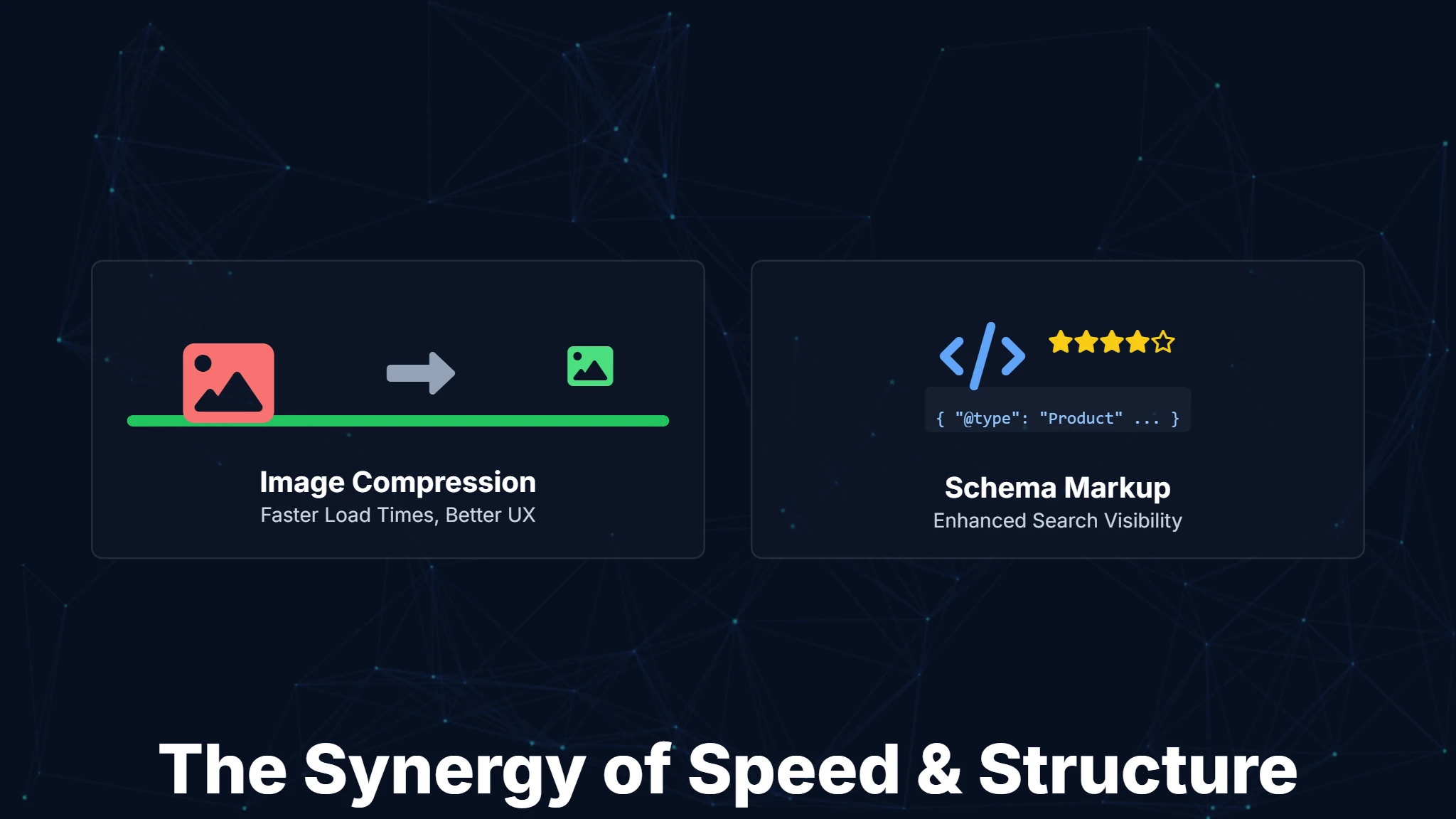
A website is no longer merely a collection of pages; it functions as a dynamic storefront, a knowledge hub, and frequently, the crucial first impression a potential customer forms of your business. With countless sites competing for attention, achieving prominence in search engine results is absolutely paramount. But what truly elevates a website in the eyes of Google, and increasingly, AI-powered search engines? The answer lies in a sophisticated blend of technical precision and intelligent content structuring.
Within the realm of Search Engine Optimization (SEO), two powerful yet often overlooked elements are image compression and schema markup. While seemingly distinct, these components work in remarkable synergy not only to accelerate your website's performance but also to enable search engines to understand your content with greater depth. This ultimately translates to higher rankings, enhanced visibility, and a superior user experience. This informational blog will demystify both concepts, explore their undeniable benefits, and subtly demonstrate how modern AI-powered platforms like Digispot AI can significantly empower your SEO strategy.
The Visual Web: Why Images Matter (and Why They Can Hurt)
In an age dominated by visual content, images are no longer just supplementary; they are integral to engaging your audience. High-quality photographs, insightful infographics, and compelling product shots can capture attention, convey complex information quickly, and evoke emotions in ways text alone cannot. They break up monotonous blocks of text, making your content more digestible and enjoyable.
What is the role of images in user engagement? Visually appealing content significantly increases user engagement, keeping visitors on your page longer and encouraging interaction. Think about it: would you rather read a wall of text or a well-illustrated article? The answer for most users is clear. Images can make your website more inviting, trustworthy, and memorable. When users stay longer, signals like dwell time improve. This tells search engines your content is valuable.
However, there's a flip side to this visual coin. While impactful, images are often the heaviest elements on a webpage. According to HTTP Archive data, images make up the bulk of the average webpage's total weight. Large, unoptimized image files can drastically slow down your website's loading speed, creating a frustrating experience for users. This slow loading time isn't just an annoyance; it's a significant barrier to your website's success.
How do large image files impact website performance? Uncompressed images demand more bandwidth and take longer to download, directly affecting your page load times. This is particularly problematic for users on mobile devices or those with slower internet connections (3G or 4G). Slow sites lead to higher bounce rates – visitors leaving your site before it even fully loads. In the competitive digital landscape, every second counts. If your Largest Contentful Paint (LCP) exceeds 2.5 seconds, you risk losing substantial traffic.
If you aren't sure which images are slowing you down, Digispot AI can help you identify and fix these issues automatically with AI-powered audits analyzing 300+ ranking factors.
How Image Compression Saves the Day for SEO and Users
This is where image compression steps in as a vital optimization technique. It’s the process of reducing the file size of your images while maintaining acceptable visual quality. Think of it as packing a suitcase efficiently: you want to fit as much as possible without breaking anything, making it lighter and easier to carry.
What is Image Compression? At its core, image compression works by removing redundant or less critical data from an image file. There are two primary types of compression:
- Lossy Compression: This method permanently removes some image data, resulting in a smaller file size but a slight, often unnoticeable, reduction in quality. Formats like JPEG heavily rely on lossy compression. It uses techniques like chroma subsampling, where color information is reduced because the human eye is more sensitive to brightness than color details. It's ideal for photographs where some data loss is acceptable for significant file size reductions.
- Lossless Compression: This method reduces file size without discarding any data, meaning the image quality remains identical to the original. PNG and GIF formats often use lossless compression. It works by identifying statistical redundancies. For example, instead of storing "white pixel, white pixel, white pixel," it stores "3 white pixels." It's best for images where preserving every pixel is crucial, such as logos, icons, or graphics with sharp lines.
How do mechanisms of compression work, and what file formats help? Beyond choosing between lossy and lossless, the file format itself plays a crucial role. Modern formats like WebP and AVIF are gaining traction. They often provide superior compression compared to older formats like JPEG and PNG, resulting in smaller file sizes with comparable or even better quality. Tools analyze pixels and color information, identifying patterns and areas that can be simplified without a significant visual impact.
Next-Gen Formats Explained
Moving beyond standard JPEGs can yield massive performance gains.
- WebP: Developed by Google, this format supports both lossy and lossless compression. It also supports transparency (like PNG) but at a fraction of the file size. Most modern browsers support WebP natively.
- AVIF: This is an even newer format derived from video coding standards. It offers superior compression efficiency, often beating WebP. However, checking browser compatibility is still wise, or using a fallback strategy.
- SVG (Scalable Vector Graphics): These aren't raster images made of pixels. They are code-based instructions for drawing shapes. They are infinitely scalable without quality loss and have tiny file sizes. They are perfect for logos and icons.
For a deeper dive into technical performance metrics, check out our guide on Core Web Vitals and SEO.
The Undeniable Benefits of Image Compression for SEO
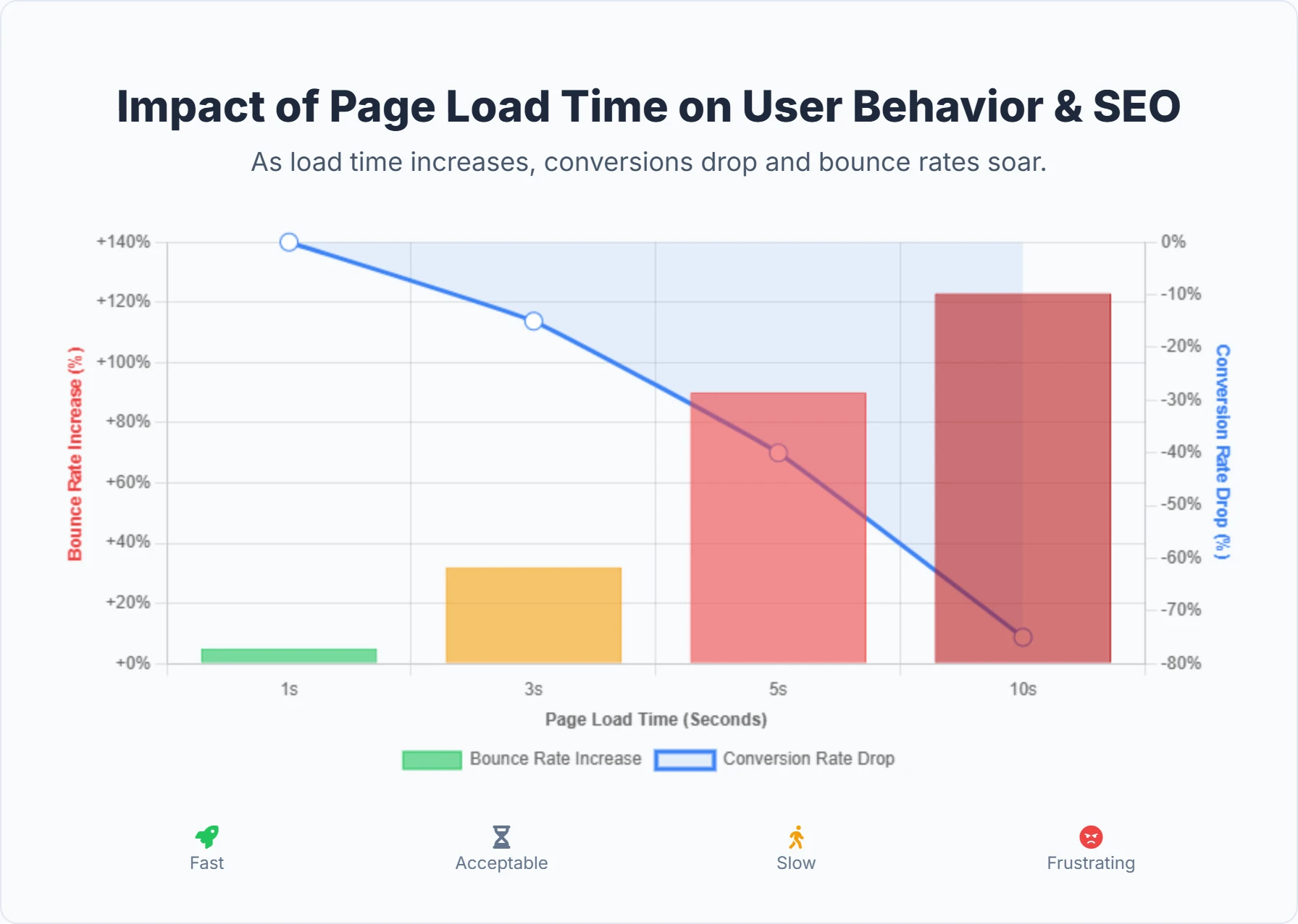
The advantages of compressing your images extend far beyond just making your website lighter. They directly impact your SEO, user experience, and even your operational costs.
- Faster Page Load Times: This is perhaps the most significant benefit. Large images are notorious for bogging down page loading. By reducing their file size, you dramatically cut down on the time it takes for your pages to fully render. Faster pages translate directly to a better user experience and are a critical ranking factor for search engines. Google explicitly states that page speed influences search rankings, particularly for mobile searches. Improving your Core Web Vitals scores, which measure page experience, is also directly aided by efficient image compression.
- Improved SEO Rankings: Search engines, especially Google, prioritize fast-loading websites because they offer a superior user experience. When your pages load quickly, search engine crawlers can index your content more efficiently. They spend less "crawl budget" waiting for resources to load. This means they can crawl more pages on your site per session. This is especially relevant in a mobile-first indexing world, where mobile load speed is paramount.
- Enhanced User Experience (UX): Imagine clicking a link and waiting several agonizing seconds for content to appear. Most users won't wait. Faster loading times lead to lower bounce rates (people leaving your site quickly) and increased dwell times (people staying on your site longer). A smoother, more responsive website keeps visitors engaged. It makes them more likely to explore other pages, convert, or return in the future.
- Reduced Bandwidth and Hosting Costs: Smaller image files consume less bandwidth when users access your site. For websites with high traffic volumes, this can translate into significant savings on hosting costs, as less data needs to be transferred. It also benefits users with data usage limits, making your site more accessible and cost-effective for them to browse.
- Better Mobile Performance: With a significant portion of internet traffic coming from mobile devices, optimizing for mobile is non-negotiable. Compressed images ensure that your website loads quickly and efficiently on smartphones and tablets, providing a seamless experience regardless of the device or network speed. Mobile networks can be unstable; light images ensure your content is visible even on weak 3G signals.
- Increased Visibility in Image Search: Properly optimized images, including relevant file names and alt text in addition to compression, can rank higher in image search results. This drives additional organic traffic to your website. Google Images is the second largest search engine in the world; neglecting it is a missed opportunity.
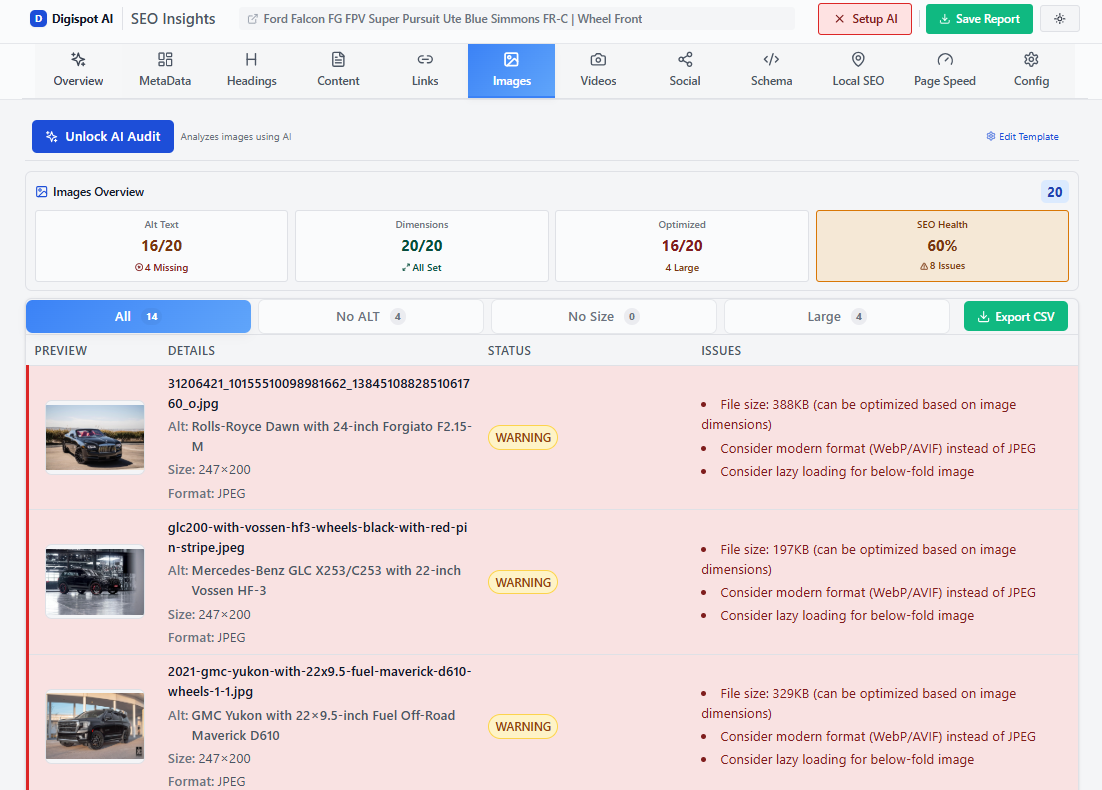
Turn invisible SEO data into clear visuals with our Free Chrome extension.
Here's a quick overview of how image compression helps:
| Benefit | Description | Impact on SEO & Users |
|---|---|---|
| Faster Page Load Times | Reduces the data size of images, allowing pages to load quicker. | Directly improves Core Web Vitals. Leads to lower bounce rates, higher user engagement, and positive ranking signals for search engines. |
| Improved SEO Rankings | Search engines favor fast websites. | A key factor in Google's ranking algorithm, especially for mobile-first indexing, contributing to better visibility in SERPs. |
| Enhanced User Experience | Users appreciate fast, responsive websites. | Leads to increased dwell time, more page views, and a positive perception of your brand. Reduces frustration and abandonment. |
| Reduced Bandwidth Costs | Less data transferred means lower server load and bandwidth usage. | Saves hosting expenses, especially for high-traffic sites. Benefits users with limited data plans. |
| Better Mobile Performance | Ensures quick loading on all devices, regardless of network speed. | Crucial for mobile-first indexing and reaching a broad audience on smartphones and tablets. |
| Increased Image Search Traffic | Optimized images are more likely to appear in Google Images and other visual search results. | Drives additional organic traffic to your site from visual search queries. |
How can you identify and solve image-related performance issues? This is where specialized tools and platforms become invaluable. For instance, a sophisticated AI SEO platform like Digispot AI can comprehensively audit your website, both in mobile and desktop modes. It intelligently identifies oversized images, inefficient file formats, and other visual culprits hindering your site's speed. Imagine having a detailed report that not only flags these issues but also helps you visualize their impact on load times and user experience. Digispot AI's capabilities extend to providing actionable recommendations for solving these issues, streamlining your image optimization process.
Get instant SEO insights on any page with our free Chrome extension. It detects unoptimized images while you browse.
Furthermore, the Digispot AI free community Chrome extension offers an immediate, on-page auditing solution. As you browse any webpage, this powerful extension, powered by popular LLM models, can instantly audit the page. It can detect if images are compressed effectively and visualize potential savings, giving you real-time insights into how "how image compression helps" directly on the page you're viewing. This hands-on approach empowers you to understand and address image optimization needs directly within your browser.
Practical Implementation Strategies
Knowing the theory is one thing; executing it is another. Here is how you can practically apply compression:
- Automation Plugins: If you use WordPress, plugins like Smush, Imagify, or ShortPixel can automatically compress images upon upload. This sets a baseline of quality without manual effort.
- CDN Transformation: Content Delivery Networks (CDNs) like Cloudflare or Cloudinary can optimize images on the fly. They can detect if a user's browser supports WebP and serve that format automatically, even if you uploaded a JPEG.
- Manual Tools: For standalone landing pages, use tools like Squoosh (by Google) or ImageOptim. These give you granular control over the quality slider, letting you find the perfect balance between byte size and visual fidelity.
- Responsive Images: Use the
srcsetattribute in your HTML. This tells the browser to load a smaller image version for mobile phones and a larger one for desktop monitors. This prevents a mobile phone from downloading a massive 4K desktop banner.
For more details on avoiding common pitfalls, read about common SEO mistakes that hurt site performance.
Beyond Speed: Unlocking Richer Search Results with Schema Markup
While image compression focuses on the "how fast" your content appears, schema markup addresses the "what" your content truly means. It's a powerful, yet often underutilized, tool that provides context to search engines, helping them understand the entities and relationships on your webpage far beyond what traditional SEO methods can achieve.
What is Schema Markup? Schema markup, also known as structured data, is a type of code that you add to your website to help search engines better comprehend the information on your pages. It uses a standardized vocabulary from Schema.org, a collaborative project created by Google, Microsoft, Yahoo, and Yandex. This shared vocabulary allows you to label different elements of your content (like a product, a review, an article, an event, or a person) in a way that search engines can easily process and interpret.
How does Schema Markup work? Think of it like giving a dictionary definition to every important piece of information on your webpage. While a search engine can crawl your text and guess what an article is about, schema markup explicitly tells it: "This is an article written by [Author Name] on [Date Published], about [Topic]." This direct communication leaves no room for ambiguity. You're not changing how your page looks to users; you're optimizing how it's processed by systems like Google Search, ChatGPT, and other AI models.
Image-Specific Schema Opportunities
Since we are discussing images, it is vital to know that Schema can specifically help your visual content.
- ImageObject Schema: You can explicitly define the license, creator, and caption of an image. This is crucial for Google Images' "Licensable" badge, which can drive traffic from users looking for stock photos or specific visual assets.
- ThumbnailUrl Property: In VideoObject or Article schema, defining a thumbnail URL helps Google choose the right image to display in Discover feeds or search snippets.
- Product Image: In Product schema, the
imageproperty is mandatory for Merchant Center integrations. It ensures your product photo appears in the Shopping tab.
Types of Schema Markup (and their real-world impact)
Schema.org offers a vast array of schema types, allowing you to mark up almost any kind of content. Here are a few common examples and how they can enhance your search results:
- Article Schema: Provides details about a blog post or news article, such as author, publication date, and headline. This can make your article eligible for rich results in Google News or Top Stories carousels.
- Product Schema: Essential for e-commerce, it allows you to display product details like price, availability, brand, and customer review ratings directly in the search results.
- Local Business Schema: Helps local businesses appear prominently in local search results, displaying information like address, phone number, business hours, and types of services.
- FAQPage Schema: If your page contains a list of frequently asked questions, this schema can present them as expandable sections directly in the search results, providing quick answers to user queries.
- Review Schema: Enables star ratings and review counts to appear alongside your search listing, significantly boosting credibility and visual appeal.
- Event Schema: Useful for marking up information about concerts, workshops, or other events, displaying dates, times, and venues.
The Game-Changing Benefits of Schema Markup
Implementing schema markup offers a suite of powerful benefits that directly contribute to your SEO success:
- Rich Snippets & Enhanced Visibility: This is the most noticeable benefit. By providing structured data, your pages become eligible for "rich snippets" or "rich results" in the Search Engine Results Pages (SERPs). These are enhanced listings that show extra details like star ratings, images, prices, or FAQ toggles. These visually stand out from standard blue-link results, making your listing more prominent and eye-catching.
- Higher Click-Through Rates (CTR): Because rich snippets are more informative and visually appealing, they naturally attract more attention. This increased visibility often leads to a higher click-through rate (CTR), meaning a greater proportion of searchers will click on your link, even if you're not in the very top position. A result with 5 stars often gets more clicks than a result ranked #1 without stars.
- Improved Understanding by Search Engines and AI: Schema markup acts as a direct line of communication to search engines. It removes ambiguity, helping Google better understand the context and relevance of your content. This deeper understanding can lead to your content being displayed for a wider range of relevant keywords and being more accurately categorized.
- Foundation for AI Engine Optimization (AEO): In an era of rapidly advancing AI, schema markup is becoming increasingly crucial for AI Engine Optimization (AEO). AI systems like Google's AI Overviews, ChatGPT, Perplexity, and other large language models (LLMs) heavily rely on structured data to understand, summarize, and cite your content accurately. By clearly labeling your content with schema, you're not just optimizing for traditional search; you're future-proofing your content for the next generation of search experiences. AI agents parse JSON-LD much faster than unstructured HTML text.
- Not a Direct Ranking Factor, But Indirectly Powerful: While Google has stated that schema markup itself isn't a direct ranking factor, it is an enabling factor. It makes your webpage eligible for rich snippets, which in turn leads to higher visibility and CTR – strong indirect signals that can positively influence rankings.
To learn more about how Google evaluates trust and authority signals, read our guide on E-E-A-T SEO.
Here’s a table summarizing common schema types and their rich result impact:
| Benefit | Description | Impact on SEO & Users |
|---|---|---|
| Faster Page Load Times | Reduces the data size of images, allowing pages to load quicker. | Directly improves Core Web Vitals. Leads to lower bounce rates, higher user engagement, and positive ranking signals for search engines. |
| Improved SEO Rankings | Search engines favor fast websites. | A key factor in Google's ranking algorithm, especially for mobile-first indexing, contributing to better visibility in SERPs. |
| Enhanced User Experience | Users appreciate fast, responsive websites. | Leads to increased dwell time, more page views, and a positive perception of your brand. Reduces frustration and abandonment. |
| Reduced Bandwidth Costs | Less data transferred means lower server load and bandwidth usage. | Saves hosting expenses, especially for high-traffic sites. Benefits users with limited data plans. |
| Better Mobile Performance | Ensures quick loading on all devices, regardless of network speed. | Crucial for mobile-first indexing and reaching a broad audience on smartphones and tablets. |
| Increased Image Search Traffic | Optimized images are more likely to appear in Google Images and other visual search results. | Drives additional organic traffic to your site from visual search queries. |
How to Implement Schema Markup
Implementing schema markup might sound technical, but with the right approach and tools, it's more accessible than ever. Google recommends using JSON-LD (JavaScript Object Notation for Linked Data) as the preferred format for structured data. JSON-LD is a JavaScript-based format that is placed within <script> tags in either the <head> or <body> section of your HTML. This method is generally easier to implement and maintain as it keeps the structured data separate from your visible content.
Use the free Schema Markup Generator to create valid structured data in minutes.
Here are common ways to implement schema markup:
- Manual Implementation: For those comfortable with code, you can write JSON-LD snippets yourself and add them directly to your webpage's HTML. This offers the most control but requires precision. A missing comma or bracket can invalidate the entire code block.
- Using SEO Plugins (for CMS like WordPress): If your website runs on a Content Management System (CMS) like WordPress, plugins such as Yoast SEO, Rank Math, or Schema Pro offer user-friendly interfaces to generate and insert schema markup without needing to write code. These plugins often automate basic schema types like Article or Organization. However, for custom schema needs, you might still need manual adjustments.
- Schema Markup Generators: Tools like Merkle's Schema Markup Generator or Google's Structured Data Markup Helper allow you to input your page's information and automatically generate the JSON-LD code, which you can then copy and paste into your site. This bridges the gap for non-developers.
- Through a Comprehensive SEO Platform: A robust platform like Digispot AI can integrate schema markup recommendations into its auditing and optimization process. It can help identify opportunities for specific schema types based on your content and monitor the performance of your rich results.
Validation is key: After implementing schema markup, it's crucial to test it to ensure it's correctly interpreted by Google. You can use Google's Rich Results Test tool or the Schema Validator to check for errors and confirm that your structured data is valid and eligible for rich results. Errors in schema can prevent Google from reading it entirely, rendering your efforts useless.
The Synergy: Image Compression, Schema Markup, and Your SEO Strategy
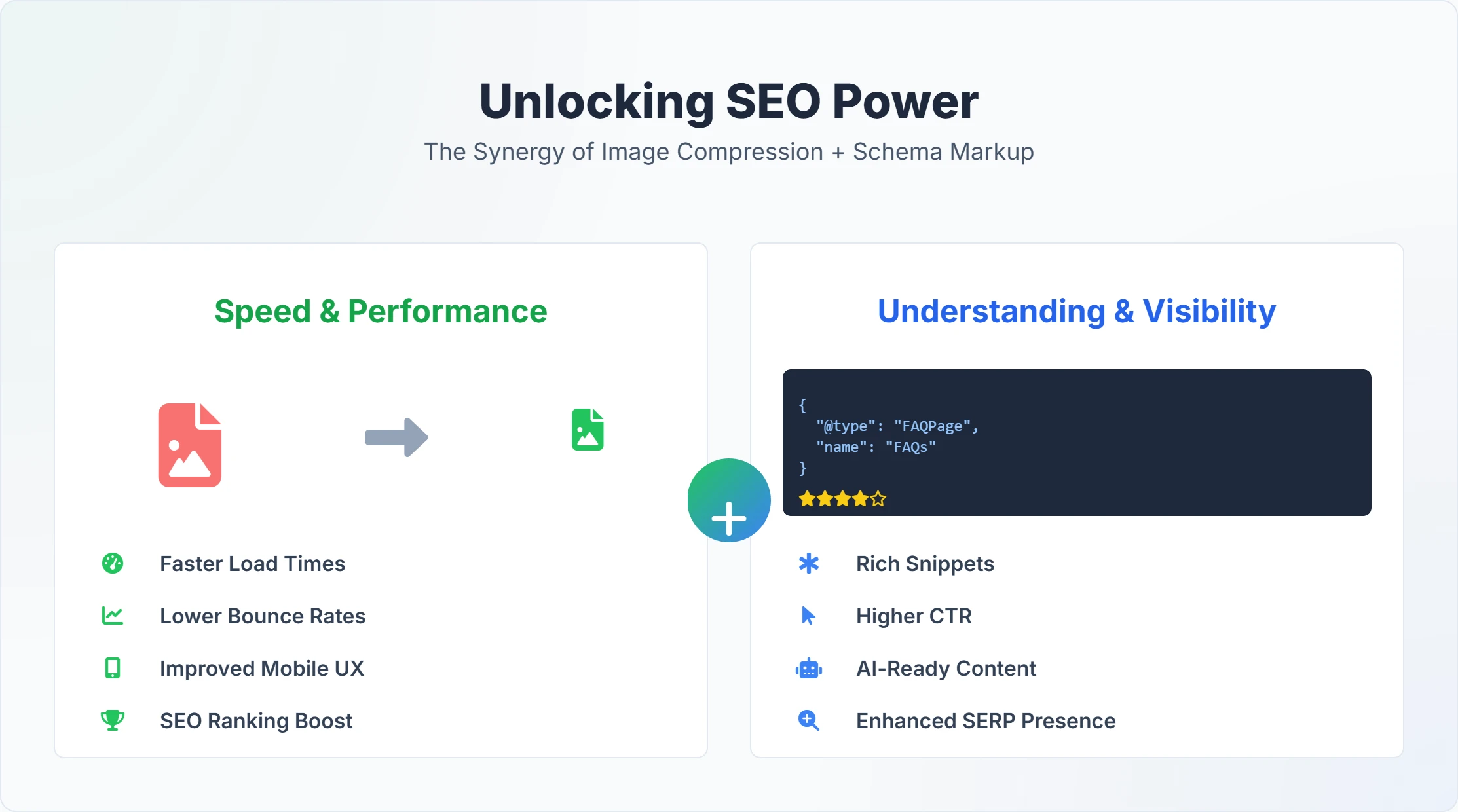
Neither image compression nor schema markup operates in isolation. Their true power unfolds when they are part of a cohesive SEO strategy. They represent the two sides of the optimization coin: Performance and Semantics.
- Image compression ensures that your website loads quickly, providing an excellent technical foundation and user experience. A fast site keeps users happy and encourages search engines to crawl and index your content more frequently and favorably. It creates the "container" for your content to be consumed efficiently.
- Schema markup then provides search engines with a clear, unambiguous understanding of that content, allowing it to be presented in rich, engaging ways in the SERPs. It labels the content inside the container so machines know exactly what it is.
Imagine a beautifully designed product page with stunning, high-resolution images. If these images aren't compressed, the page loads slowly, and potential customers bounce before seeing your offerings. Even if you have perfect product schema, no one will see those rich results if they never reach your page.
Conversely, a super-fast page without schema might rank well, but it won't benefit from the enhanced visibility and higher CTR that rich snippets provide. A user might see your link but click a competitor's link instead because the competitor showed a 5-star rating and a price tag directly in the search results.
Together, they create a powerful one-two punch: speed to satisfy the user and the search engine's technical requirements, and semantic clarity to ensure your content is understood and showcased in the most impactful way possible. This dual approach emphasizes a truly user-centric design, where speed and rich, understandable information go hand-in-hand.
Real-World Example: An E-commerce Store
Consider an online shoe store.
- Without Optimization: They upload 5MB JPEGs of shoes. The page takes 6 seconds to load. Google crawls it slowly. They have no schema. The search result is a plain blue link.
- With Optimization: They compress images to 50KB WebP files. The page loads in 0.8 seconds. They add Product Schema.
- Result: Google crawls faster. The search result now shows the shoe price, "In Stock" status, and a 4.8-star rating. Users on mobile phones can load the page instantly. Sales increase because the funnel is frictionless and the search listing is compelling.
This is the standard you should aim for. For a complete list of on-page factors to check, refer to our on-page SEO best practices.
Digispot AI: Your Ally in SEO Optimization
Navigating the complexities of modern SEO, from optimizing every image to meticulously crafting schema markup, can be daunting. Manual optimization is fine for a 5-page site, but what about a 5,000-page site? This is precisely where an advanced AI SEO platform like Digispot AI becomes an invaluable partner for businesses aiming to improve their online visibility and performance.
Digispot AI is designed to bring all SEO best practices into an automated and user-friendly model, allowing you to operate at scale with accuracy. We don't just guess; we use data-driven insights powered by multiple Large Language Models (LLMs) to give you the most accurate advice possible.
How Digispot AI helps achieve business outcomes:
- Comprehensive Auditing & Issue Identification: Digispot AI conducts deep audits of your website in both mobile and desktop modes. It analyzes over 300+ ranking factors, including content quality, technical SEO health, local SEO parameters, and critically, page performance. This isn't a surface-level scan. We simulate how Googlebot crawls your site. This holistic approach ensures that not only are image compression needs identified, but also that technical issues related to rendering or display are flagged. The platform helps you pinpoint issues and provides clear guidance on how to solve them, whether it's an oversized image, missing alt text, or an opportunity for new schema markup.
- Performance Tracking & Improvement: Digispot AI seamlessly integrates with essential tools like Google Search Console and Google Analytics. This integration allows you to track the real-world impact of your optimizations, such as improved page load times after image compression or the performance of your rich snippets enabled by schema markup. You can see how these changes translate into increased traffic and business leads. You move from "guessing" to "knowing."
- Opportunity Finder: The platform's "Opportunity Finder" feature is like having an expert SEO consultant constantly scanning your site for growth potential. It can highlight pages that would significantly benefit from image optimization, identifying heavy pages that are driving down site speed. Similarly, it can spot content where implementing specific schema types (like FAQPage or Article schema) could dramatically boost your visibility in rich results. It prioritizes tasks based on potential impact, so you always know what to work on first.
- Content Studio with AI Agents: Digispot AI's Content Studio, powered by AI agents, helps you generate SEO-optimized content. This means that when you create new blog posts or product descriptions, the platform can guide you in incorporating best practices for both image optimization and schema consideration from the outset, ensuring your new content is born "SEO-ready." It can suggest alt text for images and JSON-LD structures for your articles automatically.
The Digispot AI Free Community Chrome Extension: On-the-Go Auditing
For quick, real-time insights, the Digispot AI free community Chrome extension is a game-changer. This powerful browser extension, fueled by popular LLM models, empowers you to audit any webpage you visit instantly. It puts the power of an enterprise SEO tool directly into your browser toolbar.
How the Chrome extension supports "how image compression helps":
- Audit & Detection: With a single click, the extension can perform a rapid on-page audit. It can quickly detect unoptimized images, highlighting those that are excessively large and contributing to slow page load times. This immediate feedback helps you understand the technical SEO state of any page. It checks image formats, dimensions vs display size, and file weight.
- Visualization: Beyond just detection, the extension can visualize the impact of these issues. For example, it might show you the potential file size savings if certain images were compressed, making the benefits of image optimization tangible and easy to understand. This visual feedback reinforces "how image compression helps" by directly illustrating its positive impact on a given page.
- Comprehensive Insights: While browsing, the extension also provides quick insights into other critical SEO factors, allowing you to assess content, technical health, and overall page performance on the fly. This makes it an invaluable tool for marketers, developers, and business owners alike, offering a window into the SEO health of your website or even competitor sites.
With Digispot AI, the journey to improving business visibility, increasing traffic and business leads, and achieving significant time and cost savings becomes a structured, intelligent process. You gain the accuracy of an automated system while maintaining user-friendly control to operate your SEO strategy at scale.
Try the free On-Page SEO Analysis tool to audit any URL instantly without installing anything.
Conclusion: Start Optimizing Your Site Speed Today
In the evolving landscape of search engine optimization, achieving top rankings and attracting valuable traffic requires a multi-faceted approach. We've seen how image compression helps by ensuring your website is fast, user-friendly, and favored by search algorithms. A fast site is the baseline requirement for entering the modern search arena. Without it, your content may never get the chance it deserves.
Simultaneously, schema markup provides the semantic clarity needed for search engines and AI to truly understand your content, unlocking the potential for rich, eye-catching results that significantly boost your click-through rates. It turns your content from simple text into structured data that machines can confidently present to users.
By thoughtfully implementing image compression and schema markup, you're not just performing isolated SEO tasks; you're building a robust, efficient, and intelligently structured website that caters to both human users and advanced search technologies. Whether you're a small business or a large enterprise, embracing these foundational elements is critical for success.
Tools and platforms like Digispot AI provide the essential capabilities to audit, detect, visualize, and resolve these issues, making the complex world of SEO manageable and highly effective. Don't let large images weigh down your success. Take the step today to empower your website with the speed and smarts it needs to thrive in the digital ecosystem.
Ready to improve your search visibility? Try Digispot AI for comprehensive website audits and actionable recommendations.
--=
References
- Define your structured data using Schema.org | Google Search Central
- About rich results | Google Search Central
- Image best practices | Google Search Central
- Core Web Vitals | Google Search Central
- PageSpeed Insights | Google Developers
- JSON-LD | Google Search Central
- Google Search Console
- Google Analytics
- Digispot AI - FREE On Page SEO Audit Tool
- Digispot AI - FREE Chrome Extension for SEO Insights
Audit any page in seconds
300+ SEO checks including Core Web Vitals, schema markup, meta tags, and AI readiness — trusted by 1000+ SEO experts and marketers.
Frequently Asked Questions
Here are some of our most commonly asked questions. If you need more help, feel free to reach out to us.
Written by
Maya Krishnan
Digital growth expert
Maya is a seasoned expert in web development, SEO, and digital strategy, dedicated to helping businesses achieve sustainable growth online. With a blend of technical expertise and strategic insight, she specializes in creating optimized web solutions, enhancing user experiences, and driving data-driven results. A trusted voice in the industry, Maya simplifies complex digital concepts through her writing, empowering readers with actionable strategies to thrive in the ever-evolving digital landscape.