
Digispot AI Chrome Extension: Free On-Page SEO Auditor
Optimize your SEO workflow with the free Digispot AI Chrome extension. Run 11-category on-page audits, decode SERPs, and chat with AI in real time.
 Maya Krishnan
Digispot AI Chrome Extension: Free On-Page SEO & SERP Auditor
Modern search engine optimization requires moving quickly without getting bogged down by a dozen different browser tabs. The Digispot AI Chrome extension is designed to solve this exact problem, offering a completely free, lightweight, and powerful browser tool that brings professional-grade on-page auditing, real-time SERP intelligence, and conversational AI directly into your daily workflow.
Key Takeaways
- Run a full on-page audit in one click. The extension grades any live page across 11 categories and 150+ checks — from metadata and headings to schema and Core Web Vitals — without leaving the tab.
- Audit pages crawlers can't reach. Because it reads the rendered DOM of your active browser window, you can inspect staging environments, draft pages, and pages behind login walls.
- Skip the AI copy-paste loop. All audit findings flow automatically into the built-in AI Chat Assistant, so you can diagnose and generate fixes in the same sidebar.
- Keep it free with Bring Your Own Key. Connect OpenAI, Claude, Gemini, or DeepSeek and pay only for the tokens you use at developer rates.
- Pair it with the SEO Spider for scale. Use the extension for single-page and live work; use the Spider crawl for site-wide audits and internal link mapping.
Table of Contents
- What is the Digispot AI Chrome Extension?
- Mastering On-Page Audits with the 11 Check Categories
- Using SERP Intelligence to Decode Modern Search Results
- Supercharging Audits with the Built-In AI Chat Assistant
- Digispot AI vs. SEO Minion, Ahrefs Toolbar, and Detailed SEO Extension
- Extension vs. Spider Crawl: When to Use Each Tool
What is the Digispot AI Chrome Extension?
The modern SEO landscape is highly fragmented. Marketers and webmasters often find themselves switching between backlink checkers, schema validators, on-page scrapers, and separate AI tabs just to analyze a single webpage. The Digispot AI SEO Insights Chrome extension was built to eliminate this friction. It operates as a lightweight, zero-latency browser utility that overlays critical search engine data directly onto your active browser tab, allowing you to run diagnostic checks without leaving the page.
Rather than relying on clunky, resource-heavy software, this extension runs seamlessly in the background. It serves as a gateway to the broader Digispot AI ecosystem, translating complex search data into immediate, actionable tasks. Whether you are analyzing your own content or reverse-engineering a competitor's landing page, the tool extracts raw HTML and rendered elements in real time to give you an accurate snapshot of how search engines view your site.
Why 1,000+ SEO Professionals Use Digispot AI
With an average rating of 4.8/5 stars on the Chrome Web Store, the extension has rapidly become a staple tool for over 1,000 SEO professionals, agency leaders, and independent consultants. The reason for this quick adoption is simple: consolidation. Instead of running three different single-purpose extensions, users can check metadata, inspect structured data, analyze Core Web Vitals, and run AI prompts in one unified sidebar.
Agencies use it during live client discovery calls to spot low-hanging fruit — missing headers, broken canonical tags — in real time. Consultants use it to generate instant, on-the-spot recommendations that build immediate trust with prospective clients.
How to Install (Free, No Signup)
Getting started takes less than a minute with no account creation or credit card required:
- Navigate to the Chrome Web Store and search for "Digispot AI".
- Click Add to Chrome and confirm the installation permissions.
- Pin the Digispot AI icon to your browser toolbar for one-click access.
- Open any webpage or search results page, click the icon, and start auditing immediately.
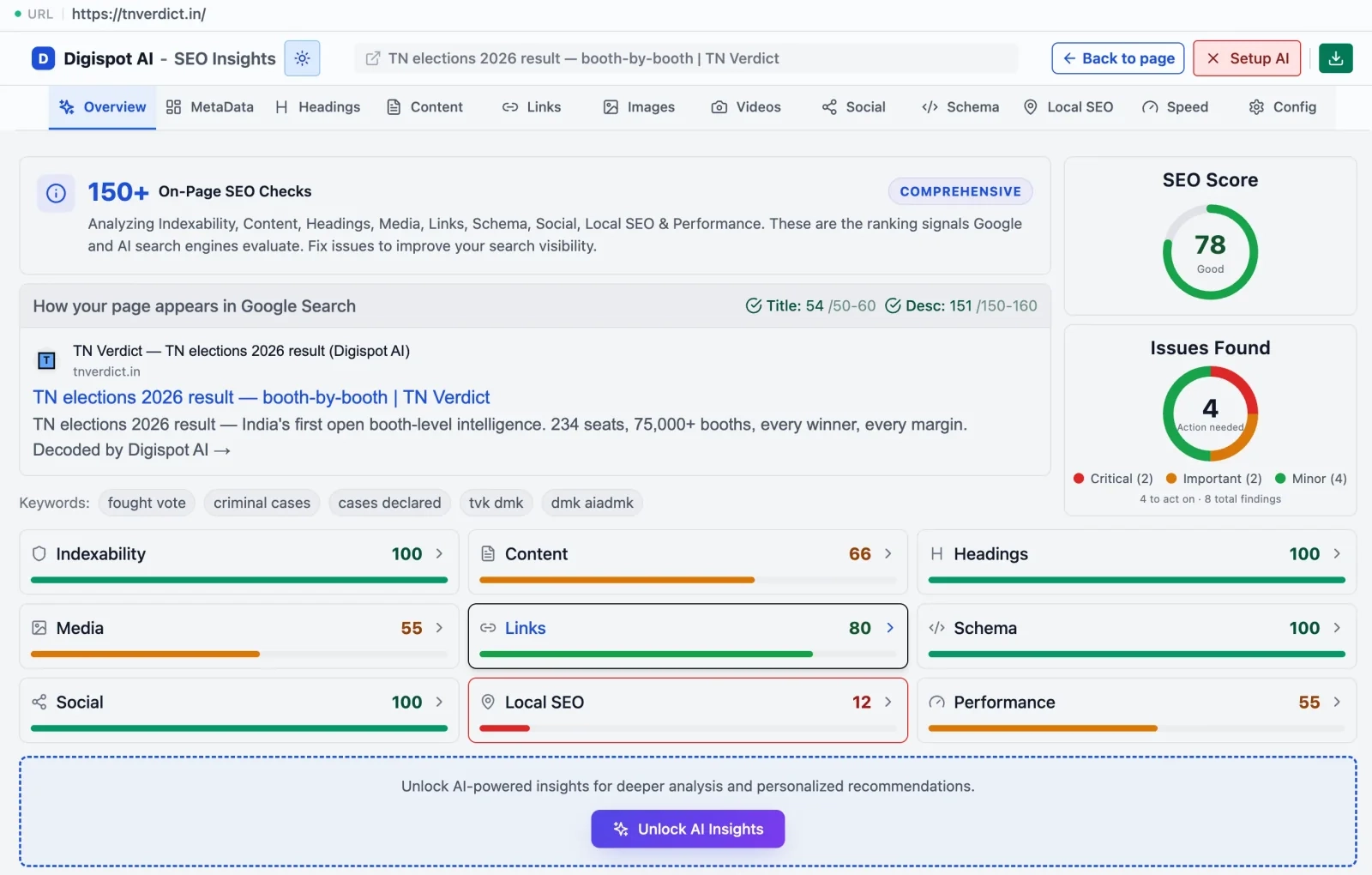 The Digispot AI Chrome extension runs a full 150+ point on-page audit on any live page in one click — surfacing scores across 11 categories from metadata to Core Web Vitals.
Mastering On-Page Audits with the 11 Check Categories
On-page optimization is the foundation of any successful organic search campaign. The extension's On-Page Auditor mode evaluates any live URL across 11 critical SEO categories, highlighting critical optimization errors in seconds.
The 11 Check Categories
When you activate the auditor, it parses the page's DOM and grades the following categories:
- Content: Word count, reading ease, keyword density, thin-content risk.
- Metadata: Title tags, meta descriptions, character limits for optimal SERP presentation.
- Headings: H1–H6 hierarchy, duplicate headings, missing H1.
- Schema Markup: Detects and validates JSON-LD, Microdata, and entity relationships.
- Keywords: Primary and secondary keyword placement across prominent HTML zones.
- Images: Missing alt text, unoptimized file formats, sizing issues.
- Video: Embedded videos and presence of VideoObject schema.
- Links: Internal, external, and canonical link health — broken paths, redirect chains.
- Social: Open Graph tags and Twitter Cards for clean social sharing previews.
- Local SEO: NAP (Name, Address, Phone) consistency and local business schema elements.
- Core Web Vitals: LCP, CLS, and INP scores directly during your page visit.
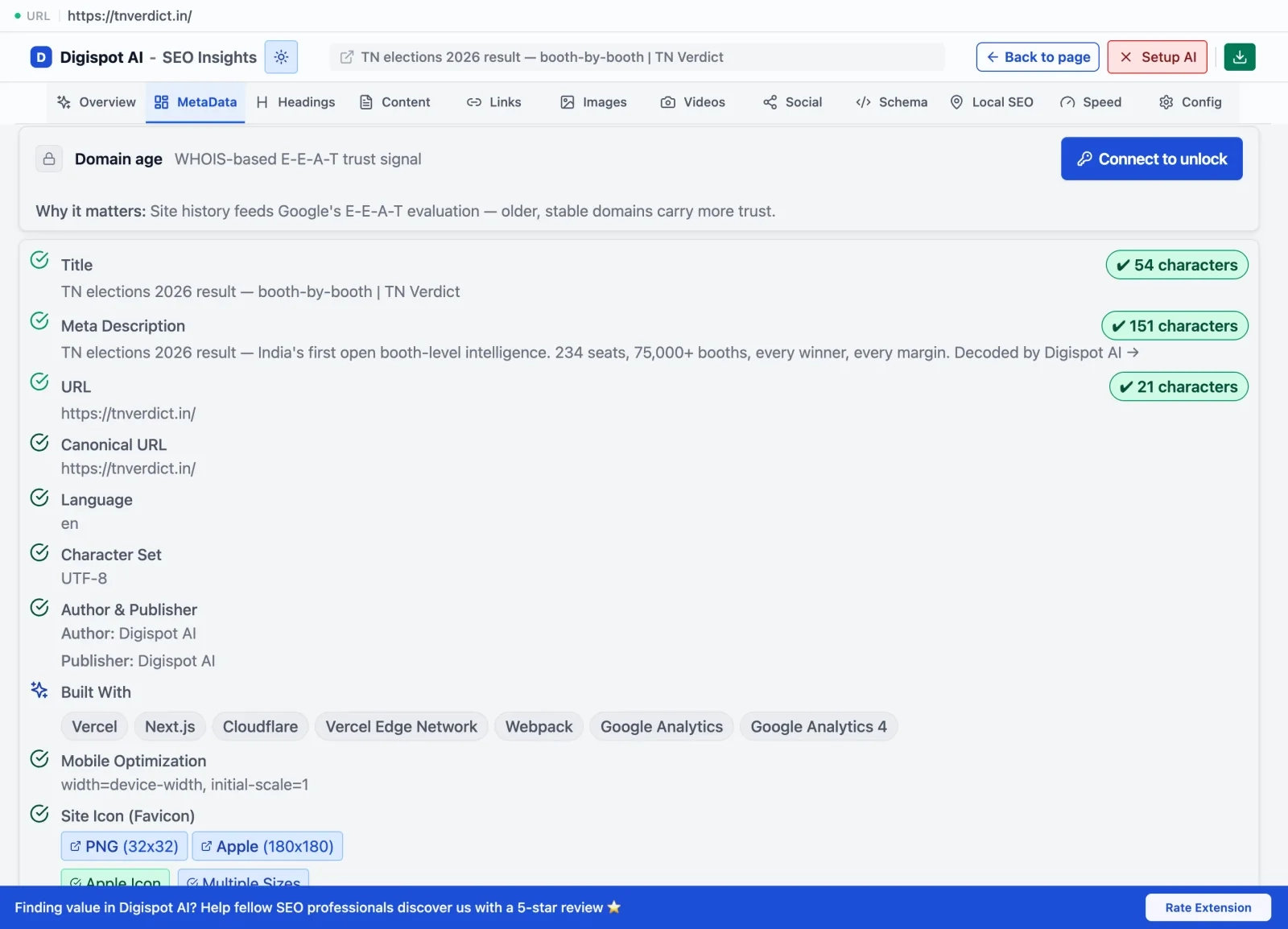 The metadata panel audits your title tag, meta description, canonical URL, and robots directives in one view — with character counts and improvement flags.
Fixing On-Page Errors in Seconds
Analyzing these elements directly in your browser helps you identify quick wins that immediately impact rankings. For example, a common issue on JavaScript-heavy sites is a mismatch between the raw HTML title and the client-side rendered title. The extension flags these discrepancies instantly, so you can fix them before the next crawl.
The most common fixes surface in seconds. In the headings panel, a missing or duplicate H1 is flagged the moment you open the auditor — the extension shows the full H1–H6 outline so you can spot a page that jumps from H2 to H4 or reuses the same heading twice; if you're unsure how to restructure it, our guide on heading tag hierarchy walks through the correct nesting. The images panel lists every <img> missing alt text alongside oversized files, which pairs well with a deliberate image compression workflow to keep LCP low. And the links panel separates broken internal paths from redirect chains and flags canonical conflicts, so you can catch a page pointing at the wrong canonical URL before it splits your ranking signals. Each flag is actionable on its own, but the real speed comes from clicking straight into the AI Chat to rewrite the offending element without leaving the page.
Using SERP Intelligence to Decode Modern Search Results
Search engine results pages are no longer just lists of ten blue links. Today's SERPs are rich, interactive environments filled with dynamic widgets, direct answers, and AI-generated summaries. The SERP Intelligence mode scans search results pages in real time to help you decode this landscape.
Deconstructing AI Overviews and Featured Snippets
Google's AI Overviews and featured snippets dominate the top of modern search results. The SERP Intelligence mode identifies which queries trigger these advanced features and deconstructs the structures of AI-generated blocks — showing you exactly which sources Google uses and what formatting they share. This lets you reverse-engineer the length, style, and structure required to secure these high-visibility placements.
In practice, that means looking past the ranking position and studying the shape of the winning answer. The mode surfaces which cited sources lead with a direct one-sentence definition versus a numbered list, whether the snippet is pulled from a paragraph or a table, and how the passages Google quotes are formatted on the source page. Those patterns are the blueprint you match when you write your own answer — a habit our Google AI Overviews strategy guide explores in depth. Because AI Overviews and rich results lean heavily on machine-readable context, the auditor's schema panel doubles as a citability check: adding the right structured data and schema makes your entities and answers easier for Google to extract and attribute back to you.
Analyzing Competitor Signals Directly on the SERP
When you search for your target keywords, the SERP Intelligence mode decodes the results page itself — surfacing signals that aren't visible to the naked eye:
- Which results are cited inside AI Overviews and why.
- Which queries trigger featured snippets, local pack, or People Also Ask.
- Competitor signals embedded in the SERP layout.
This real-time intelligence lets you understand what Google is rewarding for a query before you write a single word.
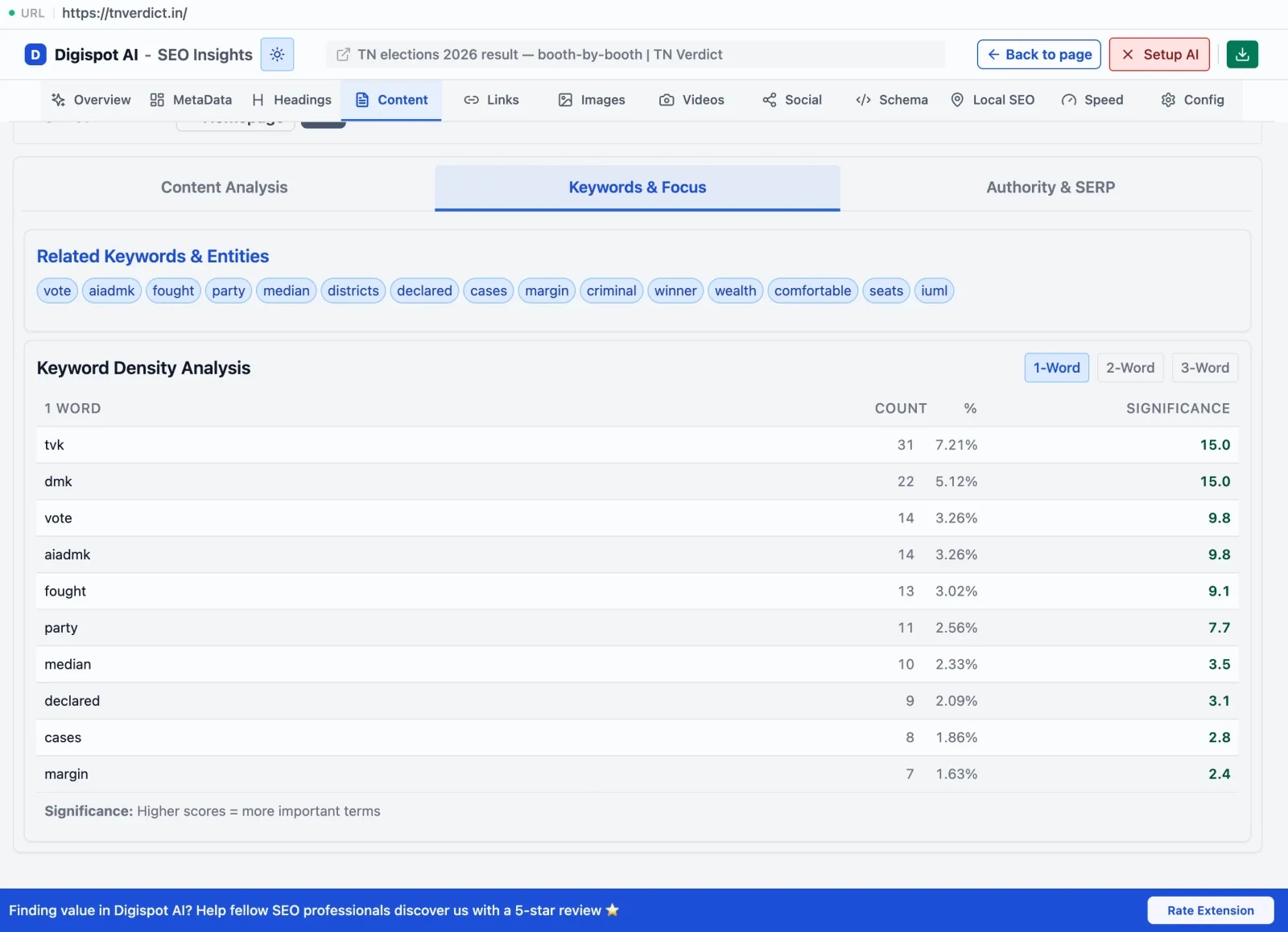 The keyword focus panel surfaces how prominently your target keyword appears across title, headings, body copy, and URL — with actionable placement guidance.
Supercharging Audits with the Built-In AI Chat Assistant
The standout feature that sets the Digispot AI extension apart from legacy browser tools is its integrated, context-aware AI Chat Assistant. Instead of copying audit data, opening a new tab, and pasting it into an LLM, the assistant works natively alongside your live audit.
[Live Webpage Audit] ──(Auto-Flows Data)──> [Built-In AI Chat] ──(Your API Key)──> [Instant Fixes]
How Audit Results Flow Automatically Into the AI Chat
When you open the AI Chat tab within the extension sidebar, all 150+ audit findings from the current page flow directly into the AI context. You can ask the AI about what the extension just found — without copying any data, switching tabs, or re-explaining the page. Ask it to suggest a better meta description, explain a schema error, or outline what to fix first — and it responds with full awareness of the actual audit results from the page you're on.
Bringing Your Own API Keys: OpenAI, Claude, Gemini, and DeepSeek
To keep the extension 100% free and give you ultimate control over your data, Digispot AI supports a Bring Your Own Key (BYOK) model. You can securely add API keys from:
- OpenAI
- Anthropic Claude
- Google Gemini
- DeepSeek
This gives you the flexibility to choose your preferred model based on the task — the analytical reasoning of Claude for schema design, or the cost-efficiency of DeepSeek for bulk metadata generation.
Digispot AI vs. SEO Minion, Ahrefs Toolbar, and Detailed SEO Extension
| Feature | Digispot AI Extension | SEO Minion | Detailed SEO | Ahrefs Toolbar |
|---|---|---|---|---|
| On-Page Audit | Yes (11 Categories, 150+ checks) | Yes | Yes | Yes (Basic) |
| Schema Validation | Yes | Yes | Yes | No |
| SERP Feature Decoding | Yes (AI Overviews, Snippets) | No | No | No |
| Built-In AI Assistant | Yes (Context-aware, BYOK) | No | No | No |
| Local SEO Checks | Yes | No | No | No |
| Core Web Vitals | Yes | No | Limited | No |
| Cost | Free | Free | Free | Requires paid Ahrefs sub |
Where Traditional Extensions Fall Short
Traditional SEO extensions show static data but leave all the analysis and execution to you. They point out that your meta description is too long — but they can't fix it. Digispot AI bridges the gap: when the extension finds that your page is missing structured data, you ask the AI assistant: "Write the JSON-LD LocalBusiness schema for this page using the contact info in the footer." In seconds, you have valid code ready to paste into your CMS.
Extension vs. Spider Crawl: When to Use Each Tool
To get the most out of Digispot AI, understand when to use the Chrome extension and when to deploy the full SEO Spider.
| Use the Chrome Extension when… | Use the Spider Crawl when… |
|---|---|
| Writing a new blog post | Auditing an entire domain of 1,000+ pages |
| Analyzing a single competitor page | Running site-wide broken link checks |
| Quick SERP research on a query | Mapping your full internal link structure |
| Doing a live audit during a client call | Scheduling automated crawl monitoring |
| Behind login walls / staging environments | Tracking issues weighted by GSC traffic |
For maximum efficiency, start your day checking site-wide health scores from the Spider dashboard. When the crawl flags a directory for duplicate meta descriptions, click through to those pages and use the Chrome extension to rewrite them on the spot — combining the best of both tools in one workflow.
Learn how to combine both tools in our complete guide: How to Do an SEO Audit: Check Your Website SEO in 7 Steps.
Related deep-dives
Continue with these closely related guides:
- on-page seo best practices — On-Page SEO Best Practices: Optimize Every Element
- meta tags seo — Meta Tags SEO Guide: Optimize for Better Rankings
- best semrush alternative — Best Semrush Alternative for 2026: Digispot AI vs Legacy SEO Tools
Audit any page in seconds
300+ SEO checks including Core Web Vitals, schema markup, meta tags, and AI readiness — trusted by 1000+ SEO experts and marketers.
Frequently Asked Questions
Here are some of our most commonly asked questions. If you need more help, feel free to reach out to us.
Written by
Maya Krishnan
Digital growth expert
Maya is a seasoned expert in web development, SEO, and digital strategy, dedicated to helping businesses achieve sustainable growth online. With a blend of technical expertise and strategic insight, she specializes in creating optimized web solutions, enhancing user experiences, and driving data-driven results. A trusted voice in the industry, Maya simplifies complex digital concepts through her writing, empowering readers with actionable strategies to thrive in the ever-evolving digital landscape.