How to Do an SEO Audit: Check Your Website SEO in 7 Steps
Learn how to check website SEO health step by step. Find technical errors, fix Core Web Vitals, audit schema, and prioritize fixes using Digispot AI.
 Maya Krishnan
To drive predictable organic growth, you need to understand exactly how search engine crawlers perceive your website. Learning how to check website SEO allows startup founders and marketing managers to transition from guesswork to data-driven optimization.
This guide walks you through a 7-step comprehensive audit — from technical crawlability to AEO readiness to backlink health — and shows you how to prioritize every fix you find.
Key Takeaways
- Audit in a fixed order: crawlability and indexation first, then on-page, speed, content, schema, backlinks, and traffic data — a page that can't be crawled can't rank no matter how polished it looks.
- Render like Googlebot: use a real-browser (Chromium) crawl so JavaScript-built pages are audited the way search engines actually see them, not with cURL-only tooling that misses dynamic content.
- Prioritize by impact, not volume: score every finding by Traffic at Risk × Severity × Ease of Fix and ship high-severity blockers on high-traffic pages first — you don't have to fix everything.
- Correlate crawl data with GSC/GA4: combining technical findings with real query and behavior data tells you whether a traffic drop is a crawl error, a Core Web Vitals regression, or a content gap.
- Make it continuous: schedule recurring crawls so new issues from code deploys and content changes surface before they cost you rankings.
Table of Contents
- What an SEO Audit Actually Reveals
- Tools You Need to Check Website SEO Properly
- Step 1: Technical SEO — Crawlability and Indexability
- Step 2: On-Page SEO — Title Tags, Headings, and Duplicates
- Step 3: Core Web Vitals and Page Speed
- Step 4: Content Audit — Thin Pages and Keyword Gaps
- Step 5: Schema Markup and AEO Readiness
- Step 6: Backlinks and Off-Page Health
- Step 7: GSC and Traffic Analysis
- What to Do After Your Audit: How to Prioritize Fixes
What an SEO Audit Actually Reveals
A website can look stunning to a human visitor while remaining completely invisible to search engines. Visual design does not guarantee crawlability. Search engine bots don't experience your website through a graphical interface — they read raw code, render JavaScript, parse metadata, and follow link paths.
If your site has hidden rendering errors, broken internal links, or misconfigured indexing directives, search engines will struggle to index your content. Your beautifully designed landing pages won't rank, regardless of how much you spent on web design.
A deep technical audit is the only way to uncover these invisible search blockers — and fix them before they continue costing you traffic.
The Most Common Issues We Find in 1,200 SEO Audits
Before you run your own audit, it helps to know what you're most likely to find. We aggregated the issues flagged across 1,200 site audits run with Digispot AI. A short list of problems shows up again and again — and most are quick fixes hiding in plain sight:
| Rank | Issue | Found on | Typical severity |
|---|---|---|---|
| 1 | Missing or duplicate meta descriptions | 63% of sites | Medium |
| 2 | Images missing alt text | 57% of sites | Medium |
| 3 | Broken internal links (404s) | 44% of sites | High |
| 4 | Slow Core Web Vitals (LCP > 2.5s) | 39% of sites | High |
| 5 | Missing or invalid schema markup | 33% of sites | Medium |
| 6 | Redirect chains wasting crawl budget | 27% of sites | Medium |
| 7 | Thin content (under 300 words) | 21% of sites | Low |
The takeaway: most sites lose rankings to the same short list of recurring, fixable problems — not exotic ones. The 7 steps below catch every item on this list.
Methodology: aggregated from 1,200 site audits run with Digispot AI between January and August 2026, de-duplicated by domain. Percentages reflect the share of sites where the corresponding automated check fired.
Tools You Need to Check Website SEO Properly
| Tool | Primary Use | Cost |
|---|---|---|
| Digispot AI Chrome Extension | Instant single-page checks | Free |
| Digispot AI SEO Spider | Full site crawl, Chromium rendering | Free 7-day trial, then $14/mo |
| Google Search Console | Historical traffic + index status | Free |
Instant Checks vs. Full Site Crawls
For quick, on-the-go analysis of a single page, the Digispot AI SEO Insights Chrome extension provides instant feedback on meta tags, heading structures, and basic technical health directly from your browser — no signup required. If you would rather not install anything, the free on-page SEO checker grades any URL against a target keyword straight from the browser.
To check website SEO across an entire domain, you need the Digispot AI SEO Spider — it maps your full site architecture, flags broken links, and identifies systemic issues across thousands of pages simultaneously.
Why Real-Browser Rendering Matters
Many traditional crawlers still use basic cURL requests to fetch page content. This method can't execute JavaScript, so sites built on React, Angular, Vue, or WordPress with dynamic plugins are crawled incompletely. Digispot AI's SEO Spider uses real Chromium rendering — loading and executing your pages exactly like Googlebot — so what you see in your audit matches what search engines actually see.
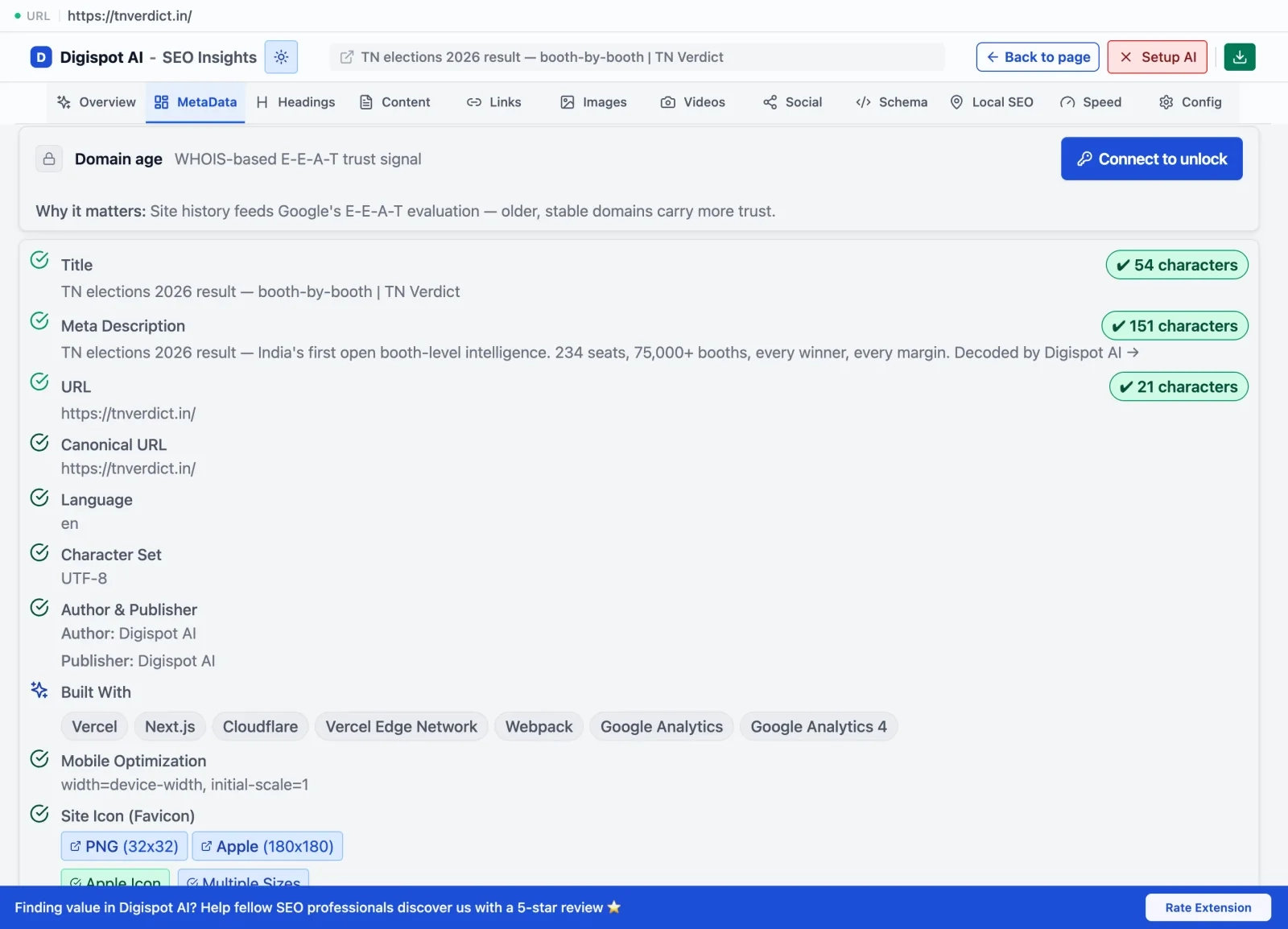 The free Chrome extension audits title tags, meta descriptions, canonical URLs, and 150+ other on-page signals on any live page — no crawl needed.
Step 1: Technical SEO — Crawlability and Indexability
Technical SEO is the foundation. If search engine bots can't crawl or index your pages, none of your other optimization efforts matter.
Check Robots.txt and XML Sitemap
Your robots.txt file controls which parts of your site crawlers can access. A single misplaced character can accidentally block your entire website:
User-agent: *
Disallow: /wp-admin/  ✓ Correct: blocks admin panel
Disallow: /           ✗ DANGER: blocks the entire site
Verify that your XML sitemap is properly formatted, contains only live 200-status URLs (no redirects or broken pages), and is referenced in your robots.txt so search bots can find it.
Find and Fix Redirect Chains and Noindex Tags
Redirect chains (A → B → C) waste crawl budget and slow page load times. Accidental noindex tags left over from development environments instruct search engines to drop pages from the index entirely — often silently.
The Digispot AI SEO Spider automates this by crawling your entire site and flagging:
- Pages blocked by
robots.txtornoindexdirectives. - Redirect chains and loops draining crawl budget.
- Broken internal and external links (404 errors).
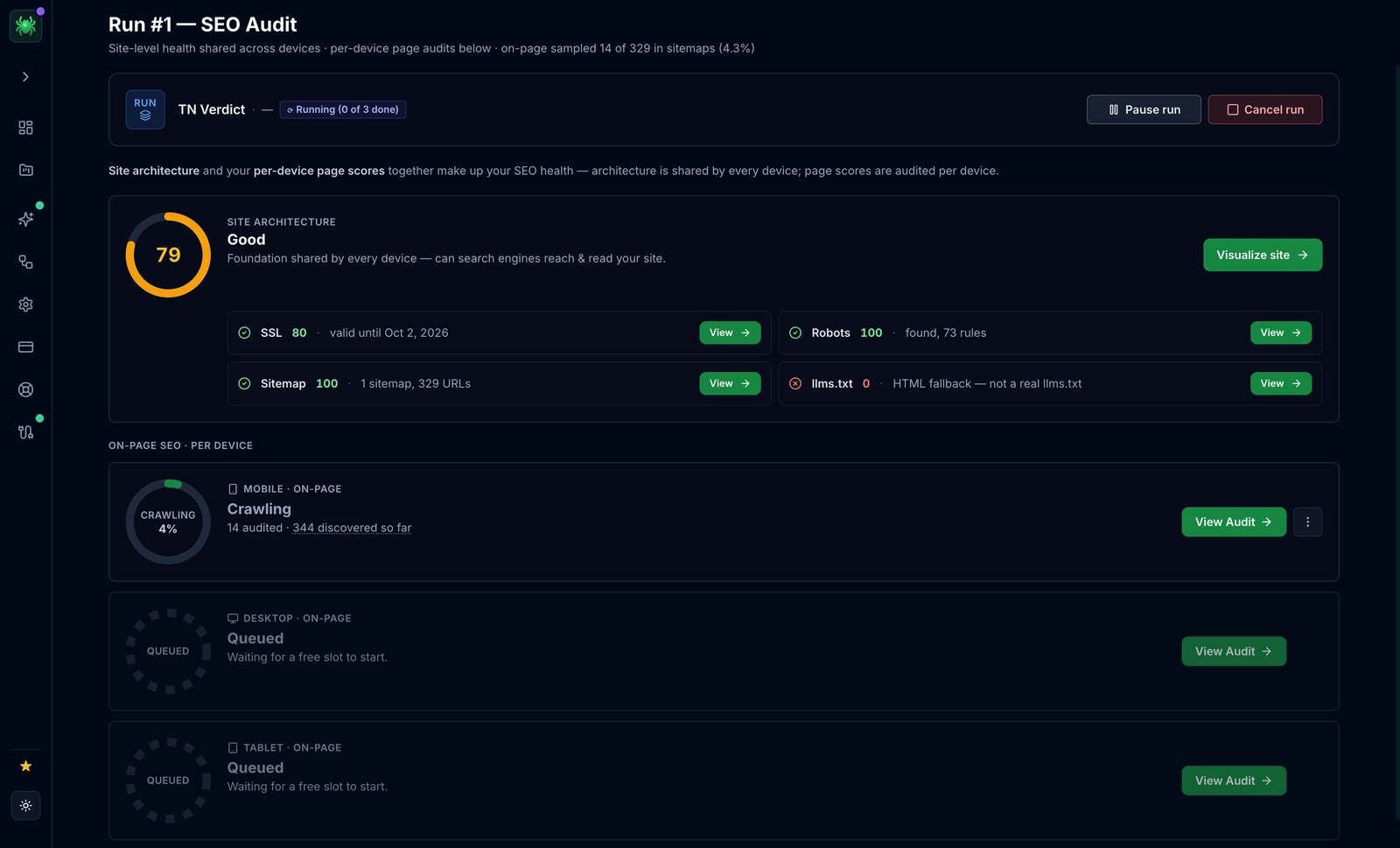 Digispot AI's site-wide crawl maps every URL's crawlability, redirect chain, and indexation status in a single run — sorted by severity and traffic at risk.
Step 2: On-Page SEO — Title Tags, Headings, and Duplicates
On-page SEO focuses on making individual pages highly relevant and understandable to crawlers and humans alike.
The Anatomy of Optimized Title Tags and Meta Descriptions
- Title Tags: 50–60 characters. Place your primary keyword near the beginning, add your brand name at the end.
- Meta Descriptions: 120–155 characters. Write compelling, action-oriented copy that accurately describes the page and includes a clear CTA.
Auditing Headings and Duplicate Content in Bulk
Every page should have exactly one H1 tag containing your primary keyword and clearly stating the page's main topic. Subsequent sections use H2 and H3 tags in a logical, nested hierarchy.
Scan for duplicate content — identical title tags, meta descriptions, or body copy across multiple pages — which confuses search engines and dilutes ranking signals.
The Digispot AI SEO Spider's dashboard shows your entire site's metadata in a single spreadsheet-style view, making bulk cleanup of missing, duplicate, or over-limit titles and H1s fast and systematic.
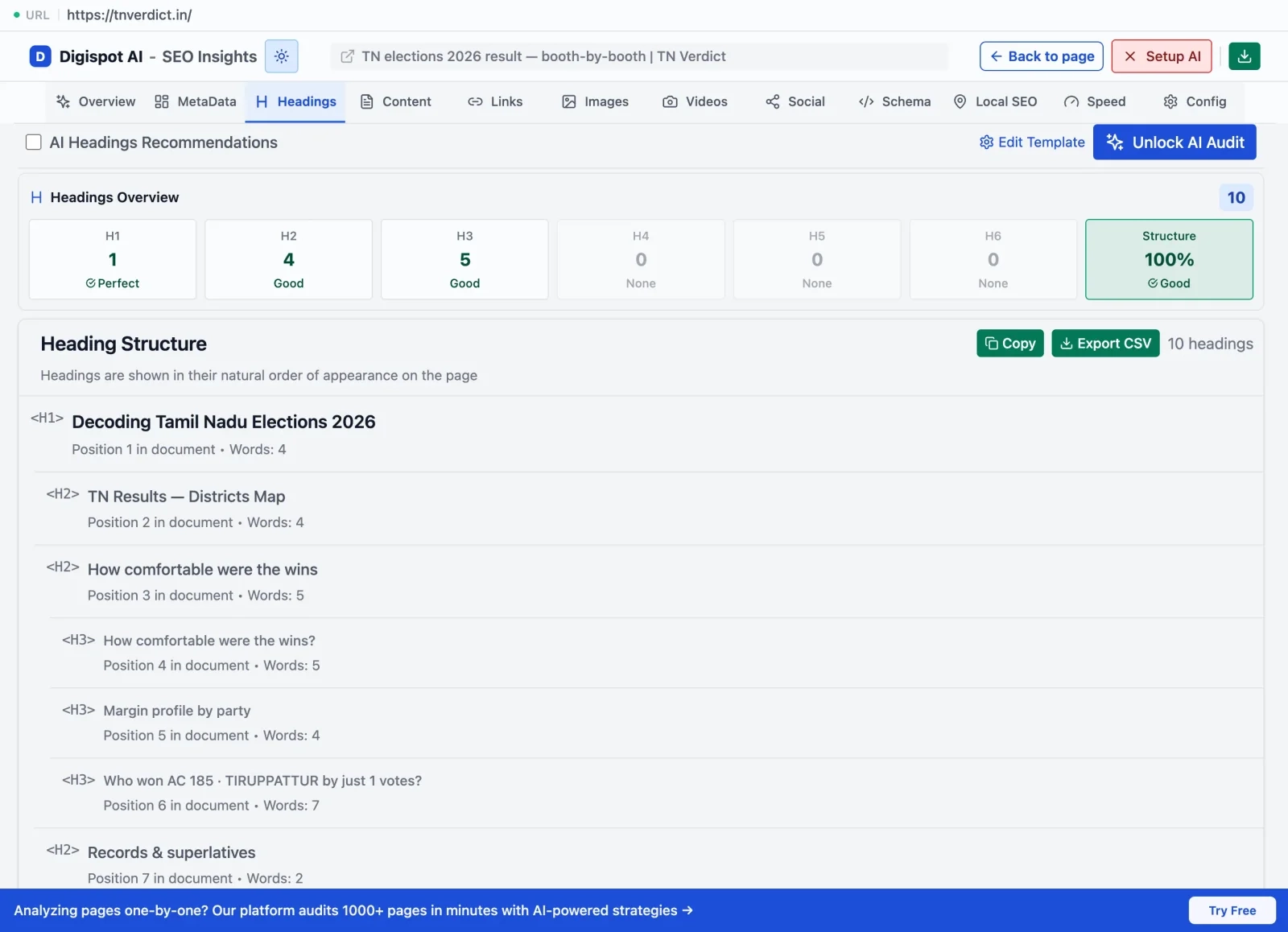 The Chrome extension's headings panel visualizes the full H1–H6 structure on any page and flags missing or duplicate headings immediately.
Step 3: Core Web Vitals and Page Speed
Page speed is a direct Google ranking factor. If your site takes too long to load, visitors leave before they see your content — and Google knows it.
LCP, CLS, and INP Thresholds
Google measures user experience through three Core Web Vitals:
| Metric | What It Measures | Target |
|---|---|---|
| LCP (Largest Contentful Paint) | How fast main content loads | Under 2.5 seconds |
| CLS (Cumulative Layout Shift) | Visual stability during load | Under 0.1 |
| INP (Interaction to Next Paint) | Responsiveness to clicks/taps | Under 200ms |
Why Real-Browser Crawling Gets You Accurate Numbers
Standard speed tests run in simulated environments that don't reflect real-world user experiences. The Digispot AI SEO Spider measures these metrics using real-browser crawling across mobile, tablet, and desktop device profiles — the same way Google measures them — so your audit results are accurate, not theoretical. Google's own guidance on web.dev defines the exact thresholds above and explains why field data can diverge from lab scores. Once you know which pages fail, our guide to optimizing Core Web Vitals for SEO walks through the fixes for each metric.
Step 4: Content Audit — Thin Pages and Keyword Gaps
High-quality content is the engine that drives organic traffic. A content audit identifies underperforming assets and surfaces new opportunities.
Identifying Thin Content
Thin content pages offer little value to users: short posts under 300 words, duplicate pages, or content that restates the same information without depth. Search engines prioritize comprehensive, authoritative resources.
Identify thin content by looking for pages with:
- High bounce rates and low time-on-page in GA4
- Zero organic impressions in GSC over the last 90 days
- Word counts significantly below competing pages that rank
Mapping Content to Keyword Goals
Every page on your site must align with a specific search intent:
- Informational: User wants an answer ("how to check website SEO").
- Commercial: User is comparing options ("best SEO audit tool").
- Transactional: User is ready to buy ("SEO Spider free trial").
Map your existing content to these intents to find keyword gaps — topics where competitors rank but you have no content. Decide whether to prune outdated pages, consolidate similar articles (preventing keyword cannibalization), or expand thin pages into comprehensive guides.
Step 5: Schema Markup and AEO Readiness
Search engines are evolving from link indexes into AI-powered answer engines. To remain visible, your site must be optimized for both traditional search and AI-driven platforms like ChatGPT and Google SGE.
Why Schema is the Language of AI Search Engines
Schema markup (structured data) provides explicit clues about the meaning of your content. It helps search engines generate rich snippets and — critically — helps LLMs parse and verify information when deciding what to cite in AI-generated answers.
Key schema types to audit:
- FAQPage: Feeds Q&A directly to AI engines and rich result features.
- Article: Establishes freshness and authorship signals.
- HowTo: Matches step-by-step search intents in AI overviews.
- Organization: Links your brand entity to your knowledge graph presence.
AEO Readiness Checklist
[ ] FAQPage schema on all Q&A content
[ ] Article schema with datePublished + dateModified on all blog posts
[ ] Organization schema sitewide with sameAs links to brand profiles
[ ] Direct answer sentences in the first 150 words of each section
[ ] Semantic heading hierarchy (H1 → H2 → H3) throughout
Use Digispot AI's free Schema Markup Generator to create valid JSON-LD for any schema type in minutes, then validate across your whole site with the SEO Spider. Follow the structured-data types documented by Google Search Central so your markup stays eligible for rich results. For entity modeling and nesting beyond the basics, see our advanced schema markup guide, and to structure content so AI engines cite it, our answer engine optimization (AEO) guide goes deeper than the checklist above.
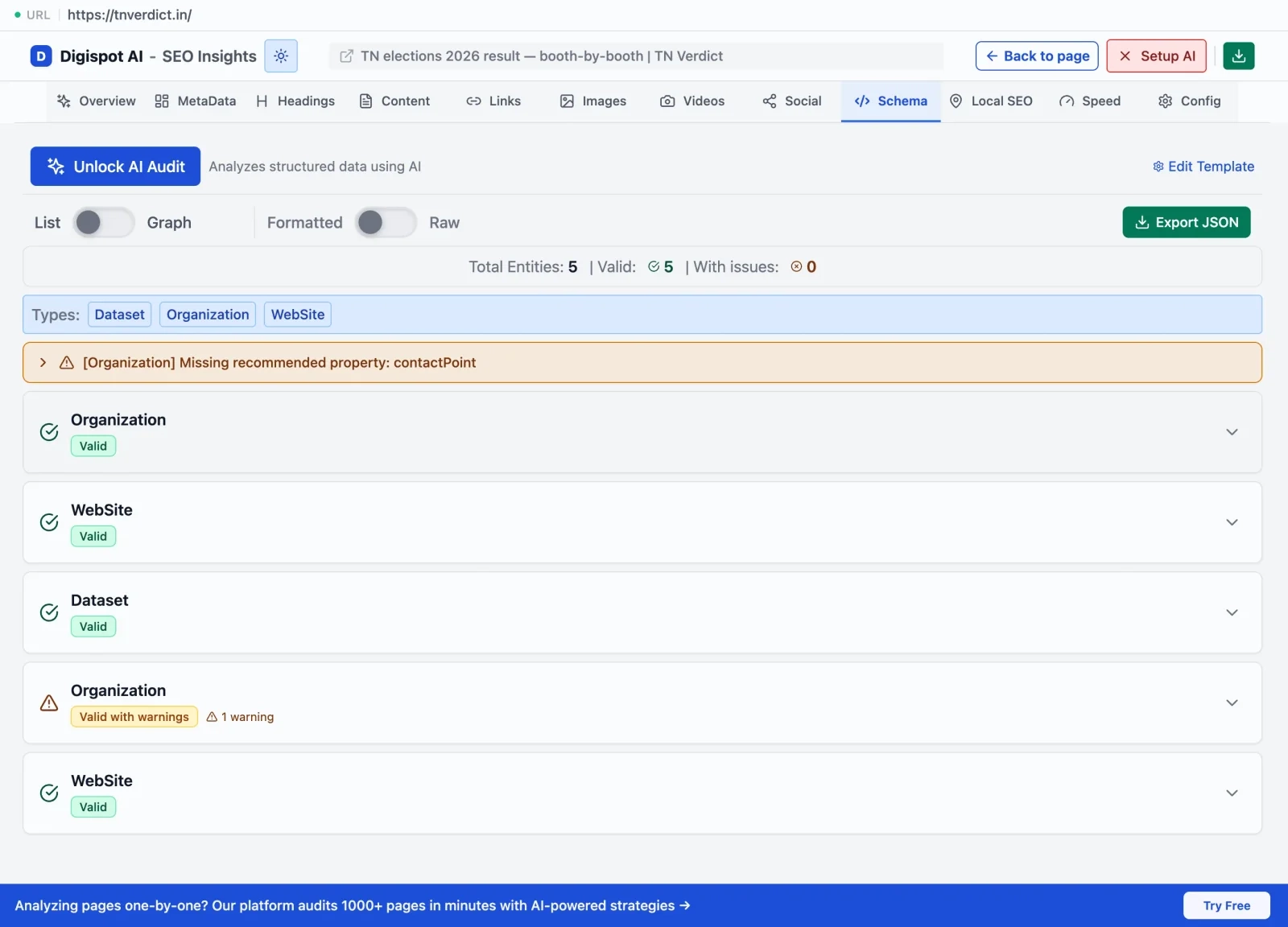 The Chrome extension's schema entities panel shows exactly how AI crawlers parse your structured data — exposing missing entity relationships that block AI Overview citations.
Step 6: Backlinks and Off-Page Health
While on-page and technical SEO focus on your site's internal health, off-page health measures authority and trust across the wider web.
Evaluating Your Backlink Profile
Backlinks are votes of confidence from other websites. 50 links from authoritative, relevant sites in your industry outweigh 5,000 links from low-quality directories. When auditing your backlink profile, check:
- Referring domains: Number of unique sites linking to you.
- Dofollow vs. nofollow ratio: A natural profile has roughly 60–80% dofollow.
- Anchor text diversity: Natural variation between branded, naked URL, and topical anchors.
- Domain rank distribution: Concentration of links from low-DR (rank N/A or under 10) domains is a red flag.
Identifying Toxic Backlinks
Toxic backlinks come from link networks, automated blog comments, or negative SEO campaigns. Regularly check your backlink profile for suspicious spikes in referring domains from unrelated niches. If you find toxic links, compile a disavow file and submit it to Google Search Console.
Digispot AI's Backlinks module automatically scores each referring domain and flags high-spam domains — so you don't have to sort through the list manually.
Step 7: GSC and Traffic Analysis
An SEO audit is most powerful when you correlate technical crawl data with real-world search behavior.
Finding Striking-Distance Keywords
Google Search Console reveals "striking distance" keywords — queries where your pages currently rank in positions 8–20. These are your fastest traffic wins: pages with existing authority that need minor on-page attention to reach page one.
Striking Distance Workflow:
1. Find keywords at pos 8–20 with high impressions in GSC
2. Refresh title tag and meta description to match query exactly
3. Add keyword to H2 or body copy where it's currently missing
4. Build 2–3 internal links from relevant high-authority pages
5. Re-crawl to confirm changes; monitor GSC impressions weekly
Merging Crawl Data with Traffic Data
By integrating GSC data directly into your Digispot crawl workspace, you can correlate search performance with technical health. A drop in organic impressions on a key page — is it caused by a sudden technical crawl error, a Core Web Vitals regression, or a competitor publishing better content? The answer determines the fix. Without combined data, you're guessing.
What to Do After Your Audit: How to Prioritize Fixes
An SEO audit is only valuable if you act on it. Once you've compiled your findings, prioritize using this formula:
Priority Score = Traffic at Risk × Issue Severity × Ease of Fix
- High-severity technical blockers first: noindex on key landing pages, broken redirects on high-traffic pages, crawl budget leaks.
- On-page quick wins second: title tag and meta description refreshes for striking-distance keywords (high ease, real CTR gain).
- Content expansion third: thin pages on important topics, keyword gaps with proven volume.
- Schema and AEO fourth: deploy FAQPage, Article, and HowTo schema across your top informational pages.
When Digispot AI's GSC integration is connected, this prioritization happens automatically — every issue in your crawl report is ranked by the organic traffic it costs you.
A worked example. Say your audit returns three findings: (1) a noindex tag left on a product landing page that earns 4,000 clicks a month, (2) missing alt text on 40 blog images, and (3) a title tag that could be tightened on a page ranking position 12. The formula sorts them instantly. The stray noindex is a high-severity blocker on a high-traffic page — fix it today, because every day it stays live is lost revenue. The title tweak is a low-effort win on a striking-distance page, so it goes second. The alt-text cleanup is real but low-severity and spread across low-traffic pages, so it's a batch job for later in the sprint. Working the list top-down means the change that recovers the most traffic ships first, not the one that happened to be easiest to spot. For a deeper breakdown of the errors that most often top these lists, see 10 common SEO mistakes to fix.
Setting Up Continuous Monitoring
Websites are dynamic. New technical issues arise with every code release or content update — a staging noindex shipped to production, a redirect rule that turned a clean URL into a chain, or a template change that stripped structured data from every blog post. Schedule automated recurring crawls in Digispot AI to catch these before they cost you rankings — and before leadership notices a traffic dip in the monthly report.
A practical monitoring cadence looks like this:
- Weekly crawl of your top revenue pages, alerting on any new
noindex, 404, or redirect chain. - Post-deploy crawl triggered after every release, diffed against the last clean run so a regression is caught in hours, not weeks.
- Monthly full-site crawl to track trends in Core Web Vitals, schema coverage, and thin-content counts.
- Quarterly deep audit paired with a fresh backlink review and a complete SEO audit checklist pass.
Watch the same signals inside Google Search Console — its Page Indexing and Core Web Vitals reports confirm from Google's side whether a fix actually took effect. If you want to prove the impact of a monitoring program over time, a backlink analysis pass alongside your crawl trend lines shows whether authority is growing in step with technical health.
Ready to run your first audit?
- Download the free Digispot AI Chrome extension for instant single-page checks
- Start a free 7-day SEO Spider trial for a full site crawl
- Generate free schema markup for your top pages
- See the complete SEO audit checklist for a printable reference
Related deep-dives
Continue with these closely related guides:
- why seo audit matters? — Why SEO Audit Matters? How does it help your business?
- log file seo analysis — Log File SEO Analysis: Googlebot Insights
Audit any page in seconds
300+ SEO checks including Core Web Vitals, schema markup, meta tags, and AI readiness — trusted by 1000+ SEO experts and marketers.
Frequently Asked Questions
Here are some of our most commonly asked questions. If you need more help, feel free to reach out to us.
Written by
Maya Krishnan
Digital growth expert
Maya is a seasoned expert in web development, SEO, and digital strategy, dedicated to helping businesses achieve sustainable growth online. With a blend of technical expertise and strategic insight, she specializes in creating optimized web solutions, enhancing user experiences, and driving data-driven results. A trusted voice in the industry, Maya simplifies complex digital concepts through her writing, empowering readers with actionable strategies to thrive in the ever-evolving digital landscape.