Best Screaming Frog & Sitebulb Alternatives for 2026
Compare Screaming Frog and Sitebulb against an AI-powered crawler: 300+ technical checks, NLP content analysis, local SEO, and MCP support.
 Maya Krishnan
Best Screaming Frog & Sitebulb Alternatives for Modern SEO in 2026
Finding a reliable screaming frog alternative has become a top priority for technical SEOs and agencies looking to optimize for the search landscape of 2026. The bar is no longer "can it crawl my site?" — it is audit depth: site-wide robots and sitemap checks, 300+ technical checks on every URL, and mobile, tablet, and desktop rendering in one crawl. This guide compares how modern spiders match Screaming Frog on that depth — and where they go further.
Key Takeaways
- The bar has moved from "can it crawl?" to audit depth — a modern crawler must render every URL in real Chromium and check it site-wide and per page, not just fetch raw HTML.
- Match on core technical SEO first, then compare the extras. Digispot AI covers the same indexation, on-page, schema, link, and performance signals as Screaming Frog, then adds tablet rendering, screenshot evidence, and AEO/GEO checks.
- Device coverage matters in 2026 — mobile, tablet, and desktop in one pass surfaces parity gaps you'd otherwise miss by testing a single viewport.
- AI-search readiness is the real differentiator — llms.txt validation, LLMBot-vs-Googlebot simulation, and an MCP server let AI agents query your crawl directly, which conventional crawlers don't offer.
- Choose by scope, not price. For a pure export-grade technical crawl, Screaming Frog stays excellent; switch when you need rendered multi-device audits, content NLP, local/keyword coverage, and traffic-weighted prioritization.
Table of Contents
- What is a Screaming Frog Alternative and Why Do You Need One?
- How Modern Crawlers Render Pages: HTTP Crawler vs. Real Chromium
- Key Features to Look For in a Next-Generation SEO Spider
- Technical Audit Depth: 300+ Checks, Site-Wide and Per-Page
- Digispot AI vs. Screaming Frog vs. Sitebulb: Feature Matrix
- Data Privacy and Performance: Local-First Desktop Crawling vs. Cloud Tools
- Who Should Switch to an AI-Powered SEO Crawler and When?
What is a Screaming Frog Alternative and Why Do You Need One?
Technical SEO auditing relies heavily on website crawlers to simulate how search engines interact with your content. For years, desktop-based crawlers like Screaming Frog have been the default choice for identifying broken links, analyzing page titles, and mapping site architecture. The architecture of the web has changed dramatically since then, and the audit itself now has to account for AI answer engines as well as traditional search.
Where the Traditional Crawler Model Runs Out of Road
Established desktop crawlers were designed around a clear and well-executed model: fetch pages, extract signals, output a comprehensive issue list. That model still works, and for a pure technical audit it works very well. Three constraints show up as the job expands:
- Resource ceilings on large crawls: Rendering JavaScript at scale is memory-intensive in any tool. On very large sites this becomes the practical limit on how much you can crawl in one pass, and it is why rendering is often disabled by default or restricted to a subset of URLs.
- Data-dense output: Exhaustive tabular data is a genuine strength for a technical specialist, and a hurdle when the audience is a client, a content writer, or a stakeholder who needs the three things that matter rather than every row.
- The issue list is the finish line: A crawler tells you what is broken. Deciding what to fix first, and actually applying the fixes, is manual work — typically an export to a spreadsheet or an AI tool. That handoff is where most of the hours go.
The Evolution of AI-Powered Technical SEO Auditing
Search has evolved beyond traditional blue links. With the rise of generative AI engines, optimizing a website now requires auditing for both traditional search crawlers and LLM-based user agents.
Modern technical SEO requires a crawler that understands how AI engines perceive your site structure. An AI-powered SEO spider does not just list 404 errors; it analyzes context, evaluates semantic structure, and checks if your content is optimized for AI search engines.
How Modern Crawlers Render Pages: HTTP Crawler vs. Real Chromium
When evaluating a screaming frog alternative, understanding how the software fetches and processes web pages is critical. A crawler that only reads raw source code will miss a significant portion of modern SEO issues.
Why Raw HTML Crawling Misses Modern SEO Issues
A traditional HTTP crawler works by sending a simple request to a server and reading the raw HTML response. While this method is incredibly fast and uses minimal processing power, it is highly inadequate for modern JS-heavy websites built on frameworks like React, Angular, Vue, or Next.js.
If your website relies on client-side rendering (CSR) to load content, navigation menus, or structured data, a raw HTML crawler will only see an empty shell of a page. It will report that your pages have no copy, no internal links, and no schema markup — even though a human user sees a fully functional website. This discrepancy leads to false positives and, worse, missed critical indexation issues that hurt your search visibility. If your stack leans heavily on client-side frameworks, our JavaScript SEO guide and dynamic rendering walkthrough explain exactly where these gaps appear and how to close them.
How Chromium Rendering Simulates Googlebot Accurately
To audit modern web applications accurately, your SEO crawler must render pages exactly like a web browser. This requires a built-in, headless Chromium rendering engine.
[Raw HTTP Crawler]  --> Reads Raw HTML Only --> Misses JS-rendered Content & Links
[Chromium Crawler]  --> Executes JavaScript --> Captures Full DOM, CLS, & Dynamic Elements
By utilizing real Chromium rendering, modern crawlers can:
- Execute JavaScript: Fully render dynamic content, interactive elements, and client-side links.
- Analyze Core Web Vitals: Measure visual stability (CLS) and loading performance (LCP) directly during the crawl — the same field-and-lab signals covered in our Core Web Vitals optimization guide.
- Identify Render-Blocking Scripts: Pinpoint exactly which third-party scripts or stylesheets are delaying page interactive times.
- Capture the Rendered DOM: Compare raw HTML against the rendered DOM to detect discrepancies in canonical tags, meta robots instructions, and structured data.
Key Features to Look For in a Next-Generation SEO Spider
A modern technical audit goes far beyond checking status codes. When selecting an alternative spider, ensure it supports the entire technical and semantic optimization workflow.
Traditional Technical Audit Checks vs. AI Search Readiness
Your crawler should seamlessly handle traditional technical checks — such as identifying redirect loops, duplicate content, broken images, and missing meta tags — while simultaneously preparing your site for AI-driven search queries.
A next-generation crawler like the Digispot AI SEO Spider introduces advanced capabilities such as Model Context Protocol (MCP) server support. This allows local AI agents (like Claude or Cursor running on your machine) to directly query your crawl database, turning raw technical data into instant, natural-language recommendations. Additionally, built-in AEO checks verify whether your pages can be easily parsed by LLM scrapers — including the LLMBot vs Googlebot side-by-side comparison that shows how AI engines see your pages differently.
Integrating GSC, GA4, and Backlink Data
Auditing technical issues in isolation is inefficient. To prioritize fixes effectively, you need to know which broken or slow pages actually drive traffic and revenue.
Modern spiders feature native API integrations that overlay:
- Google Search Console (GSC): View real-time impressions, clicks, and average position alongside your crawl data.
- Google Analytics 4 (GA4): Identify high-traffic pages that suffer from slow load times or high bounce rates.
- Backlink data: Ensure you do not accidentally redirect or delete pages holding valuable external link equity.
The payoff is prioritization. A raw issue list treats a broken canonical on a zero-traffic tag archive the same as one on your top money page. Once GSC and GA4 are connected, the crawler can rank findings by clicks and impressions at risk, so the first item you fix is the one costing the most traffic — not just the one flagged "critical" by a generic severity label. Our guide to connecting Search Console and GA4 walks through the one-click OAuth setup.
Technical Audit Depth: 300+ Checks, Site-Wide and Per-Page
If you are comparing Screaming Frog alternatives, audit depth is the first question: will this tool catch the same class of technical SEO issues?
Digispot AI SEO Spider is as deep as Screaming Frog on core technical SEO — and goes further on device coverage, AI-search readiness, and how findings are prioritized. The Spider ships 300+ checks across 20 issue categories. Those checks run at two levels: once for the whole site (robots, sitemaps, SSL, architecture) and again on every crawled URL (titles, schema, links, Core Web Vitals, and more) — each time in a real Chromium browser.
Screaming Frog built its reputation on exactly this kind of exhaustive technical crawl. Digispot matches that depth, then adds what a 2026 audit needs: three device viewports, screenshot evidence per finding, llms.txt / AEO checks, and GSC-weighted prioritization so you fix what costs clicks first.
How a Digispot crawl actually works
A typical Screaming Frog workflow is familiar: configure the crawl, hit Start, export a spreadsheet, then spend an hour filtering 4,000 rows to find what matters. Digispot follows the same crawl-first philosophy, but the pipeline is built for rendered, multi-device audits:
1. Discover   → Follow internal links, respect robots.txt, map site architecture
2. Render     → Execute JavaScript in headless Chromium (mobile → tablet → desktop)
3. Check      → Run 300+ checks per URL against the rendered DOM
4. Capture    → Screenshot every page at each viewport — evidence, not guesswork
5. Score      → Weighted A–F grades across 9 on-page categories + site-level health
6. Prioritize → Overlay GSC + GA4 data; rank issues by traffic at risk
Each crawled page opens a 12-tab report — metadata, headings, content, links, images, schema, performance, social, local SEO, AI search readiness, and more — scored 0–100 per category. You get the spreadsheet-level granularity Screaming Frog is known for, but organized so a developer, content writer, or client can open one URL and see exactly what's wrong, on which device, with a screenshot to prove it.
Site-wide checks (entire crawl)
Before any single URL is scored, the Spider validates the foundations every page depends on. These run once per crawl, at the site level — the same class of signals Screaming Frog surfaces in its site-structure and configuration reports:
- robots.txt — rules, crawl directives, blocked resources, and conflicting signals
- XML sitemap — presence, validity, URLs that 404 or redirect, and coverage gaps vs. what was actually crawled
- HTTPS / SSL — certificate health, mixed content, and HTTP→HTTPS consistency
- Redirect topology — chains, loops, temporary vs. permanent redirects, and soft-404 patterns
- Site architecture — crawl depth, orphan pages, hub-and-spoke structure, and internal link equity flow
- Indexability signals — noindex/nofollow at scale, conflicting canonicals, and pagination handling
- llms.txt & AI crawler visibility — whether LLM bots (GPTBot, PerplexityBot, etc.) are allowed and can parse your content
One misconfigured robots.txt or sitemap can block thousands of URLs. Catching that at the entire-site level — before you drill into individual page tabs — is what separates a serious technical audit from a link checker.
The full 300+ check catalog, by category
Below is what the 300+ checks actually cover. If you have used Screaming Frog's issue filters, sitemap reports, or custom extraction, these categories will feel familiar — Digispot groups them so each maps to a clear fix, not an opaque error code.
1. Site-level crawlability & indexability
The gatekeepers: can search engines and AI crawlers find, fetch, and trust your site?
- robots.txt rules and crawl directives
- XML sitemap presence, validity, and coverage
- HTTPS, SSL certificate, and mixed-content checks
- llms.txt and AI / LLM crawler visibility
- Robots meta, X-Robots-Tag, and noindex audits
- Redirect chains, loops, and broken links
2. Page-level on-page SEO
Every URL is audited the way Googlebot renders it — not just the raw HTML source.
- Title tags and meta descriptions (length, duplication, keyword alignment)
- Heading structure (H1–H6 hierarchy, empty headings, multiple H1s)
- Content depth, readability, and keyword usage
- Image SEO: alt text, dimensions, compression, and lazy-load behavior
- Video SEO and media markup
- Internal and external link quality (broken, nofollow, anchor text)
3. Structured data & social readiness
Rich results, knowledge panels, and clean link previews all depend on markup the Spider parses and validates on every page.
- Schema markup (JSON-LD) validation and required properties
- Open Graph tags for social sharing
- Twitter / X Card markup
- Rich-result and AEO (answer-engine) eligibility
- Canonical URL and duplicate-content detection
- Breadcrumb and entity markup
4. Performance & Core Web Vitals
Speed and stability are ranking factors. Digispot measures real-browser performance per device, not lab-only guesses.
- Core Web Vitals: LCP, INP, CLS
- Page load time and render-blocking resources
- Mobile, tablet, and desktop parity — score gaps flagged automatically
- Server response time (TTFB)
- Resource weight and caching headers
- Layout-shift and jank detection
5. Local SEO & business signals
For clinics, law firms, stores, and service businesses, local visibility depends on structured signals most crawlers skip.
- LocalBusiness schema and NAP consistency
- Geo and location-page coverage
- Google Business Profile alignment
- Service-area and "near me" readiness
- Reviews and ratings markup
6. Internationalization & technical hygiene
Multi-region and multi-language sites need clean signals so the right page ranks in the right market.
- hreflang and language targeting
- Canonical and alternate-URL consistency
- URL structure, parameters, and pagination
- Crawl depth and orphan-page detection
- International duplicate-content checks
Together, these six layers are why we say Digispot is as deep as Screaming Frog on technical SEO: the same indexation, on-page, schema, link, and performance signals you'd expect from an industry-standard desktop crawl — plus local, international, and AI-search categories Screaming Frog does not cover natively.
Per-page checks (every URL, every device)
Every URL in scope is rendered in a real Chromium browser, then scored against the full catalog above. That full pass runs three times per URL — once per device mode:
| Screaming Frog | Digispot AI SEO Spider | |
|---|---|---|
| Checks per crawl | Deep technical catalog | 300+ checks — site-wide + every URL |
| Issue categories | Broad filter set | 20 canonical categories |
| Per-page report depth | Column-based export | 12 scored tabs per URL |
| Device modes | Mobile + Desktop (2) | Mobile, Tablet, and Desktop (3) |
| Rendered DOM audit | Yes (JS rendering mode) | Yes — real Chromium on every device mode |
| Screenshot evidence | Limited | Every finding backed by a captured screenshot |
| Issue prioritization | Manual (sort/filter export) | Automatic — ranked by GSC/GA4 traffic at risk |
Three device modes: why tablet matters
Screaming Frog supports mobile and desktop user-agent switching — enough for many audits. Digispot adds a dedicated tablet viewport because responsive layouts do not break in binary.
In practice, tablet is where parity problems hide:
- Navigation collapses differently — a desktop H1 visible on mobile can disappear on tablet breakpoints
- Schema injected client-side — React/Vue apps often hydrate metadata only at certain widths
- CLS spikes on mid-size viewports — ad slots and sticky headers behave differently between phone and desktop
- Cloaking detection — Digispot compares what each device sees and flags pages that serve materially different content
Each URL gets an independent score on mobile, tablet, and desktop. When scores diverge, the Spider surfaces a parity gap — so you fix the viewport that's failing, not just the one you remembered to test.
Rendered DOM vs. raw HTML: what Screaming Frog users already know
Screaming Frog pioneered the "crawl rendered HTML" workflow — and Digispot builds on the same principle. Both tools can compare raw HTML (what the server returns) against the rendered DOM (what JavaScript produces after execution).
That comparison catches issues that destroy rankings silently:
| Signal | Raw HTML only | Rendered DOM (both tools) |
|---|---|---|
| Client-side canonical tag | Missing | Present — but only after JS runs |
| SPA internal links | Zero links found | Full navigation graph mapped |
| Lazy-loaded product schema | Not detected | Validated JSON-LD captured |
| Meta robots noindex | Absent in source | Injected by tag manager at runtime |
Where Digispot extends the model: the rendered DOM audit runs per device mode, with a screenshot archive you can attach to a Jira ticket or client report. No more "trust me, the H1 is missing" — the evidence is in the crawl.
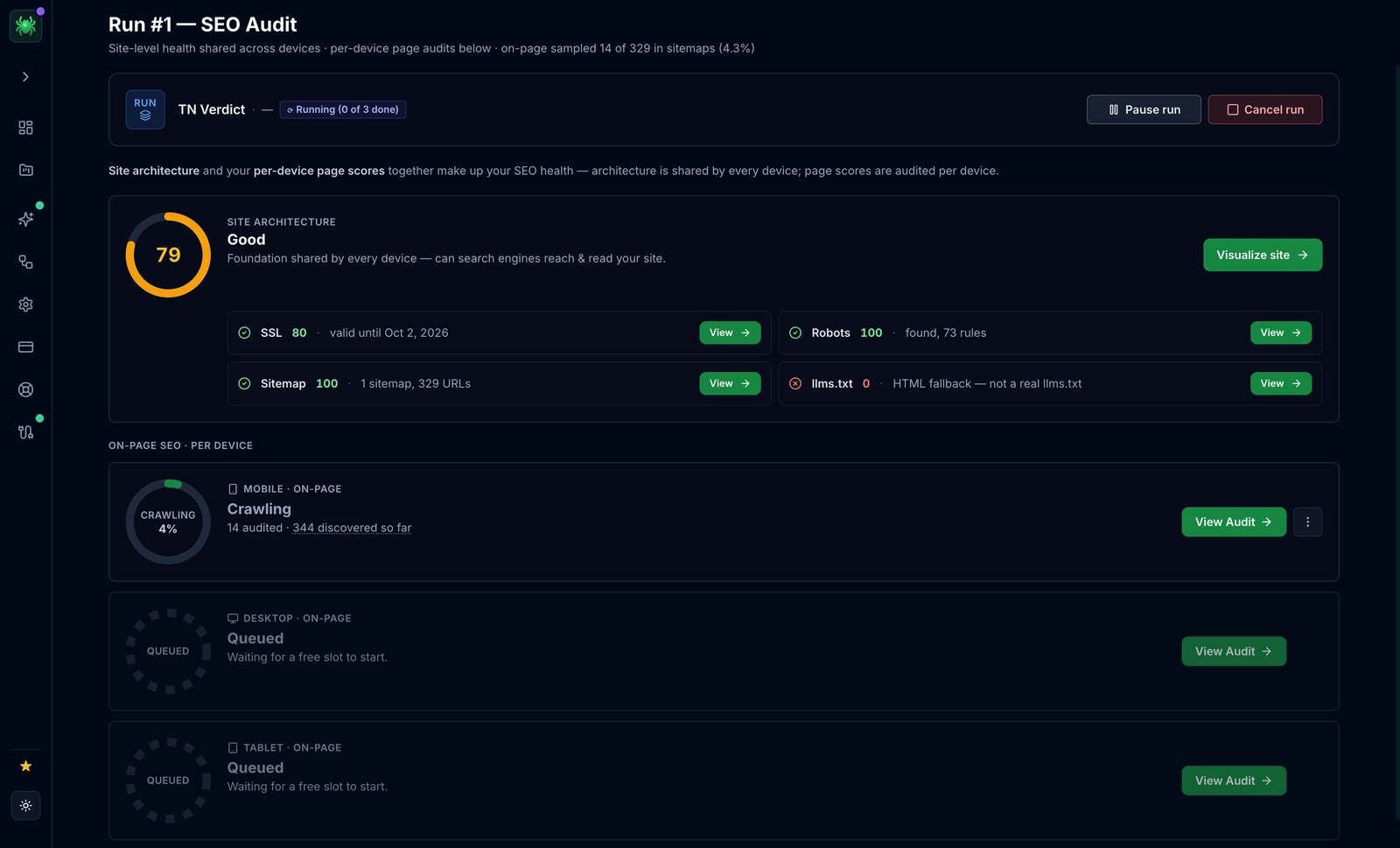 300+ checks on every page, three device modes per crawl, and GSC traffic overlaid so fixes are ranked by impact — not spreadsheet row order.
Digispot AI vs. Screaming Frog vs. Sitebulb: Feature Matrix
Screaming Frog and Sitebulb are mature, well-built crawlers with loyal followings, and both do their core job well. Screaming Frog is the industry reference for export-grade crawl data; Sitebulb is widely liked for how clearly it presents audit findings. If a technical crawl and a prioritized issue list is what you need, both are solid choices.
What has changed in 2026 is the scope of the job. Search now includes AI answer engines, and the audit no longer ends when the issue list is generated. Digispot AI is built for that wider brief, and the comparison below is limited to those differences — not a claim that either tool is bad at what it does.
Competitor capabilities below reflect their publicly documented feature sets as of August 2026. Both tools ship frequently, so check their current documentation before making a purchase decision.
Depth of instrumentation
Digispot AI instruments 300+ checks across 20 categories on every page, and captures a screenshot alongside findings so evidence is visual rather than a row in a spreadsheet.
| Instrumentation | Screaming Frog | Sitebulb | Digispot AI SEO Spider |
|---|---|---|---|
| JavaScript rendering | Chromium | Chromium | Real Chromium |
| Devices per crawl | One user-agent per crawl | One configuration per crawl | Mobile + tablet + desktop in one pass |
| Checks per page | Extensive crawl data | Extensive audit hints | 300+ across 20 categories |
| Screenshot evidence with findings | — | — | Yes |
All three render JavaScript properly. The practical difference is that a single Digispot crawl covers three viewports, so mobile-specific problems surface without re-running the crawl under a different configuration.
AI readiness: AEO, GEO, and MCP
This is where the gap is genuinely structural rather than incremental. Traditional crawlers audit your site for Googlebot. Digispot AI also audits it for the answer engines — AEO (Answer Engine Optimization) and GEO (Generative Engine Optimization) — and then exposes the findings to your AI agent over MCP.
| AI readiness | Screaming Frog | Sitebulb | Digispot AI SEO Spider |
|---|---|---|---|
| AI crawler visibility (AEO/GEO) | — | — | LLMBot vs Googlebot simulation |
| llms.txt validation | — | — | Yes |
| NLP content analysis | — | — | Readability, passive voice, topic depth (English) |
| AI insights & chat copilot | LLM calls per crawl | — | Built-in copilot |
| Bring your own LLM key | — | — | OpenAI · Claude · Gemini · DeepSeek |
| MCP server for AI agents | — | — | 60 tools |
Three things are worth separating out here:
AEO/GEO coverage. GPTBot, PerplexityBot, ClaudeBot and Google-Extended fetch your pages differently than Googlebot does. Digispot AI simulates those user agents and validates llms.txt, so you can see what an answer engine actually retrieves — a check with no direct equivalent in a conventional crawler. If this is new territory, our answer engine optimization guide and the primer on optimizing for AI crawlers cover the fundamentals.
NLP analysis. An English NLP layer scores readability (Flesch), passive-voice ratio, primary keyword, content depth, scanability, and topic authority. Screaming Frog does offer AI integration via OpenAI and Gemini calls during a crawl; that is a genuine feature, and it is a different thing from a resident content-analysis layer plus a chat copilot over your crawl data.
MCP. An MCP server exposes 60 tools, so Claude, Cursor, or another MCP client can query the crawl and act on it. This is the clearest current separation between Digispot AI and both competitors — though MCP adoption is moving quickly across the tooling market, and we would expect others to follow.
On language coverage, to be precise: the crawler handles multi-language and multi-locale sites through 8 internationalization checks covering hreflang, x-default, language tags, regional targeting, and currency signals. The NLP layer is English-only — readability and passive-voice metrics are not returned for non-English pages. International sites get full technical and i18n coverage; the deeper content analysis applies to English pages.
Beyond technical SEO
Screaming Frog and Sitebulb are focused technical crawlers by design. Digispot AI carries business context — industry and multi-location profiles — into the analysis, so a multi-location dental practice and a SaaS product aren't scored against the same generic template.
| Coverage | Screaming Frog | Sitebulb | Digispot AI SEO Spider |
|---|---|---|---|
| Industry- & location-aware analysis | — | — | Industry + multi-location profiles |
| Local SEO signals | Schema extraction | Schema extraction | NAP + LocalBusiness scoring |
| Multi-language / locale checks | hreflang reporting | hreflang reporting | 8 i18n checks |
| Keyword-to-page coverage map | — | — | Yes |
| Keyword research & backlinks | — | — | Included |
| Content & image generation | — | — | Brand-aware |
| GSC + GA4 | API integration | API integration | One-click OAuth, traffic-weighted ranking |
The GSC row deserves a note: all three connect to Google data. The difference is what happens with it — Digispot AI uses connected Search Console and GA4 data to rank issues by the traffic each one puts at risk, so the list arrives prioritized by impact rather than by severity label alone.
Pricing
| Screaming Frog | Sitebulb | Digispot AI Starter | |
|---|---|---|---|
| Annual cost | £199/yr (≈$279 USD) | From ~$16/mo (Lite) | $169/yr |
| Free tier / trial | 500 URLs free | Free trial | 7-day full trial + Scout (100 pages free) |
| AI / MCP integration | AI calls per crawl | — | Built-in MCP server |
At $169/yr, Digispot AI Starter is roughly 40% less than a Screaming Frog licence, and Sitebulb's higher tiers land above that as well. Pricing changes — check each vendor's current page before deciding. See our pricing page for tier details.
Cost shouldn't be the deciding factor. If your work is a pure technical crawl with export-grade data, Screaming Frog remains excellent at exactly that. The case for switching is scope: AEO/GEO visibility, NLP content analysis, local and keyword coverage, and an MCP server your AI agent can drive.
Data Privacy and Performance: Local-First Desktop Crawling vs. Cloud Tools
As data privacy regulations tighten globally, how your SEO tools handle sensitive site data is more important than ever.
Many modern SEO tools have migrated entirely to the cloud. While cloud tools offer convenience, they introduce significant drawbacks:
- Data Exposure: Uploading pre-production site crawls or staging environment data to third-party cloud servers can violate corporate security policies.
- Usage Caps: Cloud crawlers often charge per crawled page, making large-scale technical audits expensive.
Digispot AI is local-first. Your crawl data, reports, and screenshots stay on your own Mac by default. The only data that leaves is what you explicitly send to an AI provider. And crawling never burns credits — crawl as many pages as your tier allows without worrying about usage meters.
This local-first model matters most in three situations that trip up cloud crawlers:
- Staging and pre-production audits: You can crawl a password-protected staging environment or an unreleased redesign without that content ever touching a third-party server — useful when NDAs, embargoed launches, or regulated data are involved.
- Bring-your-own AI key: Because the analysis layer calls whichever LLM key you supply (OpenAI, Claude, Gemini, or DeepSeek), the AI provider relationship is yours to control — you decide which pages, if any, are sent for interpretation, rather than routing everything through a vendor's shared cloud pipeline.
- Predictable cost on large sites: Per-page cloud pricing turns a routine audit of a large ecommerce or publisher site into a budgeting exercise. A local crawl removes the meter entirely, so the tool cost is fixed regardless of crawl size.
The trade-off is honest: a local desktop crawl uses your machine's CPU and memory, so a very large rendered crawl is bounded by your hardware rather than someone else's server farm. For most agency and in-house workloads that's a fair exchange for keeping sensitive crawl data off the cloud.
[Your Website / Staging] ---> [Digispot AI Spider (Local Mac)] ---> Secure Local Storage
                                         │
                                Only what you explicitly send
                                         │
                                    [AI Provider]
Who Should Switch to an AI-Powered SEO Crawler and When?
When to Migrate from Legacy Desktop Tools
Consider migrating if you encounter any of these trigger events:
- Escalating Software Costs: Paying for multiple fragmented tools — one for crawling, one for keyword tracking, another for AI analysis — when consolidating can drastically reduce overhead.
- Slow Client Deliverables: Your team spends hours cleaning up CSV exports from legacy tools to create client-ready reports. An interactive workspace with MCP-connected AI agents eliminates this.
- JavaScript-heavy sites: Your site is built on React, Next.js, Angular, or Nuxt, and HTTP crawlers are returning incomplete audit results.
- AI search readiness: You need to know how LLM crawlers like GPTBot and PerplexityBot see your pages — a check conventional crawlers were never designed to perform.
How Agencies Streamline Audits with Consolidated Workspaces
Digital marketing agencies frequently struggle with tool fragmentation. Analysts lose time switching between rank trackers, site crawlers, and analytics dashboards.
A consolidated workspace simplifies this by mapping your technical crawl findings directly to search performance metrics. Instead of presenting clients with an intimidating spreadsheet of 500 unprioritized redirect warnings, agencies can connect Claude or Cursor via the Spider's MCP server to generate a clear, prioritized action plan based on actual traffic impact.
Ready to see it in action? Start your free 7-day trial of the Digispot AI SEO Spider and run your first real-Chromium audit today. For a broader comparison of how Digispot stacks up, see our Digispot AI vs. Ahrefs breakdown.
Related deep-dives
Continue with these closely related guides:
- crawl budget seo — Crawl Budget SEO: Optimization Guide for Large Sites
- why seo audit matters? — Why SEO Audit Matters? How does it help your business?
Audit any page in seconds
300+ SEO checks including Core Web Vitals, schema markup, meta tags, and AI readiness — trusted by 1000+ SEO experts and marketers.
Frequently Asked Questions
Here are some of our most commonly asked questions. If you need more help, feel free to reach out to us.
Written by
Maya Krishnan
Digital growth expert
Maya is a seasoned expert in web development, SEO, and digital strategy, dedicated to helping businesses achieve sustainable growth online. With a blend of technical expertise and strategic insight, she specializes in creating optimized web solutions, enhancing user experiences, and driving data-driven results. A trusted voice in the industry, Maya simplifies complex digital concepts through her writing, empowering readers with actionable strategies to thrive in the ever-evolving digital landscape.