Google Search Console Integration: Unified GSC & GA4 Data
Eliminate tab-switching. Use Digispot AI's GSC integration to connect Search Console and GA4, and automatically prioritize SEO fixes by traffic at risk.
 Maya Krishnan
Managing SEO performance across disconnected tools wastes analyst hours and delays critical optimization decisions. For most in-house SEO managers and agency account directors, the daily workflow involves Google Search Console in one tab, GA4 in another, the crawler in a third, and a spreadsheet open somewhere for the manual reconciliation between them.
Digispot AI's native GSC integration eliminates this pattern by unifying Search Console and GA4 data with your crawl findings in a single workspace — and using that combined data to automatically rank every SEO issue by the traffic it costs you.
Key Takeaways
- Connect once, in under two minutes. Read-only Google OAuth links your GSC and GA4 properties so every crawl auto-maps clicks, impressions, sessions, and conversions to each URL — no CSV exports or VLOOKUPs.
- Fix by traffic at risk, not by list order. Digispot scores each technical issue (404s, redirect loops, canonical mismatches, missing meta) against the organic sessions on the affected page, so your developer hours go to the fixes that protect real traffic.
- Grab the fastest wins first. Striking-distance keywords (positions 8–20) surface automatically — refresh the title and meta and expand thin copy to push those pages onto page one.
- Catch silent regressions before month-end. Scheduled crawls plus GSC data alert you when a
noindex, bad canonical, or indexation error lands on a high-traffic page. - Align clicks with conversions. The Traffic & Engagement Report exposes "ranks-but-bounces" and "hidden gem" pages by overlaying GA4 engagement on GSC clicks in one view.
Table of Contents
- Why Segmented GSC and GA4 Reporting Fails SEO Teams
- What a True GSC Integration Actually Does
- How Digispot AI Connects GSC and GA4
- Traffic-Weighted SEO Prioritization in Action
- Automatically Surfacing Striking-Distance Keywords
- Safeguarding Your High-Traffic Pages at Risk
- The Traffic & Engagement Report: Aligning Clicks with Conversions
- Connecting GSC and GA4 to Digispot: 3 Steps
Why Segmented GSC and GA4 Reporting Fails SEO Teams
The Tab-Switching Tax
For busy SEO managers, the workday is often consumed by a frustrating loop: Google Search Console for search queries, GA4 for user behavior, the crawler for technical issues, and spreadsheets to stitch it all together. This context-switching is not just inefficient — it creates a gap between what you observe and what you act on.
Without unified reporting, critical blind spots develop. Teams regularly spend weeks optimizing high-impression keywords, only to discover that the landing pages targeting those terms suffer from a 90% bounce rate. The traffic was there. The conversion wasn't. And the disconnect was only visible by manually joining two datasets that never talked to each other.
The Data Reconciliation Problem
Pulling meaningful insights from disconnected tools requires exporting massive CSV files, running manual VLOOKUPs, and formatting spreadsheets — before a single optimization is implemented. This labor occurs before any value is created. For in-house teams of 1–3 people, this overhead can consume a quarter of the available working hours each week.
What a True GSC Integration Actually Does
Many SEO tools claim GSC connectivity but simply replicate the charts already visible in Google's native portal. That is not integration — it is a mirror.
A true GSC integration does something more valuable: it changes how you evaluate SEO issues. Instead of presenting a flat list of crawl errors with no context, it overlays your Search Console and GA4 metrics onto every finding so you know, at a glance, whether a broken redirect on page A is costing you 5,000 monthly sessions or 5.
The Power of Traffic-Weighted Issue Prioritization
Digispot AI scores every technical issue — 404 errors, redirect loops, canonical mismatches, missing meta descriptions — by the actual organic sessions and revenue currently at risk on the affected URL. This transforms a generic checklist of 500 errors into a ranked fix plan where the most expensive problems are always at the top.
The result: your developer resources are allocated to the fixes that actually protect traffic, not to whatever the crawler happened to list first.
How Digispot AI Connects GSC and GA4
Secure OAuth Synchronization
Connecting Digispot AI to your search data is straightforward. Using Google's official OAuth protocol, the platform establishes a direct, read-only connection to your GSC and GA4 properties. Your data is encrypted in transit and never shared across projects.
Chromium Crawling + Real-Time Analytics
Once authorized, Digispot AI's SEO Spider crawls your website with real Chromium rendering — seeing the page exactly as Googlebot sees it, including JavaScript-rendered content, lazy-loaded images, and dynamic schema. Simultaneously, it maps real-time GSC impressions and GA4 sessions to every crawled URL.
[Google Search Console API] ──┐
                               ├─► [Digispot AI Workspace] ──► Unified Dashboard
[Google Analytics 4 API] ─────┤
                               │
[Chromium SEO Spider Crawl] ───┘
For any URL on your site, the unified dashboard shows:
- Organic clicks and impressions
- Click-through rate (CTR) and average ranking position
- GA4 sessions, bounce rate, and engaged time
- Goal completions and conversion values
- Technical issues affecting that URL from the latest crawl
All from one screen — no export, no VLOOKUP, no reconciliation. Read our comprehensive Google Search Console guide for background on what GSC measures before diving into the integration.
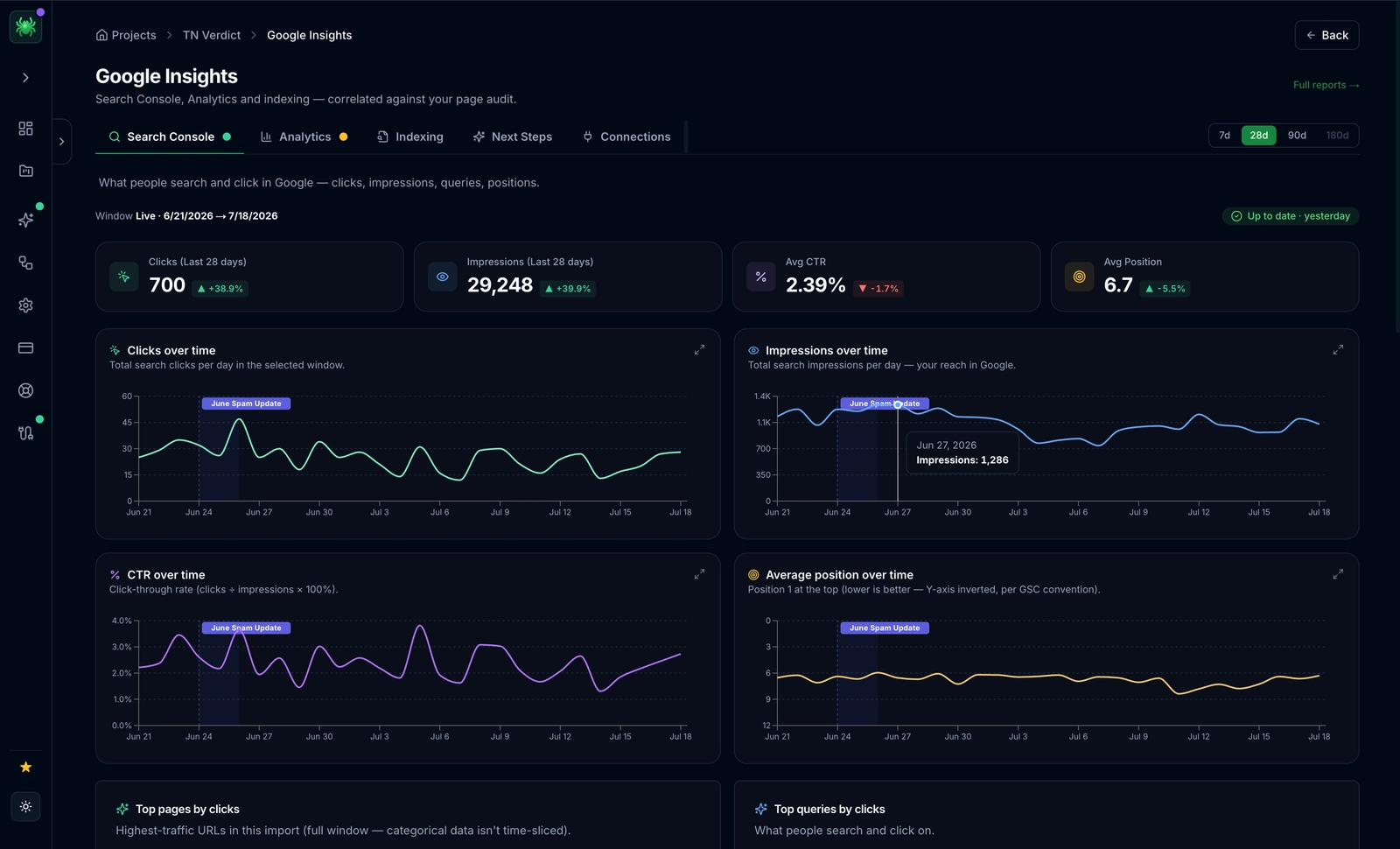 Digispot AI spider GSC panel surfaces organic clicks, impressions, CTR, and average position for every URL — all within the same workspace as your crawl data and technical issues.
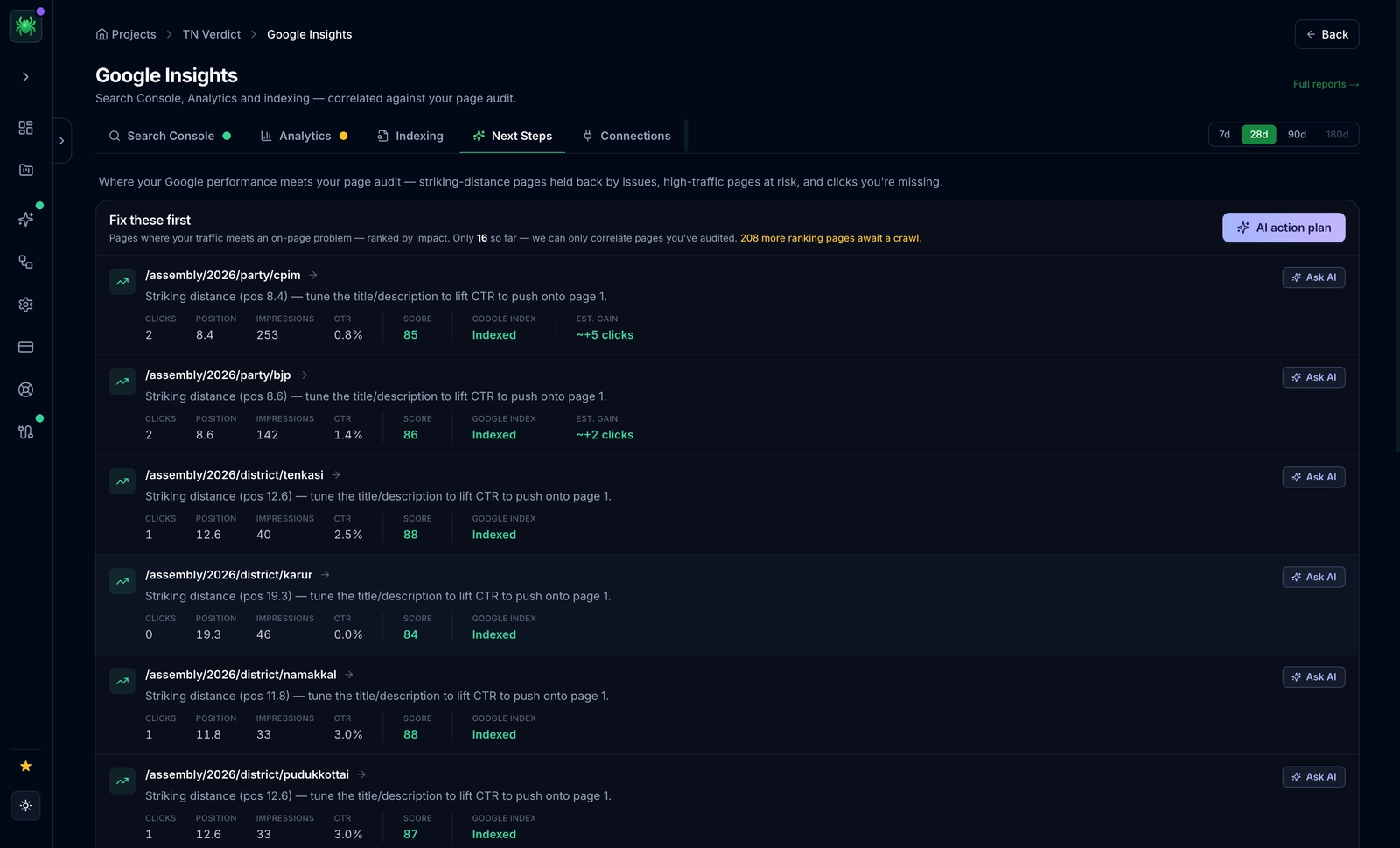 Once connected via OAuth, Digispot AI Spider overlays live GSC,G4A click and impression data onto every crawled URL — no manual data reconciliation required.
Traffic-Weighted SEO Prioritization in Action
Consider two technical errors discovered in the same crawl:
| URL | Issue Type | Monthly Sessions | Digispot Priority |
|---|---|---|---|
/services/enterprise-seo | Broken redirect | 5,200 | Critical (9.8) → Fix immediately |
/archive/2018-post | Broken redirect | 12 | Low (1.2) → Monitor only |
In a standard SEO audit tool, both appear as identical technical flags. Your team spends time digging through spreadsheets to determine which actually matters.
In Digispot AI Spider, the high-traffic error surfaces at the top of your fix-first task list automatically. The low-traffic error is deprioritized. Developer resources go where they generate measurable traffic recovery — not where they happen to land on a list.
This traffic-weighted prioritization runs on every crawl, continuously, across your entire site or client portfolio.
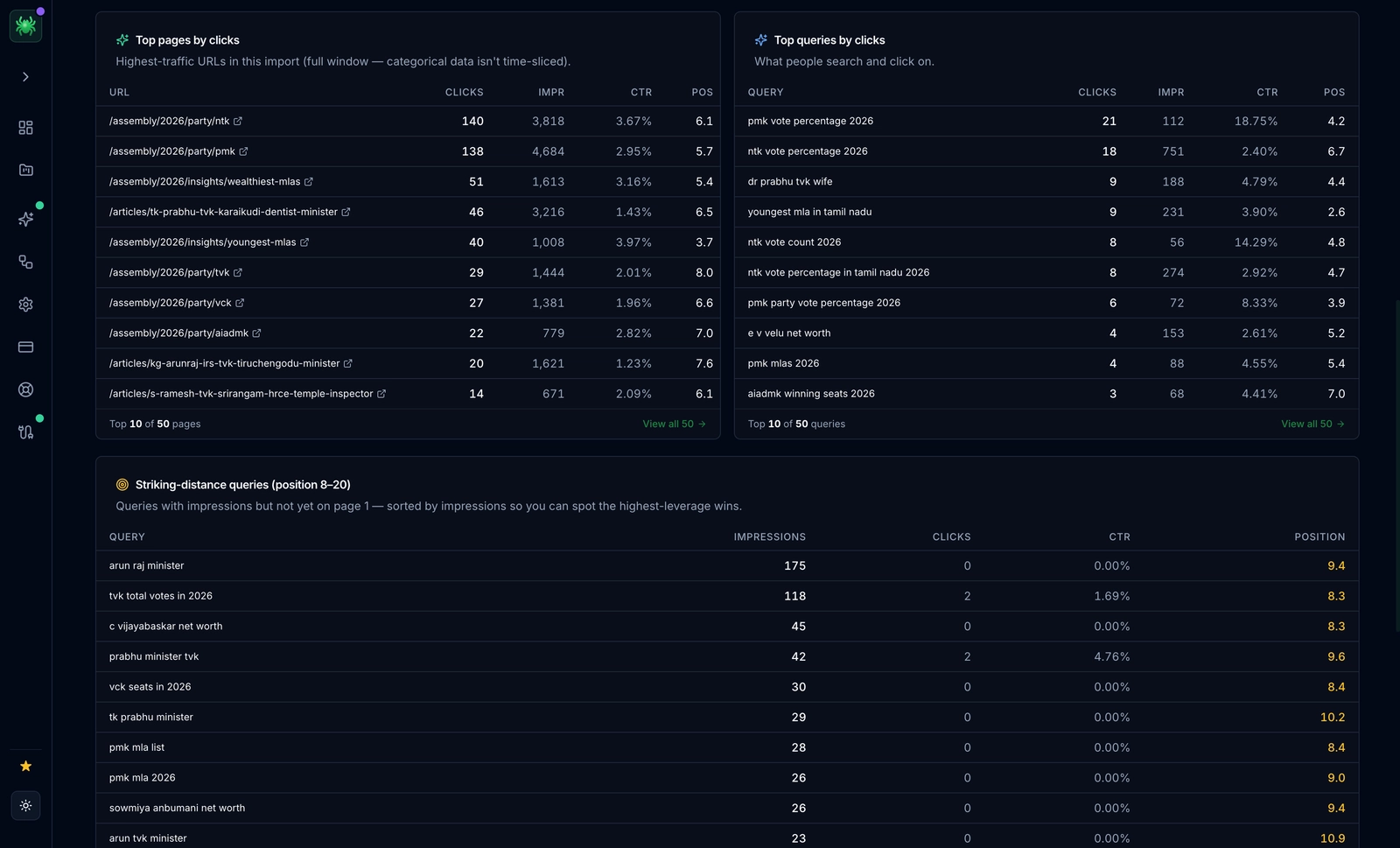 Digispot AI Spider automatically surfaces your top GSC queries — sorted by impressions, clicks, and position — so you always know which keywords are closest to page one.
Automatically Surfacing Striking-Distance Keywords
Striking-distance keywords are high-volume search queries where your site already ranks in positions 8–20. These are your fastest traffic wins: the pages already have some authority, they just need a title/meta refresh or minor content expansion to break onto page one.
Digispot AI Spider parses your live GSC data to surface these automatically — no manual SERP scraping or position tracking export needed. The workflow:
- Identify striking-distance keywords with high impressions and low CTR in the Digispot keyword module — the high-impression, low-CTR pairs are where a snippet rewrite moves the needle fastest.
- Open the affected page and refresh the title tag and meta description to better match the query; front-load the target term and lead with the benefit, following the patterns in our meta tag optimization guide and CTR optimization guide.
- Add the target keyword naturally into H2s or body copy where it's currently missing, and cover the adjacent sub-questions the query implies so the page fully satisfies intent rather than mentioning the term once.
- Run a quick re-crawl to confirm changes are indexed, then watch the CTR and average-position columns over the next two GSC refresh cycles to confirm the lift held.
For e-commerce SEO teams, our guide on using Google Search Console for e-commerce covers additional patterns specific to product and category pages.
Safeguarding Your High-Traffic Pages at Risk
The most dangerous SEO issues are silent technical defects on your top-performing pages. A rogue noindex directive, an accidental canonical pointing away from your homepage, or a sudden Core Web Vitals regression on your primary landing page can decimate organic traffic overnight — and remain invisible until the next crawl.
Digispot AI continuously monitors your top traffic-driving pages. By combining GSC click data with automated scheduled crawls, the platform detects sudden changes in crawlability, indexation status, or on-page health. If a "Discovered — Currently Not Indexed" error appears on a page generating substantial organic sessions, you get an immediate alert — not a surprise at end-of-month reporting.
Because each finding is anchored to live GSC clicks, the alerts are ranked the same way your fix list is: a noindex accidentally shipped on a category page pulling thousands of sessions jumps to the top, while the same directive on a stale utility page stays quiet. The most common silent defects Digispot watches for on high-traffic URLs include:
- A rogue
noindexor robots block shipped in a template change — see excluded by 'noindex' tag errors for how these slip through. - A canonical pointing to the wrong URL, quietly consolidating a page's authority elsewhere. Our primer on what a canonical URL is explains why one wrong tag can deindex a top performer.
- A Core Web Vitals regression — an LCP or CLS spike from a new hero image or third-party script that tanks rankings; optimizing Core Web Vitals covers the fixes.
- A new redirect chain or loop introduced by a migration — walked through in how to fix GSC page redirect errors.
Our guide on fixing Discovered — Currently Not Indexed errors covers the most common causes and remediation steps for this specific issue.
The Traffic & Engagement Report: Aligning Clicks with Conversions
The combined Traffic & Engagement Report in Digispot AI maps your GSC click data directly against GA4 user engagement metrics in a single view. Two patterns it surfaces immediately:
High CTR, High Bounce ("ranks-but-bounces"): The page successfully attracts search clicks but users leave immediately. This signals an intent mismatch — the title/meta promises something the page doesn't deliver. Fix the page content, not the ranking; our guide on reducing website bounce rate covers the on-page changes that keep those clicks engaged.
Low Impressions, High Engagement ("hidden gem"): The page converts well but barely appears in search. It deserves more visibility — internal links, content depth, and title/meta refresh will surface it to more searchers.
Both patterns are invisible when GSC and GA4 live in separate tabs. Together in one view, they become your highest-ROI optimization list.
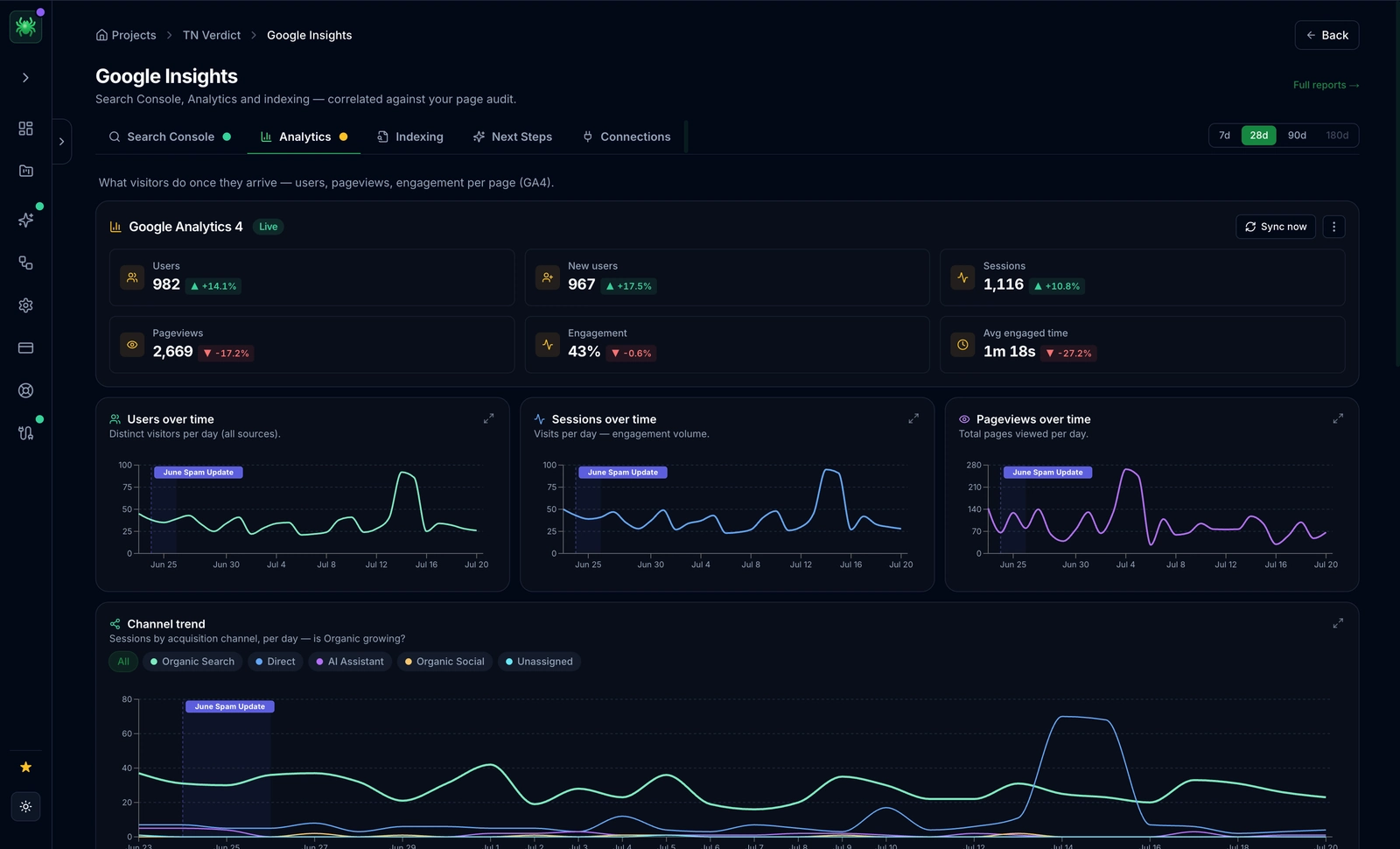 The Traffic & Engagement Report in Digispot AI Spider merges GA4 sessions, bounce rate, and engaged time with GSC clicks in a single view — revealing which pages rank but don't convert.
Connecting GSC and GA4 to Digispot: 3 Steps
Setup is secure, requires no developer support, and takes under two minutes:
Step 1 — Navigate to Integrations Sign into your Digispot AI account, open your project workspace, and click Integrations in the main navigation menu.
Step 2 — Authenticate via Google OAuth Click Connect next to Google Search Console and GA4. Follow the secure OAuth prompts to select your account and authorize read-only access to your properties.
Step 3 — Run Your First Crawl Launch a crawl with the Digispot SEO Spider. The platform automatically maps your GSC impressions and GA4 sessions to your technical audit data from the first run. No additional configuration needed.
Ready to stop switching tabs and start optimizing for revenue? Explore the full platform features or start a free 7-day trial to connect your GSC and GA4 data today.
Related deep-dives
Continue with these closely related guides:
- seo workflow automation — SEO Workflow Automation for Agencies: Cut Reporting Time by 80%
- seo tools for in-house — SEO Tools for In-House Teams: Automate Audits, Track Rankings, Prove ROI
- google search console — Google Search Console Guide: Master SEO Insights
Audit any page in seconds
300+ SEO checks including Core Web Vitals, schema markup, meta tags, and AI readiness — trusted by 1000+ SEO experts and marketers.
Frequently Asked Questions
Here are some of our most commonly asked questions. If you need more help, feel free to reach out to us.
Written by
Maya Krishnan
Digital growth expert
Maya is a seasoned expert in web development, SEO, and digital strategy, dedicated to helping businesses achieve sustainable growth online. With a blend of technical expertise and strategic insight, she specializes in creating optimized web solutions, enhancing user experiences, and driving data-driven results. A trusted voice in the industry, Maya simplifies complex digital concepts through her writing, empowering readers with actionable strategies to thrive in the ever-evolving digital landscape.